At a Glance
Native Playwright visual regression is free to start and expensive to scale.
The cost shows up in CI, not on day one.
Cross-OS rendering breaks pixel diffs: Windows, macOS, and Linux render fonts and spacing differently, so the same code produces different baselines on different machines.
Component snapshots beat full-page captures: smaller scope means clearer failure signal, fewer timeouts, and less flake on asset-heavy pages.
GitHub cannot diff baseline images inline: approving updates means pulling branches locally, copying files, and pushing manually — real PR friction at scale.
The choice is not native vs commercial. It is whether your team has the Docker discipline and review workflow to make native survive past 100 visual tests.
Visual testing looks deceptively simple on day one. Capture a baseline image, run the suite, and let the framework flag pixel deviations. That is exactly how Playwright visual regression works locally — and exactly why it tends to break in continuous integration. The framework’s toHaveScreenshot() assertion is built in and free, but the cost lives in baseline management, cross-OS rendering, and pull-request workflows. Native screenshot testing works flawlessly on a single developer’s machine. It struggles the moment baselines have to survive a Linux CI runner, three browser engines, and a reviewer who cannot see image diffs in GitHub. This guide is a production playbook for engineers who already use Playwright and need to scale visual checks past the proof-of-concept phase.

What does Playwright visual regression actually do?
Playwright visual regression compares a saved baseline image against a fresh screenshot pixel by pixel. When deviations exceed the configured threshold, the test fails and Playwright generates a diff image highlighting the changed region. Baselines are stored locally next to test files; updates require an explicit --update-snapshots flag.
The core assertion is .toHaveScreenshot(). By default it captures the viewport only — to capture scrollable pages, engineers must explicitly pass { fullPage: true }. Frederik Dohr documented this gotcha when setting up Playwright from scratch for a CSS refactor protection project, choosing manual configuration over npm init playwright@latest specifically to understand how the pieces fit together. Industry consensus across multiple practitioner sources strongly favors component-level snapshots over full-page captures: smaller scope produces a clearer failure signal and avoids the timeouts that plague resource-intensive full-page screenshots.
Baselines live in a <testfile>-snapshots/ directory, automatically named by test title and browser engine — for example, home-page-desktop-firefox.png. Playwright generates one image per browser engine, since Chromium, Firefox, and WebKit each render fonts and layouts slightly differently. When intentional UI changes occur, engineers run the suite with --update-snapshots to regenerate the saved images. This is the entirety of the native Playwright screenshot testing workflow — and it is enough to ship a small suite. The friction begins as the suite grows.
For practitioners building broad coverage tools, the native API is highly adaptable. Dohr’s Playwright visual regression tutorial approach used a custom web crawler that auto-generated one visual test per identified URL, providing wide refactor protection without manually maintaining repetitive test files.
Why do Playwright visual tests pass locally and fail in CI?
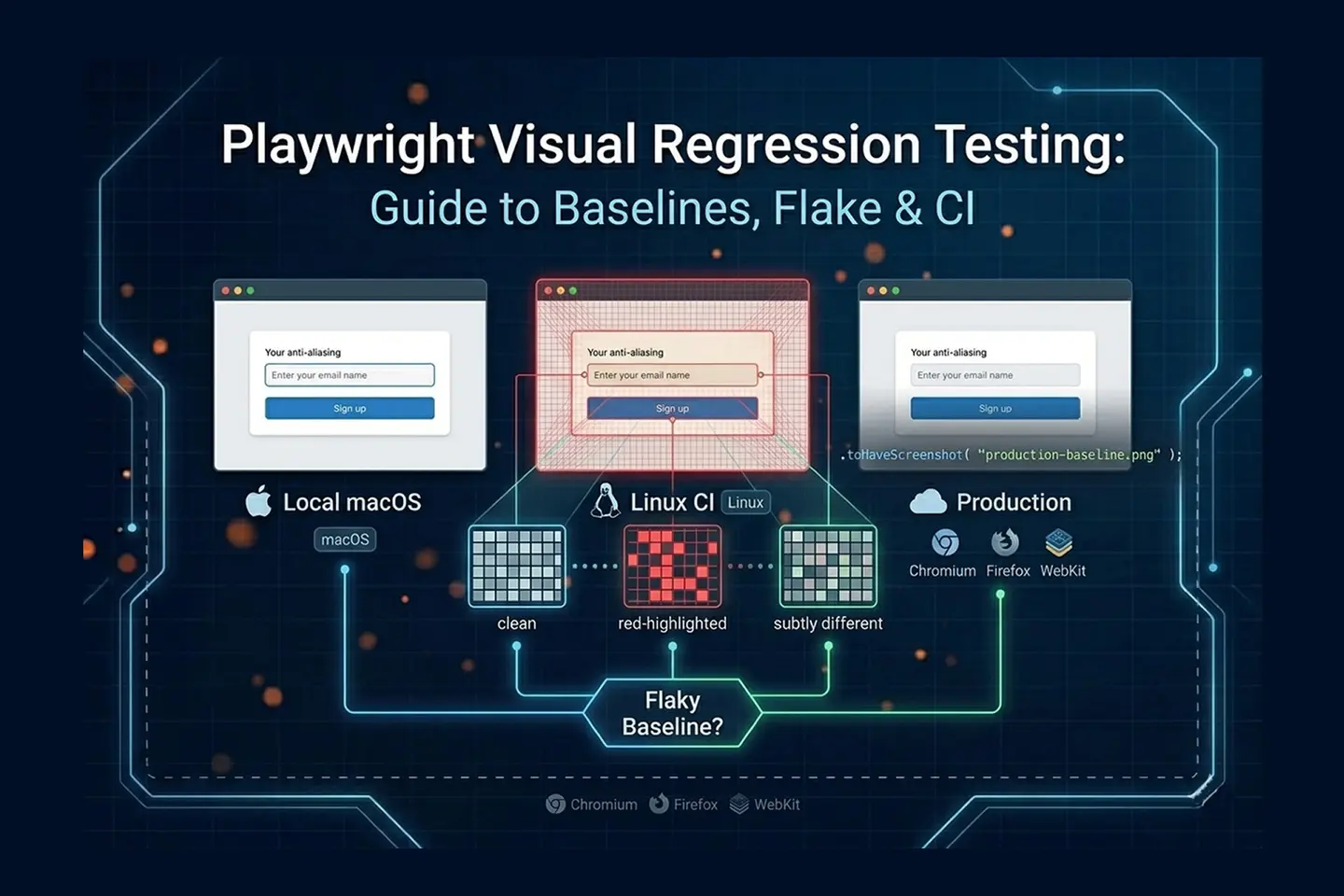
The most common cause is the operating system rendering problem. Windows, macOS, and Linux render fonts, anti-aliasing, and pixel spacing differently. A baseline captured on a developer’s Mac will fail when compared against a screenshot taken on the Linux CI runner, even when the application code has not changed.
Even identical hardware is not immune. Corey House documented running tests across two M1 MacBook Pros on near-identical OS versions and still observing visual flake when pixel sensitivity thresholds were tuned high. This is not a Playwright bug — it is the underlying reality of how operating systems and GPUs handle font hinting and subpixel rendering. If you are debugging broader pipeline instability and trying to figure out [why Playwright tests become flaky][SPOKE-PW-FLAKY], cross-machine rendering differences are often the silent root cause behind visual assertion failures specifically.
The fix is environment normalization. Nora Weisser’s Docker-based approach is the most-cited practitioner solution: a Dockerfile based on the official Playwright image, plus docker-compose mounting screenshot volumes so developers run the same Linux rendering engine locally that the CI runner uses. A single command brings up the same environment everywhere, which eliminates “works on my machine” visual discrepancies entirely. The less flexible alternative is to lock baseline generation to a single stable OS — usually by running visual tests exclusively on CI hardware or only on the main branch.
GitHub itself plays a role here too. The platform sees baseline images as binary blobs and cannot render image diffs in pull requests, which means rendering problems caught in CI are inherently harder to triage than functional test failures.
How do you manage Playwright visual regression CI baselines without breaking the pipeline?
Playwright visual regression CI integration requires treating visual checks as a separate, isolated pipeline stage. Tag visual tests with @visual, exclude them from standard runs using --grep-invert, and execute them in a dedicated Docker step. This keeps functional feedback fast and quarantines visual flake to a controlled environment.
The tagging pattern is straightforward in practice. Weisser’s published workflow tags every visual test with @visual at the test definition level, then uses --grep-invert "@visual" on the standard pipeline so feature branches get fast functional feedback without waiting on screenshot rendering. The visual stage runs separately, gated to main-branch merges or to a nightly cron, with Docker Compose providing rendering stability across runs.
Storage is the harder problem. Native baselines live in the Git repository, with one image per browser engine — a ten-test suite covering Chromium, Firefox, and WebKit produces thirty committed images. The repo grows fast, but the bigger pain is approval. GitHub, GitLab, and most version control UIs cannot diff images inline. When a baseline updates, the reviewer sees a binary file change with no visible context. Resolving the conflict requires pulling the branch locally, opening the images side by side, copying the new baseline into the feature branch, and pushing manually. House calls this “GitHub diff blindness,” and it is the single biggest reason teams move off native after a few months. The Linux Foundation’s 2024 State of Open Source Report and Stack Overflow’s 2024 Developer Survey both confirm that PR review friction is consistently among the top reported drags on engineering velocity, and binary baselines fall squarely into that category.
For teams that want broader context on how this CI pattern fits into a complete autonomous workflow, our LLM regression testing pipeline guide covers how AI-generated assertions slot into the same staged-pipeline architecture.
How do you mitigate Playwright visual testing flake from dynamic content and timing?
Playwright visual testing flake from dynamic content is mitigated through four native mechanisms: threshold tuning with maxDiffPixels and maxDiffPixelRatio, region masking via the mask option, CSS injection through stylePath, and timing control with network-idle waits and loader toggles. Each addresses a specific class of false positive.
Threshold tuning is the first lever. maxDiffPixels defines an exact allowable count — for example, maxDiffPixels: 100 permits up to one hundred mismatched pixels. maxDiffPixelRatio defines an allowable percentage of the image area, so maxDiffPixelRatio: 0.01 permits a one-percent difference. Both can be set per-test or globally in playwright.config. The trade-off is real: too strict and you flake constantly on subpixel font rendering; too loose and you miss genuine visual regressions. Practitioners across the research consensus tune case by case rather than chasing a single global value.
Region masking and CSS injection handle predictable dynamic elements — timestamps, account balances, randomized lists, A/B variant text. The mask option accepts an array of locators and overlays a solid-color box (typically pink or yellow) over each matching element before capture. The stylePath option goes further, injecting custom CSS to hide or remove dynamic elements entirely from the DOM before the screenshot is taken. Use masking for visible-but-volatile content and stylePath when you want the element gone from the layout calculation altogether.
Timing control addresses lazy-loaded assets and loading spinners. Holding the snapshot until the network is idle for a defined duration ensures lazy assets are fully painted. House’s loader-control technique is the complementary fix: build application-level toggles that force-show or force-hide loading states during snapshot capture, so tests record a predictable UI rather than a mid-transition frame.
Component isolation caps the blast radius. Pairing Playwright with Storybook means a single CSS regression breaks one component snapshot rather than dozens of full-page captures. This is the architectural pattern Joe Lencioni described in his CSS-Tricks comment thread: a handful of full-page tests for confidence, plus many component-level screenshots backed by Storybook. Independently, Stack Overflow’s 2024 survey shows component-driven development is now the dominant frontend pattern, so this isolation strategy fits how most modern teams already structure their UI code.
Try It Now
Generate the test cases your visual suite is missing — in seconds, not sprints.
Paste any user story into TestStory.ai and watch the orchestration layer generate structured, Gherkin-formatted test cases instantly — covering happy paths, edge cases, and the failure scenarios your team would typically miss. No account required.
No credit card required.
How does native Playwright compare to Applitools, Autonoma, and other commercial tools?
Native Playwright is free, code-driven, and locally executed; commercial tools like Applitools and Autonoma run on cloud-standardized hardware with AI-based diffing and dashboard approvals. Teams typically migrate when cross-OS flake and PR-approval friction outweigh the savings of staying free.
Applitools Eyes approaches the problem from the rendering layer. Comparisons execute on cloud-standardized hardware, which sidesteps the local rendering lottery entirely — no Docker normalization required. A single baseline plus a cloud fallback mechanism handles checks across multiple browsers and OS combinations; new combos prompt an approve-or-reject decision rather than a hard failure. Strict pixel matching is replaced with AI match levels: Layout verifies structure while ignoring text and color content, Dynamic auto-masks numeric values, and a human-vision-mimic algorithm ignores invisible pixel shifts. The visual approval dashboard with A/B baseline branching (“Version A” and “Version A with Banner” can both pass) directly addresses the GitHub diff-blindness problem.
Autonoma comes at it from a different angle: a codeless recorder, self-healing locators, and AI visual diffing baked into a single workflow. Per vendor data, pricing runs roughly $500–$1,500 per month for a team of five, with a 14-day trial, and vendor-claimed maintenance is around 4% of sprint capacity (about 1.5 hours per month). The fit is teams shipping continuously where test maintenance is genuinely eating sprint capacity rather than producing meaningful coverage.
Happo earns one specific mention. Joe Lencioni recommended it in the CSS-Tricks comments as a pairing with Storybook, Playwright, and CI for component-level confidence without full-page noise. It is not a like-for-like alternative to Applitools or Autonoma in this analysis — the research scope did not extend to its diffing architecture or pricing — but it is the named open-source-adjacent recommendation worth knowing about.
The categorical mismatch worth flagging: BackstopJS, Percy, Argos, Chromatic, and Lost Pixel all exist in the same general space, but the research consensus did not produce verifiable comparison data on them. Treat any side-by-side claim about those tools — including ours — as something to validate against vendor documentation before committing.
Native Playwright vs Applitools vs Autonoma — side-by-side comparison
| Capability | Native Playwright | Applitools Eyes | Autonoma |
|---|---|---|---|
| Pricing | Free / open source | Commercial / paid (free trial) | ~$500–$1,500/mo (team of 5); 14-day trial |
| Baseline storage | Local files in Git repo, one per browser | Cloud storage and versioning | Cloud storage |
| Cross-OS handling | Requires Docker normalization | Cloud-standardized rendering hardware | Not covered in this research scope |
| AI / perceptual diffing | None — strict pixel matching only | Layout, Dynamic, human-vision algorithms | Integrated AI visual diffing |
| Approval workflow | Manual Git branch updates, no inline diff | Dashboard with A/B baseline branching | Not covered in this research scope |
| Best fit | Static components, deterministic data, Docker-normalized CI | Complex apps with high dynamic content and large browser matrices | Teams where test maintenance is consuming sprint capacity |
| Maintenance overhead | High — threshold tuning, baseline updates, flake triage | Low — no threshold tuning, no Docker required | Low — vendor claim ~4% of sprint (~1.5 hrs/mo) |
How do you scale Playwright visual regression beyond 50–100 tests?
Native Playwright handles diffing execution well, but it does not solve workflow management. Once a suite passes 50–100 visual tests, teams need a layer that tracks run history, surfaces flaky-test patterns across cycles, and routes confirmed defects into the team’s tracker — none of which lives inside the test runner itself.
This is where the orchestration layer comes in. TestQuality ingests Playwright runs through the standard JUnit XML reporter: configure Playwright to output results in JUnit format via the reporter option in playwright.config.js, then use the TestQuality CLI command testquality upload_test_run to push the results into a named project and test cycle. The platform then provides the management plane the test runner itself does not: historical run tracking across cycles, pass/fail trend analysis to surface tests that flake in clusters rather than randomly, and a central place where reviewers triage failures rather than digging through CI logs.

The defect side of the workflow is intentionally human-in-the-loop. When a tester confirms that a failed visual check represents a genuine UI regression rather than acceptable rendering variance, they log it as a defect in TestQuality and attach the diff image as evidence. The native GitHub and Jira integrations then sync that defect to the team’s tracker — closing the GitHub diff-blindness gap from the management side rather than the rendering side. This human triage step is deliberate for visual regression specifically, where auto-creating tickets on every pixel diff would create noise; a reviewer is the right filter between “rendering changed” and “rendering broke.”

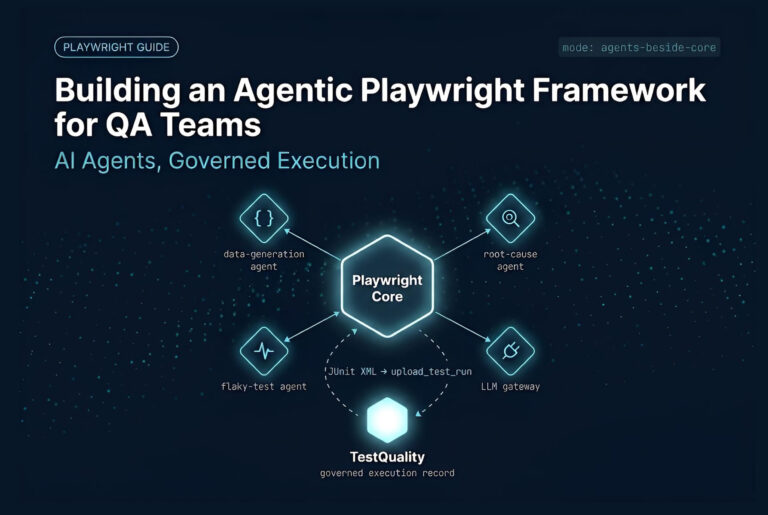
Upstream of execution, TestStory.ai operates as the agentic test case generator that feeds the suite. Rather than engineers manually authoring each visual test, TestStory.ai generates structured Playwright test cases from user stories, acceptance criteria, or architecture diagrams — including the visual regression checks themselves.
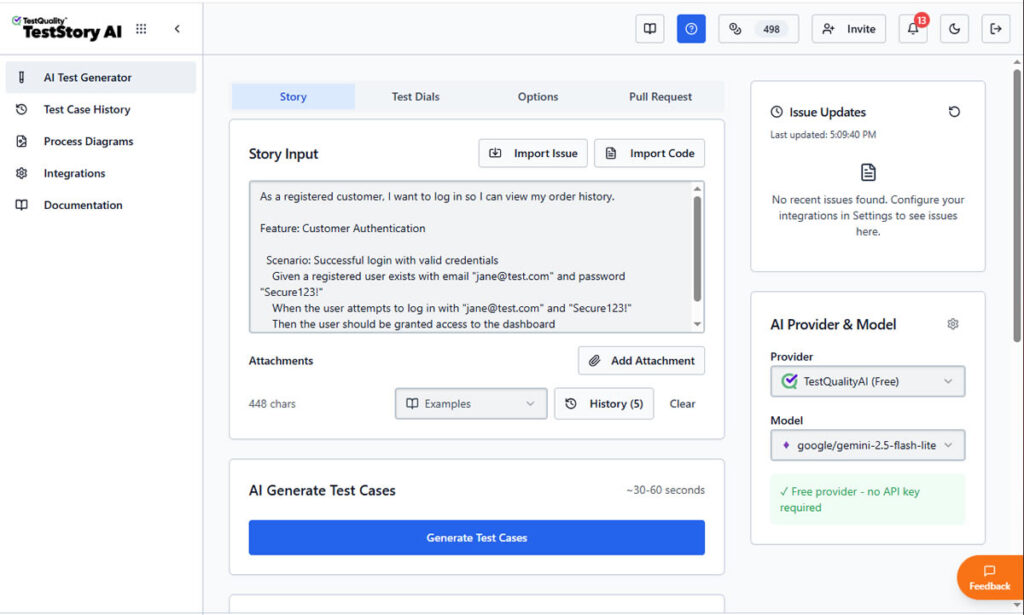
This is the same architectural pattern documented in the Agentic SDLC playbook: TestStory.ai generates, Playwright executes, TestQuality ingests run results and manages defect workflows.
The result of this full integration is a coverage pipeline that scales linearly with feature work rather than with engineer hours, which is exactly the bottleneck the shift to Agentic QA is designed to break. The same orchestration model integrates cleanly with Playwright Test Agents and MCP for fully autonomous test runs.
How These Layers Work Together
Generation — TestStory.ai: turns user stories, acceptance criteria, and architecture diagrams into structured Playwright test cases, including visual regression checks.
Execution — Playwright: runs the suite, captures screenshots, compares against baselines, and outputs JUnit XML results plus diff images on failure.
Management — TestQuality: ingests JUnit XML run results via the CLI, tracks flaky patterns across cycles, and provides the workspace where reviewers triage failures and log confirmed defects to Jira or GitHub through native integrations.
Which Playwright visual regression approach fits your team?
Choose native Playwright if you have Docker discipline, deterministic test data, and a small-to-mid suite anchored in components. Choose a commercial tool when dynamic content and PR-approval friction are visibly costing sprint capacity. The decision is rarely about money — it is about whether your team can absorb the maintenance shape native creates.
Stay native if: you are primarily testing static pages or isolated components via Storybook; your team can enforce Docker normalization across local and CI environments; your test data is fully deterministic (mocked APIs, reset databases, query-string-forced UI states); and your suite stays under roughly one hundred visual tests. Native pairs cleanly with Playwright vs Selenium migrations because the test code stays in your repo and the screenshot tooling is already built into the framework you just adopted.
Switch to commercial if: your application has high dynamic content density (user-generated text, frequent A/B tests, layout shifts on every page); your PR review process is bottlenecking on baseline approvals; you need structural AI diffing that ignores text content and focuses on layout intent; or you are running visual checks across a large browser and viewport matrix that makes per-baseline maintenance untenable.
Hybrid is also valid: native for component-level Storybook checks where you want code-collocated baselines, plus a cloud tool for full-page integration scenarios where AI diffing and dashboard approvals pay for themselves. For teams still locking in their base automation framework before layering visual checks on top, our earlier framework comparison covering Robot Framework and Katalon Studio provides broader context on the upstream decision.
A quick suite-size heuristic from the practitioner research: under 25 visual tests, native is almost always correct. From 25 to 100, native works if your team has Docker and Storybook discipline. Past 100, the math on commercial tooling usually flips, especially if your suite covers more than two browser engines.
Conclusion
Visual regression in Playwright is a workflow problem, not a tooling problem. The native API does the diffing well; what scales poorly is baseline management, cross-OS rendering, and the pull-request review loop. Teams that succeed with native do so by enforcing Docker normalization, isolating components through Storybook, and treating visual checks as a separate pipeline stage tagged @visual and executed in a controlled environment. Teams that don’t reach that discipline tend to migrate to commercial tools — not because native is broken, but because the maintenance shape of pixel-strict diffing across a real engineering team is steeper than the day-one experience suggests. The right choice depends on your team’s CI maturity, suite size, and how much dynamic content lives in the UI you are testing.
Technical Deep Dive FAQ
What is Playwright visual regression testing?
Playwright visual regression testing captures a screenshot of a page or component, stores it as a baseline image alongside the test file, and compares every subsequent run against that baseline pixel by pixel. When the difference between the new screenshot and the baseline exceeds a configured threshold, the test fails and Playwright produces a diff image highlighting the changed region. The core API is the toHaveScreenshot assertion, and baselines are updated explicitly using the –update-snapshots flag.
Is Playwright screenshot testing the same as visual regression testing?
In Playwright the two terms describe the same workflow. Screenshot testing is the mechanism — capturing an image of a page or component — and visual regression is the discipline of comparing that screenshot against a saved baseline to detect unintended UI changes. Playwright’s toHaveScreenshot assertion handles both capture and comparison in a single call, which is why the framework’s documentation and most practitioner content treat the terms interchangeably for native usage. Outside Playwright, the distinction matters more, since some tools only capture and others only compare.
How do I handle timestamps and dynamic data in Playwright visual tests?
Playwright provides two native mechanisms for dynamic content. The mask option accepts an array of locators and overlays a solid-color box over each matching element before capture, which is ideal for visible-but-volatile content like timestamps or balances. The stylePath option goes further by injecting custom CSS that hides or removes elements from the DOM entirely before the screenshot is taken. Use mask when the element should be visually present but ignored, and stylePath when the element should not affect layout calculations at all.
What is the difference between maxDiffPixels and maxDiffPixelRatio?
maxDiffPixels defines an exact, absolute number of pixels that can differ between baseline and new screenshot before the test fails — for example, a value of 100 permits up to one hundred mismatched pixels. maxDiffPixelRatio defines an allowable percentage of total image area, so a value of 0.01 permits one percent. Both can be configured globally in playwright.config or per-test. Use ratios for components that vary in size across viewports and absolute pixel counts when you need predictable behavior on a fixed-size element.
Should I commit Playwright visual baselines to my Git repository?
For native Playwright, yes — baselines are stored locally next to test files and must be committed so the CI runner has a reference to compare against. The trade-off is that GitHub and most version control UIs cannot diff images inline, so baseline updates produce binary file changes with no visual context for reviewers. Resolving this typically means pulling the branch locally, comparing images side by side, then pushing the accepted update. Commercial cloud tools bypass this entirely by versioning baselines in a managed dashboard outside the repository.
Why do I need Docker to run Playwright visual tests reliably?
Windows, macOS, and Linux render fonts, anti-aliasing, and pixel spacing differently. A baseline captured on a developer’s Mac will fail when compared against a screenshot taken on a Linux CI runner, even when the application code has not changed. Docker solves this by giving local development and CI execution the same Linux rendering engine — typically based on the official Playwright image with docker-compose mounting screenshot volumes. The result is identical rendering everywhere, which eliminates the most common source of visual flake.
Playwright vs Percy — what is the core architectural difference?
The core difference is where rendering and baseline storage happen. Native Playwright stores baselines as local image files committed to your Git repository and runs the comparison on whatever machine executes the test. Cloud-versioned tools in the same general category move baseline storage and approval workflows out of Git and into a managed dashboard. Beyond that architectural split, the research scope for this guide did not include Percy-specific feature, pricing, or capability data, so validate any specific comparison claim directly against current vendor documentation.
How does a backstopjs playwright setup compare to native Playwright?
Native Playwright handles browser automation and visual diffing in a single integrated workflow, with baselines committed to the repo and comparison logic built into the toHaveScreenshot assertion. Pairing an external visual diffing tool like BackstopJS with Playwright separates the comparison layer from the test runner, which can be useful when teams want different reporting formats or specific diffing algorithms outside Playwright’s defaults. The research scope for this guide did not produce verifiable BackstopJS-specific feature or pricing data, so validate concrete comparisons against current vendor documentation.
Key Takeaways
What to remember when running Playwright visual regression in production.
Pick the layer that fits your team’s discipline, not the one with the lowest sticker price.
The native API is sound; the workflow is the problem: toHaveScreenshot does the diffing well — it is baseline management, OS rendering, and PR review where native scales poorly.
Docker normalization is the single highest-leverage fix: running the official Playwright image locally and in CI eliminates cross-OS font and spacing flake almost entirely.
Tag visual tests @visual and exclude them from standard runs: –grep-invert keeps the functional pipeline fast and quarantines visual flake to a controlled, dedicated stage.
Component-level snapshots beat full-page captures: Storybook pairing limits failure blast radius and produces a clearer signal about which element actually changed.
GitHub diff-blindness is the migration trigger most teams hit first: when binary baseline updates start dominating PR review time, commercial dashboards usually pay for themselves.
The runner is one layer of three: generation (TestStory.ai), execution (Playwright), and management (TestQuality with Jira and GitHub integration) compose the full visual regression workflow at scale.
Past one hundred visual tests, the question stops being “is native good enough” and starts being “do we have the workflow to keep it good enough.”
Start Free Today
Move from script-writing to outcome-orchestration — let your visual suite scale with feature work, not engineer hours.
TestStory.ai generates structured test cases from your user stories, acceptance criteria, or architecture diagrams — then syncs them directly into TestQuality for execution tracking and team collaboration. Pair it with your existing Playwright runs (uploaded via the TestQuality CLI in JUnit XML format) to close the gap between visual diffing, run history, defect triage and pull-request approval.
✦ Get 500 TestStory.ai credits every month included with your TestQuality subscription — no extra cost.
No credit card required on either platform.
Sources
- “Automated Visual Regression Testing With Playwright,” CSS-Tricks (2025)
- “Playwright Visual Testing Best Practices,” presented by Applitools (2024)
- “Stop Missing UI Bugs! Visual Testing in Playwright Explained“, Artem Bondar (2025)
- “Modern E2E Testing with Playwright and AI“, Stefan Judis (2025)
- “Visual Regression Testing with Playwright: Catch UI Bugs Before Release” (2025), @TestAutomation999
- “Visual testing with Playwright and Docker,” TechNotes (2026)
- State of Open Source Report — Linux Foundation 2024
- Stack Overflow Developer Survey 2024