Key Takeaways
Pipelines are ephemeral. Your test management layer shouldn’t be.
A vendor-agnostic continuous testing pipeline is the only way to keep test history intact across CI/CD migrations.
The delivery gap is widening: AI throughput is up 59% YoY, feature-branch activity is up 50%, but main-branch success has dropped to a five-year low of 70.8%.
CI/CD tools were never built to be systems of record: native test reports in Jenkins, GitLab CI, CircleCI, Azure Pipelines, and GitHub Actions all expire, cap attachment size, or vanish on vendor migration.
JUnit XML is the universal handoff format: the TestQuality CLI uploads JUnit XML from any pipeline into a persistent project, cycle, and milestone hierarchy that survives the build server.
Treat your CI/CD pipeline as an execution environment, not a system of record. Test management is the durable spine — everything else is interchangeable.
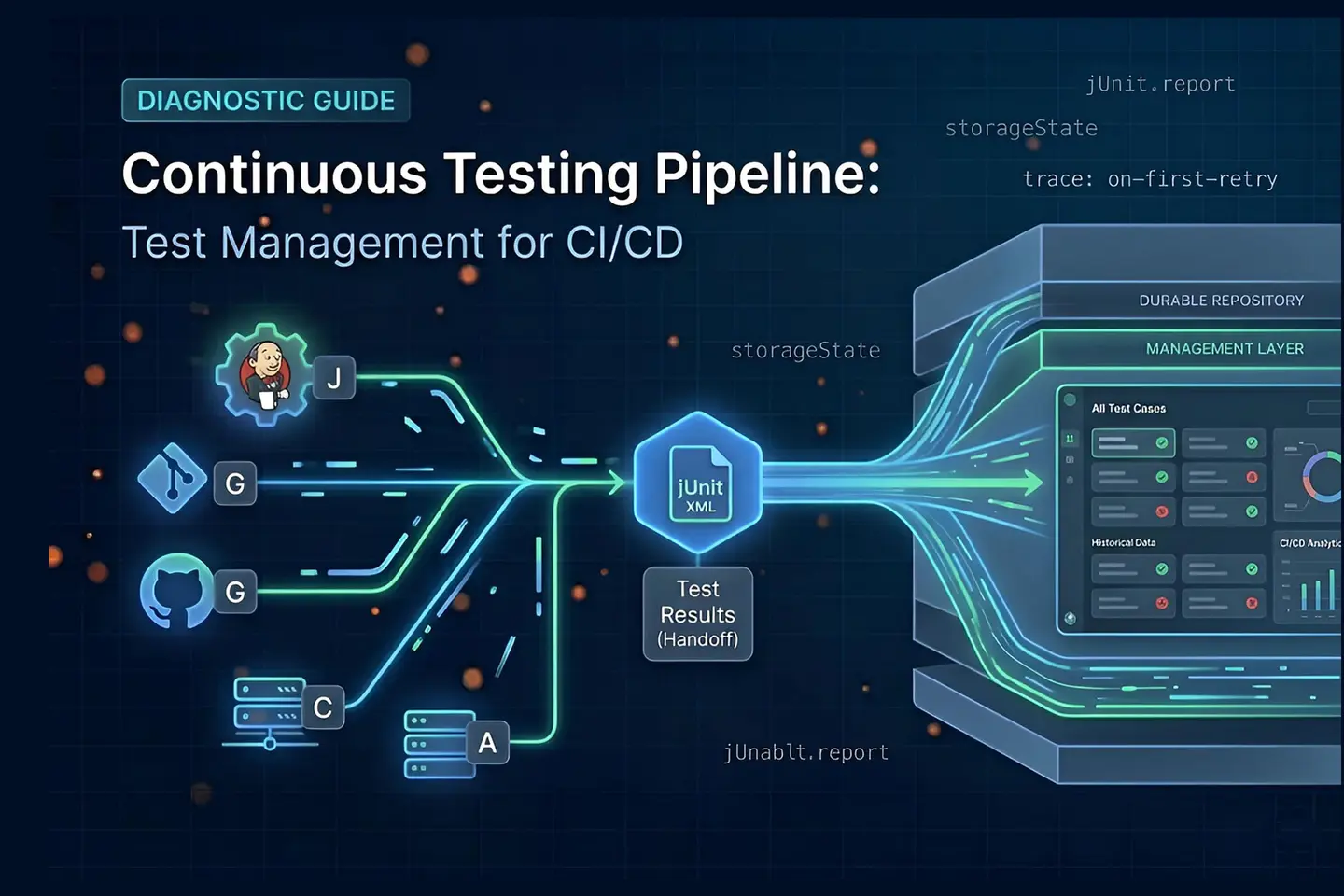
A continuous testing pipeline is the discipline of running, recording, and tracing test results across every code change in a way that survives vendor migrations and expiring build logs. The CI/CD tool executes tests; the test management layer remembers them. In modern delivery, those two responsibilities have to live in different systems because pipelines are ephemeral by design — they tear down, expire artifacts, and cap retention — while audit trails, traceability records, and run history have to last for years. A working continuous testing pipeline treats the CI/CD vendor as interchangeable execution infrastructure and centralizes the durable quality record in a dedicated test management platform that ingests results regardless of which build server produced them.
The structural tension here is sharper than it used to be. AI tooling has accelerated code throughput by 59% year-over-year and feature-branch activity is up 50%, but main-branch success rates have dropped to a five-year low of 70.8%. Pipelines are running more tests than ever, and the persistent quality record is fragmenting faster than ever.
At the same time, the Capgemini World Quality Report 2025-26 found that 60% of organizations struggle with secure, scalable test data. While 94% of teams review production data, nearly half cannot translate insights into quality improvements. The continuous testing pipeline is producing more results than ever — but the historical record is scattered across expiring build logs.
What Is a Continuous Testing Pipeline?
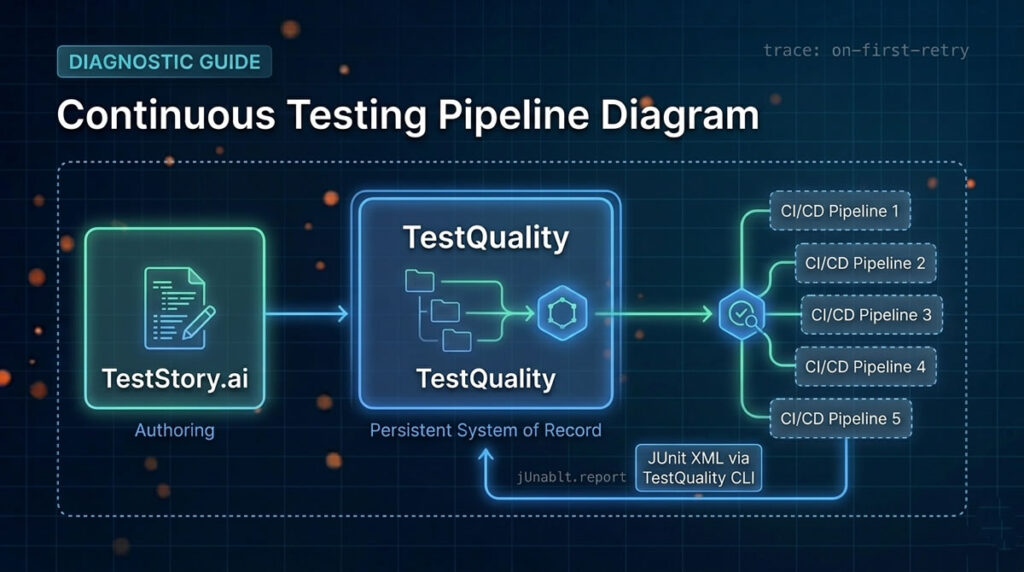
A continuous testing pipeline is a four-stage system covering authoring, execution, reporting, and traceability that runs alongside CI/CD without depending on it for storage. The CI/CD vendor executes; a dedicated test management layer persists the record. This separation is what makes the pipeline durable across vendor migrations and audit cycles.
The ISO/IEC/IEEE 29119 software testing standard formalizes the scope. Part 2 covers test processes spanning organizational management through dynamic execution, and Part 3 mandates documentation across the lifecycle — Test Case Specifications, Test Execution Logs, and Test Incident Reports. Most teams fragment these stages by default: developers author tests in local IDEs, execute them inside ephemeral CI/CD pipelines, and trace defects across disconnected dashboards. The records don’t survive the build.
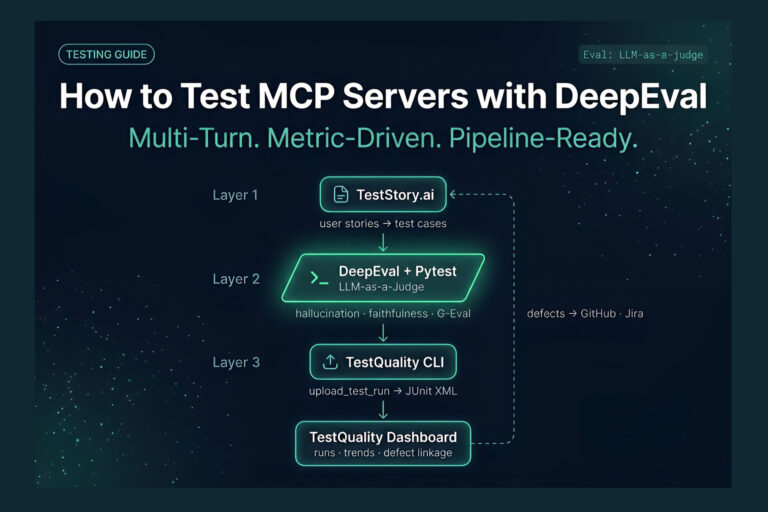
A working continuous testing pipeline decouples authoring from management from execution. TestStory.ai sits at the authoring stage, parsing user stories into Gherkin-formatted test cases. Those cases land in TestQuality, which holds the persistent record. The CI/CD pipeline — whichever vendor — pulls execution commands, runs them, and returns results back into TestQuality through the CLI. This decoupling is a core principle of the Agentic SDLC: the heavy lifting of continuous testing should not break when the underlying pipeline infrastructure changes.
Why Does CI/CD Test Management Fragment Across Vendors?
CI/CD test management fragments because every major build server stores results in its own internal format, with its own retention rules, tied to its own execution environment. When a team switches vendors or consolidates pipelines, the historical record dies with the old server. The fragmentation is structural, not accidental.
The cloud infrastructure landscape compounds this. The 2025 Stack Overflow Developer Survey shows 71.1% of developers use Docker, 43.3% use AWS, 28.5% use Kubernetes, and 26.3% use Microsoft Azure. Most teams operate across multiple ephemeral platforms simultaneously. When test management is tightly coupled to any one of them, every infrastructure change becomes a data loss event.
Migration friction is the most visible cost. Moving from Jenkins to GitLab CI, or from Azure Pipelines to GitHub Actions, typically means abandoning the historical test data attached to the previous build server. Build logs expire, execution environments are torn down, and the audit trail demanded by ISO 29119 vanishes. Teams either accept the loss or run expensive parallel migrations to extract years of run history before the deprecated pipeline goes dark.
TestQuality is built to absorb this fragmentation. It sits above the pipeline as a vendor-agnostic persistent layer that ingests results from any CI/CD tool via the TestQuality CLI. When auditors run post-incident analysis or compliance review months after a vendor switch, the complete traceability record stays intact in TestQuality, insulated from churn in the underlying execution infrastructure.
How Do Major CI/CD Providers Handle Test Results Natively?
Every major CI/CD vendor consumes JUnit XML through its own mechanism, surfaces it through its own UI, and expires it on its own timeline. The native capabilities are designed for immediate pipeline feedback — not for the multi-year historical record that quality engineering and compliance actually require.
Jenkins consumes XML test reports via the “Publish JUnit test result report” post-build action. Configuration uses Ant glob syntax (for example, **/build/test-reports/*.xml) to locate result files. Jenkins surfaces trend graphs for recent builds, but retaining lengthy standard output increases server memory consumption significantly. Clearing job history to recover disk wipes the historical quality record.
GitLab CI typically interprets JUnit XML by declaring it as an artifact under the artifacts:reports:junit keyword inside the pipeline’s YAML job configuration. The web interface summarizes test executions per pipeline, but long-term requirement coverage tracking is constrained because test data stays coupled to GitLab’s artifact storage and retention windows.
CircleCI collects test data via the store_test_results step, configured with a path to the directory containing the XML files. It requires explicit enablement of language-specific formatters such as jest-junit or mocha-junit-reporter. The Test Insights view is useful for short-term flake tracking, but results live inside short-lived artifacts bound to the platform’s retention rules.
Azure Pipelines uses the PublishTestResults@2 YAML task to upload outputs to the pipeline’s internal UI, requiring both a testResultsFormat and file-matching pattern. Attachment retention is capped at 2GB for public projects. Migrating away from Azure means leaving the historical record behind.
GitHub Actions handles test outputs inside the jobs.<job_id>.steps sequence, typically as workflow artifacts or job outputs. Artifacts are subject to retention policies and expire on schedule. Teams looking for deeper agentic GitHub test management push these XML artifacts to an external system to maintain a durable audit trail.
| CI/CD Vendor | Native Test Reporting Mechanism | Where the Test Management Gap Appears |
|---|---|---|
| Jenkins | Consumes JUnit XML via the “Publish JUnit test result report” post-build action using Ant glob syntax. | Memory bloat from retained logs; clearing job history destroys the historical quality record. |
| GitLab CI | Declares JUnit XML as a pipeline artifact via the artifacts:reports:junit YAML keyword. | Test data is coupled to GitLab artifact storage and retention; long-term tracking requires an external layer. |
| CircleCI | Collects results via the store_test_results step using language-specific JUnit formatters. | Insights bound to platform retention windows; data does not survive long-term outside CircleCI. |
| Azure Pipelines | Uploads outputs via the PublishTestResults@2 YAML task with format and file-match parameters. | Attachment retention capped at 2GB for public projects; migrating away loses the system of record. |
| GitHub Actions | Handles outputs via jobs.<job_id>.steps as workflow artifacts subject to retention policy. | Artifacts expire on schedule; long-term tracking requires external extraction. |
Try It Now
Generate the test cases that feed your CI/CD pipeline — before you touch the YAML.
Paste any user story into TestStory.ai and watch the orchestration layer generate structured, Gherkin-formatted test cases instantly — covering happy paths, edge cases, and the failure scenarios your team would typically miss. No account required.
No credit card required.
Why Is JUnit XML the Cross-Tool Standard for Test Results?
JUnit XML is the cross-tool standard because every modern CI/CD vendor parses it natively, every major test framework outputs it, and its hierarchical schema captures the suite, case, and metadata structure that ISO 29119 reporting requires. It is the lingua franca of test results — verbose by modern standards, but universally interoperable.
Originally introduced by the Ant build tool for the JUnit framework in Java, JUnit XML has long since outgrown its origins. Today it is the default output for pytest, Playwright, Cypress, Selenium, and most other major frameworks, either natively or via a single-line reporter configuration. The format’s longevity comes from its structure: <testsuites> and <testsuite> tags aggregate execution time, test counts, failures, and skips, while individual <testcase> tags capture granular outcomes alongside system-out and system-err streams.
The schema is also extensible. Modern tools inject <properties> tags at the suite and case levels to serialize custom metadata, attach screenshots, or pass hints that downstream CI tools and test management platforms use to render the data. Jenkins, for example, recognizes a convention via its JUnit Attachments plugin that references files directly from standard output. The result is that JUnit XML is the one format every CI/CD vendor and every major test management platform agrees on — which is exactly why it is the right handoff format for a vendor-agnostic continuous testing pipeline.
How Does the TestQuality CLI Create a Persistent Test Management Layer?
The TestQuality CLI is the connector that lifts test results out of any CI/CD pipeline and into a persistent project, milestone, and cycle hierarchy. It accepts standard JUnit XML, runs from any CI environment or local machine, and writes results into a system of record that survives the build server.
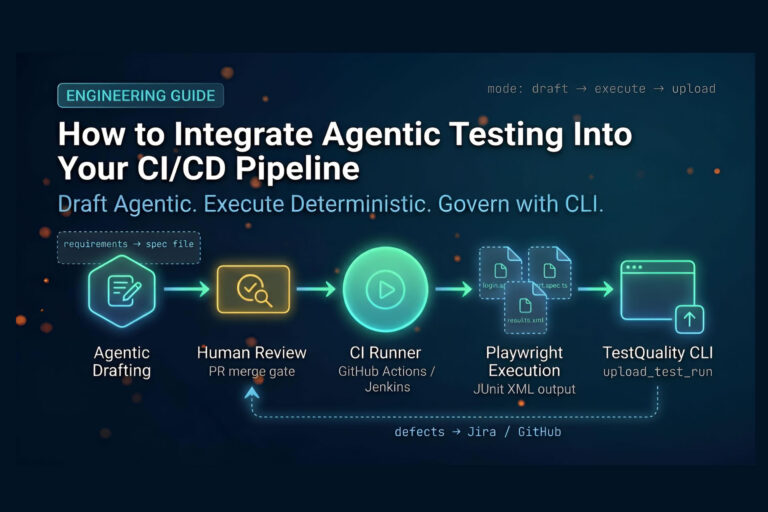
The core command is testquality upload_test_run <xmlfiles>. Because it consumes JUnit XML, it works identically whether you run it inside a Jenkins post-build step, a GitLab CI job, a CircleCI workflow, an Azure Pipelines task, or a GitHub Actions step. Your test framework outputs JUnit XML via its reporter configuration, the pipeline generates the artifact, and the CLI uploads results to TestQuality, which ingests them automatically after the upload completes. There is no auto-discovery on the TestQuality side; the CLI is the mechanism that makes the integration operational.
Routing parameters control where results land. Engineers append flags like --project_name and --milestone_name to map transient pipeline data into the correct historical buckets. The CLI also exposes sibling commands — testquality projects, testquality milestones, testquality plans, testquality suites — for managing the hierarchy directly. Full coverage of the available commands lives in the TestQuality CLI command reference.
This structure is what makes persistent quality reporting actually persistent. Test runs are organized into versioned cycles tied to releases rather than orphaned inside expiring build logs. Maintaining this structured historical data is also a prerequisite for downstream practices such as context engineering for AI-assisted testing and building agentic memory for stateful QA workflows — both of which require a durable record to read from.
Why Does Defect Logging Stay Manual in Mature CI/CD Pipelines?
Defect logging stays manual because CI/CD pipelines are inherently noisy environments, and auto-ticketing every failure pollutes the issue tracker with flakes, environmental glitches, and expected changes. A human reviewer separates real defects from pipeline noise; once a defect is confirmed, integrations sync it automatically.
Developer trust data backs this design choice. The 2025 Stack Overflow Developer Survey found that 46% of developers actively distrust the accuracy of AI tools, compared to 33% who trust them. Independently, 76% of developers report no plans to use AI for deployment and monitoring tasks. Engineering teams want automation under the hood, but they want humans on the gate where it matters — defect triage and incident attribution are exactly that gate.
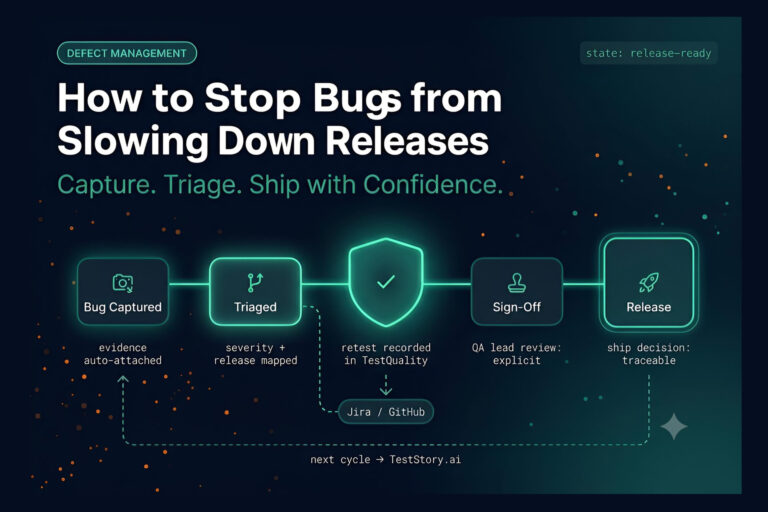
TestQuality’s defect workflow is built around this reality. When a pipeline test fails, the defect logging step and the evidence attachment step both remain manual. A tester reviews the failure, filters out pipeline noise, and attaches verified screenshots, logs, or other artifacts to the defect record. Once the tester confirms and logs the defect inside TestQuality, the GitHub and Jira integrations sync the defect record to the team’s tracker automatically. The result is a persistent quality record populated exclusively with actionable, verified issues — and an issue tracker that engineers actually trust to reflect real problems rather than CI/CD noise.
Technical Deep Dive FAQ
What is a continuous testing pipeline?
A continuous testing pipeline is the discipline of running, recording, and tracing software tests across every code change in a way that survives infrastructure changes. It spans four stages — authoring, execution, reporting, and traceability — and treats the CI/CD pipeline as an execution environment rather than a system of record. The durable test management layer ingests results from any CI/CD vendor, preserving run history, defect links, and traceability records even when build servers are retired, logs expire, or the team migrates between Jenkins, GitLab CI, CircleCI, Azure Pipelines, or GitHub Actions.
Why is test management separate from CI/CD execution?
Test management and CI/CD execution have different lifespans. CI/CD pipelines are ephemeral — they spin up runners, execute tests, expire artifacts, and tear down. Test management has to last across years of releases, audits, and team changes. When the two are tightly coupled, every pipeline migration, retention policy update, or vendor consolidation destroys the historical quality record. Separating them lets organizations swap build servers, restructure pipelines, or move between cloud providers without losing run history, defect traceability, or compliance documentation that quality engineering and regulated industries rely on.
How do you migrate test history when switching CI/CD vendors?
If historical test data lives inside the CI/CD tool, migration is destructive — Jenkins job history, GitLab artifacts, CircleCI insights, and GitHub Actions logs are not portable between vendors. The reliable approach is to keep the historical record outside any single CI/CD pipeline in a dedicated test management platform that ingests JUnit XML from any source. When you switch from Jenkins to GitLab CI or consolidate multiple build servers, only the execution layer changes. The persistent record of test runs, defects, and traceability stays intact, available to auditors and engineers indefinitely.
What format does TestQuality use to ingest test results?
TestQuality ingests JUnit XML, the universal standard for test result exchange. Most modern testing frameworks — pytest, Playwright, Cypress, Selenium, JUnit, jest — output JUnit XML either natively or through a single-line reporter configuration. Once the framework writes JUnit XML to disk, the TestQuality CLI uploads the file with the testquality upload_test_run command, and TestQuality ingests it automatically into the project, milestone, and cycle specified by the upload flags. This format-driven approach is what makes the platform vendor-agnostic across Jenkins, GitLab CI, CircleCI, Azure Pipelines, and GitHub Actions.
How does TestQuality connect to my CI/CD pipeline?
TestQuality connects to CI/CD pipelines through the TestQuality CLI. The test framework outputs JUnit XML via its reporter configuration; a CLI step in the pipeline runs testquality upload_test_run with the XML file path and routing flags such as –project_name and –milestone_name. The CLI uploads the results to TestQuality, which ingests them into the specified project, milestone, and cycle automatically. The same workflow runs identically across Jenkins, GitLab CI, CircleCI, Azure Pipelines, and GitHub Actions — there is no per-vendor plugin or integration to configure beyond invoking the CLI in the pipeline script.
Does TestQuality automatically log defects for failed tests?
No. Defect logging from a failed test is intentionally manual. CI/CD pipelines produce noisy output — flaky tests, environmental glitches, expected changes from refactors — and auto-ticketing every failure pollutes the issue tracker with false positives that engineers stop trusting. In the TestQuality workflow, a tester reviews each failure, filters out pipeline noise, attaches verified screenshots or logs, and logs the defect manually. Once the defect exists in TestQuality, the GitHub and Jira integrations sync it to the team’s tracker automatically. The result is a defect record engineers actually trust to reflect real problems.
How does TestStory.ai fit into the continuous testing pipeline?
TestStory.ai sits at the authoring stage of the continuous testing pipeline. It parses user stories, acceptance criteria, or architecture inputs and generates structured, Gherkin-formatted test cases covering happy paths, edge cases, and failure scenarios. Generated cases feed directly into TestQuality, where they live as the persistent system of record. From there, the CI/CD pipeline pulls execution commands, runs the tests via the framework of choice — Playwright, Selenium, Cypress, pytest, JUnit — and returns results back into TestQuality via the CLI. TestStory.ai owns authoring; TestQuality owns the record; CI/CD owns execution.
What is the role of human testers in an automated CI/CD pipeline?
Human testers are the gate between pipeline noise and actionable quality signal. CI/CD pipelines execute thousands of tests per day, and the outputs include flakes, environmental issues, and expected failures from refactors. Testers triage these signals, confirm which failures are real defects, attach evidence, and decide what gets escalated to the issue tracker. They also handle exploratory testing, visual regression review, and complex acceptance scenarios that fully scripted automation cannot cover. The combination of automated execution and human verification is what makes a continuous testing pipeline trustworthy rather than just busy.
Key Takeaways
The durable spine of any continuous testing pipeline.
Decouple authoring, management, and execution — and the rest of the stack becomes interchangeable.
The delivery gap is widening: AI throughput up 59% YoY, feature-branch activity up 50%, main-branch success at a five-year low of 70.8% — pipelines are generating more results than ever, and the persistent record is fragmenting faster than ever.
Native CI/CD reporting is not test management: Jenkins logs bloat, GitLab artifacts expire, CircleCI insights are retention-bound, Azure caps attachments at 2GB, and GitHub Actions artifacts expire on schedule.
JUnit XML is the universal handoff format: every major framework (Playwright, Selenium, pytest, Cypress, JUnit) emits it, and every major CI/CD vendor parses it — making it the right contract between execution and management.
The TestQuality CLI is the connector: the testquality upload_test_run command, paired with routing flags like –project_name and –milestone_name, maps transient pipeline data into a persistent project, milestone, and cycle hierarchy.
Manual defect logging is a feature, not a gap: 46% of developers distrust AI accuracy and 76% have no plans to use AI for deployment or monitoring — human-in-the-loop triage is what keeps the issue tracker trustworthy.
Three-stage architecture wins: TestStory.ai authors test cases, TestQuality holds the persistent record, and any CI/CD vendor executes — the only piece that becomes interchangeable is the one that was supposed to be ephemeral all along.
Pipelines come and go. Test history is forever — if you store it somewhere that’s not the build server.
Start Free Today
Build a continuous testing pipeline that outlasts your CI/CD vendor.
TestStory.ai generates structured test cases from your user stories, acceptance criteria, or architecture diagrams — then syncs them directly into TestQuality for execution, tracking, and team collaboration. Whether your pipeline runs on Jenkins, GitLab CI, CircleCI, Azure Pipelines, or GitHub Actions, the TestQuality CLI keeps your run history, defect traceability, and audit trail intact across every migration.
✦ Get 500 TestStory.ai credits every month included with your TestQuality subscription — no extra cost.
No credit card required on either platform.