Gemma 4 QAT refers to Google’s quantization-aware versions of Gemma 4, designed to reduce memory use and improve local inference speed on developer machines. In a direct head-to-head coding-agent task using VS Code and DeepEval, Gemma 4 QAT produced structurally incomplete test code — initializing evaluation metrics without applying them correctly and omitting the required judge model, while Qwen 3.6 35B delivered materially more usable output at nearly identical token throughput. This article explains how that comparison played out, why lower memory usage did not translate into better code quality, and where test management tools like TestQuality fit when you need to turn AI-generated test code into governed, repeatable QA test execution rather than one-off experiments inside an editor.
At a Glance
A practical look at local LLM coding performance
Lower VRAM use helped Gemma 4 QAT run locally, but it did not win on code correctness.
Focus: Real-world comparison of Gemma 4 QAT and Qwen 3.6 in a VS Code coding-agent workflow.
Task: Generate a multi-turn conversational RAG test in Python using Pytest and DeepEval.
Result: Qwen 3.6 produced materially stronger code structure and incorporated the evaluation model correctly.
Tradeoff: Token speed was similar — roughly 53 vs 54 tokens per second — but output quality was not.
QA angle: For AI-generated tests, generation speed matters less than executable, reviewable, traceable artifacts.
A local model that writes fast but writes wrong still creates rework — and rework is what QA teams usually feel first.
What is Gemma 4 QAT, and why does it matter for local coding agents?
Gemma 4 QAT is a compressed Gemma 4 variant built to use less memory and storage while improving local inference efficiency. That matters because coding agents often run inside constrained developer environments where VRAM, RAM, and token cost shape what is practical day to day.
Google’s positioning for the newer Gemma 4 family centers on two improvements. First, reduced memory footprint for local execution. Second, faster inference on-device. For teams experimenting with local AI coding agents, those are not minor benefits. They determine whether a model can run at all on a laptop and whether it stays responsive enough to be useful.
In this comparison, the interesting part is not the marketing claim alone. It is what happens when a model that looks efficient on paper is asked to do non-trivial coding work in context. That means reading an existing codebase, understanding a RAG implementation, understanding how DeepEval expects conversational test cases to be written, and then producing a valid Pytest file.
That is a higher bar than toy prompts like building a simple game or making a one-page website. It tests whether a model can reason over existing structure, not just autocomplete isolated snippets.
How was the local model comparison set up?
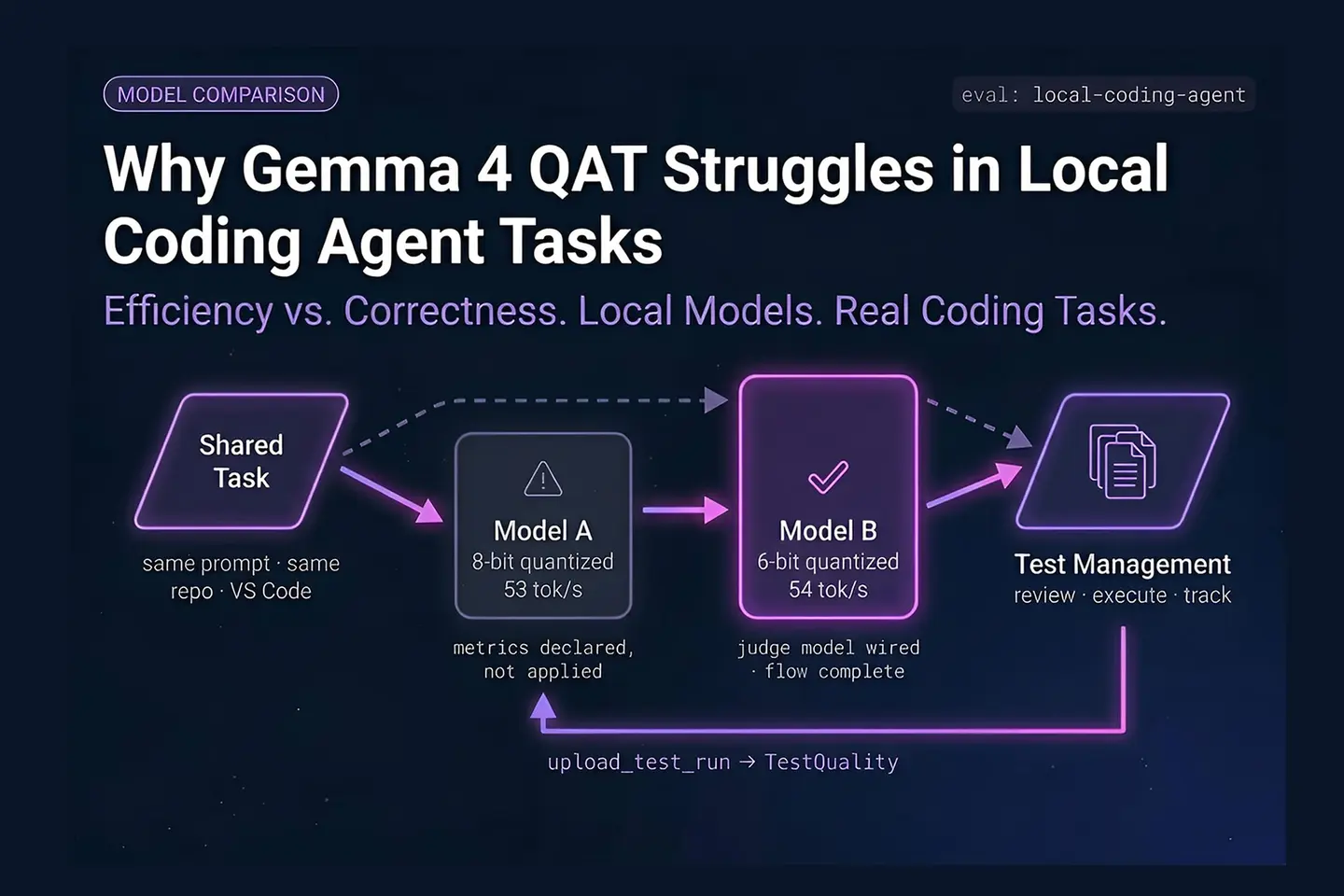
The comparison used two locally run models inside a VS Code coding-agent workflow: Gemma 4 26B A4B QAT 8-bit and Qwen 3.6 35B A3B with 6-bit quantization. Both were selected because their active parameter profiles were close enough to make the comparison meaningful.
The environment used MLX-based local model execution on Apple Silicon, with the model connected into VS Code as the active language model for the coding agent. The core idea was simple: keep the task, prompt, and workflow consistent, and change only the model.
The task was intentionally practical. Rather than asking for synthetic benchmark-style output, the agent was instructed to inspect an actual backend RAG implementation, understand DeepEval’s multi-turn conversational evaluation approach, and then create a Python Pytest file covering the required conversational metrics.
This kind of task better reflects how QA engineers and AI application teams actually use coding agents. They need code that aligns with real libraries, project-specific conventions, and evaluation logic. That is also consistent with a broader industry shift toward testing AI systems in production-like conditions rather than relying on narrow benchmark scores. For example, the Google Research discussion on LLM evaluation practices highlights how difficult it is to infer practical performance from simplified evaluations alone.
What was the coding task, exactly?
The task was to write a multi-turn conversational RAG test using DeepEval, grounded in the application’s existing backend implementation and DeepEval’s conversational evaluation patterns. The output needed to be a valid Pytest file, not a rough outline or pseudocode.
That matters because the assignment had several moving parts:
- Read the existing RAG implementation in the application codebase.
- Understand how DeepEval handles conversational and RAG-oriented metrics.
- Create a multi-turn conversation test, not a single-turn retrieval test.
- Use Python and Pytest.
- Wire in the evaluation model correctly so the metrics can actually run.
In other words, the model was not being judged on style. It was being judged on whether it could assemble a functioning evaluation artifact. For QA teams, that distinction is crucial. Generated test code that looks polished but omits the judging model or leaves metrics unexecuted is worse than incomplete code because it creates false confidence.
Why is this kind of test a good benchmark for coding agents?
This task is a strong benchmark because it combines repository understanding, third-party library usage, multi-step reasoning, and test authoring. A model has to connect concepts across files and frameworks instead of guessing from a single isolated prompt.
Many coding model demos focus on greenfield generation. That is useful, but limited. Real engineering work is usually brownfield work. You are modifying an existing app, following existing patterns, and integrating with libraries that have opinions about object structure, fixtures, and execution flow.
Multi-turn RAG evaluation is especially revealing because it is easy for a model to produce code that appears plausible while quietly missing the pieces that make the evaluation meaningful. In this case, the model needed to go beyond declaring metrics and actually pass the right judge model and conversational state through the flow.
This is where QA and AI coding overlap. According to the official Pytest documentation, maintainable tests rely on clear fixture use, reusable structure, and executable assertions. AI-generated test code that ignores these patterns tends to create fragile suites that humans have to rewrite.
How did Gemma 4 QAT perform on the real coding task?
Gemma 4 QAT completed the task superficially but missed important implementation details that made the resulting test effectively unusable. The output looked like a conversational test, yet the core evaluation logic was incomplete and the metrics were not applied correctly.
On the surface, the output checked several boxes. It generated a Pytest-style file. It recognized that the task involved multi-turn interaction. It attempted to define conversational stages. That kind of first-pass plausibility is common with modern local models.
The issue was deeper. The generated code initialized the metrics but did not actually use them in a meaningful evaluation flow. It also omitted the necessary large language model judge input for those metrics. As a result, the code was not just imperfect. It was structurally wrong for the intended DeepEval use case.
That distinction matters. A coding agent can be helpful if it gets you 80 percent of the way there and leaves obvious cleanup. It is much less helpful when it produces code that appears complete but contains conceptual gaps that a less experienced engineer might miss.
One upside did show up. Gemma 4 QAT ran with modest memory consumption for its class, reportedly using about 6.8 GB of memory in this setup while handling a 26B mixture-of-experts model with only a subset of parameters active per token. So the efficiency goal looked real. The coding result simply did not match it.
How did Qwen 3.6 perform differently?
Qwen 3.6 produced a materially stronger implementation by structuring retrieval context, handling conversational turns more coherently, and including the judge model needed for evaluation. It still was not guaranteed to be perfect on first execution, but it was much closer to usable engineering output.
The stronger result showed up in several ways:
- It built retrieval context before executing the conversation flow.
- It organized the turns with more realistic scenario progression.
- It included session handling and conversational continuity.
- It passed a model for judging the metrics, which was the critical missing piece in the Gemma output.
There were still quirks. A session fixture appeared to be recreated instead of reused from existing project code. That suggests the output could still require human cleanup. But that is normal. The important point is that the result looked directionally correct and much easier to repair than the Gemma 4 QAT version.
For a coding agent, that is often the threshold that matters. Engineers do not need perfection on the first pass. They need a draft that is logically grounded enough to iterate on quickly.
Turn generated tests into managed test assets.
If AI is helping you draft test cases or Pytest files, a structured place to review, organize, and track them keeps that work from disappearing into chat history.
Try the free test case builder →Was inference speed the deciding factor?
No. In this comparison, token generation speed was nearly identical, so speed alone did not explain the outcome. The real difference was code quality, specifically whether the generated test logic matched the intended evaluation workflow.
Gemma 4 QAT reportedly ran at about 53 tokens per second, while Qwen 3.6 ran at about 54 tokens per second in the same general setup. That is close enough that most engineers would treat the speed as functionally equivalent for this task.
When throughput is similar, correctness becomes the deciding metric. That is especially true in testing work. If a model generates a wrong test faster, it has not saved time. It has only shifted debugging effort downstream.
This is a recurring lesson with AI tooling in QA. Raw speed is easy to advertise. Useful artifacts are harder to produce. Industry-wide, that pattern shows up in developer tooling discussions as well. The Stack Overflow Developer Survey 2024 shows widespread use of AI tools, but also persistent concerns around trust, accuracy, and the need for human verification.
Does that mean Gemma 4 is bad for local use?
No. It means Gemma 4 QAT underperformed on this specific coding-agent task. The local efficiency gains still looked promising, and the 12B dense variant was noted as having especially good inference speed, even if code quality did not stand out.
That is an important nuance. A model can be attractive for one workload and weak for another. The transcript’s observations suggest at least three separate judgments:
- Gemma 4 QAT: efficient local execution, but disappointing coding output in this scenario.
- Gemma 4 12B: fast inference, especially appealing on lower-memory laptops, but not compelling enough for coding quality.
- Qwen 3.6: stronger choice for coding-agent tasks, at least in this head-to-head local workflow.
So the right takeaway is not “never use Gemma 4.“ It is “do not assume compression and local efficiency automatically translate into better agentic coding performance.”
What should QA and AI teams learn from this comparison?
QA and AI teams should evaluate local models on real tasks that end in executable test artifacts, not benchmark scores or polished demos. The key measure is whether the model reduces review and repair time once the code lands in your actual workflow.
There are a few practical lessons here.
Use repository-aware tasks:
If a model cannot inspect your implementation and align with it, the result will often be generic. Generic test code is rarely enough for AI application testing.
Prefer correctness over superficial completion:
A finished-looking file is not the same as a working test. In AI evaluation work, small omissions like a missing judge model can invalidate the whole artifact.
Measure repair cost:
The real question is not “Did it generate code?” It is “How much human effort is required to make this trustworthy?”
Keep generated artifacts under test management:
Once you start producing AI-assisted test assets, you need a way to review, organize, execute, and report on them. One way to handle that in TestQuality is to store manual and automated test cases in the same governed workspace, connect them to runs, and keep the execution history visible over time. See the TestQuality docs for current workflow details.
How can you evaluate local coding models more fairly in your own environment?
A fair evaluation uses the same prompt, the same repository, the same editor integration, and a task with objectively checkable output. If you change multiple variables at once, you usually end up comparing setup differences rather than model capability.
A practical evaluation checklist looks like this:
- Pick one real task. Use a task that touches your actual codebase.
- Keep the prompt constant. Do not tune one model more aggressively than the other.
- Use the same agent path. Same editor, same extension, same local runtime.
- Inspect the output manually. Check for omitted dependencies, fake APIs, and missing execution logic.
- Run the code. Even strong-looking output may break on import or fixture resolution.
- Track revision time. The better model is often the one needing fewer correction loops.
If your team formalizes this process, a test management platform becomes useful quickly. You can treat model-generated test cases as draft assets, route them through review, and then execute them in controlled runs instead of treating AI output as disposable snippets.
What common mistakes should you avoid when comparing local coding LLMs?
The biggest mistake is confusing plausible output with correct output. Other common errors include using toy prompts, changing setup variables between runs, and ignoring whether the generated artifact actually executes within your project.
- Do not compare on toy examples only. A model that builds a simple game may still fail on your production test harness.
- Do not overvalue token speed. Similar speed can hide large quality differences.
- Do not skip library-specific validation. Frameworks like DeepEval, Pytest, and RAG tooling have structural expectations.
- Do not assume quantization preserves coding quality. Compression can help fit and speed while still changing output behavior.
- Do not leave AI-generated tests unmanaged. Untracked artifacts are difficult to review and easy to lose.
Technical Deep Dive FAQ
What is Gemma 4 QAT?
What is Qwen 3.6 in this comparison?
Why did Gemma 4 QAT fail the coding-agent task?
Did Gemma 4 QAT have a local performance advantage?
Was token speed meaningfully different between the two models?
Why is a multi-turn RAG test harder than a simple code-generation prompt?
How should a QA team validate AI-generated test code from a local model?
Is Gemma 4 12B still worth trying for local workflows?
Key Takeaways
What this local LLM comparison actually showed
Efficient local inference is useful, but usable code is the real outcome metric.
Gemma 4 QAT’s strength: Reduced memory footprint and good local responsiveness — about 6.8 GB for a 26B MoE model.
Gemma 4 QAT’s weakness: Generated code that looked valid but missed essential DeepEval evaluation logic and the required judge model.
Qwen 3.6 advantage: Better structured output, stronger conversational test flow, and correct inclusion of the judging model.
Evaluation lesson: Similar token speed — 53 vs 54 tokens per second — does not mean similar engineering usefulness.
QA implication: Judge local coding models by executable test artifacts and review effort — not demos or benchmark claims.
The best local coding model is usually the one that leaves your team with less cleanup — not the one with the prettiest first draft.
About the Author
Jose Amoros is part of the TestQuality marketing team, focused on agentic QA, AI-powered test management, and the operational handoff between AI-generated test artifacts and governed execution workflows. He writes regularly about CI/CD integration, Gherkin/BDD practices, and shift-left testing.
Further Reading
- A Systematic Survey and Critical Review on Evaluating Large Language Models: Challenges, Limitations, and Recommendations — arXiv:2407.04069
- Stack Overflow Developer Survey 2024
- Official Pytest documentation
- Best AI test case generation tools in 2026 — TestQuality
- TestQuality blog
- TestQuality features
- TestQuality documentation
Start Free Today
Transition from script-writing to outcome-orchestration.
TestStory.ai generates structured test cases from your user stories, acceptance criteria, or architecture diagrams — then syncs them directly into TestQuality for execution, tracking, and team collaboration.
Get 500 TestStory.ai credits every month included with your TestQuality subscription — no extra cost.
No credit card required on either platform.