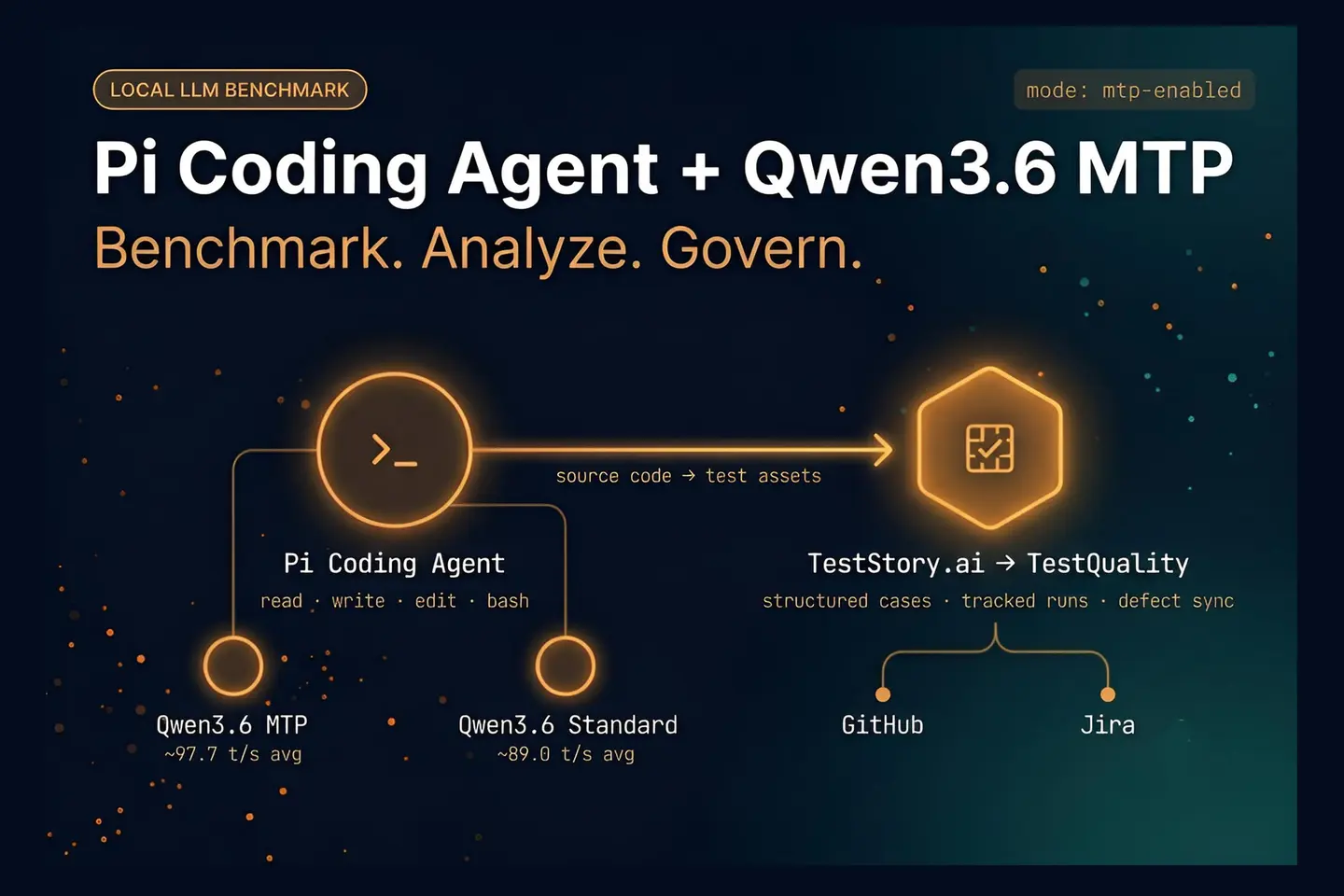
Pi Coding Agent is a minimal terminal coding harness built by Earendil Inc. that gives large language models direct read, write, edit, and bash access to a local codebase. It runs locally, supports Anthropic, OpenAI, and local model providers, and is designed to be extended through TypeScript extensions and skills. For QA teams evaluating local model performance, Pi is a practical benchmark client — it sends real coding prompts against a loaded model rather than synthetic test inputs. In this comparison, Pi Coding Agent was used to run Qwen3.6-35B-A3B in LM Studio with and without Multi-Token Prediction enabled, measuring tokens per second, draft-token acceptance, and output quality across repeated prompts.
At a Glance
Qwen3.6-35B-A3B: MTP vs Non-MTP in Pi Coding Agent
Same hardware, same prompts, same model family — only the decoding strategy changed.
Model tested: Qwen3.6-35B-A3B, run locally in LM Studio on Apple M5 Max hardware, with Pi Coding Agent as the benchmark client.
Core result: MTP averaged ~97.7 t/s vs ~89.0 t/s for non-MTP — an 8.8% throughput gain in this setup.
Peak speed: MTP hit ~109–110 t/s in round one; the benchmark context cited a peak near 113 t/s.
Key tradeoff: MTP showed slower time-to-first-token in round one; draft-token acceptance dropped from ~82% to ~69% across rounds as context grew.
What it means for QA teams: Peak throughput headlines are useful; repeated-round averages with realistic prompts are what actually determine agent workflow performance.
Fast local inference is useful, but repeated-round stability is what determines whether a model performs well in daily agent workflows.
What is Qwen3.6 MTP, and why does it matter?
Qwen3.6 MTP is the Multi-Token Prediction variant of the same base model, designed to draft upcoming tokens ahead of final generation. The main practical benefit is higher throughput, but the user experience depends on how often those draft tokens are accepted and how stable performance remains across repeated prompts.
In this comparison, the model under test was Qwen3.6-35B-A3B on Apple M5 Max hardware using LM Studio as the inference server and Pi Coding Agent as the benchmark client. The Qwen Team’s April 2026 release notes confirm MTP as a supported capability in this model family, with benchmark results across STEM, document understanding, and spatial reasoning tasks showing competitive performance against models including Claude Sonnet 4.5 and Gemma4-31B.
Pi, built by Earendil Inc., is a minimal terminal coding harness that gives LLMs direct read, write, edit, and bash access to a local codebase. It supports local model providers via LM Studio’s OpenAI-compatible endpoint, making it a realistic proxy for how a coding or QA agent actually interacts with a model — not a synthetic benchmark tool. The only meaningful difference between the two runs was whether the model used MTP.
That matters because it isolates the variable you actually care about. If the hardware, prompts, and basic workflow stay constant, then any speed gain is easier to attribute to MTP rather than a different model family or different inference settings.
This lines up with broader industry interest in speculative and assisted decoding. For example, the Hugging Face Text Generation Inference documentation on speculation explains the same core idea: draft likely tokens first, then validate them efficiently. The concept is not unique to one model family, but implementation quality varies a lot.
How was the MTP versus non-MTP comparison set up?
The comparison used the same Qwen3.6-35B-A3B model family, the same local environment, and the same prompts in two rounds. One run used the standard model, and the other used the MTP-labeled version, making this a controlled A versus B benchmark rather than a loose anecdotal test. For QA teams building AI tools for software testing, this kind of controlled variable isolation — same hardware, same prompts, one changed parameter — is exactly the methodology that makes benchmark results transferable to real workflow decisions.
The local runtime was LM Studio, while Pi Coding Agent acted as the client sending prompts against the loaded model. Because LM Studio’s normal interface does not expose all benchmark details directly, log streaming was used to capture model statistics such as tokens per second and MTP draft-token behavior.
Two prompts were used repeatedly:
- Round 1: a repository-understanding prompt asking what the code repository is
- Round 2: a feature-ideation prompt asking what new features could be added to the codebase
The reason for two rounds was sensible. Agent-style sessions do not stay static. As more context and prior turns accumulate, throughput can shift. That is especially relevant for coding agents, which tend to send larger and more complex token payloads over time.
That same concern shows up in AI engineering guidance from infrastructure vendors. The vLLM documentation on speculative decoding notes that speedups depend on workload shape, acceptance behavior, and implementation details. In other words, you should benchmark in the way you actually use the model.
What were the actual tokens-per-second results?
The MTP model came out ahead on average. The non-MTP version averaged about 89.0 tokens per second across two rounds, while the MTP version averaged about 97.7 tokens per second, an improvement of roughly 8.8% in this setup.
Here are the reported numbers from the comparison:
- Without MTP, round 1: about 90 tokens per second
- Without MTP, round 2: about 89.3 tokens per second
- With MTP, round 1: about 109 to 110 tokens per second
- With MTP, round 2: about 85 tokens per second
- Average without MTP: about 89.0 tokens per second
- Average with MTP: about 97.73 tokens per second
The headline number was the MTP peak above 110 tokens per second, with the test framing citing a top result near 113 t/s. That gives the MTP version the obvious win if your primary metric is raw throughput.
Still, the average is more useful than the peak, a point worth anchoring in the LLM evaluation metrics your team uses to assess model suitability for sustained agentic work.. In practical workflows, one very fast response matters less than how the model behaves across a session with repeated prompts and growing context.
Why did the MTP model feel slower at the start but faster overall?
The MTP version showed a slower first-token response in the initial round, but then generated faster once it started producing output. That pattern makes sense for a draft-and-accept generation strategy, where some overhead appears up front before throughput gains show up in the rest of the response.
This distinction is important because users often mix up two very different performance signals:
- Time to first token: how quickly the model starts answering
- Tokens per second: how fast the rest of the answer is generated
A model can lose slightly on the first metric and still win on the second. That appears to be what happened here. The MTP model was not described as universally snappier in all respects. Instead, it was slower to start in the first round, then faster in sustained output.
If you use local LLMs for coding, test case drafting, or repository analysis, this tradeoff may or may not matter. For short prompts where instant response matters most, the benefit can feel smaller. For longer completions, throughput gains become more valuable.
How do draft-token acceptance rates affect MTP performance?
Draft-token acceptance is central to whether MTP helps or disappoints. The higher the acceptance rate, the more of the model’s drafted tokens can be kept, which improves throughput. In this test, acceptance dropped from roughly 82% in the first round to about 69% in the second.
The comparison captured MTP-specific metrics including:
- Total draft token count
- Accepted draft tokens
- Rejected draft tokens
One reported example showed 355 total draft tokens, 295 accepted, and 61 rejected. Another earlier result referenced 3,391 accepted draft tokens out of 5,730. The key point is not the raw count alone, but the acceptance ratio.
As the prompt history grew, acceptance fell. That suggests a practical limit: when the coding agent keeps sending more context-heavy and varied requests, the model has a harder time accurately guessing upcoming tokens. MTP can still help, but the gains may shrink and understanding why requires the same kind of structured thinking you would apply to any LLM quality assurance evaluation: defined inputs, observable outputs, documented variance.
For QA teams evaluating AI-assisted test design, this is a reminder to benchmark against realistic sequences, not just clean one-shot prompts. If you log those benchmark runs in a shared system, a test management platform like TestQuality’s feature set for centralized test cases, runs, and reporting can help you keep a repeatable record of which model version behaved best under which workflow.
Did MTP improve output quality, or only speed?
The benchmark indicated not only higher throughput with MTP, but also more expansive output in the second round. The MTP version produced several extra lines of feature suggestions compared with the non-MTP run, which was interpreted as a qualitative improvement in that scenario.
This is where benchmark interpretation gets tricky. More output does not automatically mean better output. However, in the observed comparison, the longer answer was treated as more useful because it surfaced more feature ideas for the same codebase prompt.
That does not prove MTP always improves quality. It does suggest that, in this specific setup, the MTP variant did not sacrifice usefulness to gain speed. In fact, it appeared to produce richer answers in at least one repeated prompt.
For teams that use local LLMs to draft requirements, test cases, or implementation ideas, that combination matters. A speed gain is only valuable if the result remains usable — which is why teams evaluating AI test case generation tools need to assess output completeness and correctness, not only throughput numbers. Otherwise, you simply create bad outputs faster.
What are the main takeaways for local LLM benchmarking?
The main lesson is simple: benchmark the same model under the same conditions, then compare averages, not just peak screenshots. In this case, MTP won on average throughput, reached a much higher best-case speed, and appeared to generate richer output, but it also showed slower initial response and declining acceptance over time.
If you want your own local LLM benchmarks to be credible, use a structure like this:
- Keep hardware constant. Do not compare across different machines if the goal is to isolate model behavior.
- Keep prompts constant. Use the same prompt set across each model version.
- Run multiple rounds. One-shot tests can exaggerate wins.
- Track both throughput and startup feel. Measure tokens per second and time to first token separately.
- Capture draft-token stats for MTP. Otherwise, you cannot explain why speedups rose or fell.
- Check output usefulness. Faster nonsense is still nonsense.
This matters for software testing teams as much as for developers. AI-generated test artifacts should be benchmarked like any other engineering component: defined inputs, observable outputs, repeatable runs, and documented acceptance criteria.
How can QA teams use results like this in practice?
QA teams can use MTP benchmark results to decide which local LLM variant should support tasks like repository analysis, test idea generation, and requirements expansion. The right choice depends on whether your workflow values sustained output speed, first-token responsiveness, or longer-session stability most.
Several practical uses stand out:
- Repository understanding: Fast local answers can help testers understand unfamiliar code before designing coverage.
- Feature brainstorming: The same prompt pattern used here maps well to identifying candidate test areas.
- AI-assisted test case generation: A faster model can reduce waiting time when drafting larger manual test suites.
- Agent-based QA workflows: Repeated context-heavy prompts resemble what agentic QA tools do during multi-step analysis.
One way to operationalize this is to turn benchmark prompts into formal test cases. For example, you can store a prompt set, expected response characteristics, and run history as reusable assets. Teams working with AI coding agents and enterprise QA alternatives can use this same prompt-and-log approach to benchmark any local model variant before committing it to a production agentic workflow.
If your team evaluates multiple local models, you can create a lightweight benchmark suite around prompts such as repository summarization, feature ideation, or acceptance-criteria expansion. Then track pass or fail conditions around latency bands, output completeness, and consistency.
How does Pi Coding Agent fit into a governed QA workflow?
Pi’s terminal access and RPC mode make it a strong first-stage analysis tool, but it has no test management layer, no structured test case storage, and no GitHub or Jira sync. What it produces — repository summaries, feature ideas, coverage gaps — is raw material that needs a governed handoff to become a trackable QA artifact.
That handoff is where TestStory.ai and TestQuality close the loop.
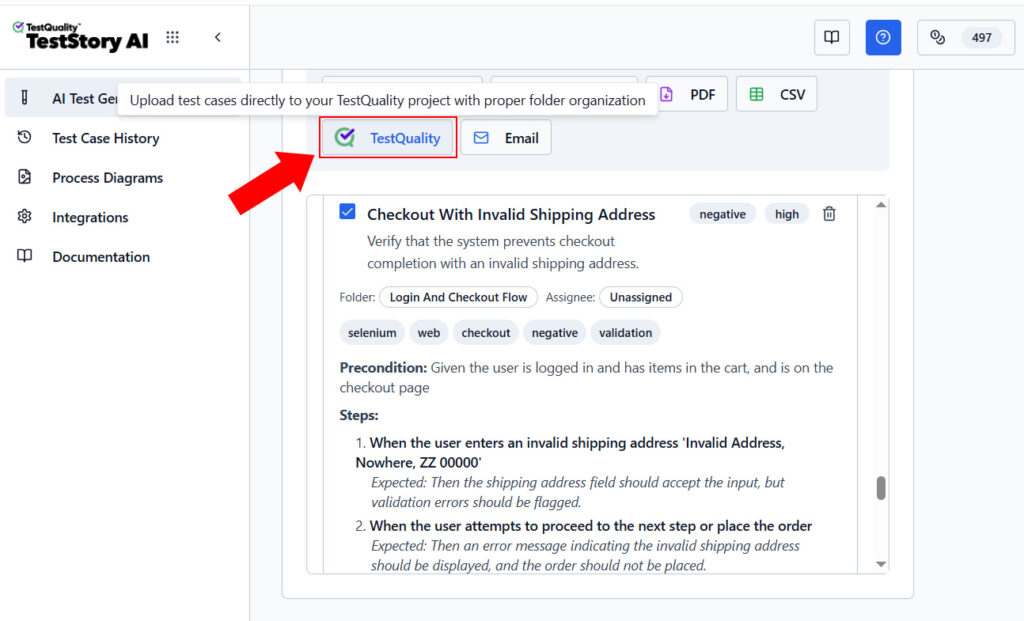
TestStory.ai accepts Source Code and full Repos as project assets — the same outputs Pi generates when it reads a codebase or summarizes an endpoint structure. Feed Pi’s analysis into TestStory.ai and it converts that material into structured, story-driven test cases. Those cases sync automatically into TestQuality for execution and tracking, rather than sitting in a terminal session or chat log nobody revisits.
The full workflow looks like this:
- Pi reads the repository using its
readtool and runs bash commands to surface endpoint structures, untested modules, or coverage gaps. - Pi’s output — source code analysis, feature summaries, or requirement ideas — becomes the input asset fed into TestStory.ai as a Source Code or Repo project asset.
- TestStory.ai generates structured test cases from that input, with the same governed output it produces from user stories, Jira issues, or epics.
- Cases sync automatically into TestQuality, where they are grouped into runs or cycles for the current release.
- Tests are executed and tracked — pass, fail, or blocked status recorded against each case.
- Defects link back to GitHub and Jira automatically through TestQuality’s native integrations, keeping test artifacts connected to the engineering work they cover.
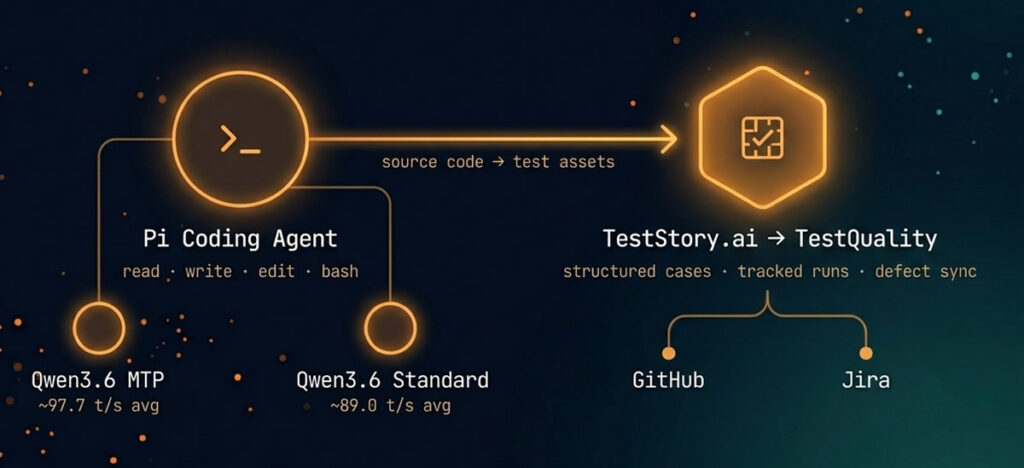
For teams already running Pi with a local Qwen model, this workflow answers the question the benchmark raises but does not resolve: what do you do with faster AI output once you have it? Throughput improvements only return value when the artifacts they produce enter a system where they can be assigned, executed, and reported against. Pi handles the analysis; TestStory.ai and TestQuality handle the governance.
If your workflow includes Pi’s RPC mode for CI/CD-embedded analysis, the same handoff applies at the pipeline level — Pi’s structured output becomes a TestStory.ai input asset on each run, keeping test case generation continuous rather than a one-time manual step.
Turn Pi’s codebase analysis into structured test cases.
Feed your repository or source code into TestStory.ai — no user stories required. Structured test cases sync directly into TestQuality for execution and tracking.
Try the Free Test Case Builder →What mistakes should you avoid when comparing MTP and non-MTP models?
The most common mistakes are relying on a single fast run, ignoring first-token latency, and treating bigger output as automatic proof of higher quality. MTP can look impressive in screenshots, but its value depends on repeatability, acceptance rate, and whether the answers remain useful in the context of your actual workload.
Avoid these specific errors:
- Comparing different model variants beyond MTP. If quantization, size, or prompt template changes, the comparison becomes muddy.
- Using only one prompt. One prompt can flatter a model.
- Ignoring session drift. Longer coding-agent sessions may reduce MTP acceptance.
- Measuring only the peak throughput. Average behavior is usually the more honest metric.
- Skipping logs. Without draft-token and token-rate stats, you are mostly guessing.
- Confusing verbosity with usefulness. More lines are not automatically better lines.
The benchmark here was useful precisely because it did not stop at a single flashy number. It included two rounds, considered degradation, and looked at draft-token acceptance as part of the explanation.
Technical Deep Dive FAQ
What is Pi Coding Agent?
What is Multi-Token Prediction in a local LLM?
What is the difference between MTP and non-MTP Qwen3.6 models?
How fast was Qwen3.6 MTP in this benchmark?
Why did the MTP model slow down in round two?
What draft-token acceptance rates were observed?
How do you see MTP stats in LM Studio if the UI is limited?
Is average tokens per second more important than peak speed?
How should a QA team turn local LLM benchmarking into a repeatable process?
Key Takeaways
What This Pi Coding Agent Benchmark Actually Shows
MTP won — but the details matter more than the headline number.
Speed winner: Qwen3.6-35B-A3B with MTP outperformed non-MTP on average in this controlled local test run through Pi Coding Agent.
Peak result: MTP crossed 110 t/s in round one, with the benchmark context citing a top result near 113 t/s.
Important tradeoff: MTP showed slower initial response time before sustained throughput improved; draft-token acceptance dropped from ~82% to ~69% across rounds.
Session realism matters: Benchmark with repeated, context-heavy prompts — the kind Pi Coding Agent sends in real coding sessions — not single clean queries.
Govern the output: Faster local inference only returns value when the artifacts Pi generates feed a system where they can be executed and tracked — TestStory.ai and TestQuality close that loop.
The best benchmark is not the one with the highest number. It is the one you can reproduce next week — with the same prompts, the same logs, and the same acceptance criteria.
About the Author
Jose Amoros is part of the TestQuality marketing team, focused on agentic QA, AI-powered test management, and the operational handoff between AI-generated test artifacts and governed execution workflows. He writes regularly about CI/CD integration, Gherkin/BDD practices, and shift-left testing.
Further Reading
Alejandro AO Pi Coding Agent walkthrough
Pi Coding Agent
- Pi Coding Agent official documentation
- Pi Coding Agent on GitHub
- Pi Coding Agent NPM package
- Qwen3.6-35B-A3B: Agentic Coding Power, Now Open to All — Qwen Team, April 2026
- Alejandro AO Pi Coding Agent walkthrough
Speculative and multi-token decoding
TestQuality internal links
- Top AI tools for software testing in 2026
- LLM evaluation metrics and testing strategies
- Best AI test case generation tools in 2026
- LLM testing and evaluation: QA guide
- AI test case generators: Jira free vs enterprise agents
- TestQuality features overview
- TestQuality documentation
Start Free Today
Transition from terminal analysis to governed test execution.
TestStory.ai generates structured test cases from your source code, repos, user stories, or architecture diagrams — then syncs them directly into TestQuality for execution, tracking, and team collaboration.
Get 500 TestStory.ai credits every month included with your TestQuality subscription — no extra cost.
No credit card required on either platform.