Gherkin API testing turns REST endpoints into plain-language Given-When-Then scenarios that work as both living documentation and automated checks.
- API-level BDD skips the fragile UI layer, so your scenarios stay stable even when the front end changes.
- A handful of repeatable patterns (CRUD lifecycles, status matrices, Scenario Outlines, chained requests) cover most real-world REST testing.
- Declarative steps with one behavior per scenario keep step definitions thin and debugging painless.
- Contract testing is still a major blind spot, with only a small fraction of teams validating API contracts today.
Start with one feature file for your busiest endpoint, then roll the patterns below across your whole API surface.
APIs are where modern software actually breaks. The average application now leans on dozens of APIs to function, and when a single endpoint returns the wrong status code or a malformed payload, the entire user experience falls over. Teams are pushing quality checks down to the service layer, where feedback is faster and less brittle. The trouble is that raw API tests, buried in code, are unreadable to anyone who isn't fluent in the framework.
Gherkin API testing closes this gap. You describe how each endpoint should behave in plain Given-When-Then language, then wire those descriptions to real HTTP calls underneath. REST still powers the overwhelming majority of web services, yet contract validation remains a glaring blind spot for most teams, which means readable, behavior-first API checks have never mattered more. In this post, we'll cover what behavior-driven API testing looks like in practice, the patterns worth memorizing, and the code examples to copy into your own suite.
What Is Gherkin API Testing, and Why Bother?
Gherkin API testing is the practice of writing behavior-driven scenarios in Gherkin syntax that exercise an API directly rather than going through a browser or mobile screen. Each scenario reads like a sentence anyone on the team can follow, and a thin layer of step definitions translates those sentences into actual requests against your endpoints. The result is a test suite that documents your API's contract and verifies it at the same time.
The reason this works so well for services is structural. Gherkin's Given-When-Then shape maps almost perfectly onto an HTTP request: you set up state and auth, you fire a method at a URL, and you assert on the response. There's no clicking, no waiting for elements to render, and no selectors to maintain.
Why Gherkin Fits APIs Better Than UI
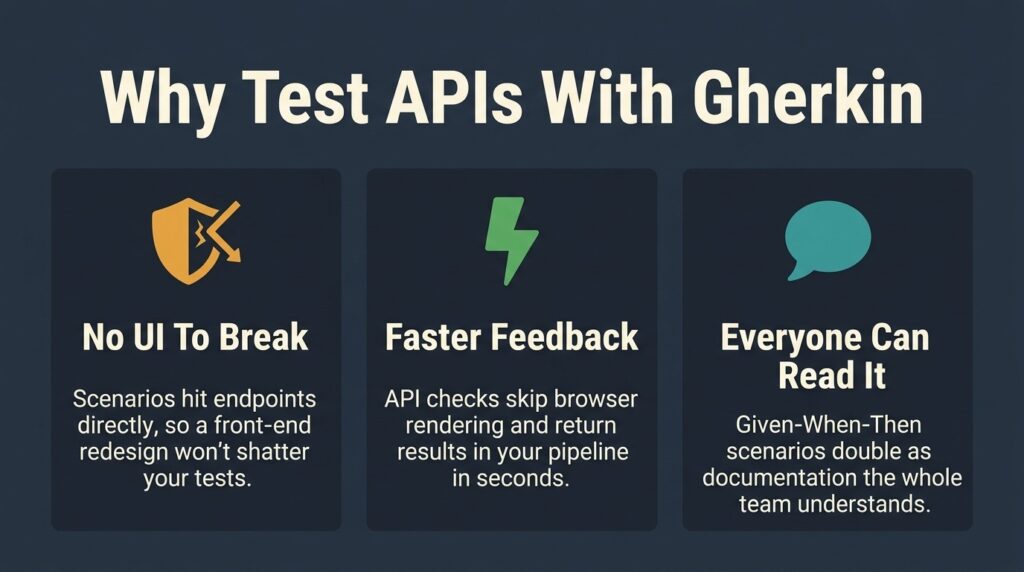
UI-driven BDD has a well-known problem. The scenarios are beautiful and stable, but the step definitions underneath are fragile because they depend on selectors that break every time the interface shifts. You end up maintaining two layers instead of one.
API scenarios dodge that issue. A step like "When I send a POST to /checkout with item 42" resolves to a single HTTP call, so there's nothing to break when the front end gets redesigned. That stability is a big reason Gherkin test suites at the service layer tend to outlive their UI counterparts. If you want a refresher on the underlying language first, the guide on how to write Gherkin tests covers the keywords and structure in depth.
Where API Testing BDD Pays Off
The clearest win is shared understanding. When a product manager can read a .feature file during sprint planning and catch a missing error case before any code ships, the collaboration payoff is real and immediate. API testing BDD also produces tests that run faster than equivalent UI tests because they skip browser rendering completely.
It pays off again in CI. Fast, readable API checks slot cleanly into a pipeline and give developers feedback within minutes of a commit. Surveys consistently show that developers reward tools that are reliable and well-documented, and a clean BDD suite is exactly that for your API.
How Do You Structure a Gherkin Test for a REST API?
Every solid API scenario follows the same anatomy, and once you internalize it, writing new Gherkin test cases becomes mechanical. The three core steps each own a distinct responsibility, and keeping them separate makes scenarios readable and debuggable.
Here's the shape before we break it down:
Feature: User retrieval API
As an API consumer
I want to fetch user records
So that I can display profile data
Scenario: Retrieve an existing user
Given the API is available
And I am authenticated as a standard user
When I send a GET request to "/users/42"
Then the response status should be 200
And the response body should contain "email"

Given: Setup, Auth, and State
The Given steps put the system into a known state before anything happens. For APIs, that usually means establishing a base URL, loading credentials, and seeding any data the request depends on. Everything in this block is a precondition, never an action.
A common mistake is cramming the actual request into a Given step. Resist that. If you're describing something the user or another system already did, it belongs here, and the real call comes later.
When: The Single Request
The When step is the event under test, and there should be exactly one per scenario. It names the HTTP method, the path, and any payload. Keeping it to a single action lets you instantly pinpoint failures because a red test points at one request and one request only.
Then: Assertions on the Response
Then steps describe the observable outcome. For an API, that means the status code, specific fields or values in the response body, and sometimes headers like content type or rate-limit info. You can stack multiple assertions with And, but they should all describe the same outcome, not branch into new behaviors.
What Are the Core Gherkin API Testing Patterns?
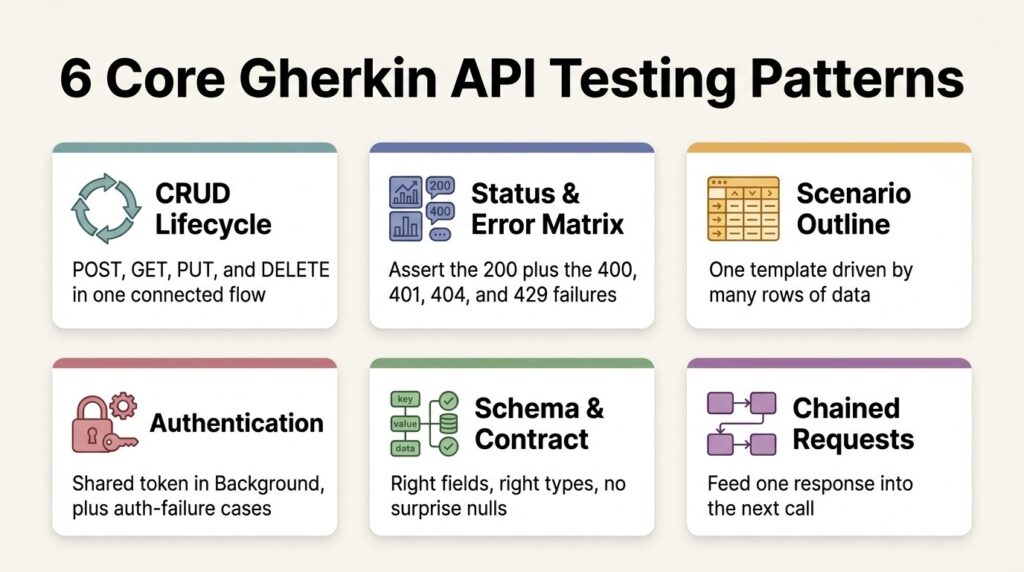
Most API scenarios you'll ever write are variations on a small set of patterns. Learn these, and you can cover an entire service without reinventing structure each time. This is the heart of practical API-level BDD, so here are the six patterns worth committing to memory.
- The CRUD lifecycle pattern. Model create, read, update, and delete as a connected set of scenarios for a resource. POST creates it, GET confirms it exists, PUT or PATCH modifies it, and DELETE removes it. This gives you full coverage of a resource's happy path in one feature file.
- The status and error matrix pattern. For each endpoint, write scenarios for the success code plus the failure codes that matter: 400 for bad input, 401 or 403 for auth problems, 404 for missing resources, and 429 for rate limits. Authentication and validation errors are among the most common API failures, so this pattern catches real bugs.
- The Scenario Outline pattern. When the same behavior needs many input combinations, parameterize one scenario instead of copy-pasting 10. We'll dig into this one below because it's the workhorse of data-driven API testing.
- The authentication pattern. Pull auth into a Background block so every scenario inherits a valid token without repeating the setup. Then write dedicated scenarios for expired tokens, missing tokens, and insufficient permissions.
- The schema and contract pattern. Assert that the response shape matches the agreed contract: required fields are present, types are correct, and no unexpected nulls sneak through. This is the pattern most teams skip and later regret.
- The chained request pattern. Use a value from one response as input to the next request, like creating a record and capturing its ID to fetch or delete it. This mirrors real client workflows and is where end-to-end API behavior gets validated.
A quick note on patterns 1 and 6: they're easy to overdo. Keep each scenario focused on a single behavior, and lean on the examples of good versus bad Gherkin scenarios if you find your steps drifting into procedural detail.
How Do You Write Data-Driven Gherkin Test Cases for APIs?
Validation logic is where Scenario Outlines earn their keep. Instead of writing a separate scenario for every email format or boundary value, you write one template and feed it a table. The scenario runs once per row, so adding a new case is as simple as adding a line.
Here's a parameterized validation example for a registration endpoint:
Scenario Outline: Validate email on registration
Given the API is available
When I send a POST to "/register" with email "<email>"
Then the response status should be <status>
And the response message should be "<message>"
Examples:
| email | status | message |
| valid@example.com | 201 | Account created |
| missing-at.com | 422 | Invalid email format |
| | 400 | Email is required |
| dup@example.com | 409 | Email already in use |
This single block replaces four near-identical scenarios and keeps the feature file readable. The step definition underneath stays generic, parsing each parameter and firing the request. For a deeper look at parameter handling and table syntax, the complete guide to Gherkin syntax walks through every keyword. Data-driven Gherkin test cases like these are how you get broad coverage without a maintenance nightmare.
Which Frameworks Wire Gherkin to API Calls?
Gherkin is a language, not a tool. To execute your scenarios against an API, you need a runner that connects each step to code that makes HTTP requests. The right choice usually follows whatever language your team already writes in, since step definitions live alongside your application stack.
The table below compares the common options. Each is a complementary execution framework, the kind of tool that runs your scenarios rather than competing with how you manage them.
| Framework | Language | Best for | HTTP layer |
| Cucumber + REST Assured | Java | JVM teams, mature ecosystems | REST Assured |
| pytest-bdd | Python | Pytest shops, data-heavy suites | requests / httpx |
| Behave | Python | Readable, standalone BDD | requests |
| Cucumber.js | JavaScript / TypeScript | Node and full-stack teams | axios / fetch |
| Karate | DSL (no step code) | API-only teams wanting speed | built-in |
A Python example using Behave shows how thin the glue can be. The feature file stays in plain Gherkin, and the step definition does the actual work:
# steps/api_steps.py
import requests
from behave import given, when, then
@given('the API is available')
def step_base(context):
context.base_url = "https://api.example.com"
@when('I send a GET request to "{path}"')
def step_get(context, path):
context.response = requests.get(context.base_url + path)
@then('the response status should be {code:d}')
def step_status(context, code):
assert context.response.status_code == code
If you'd rather see the Java side of this, with WireMock standing in for the live service, the Baeldung walkthrough on Cucumber REST testing is a clean reference.
What Are the Best Practices for API Testing BDD?
Patterns get you started, but a few habits separate suites that scale from suites that rot. The biggest one is staying declarative. Describe what the API should do, not the mechanical steps of how a client does it, and your scenarios stay readable for years.
Keep these principles close as your suite grows:
- One behavior per scenario. If a scenario tests registration and login together, a failure leaves you guessing which broke. Split them.
- Push shared setup into Background. Auth tokens, base URLs, and common seed data belong there, not repeated in every scenario.
- Keep step definitions thin. Steps should parse inputs and assert outputs. Heavy logic belongs in helper functions, not in the glue code.
Two more principles matter especially for APIs. Tag your scenarios (@smoke, @regression, @contract) so your pipeline can run the right subset at the right stage. Deliberately close the contract-testing gap because validating response shapes is the highest-value check most teams are still missing.
How Does Gherkin API Testing Fit Into CI/CD and Traceability?
Readable API scenarios are only half the value. The other half is running them automatically on every change and connecting each result back to the requirement it verifies. Wired into a pipeline, your Gherkin test suite becomes a quality gate that catches regressions before they reach production.
This area is where execution meets management. Running tests is straightforward, but knowing which requirement a failing scenario maps to, and whether last night's run covered the endpoints you shipped, takes a layer above the framework. Strong test automation in CI/CD depends on having manual and automated results, plus traceability back to requirements, living in one place rather than scattered across CI logs.
It's also where AI is changing the workflow. Modern platforms can generate Gherkin test cases from your requirements in seconds, outputting ready-to-run scenarios in BDD format and covering the edge cases a human would skip. That turns your feature files from something you hand-write into something an intelligent layer drafts, and you refine. Pair that generation with a place to execute and track everything, and your API quality story stops being a pile of scripts and starts being a system.
Frequently Asked Questions
Can you do Gherkin API testing without Cucumber? Yes. Gherkin is just the language, and several runners read .feature files, including pytest-bdd, Behave, and Cucumber.js. You can also practice the same Given-When-Then thinking with API-native tools like Karate that use their own DSL. Cucumber is popular, but it's one option among several.
Is API testing BDD slower than writing plain API tests? There's a small upfront cost to writing scenarios and step definitions, but it pays back quickly. Once your step library exists, new Gherkin test cases are often just a few readable lines plus a row in an Examples table, and the shared readability saves hours in review and onboarding.
How many assertions should a single API scenario have? Keep them focused on one outcome. Asserting the status code plus two or three response fields that describe the same result is fine. If you find yourself checking unrelated behaviors, that's a signal to split the scenario in two.
What's the difference between Gherkin and BDD? BDD is a development methodology built on collaboration and shared understanding. Gherkin is the structured language often used to write BDD scenarios. You can practice BDD without Gherkin, and you can write a Gherkin test without fully adopting BDD, though using them together is where the value compounds.
Should I test contracts with Gherkin or a dedicated contract tool? Both have a place. Gherkin scenarios are excellent for asserting that a response contains the right fields and types in a readable way. For strict, consumer-driven contract enforcement at scale, a dedicated contract-testing tool complements your BDD suite rather than replacing it.
Turn Your API Specs Into Living Tests
Gherkin gives your API tests a voice that the whole team can read, and the patterns above give you a blueprint to cover any REST service without drowning in maintenance. The teams that excel at behavior-driven API testing treat scenarios as shared documentation first and automation second, then connect both to their pipeline.
As an AI-powered QA platform, TestQuality lets you generate Gherkin-formatted scenarios with TestStory.ai, manage them alongside your manual and automated results, and run agentic QA workflows that keep coverage current as your API evolves, all with native GitHub and Jira integration. Start your free trial and put your API scenarios to work today.
This article covers general API testing practices and patterns. Specific framework behavior and syntax can change between versions, so always check your runner's current documentation.