Well-written Gherkin test cases are the foundation of successful BDD, but sloppy scenarios wreck team collaboration and break your automation suite.
- Declarative scenarios describe user behavior and outcomes, not button clicks or CSS selectors, so they survive UI refactors.
- Independent scenarios run on their own with no shared state, which keeps your test suite reliable and easy to maintain.
- Business-focused language lets both engineers and non-technical stakeholders read, review, and validate the same specification.
- One behavior per scenario makes failures obvious and debugging fast, the single rule that separates good vs bad Gherkin.
The gap between good and bad Gherkin isn’t syntax; it’s whether your scenarios describe what the system does instead of how it does it.
Writing effective Gherkin test cases separates BDD implementations that ship value from the ones that turn into maintenance nightmares. Behavior-driven development keeps gaining industry adoption, yet plenty of teams still struggle to produce scenarios that hold up in practice, which is exactly why a modern test management platform keeps BDD collaborative and executable.
The difference between good and bad Gherkin comes down to communication, maintainability, and delivering software that meets real business needs. Poor Gherkin syntax turns a collaborative process into a technical bottleneck that frustrates developers and stakeholders alike. Get it right, and your feature files become living documentation that everyone trusts.
What Makes Gherkin Test Cases Effective?
Gherkin scenarios work when they bridge business requirements and technical implementation. The best scenarios read like user stories anyone can follow while still giving your automation framework enough structure to execute reliably. If a product manager can read your scenario without asking “what does this even mean?”, you’re on the right track.
Good Gherkin syntax follows three core principles that separate professional implementations from first-draft attempts. Master these, and most of your bad-scenario problems disappear on their own. Learning how to write Gherkin tests properly starts here.
- Scenarios describe behaviors, not procedures. Instead of documenting every click and keystroke, effective Gherkin focuses on what the system should do from the user’s perspective.
- Each scenario tests exactly one behavior. Teams that cram multiple checks into a single scenario create brittle tests that break constantly and are painful to debug. The cardinal rule of BDD is blunt: one scenario, one behavior.
- Scenarios use language that stakeholders understand. Technical jargon, CSS selectors, and implementation details have no business in your feature files. The goal is shared understanding between business and technical teams.
These principles are far easier to enforce inside a structured environment built for creating, managing, and automating Gherkin BDD scenarios, so alignment across stakeholders doesn’t depend on everyone remembering the rules.
What Common Mistakes Turn Gherkin Test Cases Into Bad Ones?
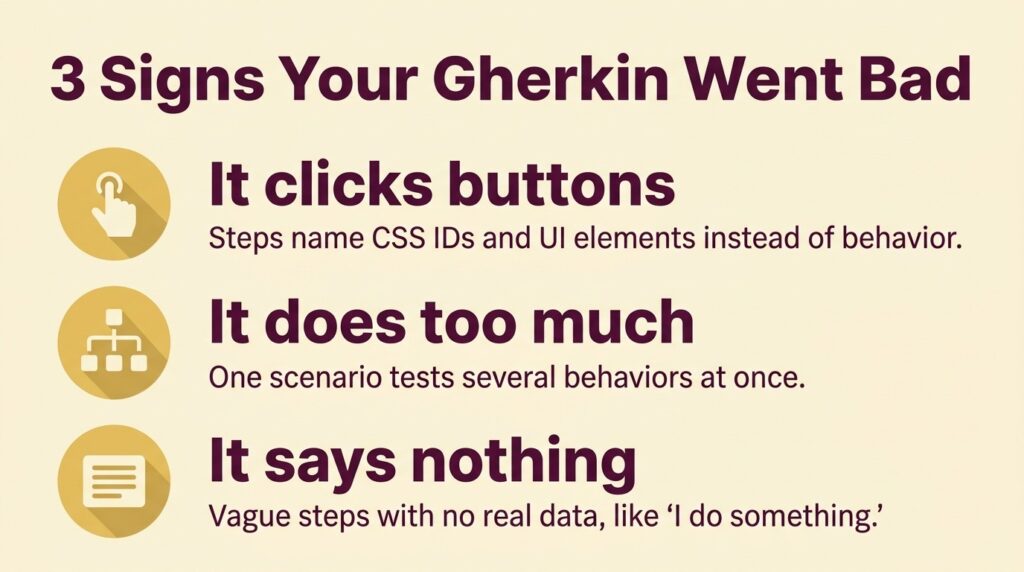
Most teams make the same predictable errors on their first feature files. These mistakes turn Gherkin BDD into a technical burden that slows delivery and annoys everyone involved. Recognizing them is the fastest way to sort good vs bad Gherkin in your own suite.
Writing Implementation-Heavy Scenarios (Bad Example)
# BAD EXAMPLE – Don’t write scenarios like this
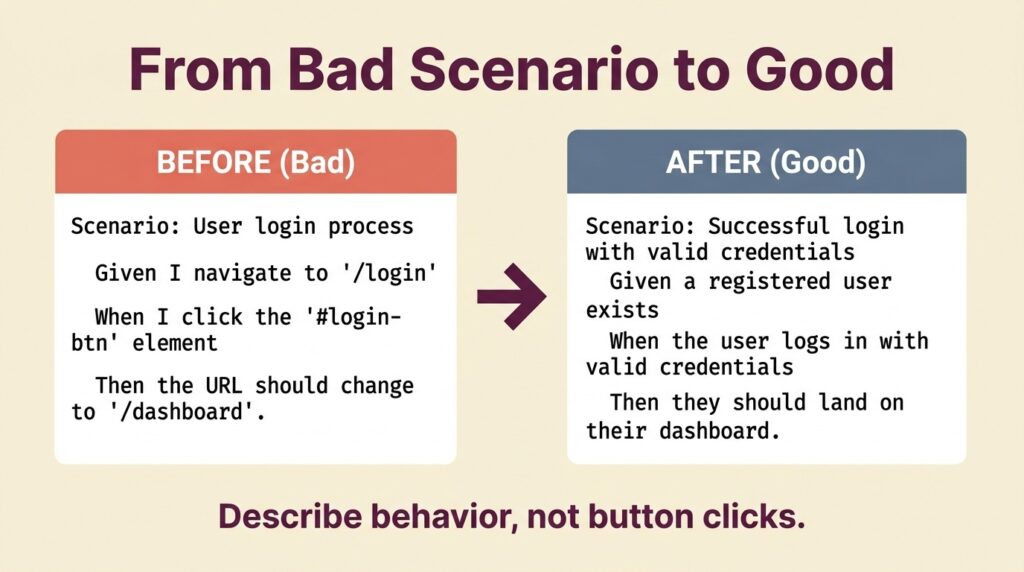
Scenario: User login process
Given I navigate to “https://example.com/login”
When I click on the element with ID “username-field”
And I type “testuser” into the input field
And I click on the element with ID “password-field”
And I type “password123” into the password input
And I click the button with class “login-btn”
Then I should see the URL change to “https://example.com/dashboard”
And the element with ID “welcome-message” should be visible
This scenario breaks multiple Gherkin principles at once. It’s overly technical, fragile to any UI change, and fixated on how rather than what. A non-technical stakeholder can’t meaningfully review or modify it, which defeats the entire point of BDD.
Creating Multiple-Behavior Scenarios (Bad Example)
# BAD EXAMPLE – Testing multiple behaviors in one scenario
Scenario: Complete user registration and first purchase
Given I am on the registration page
When I fill out the registration form with valid data
And I click the “Register” button
Then I should see a welcome message
When I navigate to the products page
And I add “Wireless Headphones” to my cart
And I proceed to checkout
And I enter my payment information
And I complete the purchase
Then I should receive an order confirmation email
And my account should show the purchase history
This one tests registration AND purchasing in a single scenario. When it fails, debugging is miserable because the break could live in either workflow. Gherkin technically permits multiple When/Then pairs, but stacking them usually signals more than one behavior. Aim for one When and one Then block per scenario.
Using Vague or Generic Language (Bad Example)
# BAD EXAMPLE – Too vague to be useful
Scenario: User does something
Given I have some data
When I perform some action
Then something should happen
Generic scenarios add zero value for understanding requirements or building automation. They’re placeholder text that teams swear they’ll flesh out later and never do.
What Do Gherkin Best Practices Look Like With Good Examples?
Professional BDD teams write scenarios that focus on user value, use clear language, and stay independent. Here’s how you transform each of the bad examples above into effective specifications. These are the Gherkin best practices that actually move the needle.
Writing Behavior-Focused Scenarios (Good Example)
# GOOD EXAMPLE – Focuses on behavior, not implementation
Scenario: Successful user login with valid credentials
Given a registered user exists with username “testuser”
When the user logs in with valid credentials
Then they should be redirected to their dashboard
And the dashboard should display a personalized welcome message
This version describes what should happen without pinning down implementation details. It’s readable by non-technical stakeholders, stable when the UI changes, and it clearly states the expected outcome.
Independent Single-Behavior Scenarios (Good Example)
# GOOD EXAMPLE – One behavior per scenario
Feature: User Account Registration
Scenario: Successful account creation with valid information
Given the registration page is displayed
When a new user registers with valid account information
Then their account should be created successfully
And they should receive a welcome email
Scenario: Invalid email format prevents registration
Given the registration page is displayed
When a user attempts to register with an invalid email format
Then they should see an email validation error
And their account should not be created
Each scenario owns exactly one behavior. The success path stays focused on the happy path, while the validation scenario handles one specific error condition. That separation makes failures easy to diagnose and scenarios easy to maintain.
Using Specific, Meaningful Data (Good Example)
# GOOD EXAMPLE – Specific data that provides context
Scenario: Customer views order history after recent purchase
Given customer “Sarah Johnson” has an account
And she placed order #12345 for $127.99 on “2024-12-15”
When she views her order history
Then she should see order #12345 listed
And the order amount should display as $127.99
And the order date should show as “December 15, 2024”
Concrete data makes scenarios realistic and easy to picture. Real values beat placeholder text every time because reviewers can actually visualize the experience. Lean on stable test fixtures for those values, like a seeded order #12345, so scenarios stay readable and reliable. Don’t tie them to volatile production data.
Real-World Scenario Transformations
Let’s walk through how teams turn problematic scenarios into professional BDD specifications across different domains. These transformations are the clearest way to see the difference because you can watch the same behavior expressed both ways.
E-commerce Example Transformation
Before (Bad):
Scenario: Shopping cart functionality testing
Given I go to the website homepage
When I click on “Products” in the navigation menu
And I click on the first product image
And I click the “Add to Cart” button
And I click the shopping cart icon
Then I should see 1 item in the cart
When I click the “+” button next to the item
Then I should see 2 items in the cart
When I click “Remove” on the item
Then the cart should be empty
After (Good):
Feature: Shopping Cart Management
Scenario: Adding items to empty cart
Given the customer is browsing available products
When they add “Bluetooth Speaker” to their cart
Then their cart should contain 1 item
And the cart total should reflect the speaker price
Scenario: Increasing item quantity in cart
Given the customer has “Bluetooth Speaker” in their cart
When they increase the quantity to 2
Then their cart should show 2 speakers
And the cart total should equal 2 x the speaker price
Scenario: Removing items from cart
Given the customer has items in their cart
When they remove all items
Then their cart should be empty
And the cart total should be $0.00
The transformation splits three distinct behaviors into independent scenarios. Each one now uses declarative language that describes user actions and business outcomes instead of raw UI clicks.
Banking Application Example
Before (Bad):
Scenario: Account balance and transfer testing
Given I log into my banking account
And I navigate to the accounts page
When I check my checking account balance
Then I should see my current balance displayed
When I click on “Transfer Money”
And I select my savings account as the source
And I select my checking account as the destination
And I enter $500 as the transfer amount
And I click “Submit Transfer”
Then I should see a success message
And my savings account balance should decrease by $500
And my checking account balance should increase by $500
After (Good):
Feature: Account Management
Scenario: Customer views account balance
Given customer “John Smith” has a checking account with $1,250.00
When he views his account balance
Then he should see $1,250.00 displayed
Scenario: Successful money transfer between accounts
Given customer “John Smith” has $2,000 in savings
And he has $500 in checking
When he transfers $500 from savings to checking
Then his savings balance should be $1,500
And his checking balance should be $1,000
And he should receive transfer confirmation
The improved version separates balance checking from money transfers, uses specific dollar amounts, and centers business outcomes over UI navigation. This transformation is the difference that a few Gherkin best practices make in a real suite.
What Are 7 Advanced Techniques for Better Gherkin Scenarios?
Once your scenarios are behavior-focused and independent, these advanced Gherkin features help you build maintainable, scalable suites. Here are the techniques that separate expert BDD teams from basic attempts, and you can adopt them one at a time.
1. Strategic Background Usage
Use Background sections to kill repetition without creating dependencies between scenarios:
Feature: Online Shopping Checkout
Background:
Given customer “Maria Lopez” is logged into her account
And she has a valid payment method on file
Scenario: Express checkout for single item
Given “Wireless Mouse” is in Maria’s cart
When she selects express checkout
Then her order should be processed immediately
Scenario: Standard checkout with shipping options
Given “Gaming Keyboard” is in Maria’s cart
When she proceeds through standard checkout
Then she should see available shipping options
Use Background only for static preconditions like identity or config. Avoid actions that change data shared across scenarios, or you’ll reintroduce the coupling you were trying to remove.
2. Effective Scenario Outlines
Use example tables to test the same behavior with different inputs:
Scenario Outline: Password validation rules
Given a user is creating a new account
When they enter “<password>” as their password
Then they should see “<result>”
Examples:
| password | result |
| abc123 | Password too short |
| password123 | Password needs uppercase |
| PASSWORD123 | Password needs lowercase |
| Password123 | Password accepted |
3. Proper Data Tables Implementation
Use data tables for complex input structures:
Scenario: Bulk user import from spreadsheet
Given the admin is importing new users
When they upload a file containing:
| Name | Email | Department |
| Alice Brown | alice@example.com | Marketing |
| Bob Wilson | bob@example.com | Sales |
| Carol Davis | carol@example.com | Support |
Then all three users should be created successfully
And each user should receive activation emails
4. Meaningful Tag Organization
Organize scenarios with tags for selective execution:
@smoke @critical
Scenario: Core login functionality
Given a registered user exists
When they log in with valid credentials
Then they should access their dashboard
@regression @payment
Scenario: Credit card payment processing
Given a customer has items in their cart
When they pay with a valid credit card
Then their payment should be processed successfully
5. Doc String Usage for Complex Text
Use doc strings for multi-line text inputs:
Scenario: Customer submits detailed support request
Given a customer needs technical help
When they submit a support ticket with details:
“””
I’m experiencing intermittent connection issues with your mobile app.
The app crashes when I try to upload photos larger than 5MB.
This happens on both WiFi and cellular connections.
Device: iPhone 13 Pro
iOS Version: 17.2
App Version: 3.1.4
“””
Then a support ticket should be created
And the customer should receive a ticket confirmation
6. Clear Feature Descriptions
Write feature descriptions that explain business value:
Feature: Customer Loyalty Points
As a retail customer
I want to earn and redeem loyalty points
So that I receive rewards for frequent purchases
Rule: Earning points
Scenario: Earn 1 point per dollar
Given a customer has a loyalty account
When they complete a $35 purchase
Then they should earn 35 points
Rule: Redemption threshold
Scenario: 100 points equals $5 credit
Given a customer has 100 points
When they redeem points at checkout
Then $5 should be applied as a credit
Rule: Point expiration
Scenario: Points expire after 12 months of inactivity
Given a customer has 200 points and 12 months of inactivity
When the system evaluates point expiration
Then those points should expire
7. Smart Scenario Naming
Create scenario titles that communicate business value, not test mechanics:
# Good – Describes business outcome
Scenario: Premium member receives free shipping
# Bad – Describes test action
Scenario: Test shipping calculation for premium users
Can AI Generate Gherkin Scenarios From Requirements?
Yes, and it’s quickly becoming one of the most practical shortcuts for teams drowning in scenario-writing. Modern AI tooling can read a user story or acceptance criteria and produce structured Given-When-Then scenarios in seconds, complete with edge cases and negative paths you might have missed. A blank feature file becomes a solid first draft you can refine instead of building from scratch.

The catch is that AI-generated scenarios still need human review against the same Gherkin best practices covered above. Ask an AI tool for “login scenarios,” and you can get imperative, click-by-click steps unless you prompt it toward declarative behavior. Used well, AI test case generation handles the repetitive first pass so your team can spend its energy validating behavior and business rules. It pairs naturally with BDD because Gherkin’s plain-language structure is exactly what large language models are good at producing and parsing.
Test management is shifting from a passive scenario repository toward an active, AI-driven intelligence layer. QA Agents can help draft, organize, and maintain Gherkin BDD scenarios throughout the workflow, so your feature files keep pace with the code instead of rotting into stale documentation.
How Do You Measure Gherkin vs BDD Success?
Comparing Gherkin vs BDD helps teams focus on outcomes rather than documentation for its own sake. Teams that adopt test automation report strong returns, but the payoff depends far more on how well they implement BDD than on whether they produce feature files at all.
Teams practicing effective BDD report faster development cycles, fewer production defects, and better stakeholder collaboration. BDD frameworks are widespread, yet many teams still use them backward, writing scenarios after the code instead of letting scenarios drive development. That single habit undermines most of the value.
The key metrics for BDD success include scenario reusability, stakeholder engagement in scenario creation, and the percentage of scenarios that automate without modification. The table below shows what those metrics look like on both ends of the spectrum.
| Metric Category | Good BDD Implementation | Poor BDD Implementation |
| Scenario Maintainability | Changes require minimal scenario updates | Changes break many existing scenarios |
| Stakeholder Participation | Non-technical users can read and modify scenarios | Only developers touch feature files |
| Automation Success | Most scenarios automate without code changes | Many scenarios need heavy rework to automate |
| Development Speed | Scenarios written before coding begins | Scenarios created after implementation |
| Defect Detection | Issues caught during scenario review | Problems surface late in the testing phase |
How Do You Integrate Gherkin Into Modern Workflows?
Modern teams wire their feature files straight into CI/CD pipelines to get full value from BDD. That practice requires more than a place to store scenarios. You need tooling that links Gherkin test cases directly to execution, reporting, and defect tracking. As the automation testing market keeps expanding, projected to reach $84.22 billion by 2034 at a 16.84% CAGR, teams need scalable ways to manage growing suites without losing quality.
Successful integration means aligning your scenarios with automated testing frameworks. Teams see the most success when they set clear processes for scenario review, keep living documentation current with development, and build tight feedback loops between business and technical stakeholders. Cucumber, SpecFlow, and Behave handle the execution side, while a management layer keeps everything organized and traceable.
The most effective teams treat Gherkin scenarios as executable specifications that drive both development and testing. Product owners, developers, and testers refine scenarios together before implementation starts, so everyone shares the same understanding of requirements and expected outcomes. A test management platform built for BDD provides visibility into scenario coverage, automation status, and business alignment, which becomes essential as you scale across multiple projects.
Frequently Asked Questions
Q: What are Gherkin test cases? A: Gherkin test cases are plain-language scenarios written in a structured Given-When-Then format that describe how software should behave. They’re readable by both technical and non-technical stakeholders and can be automated with tools like Cucumber, SpecFlow, and Behave, making them the bridge between business requirements and executable tests.
Q: How many scenarios should I write for each feature? A: Focus on covering critical user paths and edge cases rather than hitting a number. Most features need enough scenarios to cover happy paths, validation errors, and boundary conditions. Quality beats quantity every time.
Q: Should I write scenarios for every possible test case? A: No. Write scenarios for behaviors that matter to business stakeholders and the user experience. Use traditional test cases for technical edge cases, performance testing, and low-level validation that doesn’t need stakeholder involvement.
Q: How do I handle complex business rules in Gherkin scenarios? A: Break complex rules into multiple scenarios, use scenario outlines for rule variations, and use the Rule keyword to group related scenarios. Keep one rule aspect per scenario to maintain clarity.
Q: What’s the difference between Gherkin and BDD? A: Gherkin is the syntax language used to write scenarios, while BDD is the collaborative development methodology. You can write Gherkin syntax without practicing true BDD if stakeholders aren’t involved in creating and reviewing scenarios.
Q: Can Gherkin scenarios replace traditional test documentation? A: For user-facing behaviors, well-written Gherkin scenarios often make better documentation than traditional test cases because they describe business value and stay current with development. Technical testing may still need supplementary documentation.
Turn Your Gherkin Test Cases Into a Quality Engine
Effective Gherkin test cases demand proper tooling and seamless workflow integration to reach their full potential. Teams running BDD at scale need more than a text editor for scenarios; they need a platform that supports collaborative scenario creation, automated execution, and clear reporting, all linked to the code changes that matter.
An AI-powered QA platform changes the game. TestQuality unifies your Gherkin BDD scenarios with manual and automated testing, native GitHub and Jira integration, and QA Agents that help draft and maintain scenarios as your product evolves. Its AI test generation tool, TestStory.ai, turns user stories and requirements into structured Gherkin scenarios through a simple chat interface, so your BDD practice stops being a documentation exercise and starts driving quality for both human-written and AI-generated code. Start your free trial today and see how fast good Gherkin can move.