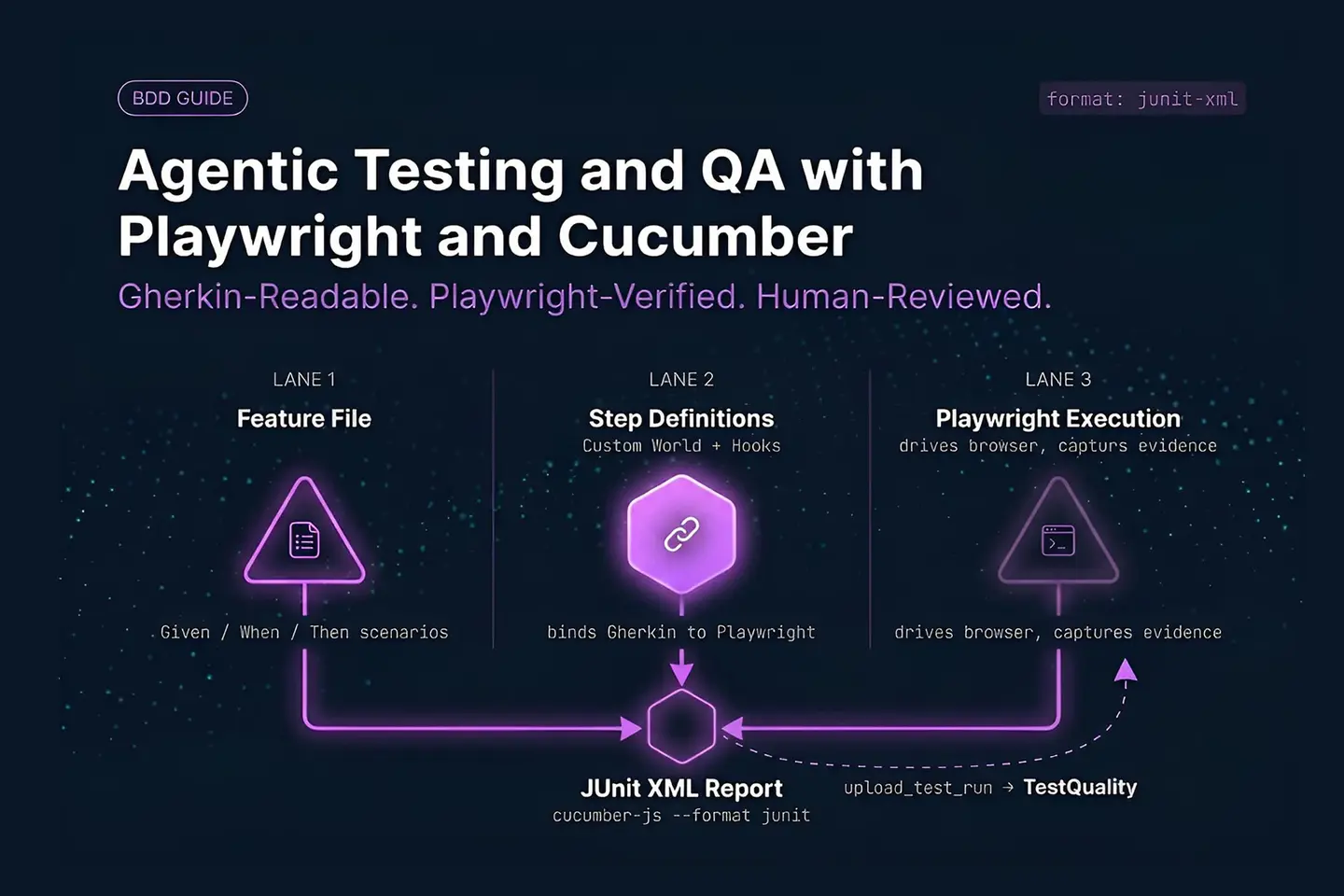
Playwright and Cucumber is a BDD testing combination that pairs Gherkin feature files with Playwright’s browser automation engine, letting teams write behavior in plain language while executing it through deterministic, code-driven checks. Cucumber parses Feature and Scenario statements written with Given, When, and Then keywords, step definitions bind those statements to TypeScript or JavaScript functions, and those functions call Playwright to drive the browser and make assertions. Agentic AI can assist this workflow by drafting scenarios, flagging coverage gaps, and organizing reusable steps, but execution evidence and release judgment still belong to QA engineers working inside a test management platform built for governed review.
At a Glance
A practical BDD structure for Playwright and Cucumber
Keep specifications readable, execution deterministic, and test evidence traceable.
BDD layer: Cucumber feature files express behavior through Features, Backgrounds, Scenarios, tags, and Scenario Outlines.
Execution layer: Step definitions call page-object methods, while Playwright controls the browser, assertions, and traces.
Lifecycle layer: A custom Cucumber World and hooks create, share, and dispose of browser resources per scenario.
Reporting layer: A JUnit-formatted Cucumber run uploads through the TestQuality CLI into a named project and cycle.
Governance layer: Agentic Testing and QA needs human review of generated scenarios, implementation, and failure evidence.
The useful boundary is simple: AI can assist the drafting and analysis work, while reproducible automation supplies the evidence.
What Does Agentic Testing and QA Mean in a Playwright and Cucumber Framework?
Agentic Testing and QA is a workflow where AI inspects requirements, feature files, and failure data to draft test artifacts, while Cucumber and Playwright stay responsible for structured specifications and repeatable browser execution. The output is reviewed coverage, not autonomous release approval.
Traditional prompt-based assistance produces isolated code snippets with no memory of the surrounding suite. An agentic workflow instead works across related artifacts — requirements, existing feature files, page objects, prior test cases, and recent failures — which is useful when a tester needs help spotting a missing negative path, a repetitive step, or a plausible data table. For teams new to the underlying methodology, our BDD fundamentals guide covers the Given-When-Then structure Cucumber depends on.
Behavior-Driven Development (BDD) gives this workflow a stable shared language. A feature file communicates what the system should do, in terms a product owner can review. Step definitions bind each business statement to implementation code. Playwright supplies browser automation, assertions, tracing, and screenshots.
Do not confuse generated text with verified coverage. An AI-drafted scenario may read as plausible while still omitting a business rule, misusing a shared precondition, or asserting an implementation detail instead of user-observable behavior. Agentic Testing and QA works when QA engineers set the quality strategy, review every suggested artifact, and treat actual Playwright run results — not the draft — as the source of truth.
How Should a Playwright Cucumber Project Be Structured?
A maintainable Playwright Cucumber project separates Gherkin specifications, step definitions, a custom World, hooks, page objects, configuration, and reports into distinct folders, so feature files stay readable instead of becoming code-like scripts.
A practical structure looks like this:
- features/ — Gherkin files that describe system behavior.
- steps/ — step definitions that bind Given, When, Then, and related phrases to TypeScript functions.
- support/world.ts — the custom World that holds the browser, context, page objects, and scenario-specific state.
- support/hooks.ts — setup and cleanup hooks for browser resources, screenshots, and attachments.
- pages/ — page objects with reusable browser interactions and page-level assertions.
- cucumber.js — configuration, including required files, formatters, profiles, and paths.
- package.json — named scripts for full-suite, tagged, headed, and reporting runs.
The custom World functions like a fixture container built for Cucumber’s execution model. It gives step definitions shared access to page objects without reconstructing a login, inventory, or checkout object inside every step. Keep browser control out of feature files: a phrase such as “I am on the login page” should call a page-object method that navigates to the correct route, not reference a selector directly. That keeps the specification readable while containing technical detail in the page layer. Our Cucumber and Gherkin best practices guide covers folder conventions and naming patterns in more depth.
Test data deserves its own home rather than living inline in step definitions. A fixtures/ or data/ folder with typed objects for users, products, and environment-specific values keeps a scenario like “log in with a locked-out user” pointing at one source of truth instead of a hard-coded string duplicated across a dozen step files. When an agent drafts a new scenario, giving it access to that same fixtures folder — rather than letting it invent new literal values — is one of the simplest ways to keep generated tests consistent with the rest of the suite.
What Belongs in a Gherkin Feature File Versus a Cucumber Step Definition?
Feature files should describe user-observable behavior and business rules in Gherkin syntax, step definitions should map those statements to reusable application actions and assertions, and page objects should hold selectors — that separation is the foundation of readable Agentic Testing and QA.
A feature file opens with a Feature title and contains one or more Scenario blocks. The language should explain intent, not browser choreography — a login specification might say that a valid standard user reaches the inventory page, while invalid credentials show a relevant error. For the full keyword set — Given, When, Then, And, But, Background, and Scenario Outline — see our Gherkin syntax reference.
Feature: Inventory access

  Background:
    Given I am on the application login page

  Scenario: Standard user reaches inventory
    When I log in with "standard_user" and "secret_sauce"
    Then I should see the product page

  Scenario: Invalid credentials are rejected
    When I log in with "locked_out_user" and "secret_sauce"
    Then I should see a login error containing "locked out"
Each executable line needs a matching step definition. A step definition receives text captured from the Gherkin expression, calls a method on the custom World, and performs the expected assertion. Cucumber’s official API documentation describes the step-definition and hook model used to bind these specifications to code. Use parameters when only the input or expected output changes — one generic login step handles every username, and one error-assertion step accepts different expected message fragments, which keeps behavior expressive without duplicating implementation.
How Do a Custom Cucumber World and Hooks Manage Playwright Browser State?
The custom World is a scenario-scoped object that stores what step definitions need — browser, context, active page, and page objects — while hooks control when Playwright creates and disposes of those resources, keeping one scenario’s state from leaking into the next.
A World should expose only the state steps genuinely need: the Playwright browser, browser context, active page, base URL, test data, and page-object instances. It is not a place to store arbitrary global values — scenario data should stay isolated so one scenario’s outcome cannot affect another’s. Cucumber’s own World documentation notes that the World is unavailable inside BeforeAll and AfterAll hooks, since those run outside any single scenario’s context; a Before hook is where World properties typically get initialized.
Hooks make lifecycle behavior consistent. A setup hook can create the browser context and initialize page objects before each scenario. A teardown hook can collect screenshots after a failure and close the page, context, and browser — evidence that matters when a run needs to be diagnosed later rather than re-run blind. Playwright’s fixture documentation describes the same principle of explicit setup and cleanup, even though Cucumber uses its own World and hook mechanisms rather than Playwright Test fixtures directly.
For Agentic Testing and QA, this boundary matters. An AI assistant can draft a new scenario or step, but it has to reuse the established World and page-object conventions — a generated addition that bypasses shared setup usually duplicates selectors and creates inconsistent cleanup.
When Should You Use Backgrounds, Tags, and Scenario Outlines in Cucumber?
Use a Background only for a short precondition every scenario in a feature shares, tags to select scenarios by purpose or execution scope, and Scenario Outlines for identical workflows across multiple data sets — misusing any of the three creates opaque, brittle specifications.
Background is appropriate when every scenario in a feature starts from the same place — a login page, an authenticated session — and should not contain a long chain of hidden setup steps. If one scenario needs a different starting state, write that precondition explicitly rather than forcing it through a shared Background.
Tags are execution metadata, not documentation. They identify which scenarios belong to a smoke suite, a regression suite, or a release check, and npm scripts can call Cucumber with a tag expression or a named profile. A profile is a reusable bundle of Cucumber settings — required TypeScript support files, formatter configuration, headed mode, report output — so tags select what runs and profiles define how it runs.
Scenario Outlines avoid repeating an identical workflow when only the values change. An Examples table works well for valid and invalid credentials, expected error text, or role-specific outcomes; it does not work for fundamentally different workflows, which read more clearly as separate scenarios. Our maintainable Gherkin scenarios guide has more detail on keeping Outlines readable as a suite grows.
Turn requirements into reviewable test cases
TestStory.ai generates structured test cases from user stories and requirements, giving QA teams a starting point to review before execution and reporting.
Create test cases free →How Can Teams Run and Report Playwright Cucumber Tests Reliably in CI/CD?
Reliable reporting starts with Cucumber’s built-in JUnit formatter writing an XML file, which the TestQuality CLI then uploads into a named project and test cycle — the same mechanism whether the run happens on a laptop or inside a CI/CD pipeline.
Instead of asking every engineer to remember a long command, define scripts in package.json. One script runs the full BDD suite, another runs a smoke tag, and a third writes a report file:
{
  "scripts": {
    "test:bdd": "cucumber-js",
    "test:bdd:smoke": "cucumber-js --tags @smoke",
    "test:bdd:report": "cucumber-js --format junit:reports/cucumber-results.xml"
  }
}
Cucumber’s built-in junit formatter writes an XML file in the standard(ish) JUnit format Cucumber describes in its own reporting documentation. That file is the connector to test management: the TestQuality CLI’s upload_test_run command pushes the JUnit XML into a named TestQuality project and test cycle, whether the run happened on a laptop or inside a CI/CD job. TestQuality does not auto-discover test runs — the CLI step is what makes the pipeline connection real, and naming it explicitly (rather than saying a platform “plugs into” CI/CD) is what separates a workable setup from a vague one. See the TestQuality CLI overview and command reference for the full option set, including project and cycle targeting, attachments, and defect linking.
Governance is what makes the output operational.
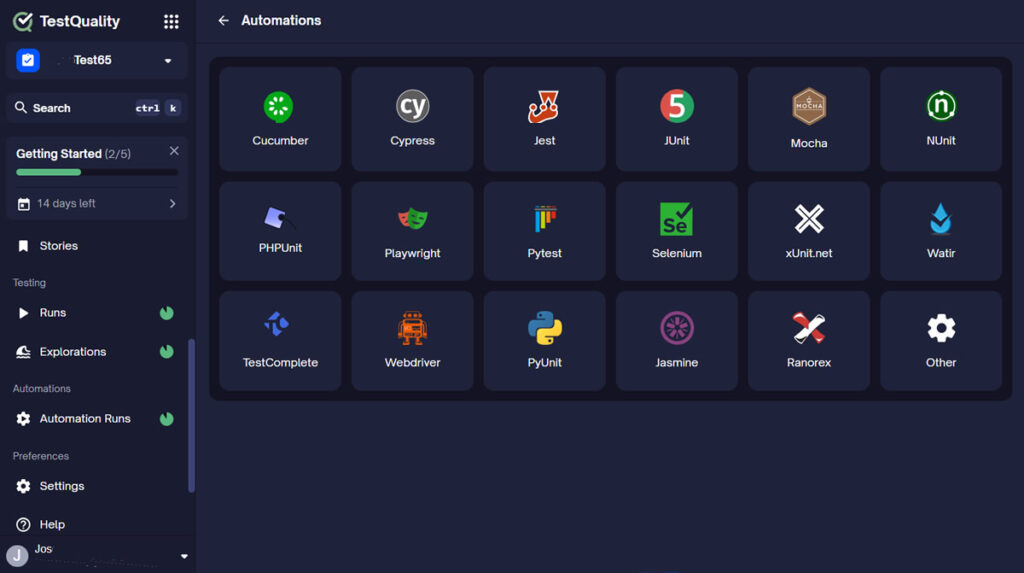
Once results land in TestQuality, pass/fail status, scenario names, and execution metadata feed run history and trend reporting automatically.
TestStory.ai converts project assets — user stories, Jira issues, epics, process diagrams, source code, or full repositories — into structured, story-driven test cases that sync directly into TestQuality.
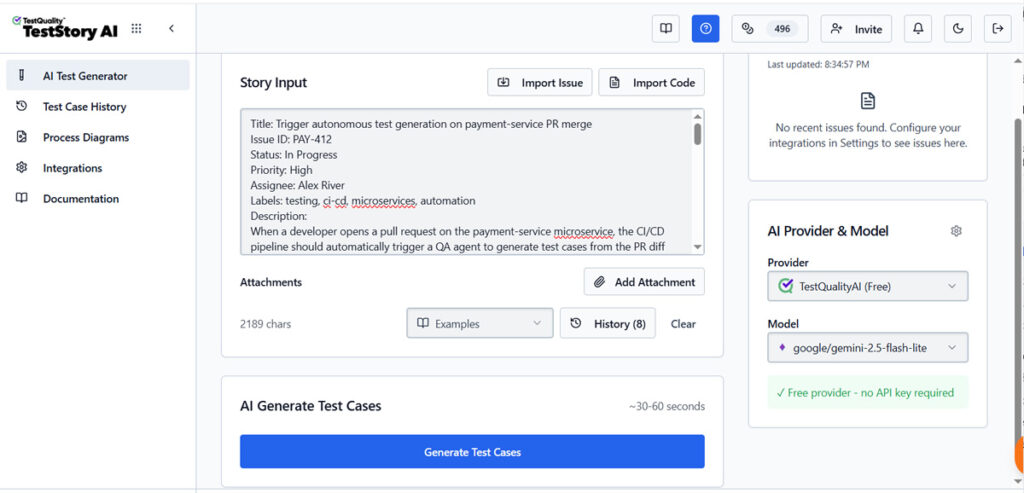
The two tools operate at different points in the QA workflow and are not redundant. TestStory.ai generates the test case coverage from requirements.
Defect logging from a failed scenario stays a manual step: a tester reviews the failure, confirms it represents a genuine regression rather than flake, and logs the defect. That review step is deliberate rather than a gap — distinguishing a real UI break from acceptable variance benefits from a human in the loop, especially for exploratory and visual-regression work. Once a defect exists in TestQuality, its GitHub and Jira integrations sync the record to the team’s tracker automatically. Our guide on Gherkin testing in CI/CD walks through wiring this into GitHub Actions and similar pipelines end to end.
What Mistakes Weaken a Playwright Cucumber Framework?
The most damaging mistakes are writing UI choreography into Gherkin, duplicating step definitions, reusing browser state carelessly, overloading Backgrounds, confusing tags with profiles, and trusting AI-generated scenarios without review.
- Writing UI choreography in Gherkin. Statements that expose every click, selector, or field interaction turn a specification into a script. Describe user intent and keep implementation mechanics in page objects.
- Creating near-identical step definitions. Parameters handle usernames, passwords, roles, and expected messages when the underlying implementation is the same; duplicated steps just fragment the suite.
- Using Background as a dumping ground. A long Background hides preconditions that only some scenarios need, and it runs before every scenario whether or not that setup applies.
- Confusing a tag with a profile. A tag identifies a scenario category; a profile defines reusable execution settings. Conflating the two makes CI configuration hard to reason about.
- Reusing browser sessions carelessly. Shared context can make a suite pass or fail based on execution order. Create a clean scenario context when isolation matters.
- Ignoring setup failures. A missing browser initialization or an unloaded TypeScript support file can prevent tests from ever reaching application behavior, and that failure looks nothing like a real assertion failure in a report.
- Letting AI add code without conventions. Require generated steps to reuse existing page objects, existing assertions, and standard hooks, and route every addition through code review before merge.
Distinguish test failure from framework failure early. An authentication assertion failing is a different problem than a browser failing to launch, and reports, screenshots, and console output should make that distinction visible — otherwise teams spend review time debugging the wrong layer.
Agentic drafting amplifies whichever of these habits already exists in a codebase. An agent working from a suite with consistent World usage, parameterized steps, and clean tags tends to produce additions that match that pattern. An agent working from a suite with UI choreography baked into feature files and duplicated step definitions will often extend those same problems faster than a human would, simply because it can generate more code per review cycle. That is an argument for fixing structural debt before introducing agentic drafting, not after.
Avoiding these mistakes gets harder as scope grows — the real fix is knowing where the evidence lives once an agent finishes its work.
Keeping Control at Scale
Where does that control live once your team scales past one project?
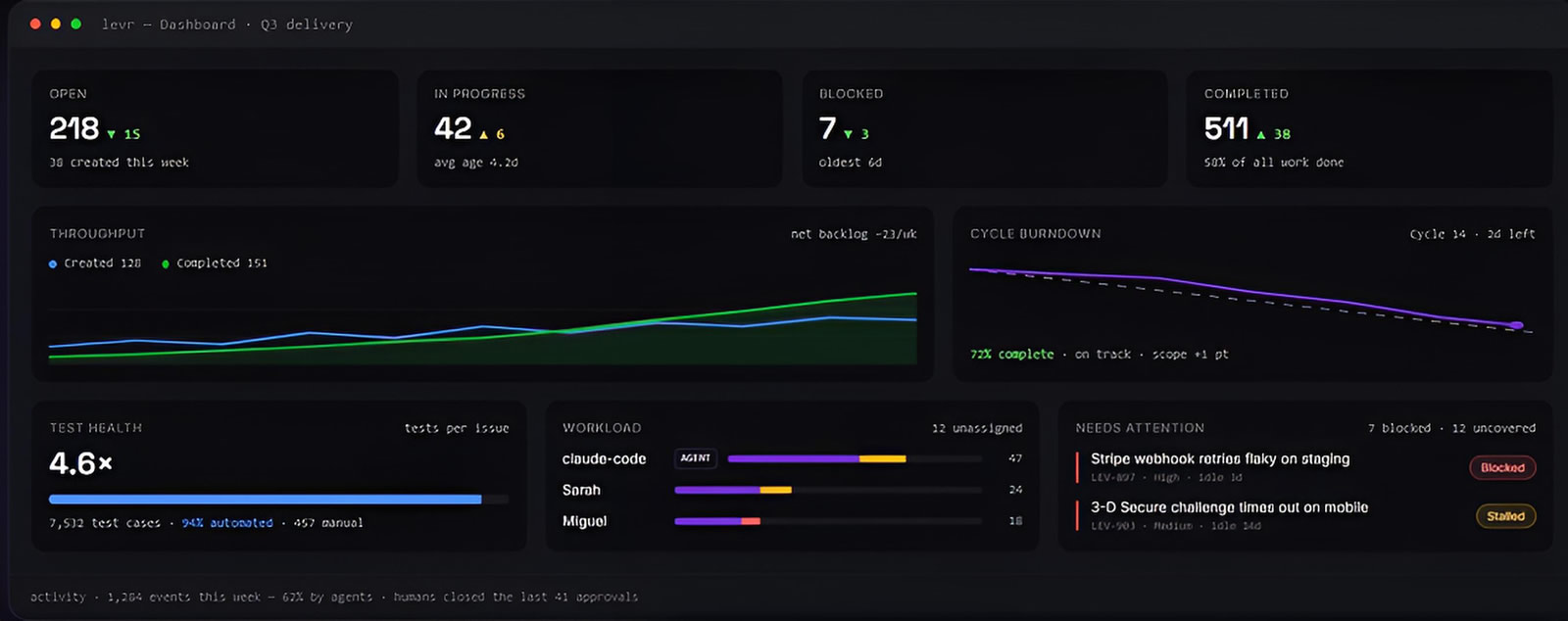
Levr, an agent-first project control plane, applies the same discipline at the project level: issues, tests, and run results live in one graph, and nothing reaches Done until it clears the verification you’ve defined, whether a human or an agent did the work.
Every action attributed to the agent or human who performed it, a clear audit trail as your team scales.
See Levr’s agent-run execution →
How Do You Introduce Agentic Testing and QA Without Losing Control?
Introduce Agentic Testing and QA by giving AI bounded drafting and analysis tasks, keeping human approval on specifications and code, and treating deterministic Playwright runs as the validation step — then expand scope only after the workflow produces evidence worth trusting.
Gartner projects that by 2028, at least 15% of day-to-day work decisions will be made autonomously through agentic AI, up from close to 0% in 2024, with roughly a third of enterprise software including agentic AI capabilities by the same year. For QA, the realistic reading of that trend is that agent-based drafting becomes a standard layer next to test management and automation frameworks — not a replacement for either.
That expansion has to be paced against how much developers actually trust AI output today. In the 2025 Stack Overflow Developer Survey, 84% of developers now use or plan to use AI tools, up from 76% the year before, yet only 32.7% say they trust the accuracy of AI-generated output, while 45.7% actively distrust it. Rising adoption alongside falling trust is exactly the pattern that argues for bounded scope and mandatory review rather than open-ended delegation.
A practical rollout:
- Choose a narrow target — a stable workflow such as login, checkout validation, or a small smoke suite.
- Provide grounded inputs — user stories, acceptance criteria, existing feature files, page objects, and naming conventions.
- Request structured outputs — scenarios, risk-based negative paths, or reusable parameterized steps, not unrestricted automation.
- Review before merge — a QA engineer validates business correctness, scope, assertions, test data, and duplication.
- Run the deterministic suite — execute Playwright, inspect failures, and preserve screenshots and reports as evidence.
- Track results in one place — link reviewed test cases to requirements, runs, defects, and release evidence.
The outcome is not fewer testers. It is a clearer division of labor: AI speeds up analysis and first-draft artifacts, Playwright and Cucumber prove repeatable behavior, and QA specialists make the judgment calls that require product, risk, and domain knowledge.
How Does TestStory.ai Fit Into a Playwright and Cucumber Test Case Workflow?
TestStory.ai generates structured, story-driven test cases from project assets such as user stories, GitHub or Jira issues, and process diagrams, syncing them into TestQuality where a team turns reviewed cases into the Gherkin scenarios a Playwright Cucumber suite implements.
The practical bridge between agentic drafting and a governed Playwright Cucumber suite looks like this:
- Feed a supported input into TestStory.ai — a GitHub issue, Jira issue, user story, epic, process diagram, or source code.
- TestStory.ai generates structured test cases from that input.
- Cases sync automatically into TestQuality.
- A QA engineer reviews the cases and translates the approved ones into Gherkin scenarios and step definitions.
- The team groups the resulting Playwright Cucumber suite into a run or cycle for the current release.
- Results execute, get recorded, and feed coverage and defect-trend reporting, with defects linking back to GitHub or Jira once a tester confirms them.
TestStory.ai also connects with MCP-compatible agentic developer tools — Cursor, Claude Code, VS Code with Copilot, and Roo — so test generation happens inside the same workflow engineers already use rather than as a separate step. That input flexibility, not just user-story parsing, is what makes it a meaningful complement to a Cucumber-based BDD practice: a process diagram or a source diff can seed a first-draft scenario as easily as a written story can. TestStory.ai is included with every TestQuality subscription, so the handoff from draft to governed test case doesn’t require a separate tool evaluation.
Technical Deep Dive FAQ
What is Agentic Testing and QA?
What is Cucumber BDD with Playwright?
Why does Cucumber report undefined steps?
What should a custom Cucumber World contain?
Should Playwright hooks launch a browser once per suite or once per scenario?
When should you use a Cucumber Background?
What is the difference between Cucumber tags and Cucumber profiles?
How should AI-generated BDD scenarios be reviewed before they run?
Key Takeaways
A controlled path to AI-assisted BDD automation
Good test architecture makes both human and AI contributions easier to review.
Keep layers distinct: Feature files explain behavior, steps map language to code, and page objects hold browser mechanics.
Scope state carefully: Use a custom World and hooks to initialize and dispose of Playwright resources predictably.
Report through the CLI, not around it: Cucumber’s JUnit formatter plus the TestQuality CLI’s upload_test_run is what makes CI/CD reporting real.
Reuse intelligently: Parameters, tags, and Scenario Outlines reduce duplication without obscuring business intent.
Govern AI output: Treat Agentic Testing and QA output, including TestStory.ai drafts, as reviewed work until deterministic execution confirms it.
Readable specifications are valuable only when their execution remains trustworthy.
About the Author
Jose Amoros is part of the TestQuality marketing team, focused on agentic QA, AI-powered test management, and the operational handoff between AI-generated test artifacts and governed execution workflows. He writes regularly about CI/CD integration, Gherkin/BDD practices, and shift-left testing.
Where Can You Learn More About Playwright, Cucumber, and Test Management?
- Cucumber official API and step-definition documentation
- Cucumber reporting and formatters documentation
- Playwright official fixtures documentation
- 2025 Stack Overflow Developer Survey — AI section
- Original Playwright Cucumber BDD framework source from The Testing Academy
- TestQuality documentation for test cases, runs, and reports
- TestQuality CLI overview
- TestQuality test management platform features
Start Free Today
Transition from script-writing to outcome-orchestration.
TestStory.ai generates structured test cases from your user stories, acceptance criteria, or architecture diagrams — then syncs them directly into TestQuality for execution, tracking, and team collaboration.
Get 500 TestStory.ai credits every month included with your TestQuality subscription — no extra cost.
No credit card required on either platform.