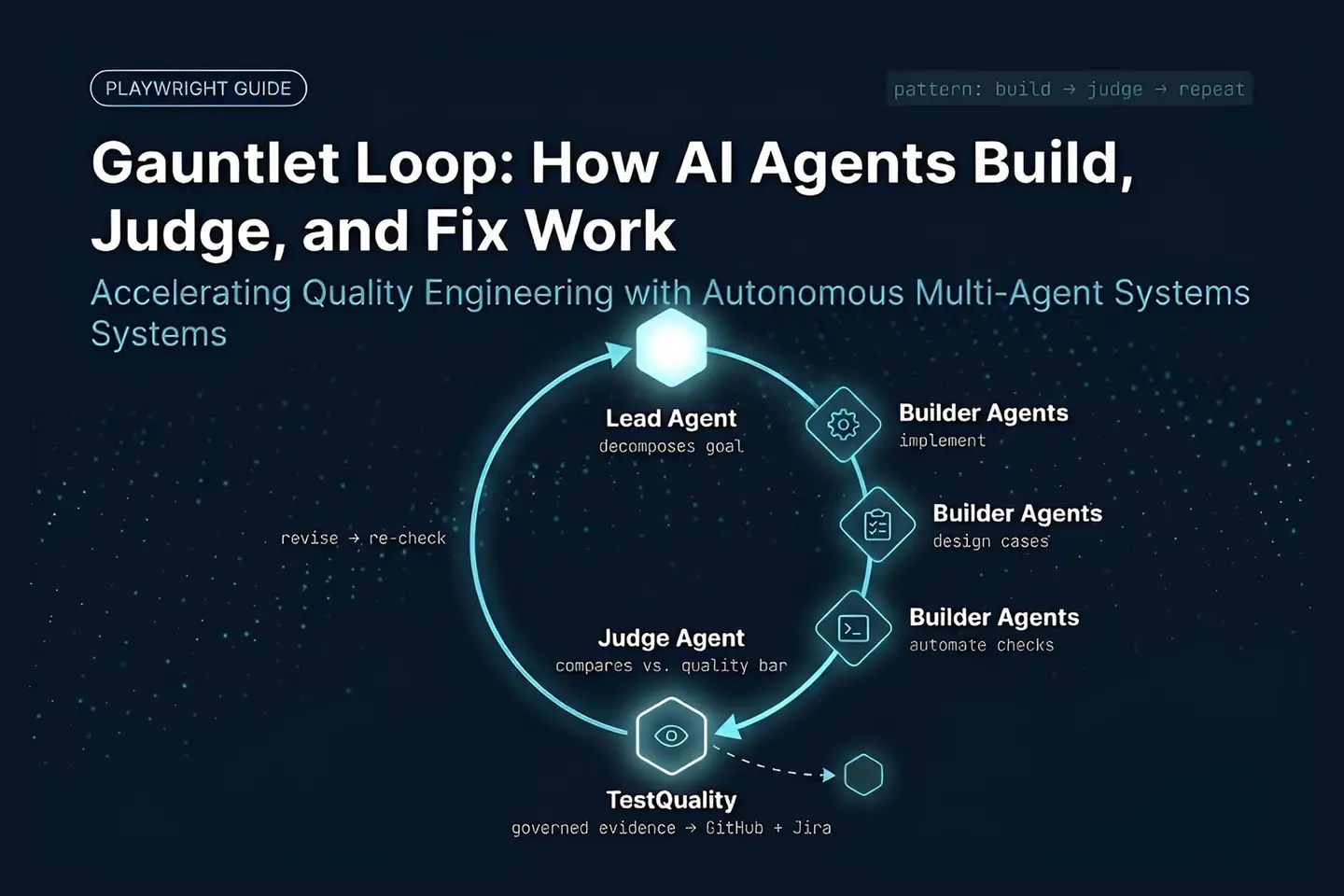
A Gauntlet Loop is an agentic AI workflow in which a lead agent breaks a broad goal into small, independently judgeable pieces, assigns them to specialist builder agents, and routes every result through a separate judge agent that compares the work against a quality bar. The pattern was popularized by Matt Shumer’s July 2026 “Claude of Duty” demo, in which Claude Opus 5 built a first-person shooter from a three-paragraph prompt. Builders revise, judges re-check, and the cycle repeats until the bar is met or a boundary stops it. For QA teams, the same pattern can structure how AI agents design, build, and test an application inside a test management platform.
At a Glance
A practical model for iterative multi-agent work
Generation becomes more useful when evaluation is built into the workflow, not bolted on after.
Core pattern: A lead agent decomposes work, builder agents produce it, and a separate judge agent evaluates it against a concrete quality bar.
Origin: Popularized by Matt Shumer’s 2026 “Claude of Duty” demo, where Claude Opus 5 built a full game from a three-paragraph prompt.
QA role: Testing agents should validate observable execution evidence, not just inspect generated code.
Key risk: A self-reported “complete” result is not proof that requirements or business rules are correct.
The value of an autonomous loop depends less on agent count than on the quality of its evidence, criteria, and controls.
What is a Gauntlet Loop in AI development?
A Gauntlet Loop is a multi-agent orchestration pattern that assigns creation and evaluation to separate AI roles, then repeats work based on structured criticism until it clears a defined quality bar. Rather than accepting a single generated response, it forces every output through independent judgment before acceptance.
The pattern traces to a July 2026 demo by developer Matt Shumer, who used a three-paragraph prompt to have Claude Opus 5 build a working first-person shooter — roughly 55,000 lines of code across 11 subsystems, with every asset generated in-browser using Three.js and WebGL2. Shumer’s critic agent scored early attempts around 3.59 out of 10 against a reference bar and pushed successive builds past 5.0 before the run stopped. The Gauntlet Loop guide at somethingbig.ai documents the mechanics in detail.
The pattern is often described as a builder-versus-critic model. A lead agent receives the overall assignment — building a website, or building a Playwright test framework — and decomposes it into the smallest pieces that can be judged independently. It distributes those pieces to specialist agents that might focus on UI, implementation, test coverage, accessibility, data handling, or debugging.
A judge agent then acts as the evaluator, working from a separate context so it never inherits the builder’s reasoning or excuses. It checks each piece against the requested outcome and a concrete quality bar — a reference screenshot, a passing test suite, a latency target — rather than a builder’s self-report. If gaps remain, the judge returns specific feedback and the lead agent schedules another revision.
This differs from asking an AI assistant to “improve the result.” The loop makes review an explicit phase with its own role, evidence requirements, and stop conditions — which matters for QA teams evaluating the broader shift toward autonomous software testing.
How does a Gauntlet Loop differ from a one-shot AI prompt?
A one-shot prompt produces a single response the operator must inspect and refine unassisted. A Gauntlet Loop treats the same request as a job definition, then uses multiple internal roles — builders, critics, and a coordinating lead agent — to generate, test, critique, and revise the work before it reaches a human.
In a conventional interaction, the assistant returns code or a plan and the human decides whether it is complete. That works for contained tasks, but it puts all integration and validation responsibility on the operator.
In a Gauntlet Loop, the lead agent delegates parallel concerns instead. A design-focused agent can assess interface quality, an implementation agent can build features, and a testing agent can exercise workflows. The judge compares the assembled outcome against the goal and either accepts it or routes it back — the same blind-comparison discipline Shumer’s demo used, where the critic agent never saw the builder’s reasoning, only the finished artifact next to the reference bar.
The distinction matters because generated code can look credible while still failing in a browser, missing edge cases, exposing incorrect data, or misreading the requirement. An iterative loop gives each failure mode a defined place in the workflow rather than leaving it for a human to discover after the fact.
What should a Gauntlet Loop prompt include?
An effective Gauntlet Loop prompt needs three parts: an objective stated as an outcome, a quality bar the judge can inspect without guessing, and firm operational boundaries. Together, these tell agents what to build, how quality will be judged, and what’s off-limits during execution.
1. State the objective as an outcome
Describe the product or artifact by what it must do, not by adjectives. Shumer’s own advice is blunt: give it the destination, let it choose the route. Avoid a broad instruction such as “make a good site” — identify the users, major flows, required content, and expected behavior instead.
For example, a test automation objective could specify a local Playwright framework that validates authentication, employee creation and editing, responsive navigation, accessibility checks, and clean browser console output.
2. Define the quality bar
Metrics tell builder agents and judges what “done” means, and the bar works best when concrete enough that a judge cannot argue with it — a reference screenshot, a passing test suite, a benchmark score, not a vague adjective like “polished.” For QA work, that can include acceptance criteria, supported browsers, responsiveness, accessibility expectations, coverage areas, and clean console output.
For browser automation specifically, use stable, user-facing evidence. The Playwright best practices documentation recommends resilient locators and testing user-visible behavior, which aligns with a Gauntlet Loop because judges need reproducible evidence rather than a builder’s assurance that the code looks correct.
3. Set operational boundaries
Boundaries prevent autonomous work from exceeding its intended scope. A request can limit work to a local environment, prohibit deployment, restrict external actions, cap iterations or time, and require approval before destructive changes. Shumer’s demo ran without a fixed iteration limit, stopping only when the human halted it — reasonable for a side project, not for a QA workflow with real deadlines and infrastructure.
Boundaries matter most where agents can reach repositories, credentials, APIs, or deployment pipelines. A loop should stop not only when quality criteria pass, but also when it hits a defined cost, time, permission, or safety limit.
How can QA teams use Gauntlet Loops for test automation?
QA teams can use Gauntlet Loops to draft and improve test suites, inspect application behavior, find coverage gaps, and verify generated changes against real evidence. The safest approach keeps deterministic execution separate from AI planning, critique, and test case generation.
A practical workflow assigns focused roles across a multi-agent QA framework:
- Lead agent: Interprets requirements, assigns work, and consolidates evidence.
- Test design agent: Creates scenarios for happy paths, failures, edge cases, and nonfunctional concerns.
- Automation agent: Implements Playwright or other automated checks.
- Execution agent: Runs the suite and records results, traces, logs, and screenshots.
- Critic agent: Challenges weak assertions, missing cases, brittle selectors, and false confidence.
- Judge agent: Decides whether the evidence meets the defined release or task criteria.
Generated test code should not be accepted only because an agent reports that it passed. The judge should require artifacts — test results, failure output, trace files, screenshots, or a reproducible command — the same blind-comparison discipline that made Shumer’s demo credible. For security testing, use a recognized structure such as the OWASP Web Security Testing Guide rather than a generic AI-generated checklist.
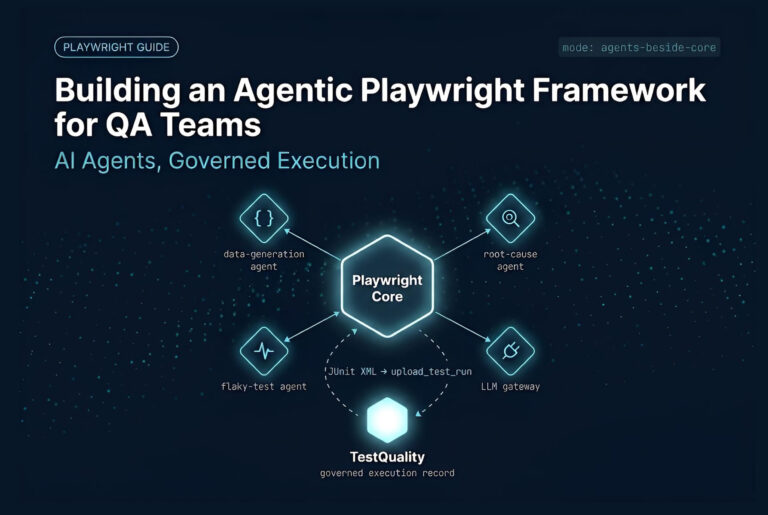
One way to manage the human side of this process is to store approved scenarios, execution results, and defects in a central test management platform. TestQuality features include centralized test case management, test cycles, reporting, GitHub integration, Jira integration, exploratory testing, and Gherkin support — a governed record once AI agents have proposed or revised test cases.
How does Levr apply the Gauntlet Loop pattern to the project control plane?
When you run a Gauntlet Loop inside a single agent session, the orchestration typically happens in memory or within a temporary execution harness. A builder agent edits a file, and a judge agent runs a test to verify it. But what happens when you need to scale this pattern across an entire software project with multiple contributors, both human and machine? This is where the concept moves from a script-level loop to a structured project tracking model.
In a typical development workflow, you might use separate tools for ticketing, test execution, and agent orchestration, trying to sync them with custom APIs. Levr takes a different approach by treating the project management plane itself as an agent-first control system where issues and tests are linked in a single, unified graph.
The functional parallel is direct: what the “judge agent” does within a single agent session, Levr’s workflow gates do at the project-management layer. In Levr, work cannot transition to a “Done” state until it passes explicit verification gates. It does not matter whether the author of a pull request or code change is a human developer or an autonomous agent. When an agent opens an issue or proposes a test, Levr treats that change as an unverified state. The system requires structured verification, such as passing a specific suite of automated tests or receiving human-in-the-loop approval, before the work is cleared. You are essentially taking the build-judge-fix cycle and baking it directly into the state machine of your project board.
Managing this at scale requires knowing exactly who, or what authored a change. If you have multiple specialist agents operating in parallel, you need clear attribution. Levr provides native agent identity, meaning you can attribute issues, test results, and state transitions directly to the specific machine identity that performed the action, alongside human team members. Because issues and tests live on the same graph rather than in disconnected systems, you can trace exactly which test failure is blocking an issue, and which agent has been assigned to resolve it.
To set this up effectively in your own pipeline, you should treat your project gates as the ultimate boundaries of your Gauntlet Loop. In practice, this means treating your project’s gates as the outer boundary of your Gauntlet Loop. Agent-driven work stays in an unverified state until it clears the checks you’ve defined — automated tests, a required review, or both. A failed check sends the work back for revision rather than letting it close. For higher-risk changes, that same gate model supports requiring a human review before the task can be marked complete.. This keeps you in control of the release criteria without having to manually monitor every step of the agent’s internal build-fix cycles.
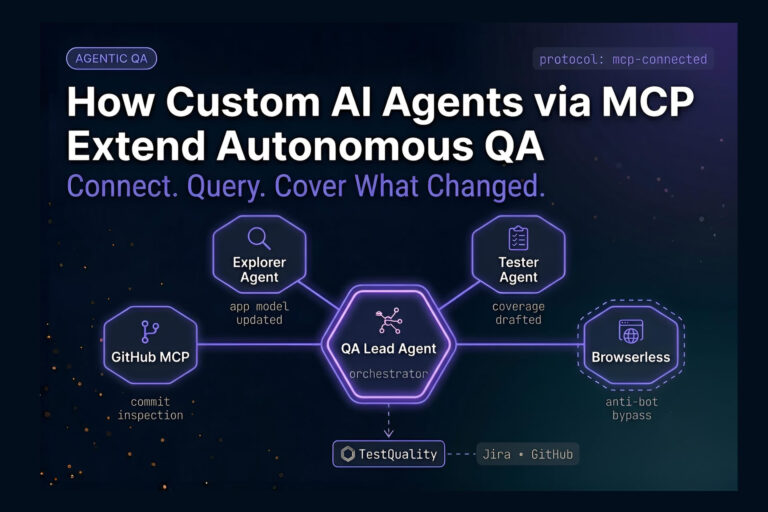
That tool-exposure pattern isn’t unique to Playwright. The same MCP host-client model that lets an LLM call navigate, click, fill, or assert as discrete tools extends naturally to project work itself — issues, test runs, and results can be exposed as MCP tools too.
That same build-fix-verify discipline extends naturally beyond a single agent session. If gates are what decide when a Gauntlet Loop’s work is actually done, the same MCP surface that gives agents tool access can expose those gates directly.
Beyond the Session
What happens when the judge agent needs to work across a whole project?
A Gauntlet Loop’s judge agent verifies one piece of work in one session. Levr, an agent-first project control plane, applies that same build-judge-fix discipline at the project level: work moves through defined states, and nothing reaches Done until it passes explicit verification — whether a human or an agent authored it.
Exposed as MCP tools, over the same surface driving the builder agents:
start_run, record_results, and finish_run — verification evidence recorded, not just a session log
Every builder and judge action attributed to its agent, alongside human review
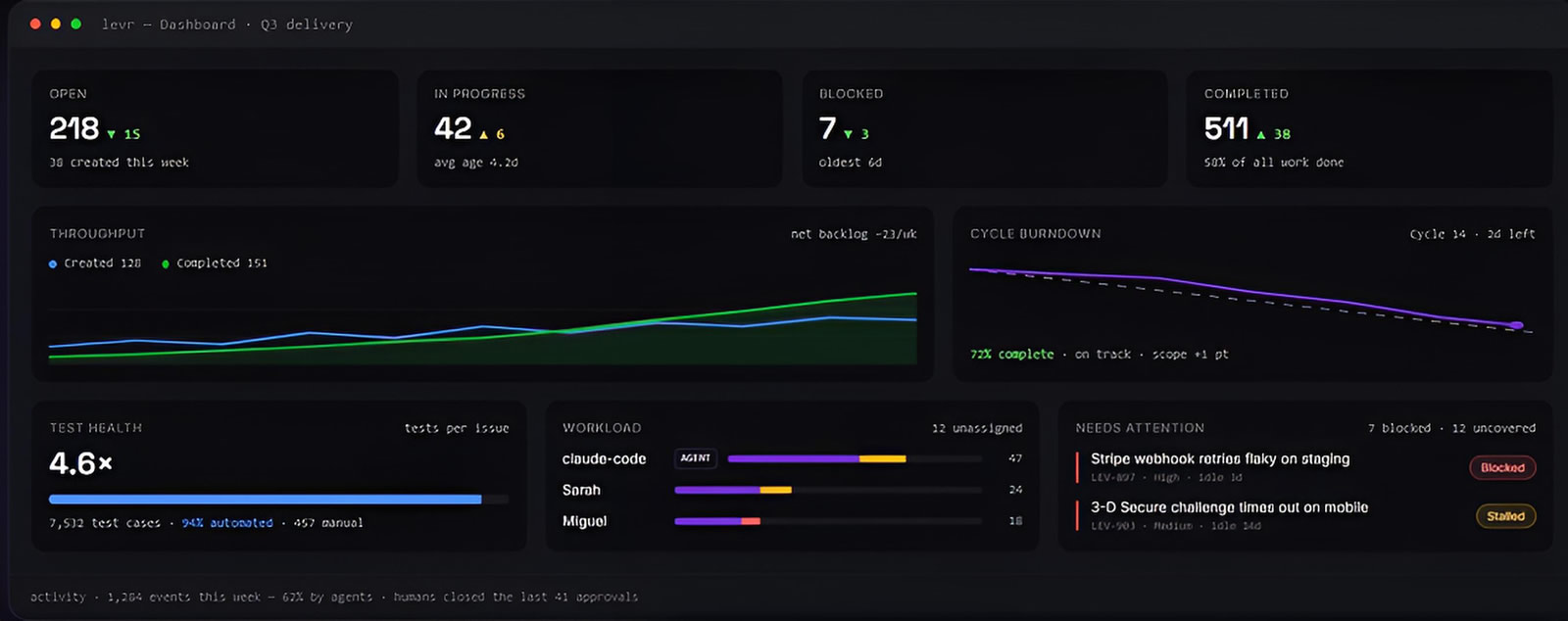
See Levr’s agent-run execution →
What does a Gauntlet Loop look like for a Playwright project?
A Gauntlet Loop for Playwright starts with a clear application scope, generates test scenarios and framework code, runs those tests against the application, and iterates on failures or coverage gaps. The loop should finish only when execution evidence — not agent self-reporting — satisfies the acceptance criteria.
Consider an internal employee management application: the task could require tests for login, employee creation and editing, list filtering, responsive navigation, accessibility, and console errors.
- Map requirements to risks. Identify critical flows, roles, data states, and negative paths before writing code.
- Create test cases. Produce clear titles, preconditions, steps, expected results, and priority.
- Generate the framework. Create project configuration, fixtures, page objects where justified, test data handling, and scripts.
- Execute in a controlled environment. Run tests locally or inside an agentic CI/CD pipeline and save objective artifacts.
- Critique the suite. Check whether tests use stable locators, assert meaningful outcomes, and cover both success and failure paths.
- Revise and rerun. Fix application defects, test defects, or missing scenarios, then repeat only within the defined boundary.
Do not confuse a large number of generated files with useful coverage. A smaller suite that validates the highest-risk workflows with readable, stable tests usually beats hundreds of shallow checks — the same “smallest judgeable piece” discipline that keeps a Gauntlet Loop’s judge agent honest.
How do you get Gauntlet Loop test evidence into TestQuality?
Playwright’s reporter outputs JUnit XML, and the TestQuality CLI uploads those results into a named project and cycle. TestStory.ai isn’t one of the loop’s builder or judge agents, it’s a separate governed generator included with TestQuality, that can produce the same kind of structured test cases a test-design agent would draft, then sync them into TestQuality before execution starts.
Once a Gauntlet Loop’s builder and test-design agents have produced a suite, the results still need to land somewhere a team can act on them. Configure Playwright’s reporter to output JUnit XML — reporter: [['junit', { outputFile: 'path/to/results.xml' }]] in playwright.config.js — then use the TestQuality CLI to push that file into a named project and cycle with testquality upload_test_run.
The CLI is the connector that makes the loop’s output operational; TestQuality doesn’t auto-discover runs without it. Once uploaded, pass/fail status, test names, and trend data flow automatically into run history and reporting.
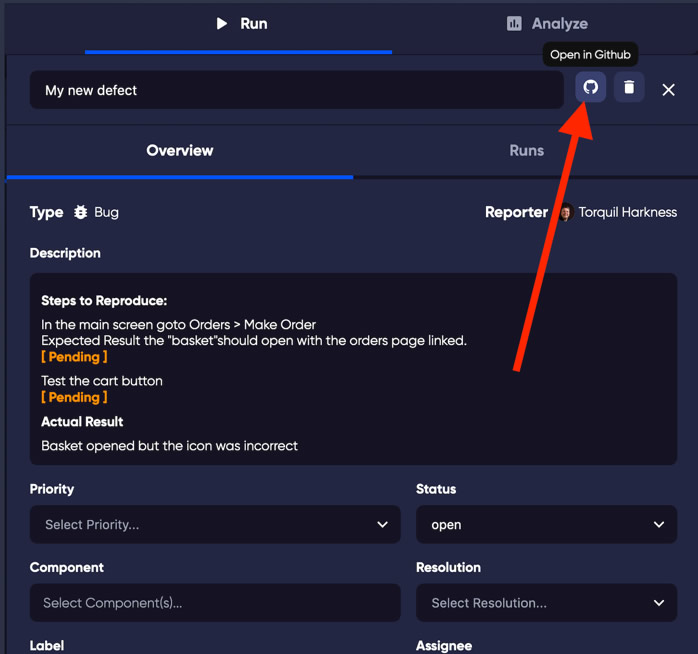
Defect logging stays manual by design. A tester reviews each failure the judge agent flagged, confirms it represents a genuine defect rather than flake or an expected change, and logs it in TestQuality — human-in-the-loop judgment that matters most for visual regression and exploratory findings, where distinguishing a real UI break from acceptable variance benefits from a reviewer. Once the defect exists, TestQuality’s GitHub and Jira integrations sync it to the team’s tracker automatically.
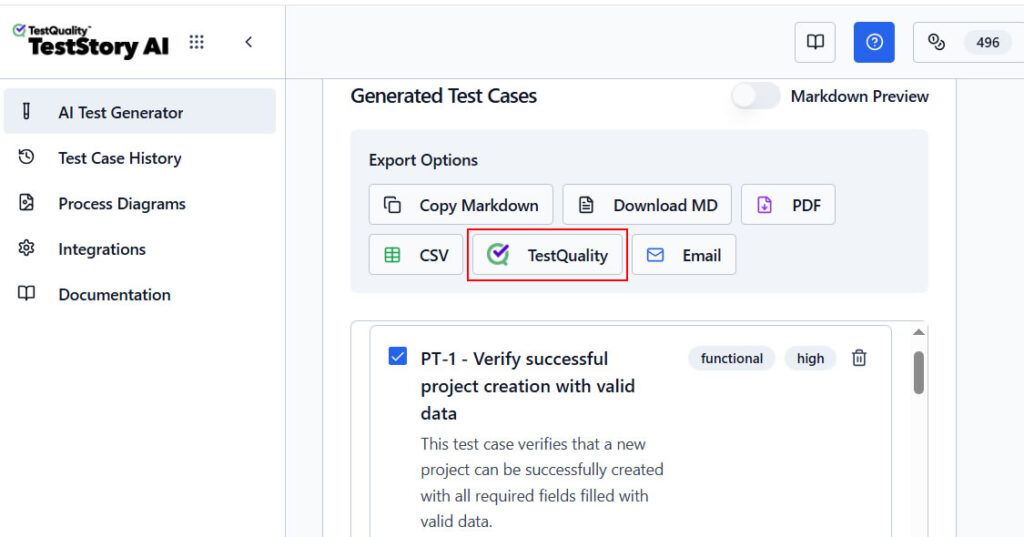
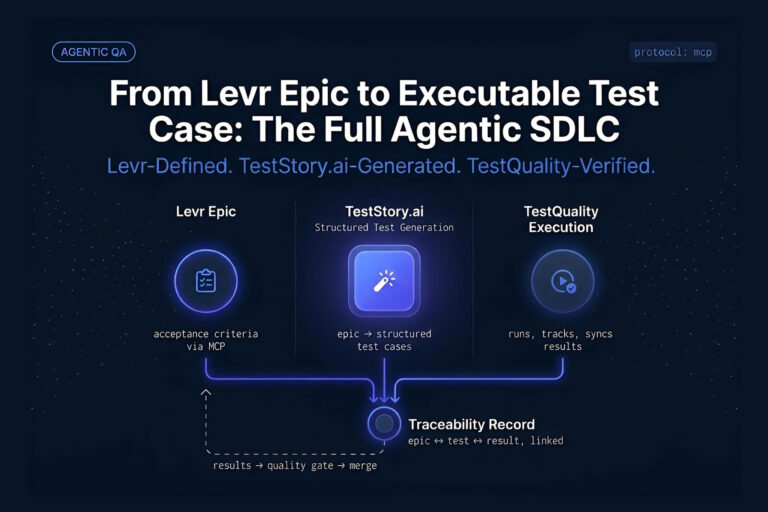
For the test-design side of the loop, TestStory.ai — included with every TestQuality subscription — can generate structured test cases from user stories, issues, epics, process diagrams, or source code, then sync them into TestQuality for grouping into runs or cycles. It also connects with CLI coding agents such as Claude Code, Cursor, and VS Code with Copilot, so a builder agent working inside one of those tools can hand off draft cases without leaving its workflow. The current command set is documented at the TestQuality CLI reference.
Where should human review remain in an autonomous agent loop?
Human review should stay at decisions involving ambiguous requirements, release risk, production access, security, privacy, and business correctness. Agents can accelerate analysis and execution, but cannot independently determine whether an unclear business outcome is acceptable.
Human-in-the-loop review matters most when a critic agent evaluates work produced by related agents sharing the same incomplete context — a judge can reliably check explicit criteria, but it may miss an unstated expectation or approve output that’s technically polished and commercially wrong. That risk is part of why how to test AI agents has become its own discipline.
Keep a person accountable for:
- Approving objectives, acceptance criteria, and the quality bar.
- Reviewing changes that affect production data, infrastructure, or customer access.
- Resolving conflicting requirements and business-rule ambiguity.
- Accepting or rejecting risk after test evidence is available.
- Reviewing changes to test strategy, especially when AI removes or rewrites existing tests.
For AI-generated test cases, TestQuality supports a reviewable handoff: teams create or import cases, launch runs, record actual results, attach evidence, link defects, and report results. The current workflow is documented at TestQuality documentation.
What are the biggest Gauntlet Loop mistakes to avoid?
The most common Gauntlet Loop failures are vague goals, a subjective quality bar, unlimited iteration, and weak verification. Adding more agents doesn’t correct unclear requirements or replace execution evidence, especially when every agent works from the same flawed context.
Using “perfect” as the only acceptance criterion
Terms like “world-class,” “production-ready,” or “perfect” can encourage effort, but they aren’t testable. Translate them into observable checks: key user journeys pass, pages work at target sizes, critical console errors are absent, and accessibility checks pass.
Letting the agent invent unsupported requirements
Autonomous systems can fill gaps with assumptions — in a website task, that may mean adding profiles, integrations, or content never supplied. Require agents to label assumptions, request clarification where needed, and avoid presenting inferred details as verified facts.
Allowing uncontrolled external access
Scraping, publishing, sending messages, changing repositories, or deploying applications can create real consequences. Put those actions behind explicit permissions. A local-build-only boundary works well when the assignment is limited to a prototype.
Testing implementation details instead of outcomes
Brittle tests often pass until a harmless UI refactor breaks them. Prefer assertions based on visible labels, accessible roles, user outcomes, and application state. The critic should reject tests that check internal structure without proving a user task works.
Stopping after a green test run
A green run proves only that the chosen tests passed, not that coverage is adequate. A judge should compare implemented scenarios against requirements and risk areas, then flag untested paths before accepting the result.
Technical Deep Dive FAQ
What is a Gauntlet Loop?
What is a multi-agent AI system?
What is a judge agent?
How do you define stop conditions for an agent loop?
Can a Gauntlet Loop replace manual QA?
How should a judge validate Playwright test generation?
What evidence should an AI testing loop retain?
How do you prevent agents from making unsafe changes?
How do teams measure whether the loop improved quality?
Key Takeaways
Build the evaluation system before scaling the agents
Better feedback loops matter more than louder prompts.
Define outcomes: Describe required behavior and user value rather than asking for a vaguely polished result.
Make quality observable: Use a concrete quality bar and inspectable artifacts a judge can check — not self-reports.
Separate roles: Keep planning, implementation, testing, and independent critique distinct, with judges working from separate context.
Set limits: Cap time, cost, retries, permissions, and external actions before autonomous work begins.
Keep accountability human: Use agent output as evidence, while people approve business-critical and release decisions.
An autonomous workflow is only as trustworthy as the criteria it must satisfy.
About the Author
Jose Amoros is part of the TestQuality marketing team, focused on agentic QA, multi-agent orchestration patterns, and the operational handoff between AI-generated test artifacts and governed execution workflows. He writes regularly about CI/CD integration, Gherkin/BDD practices, and shift-left testing.
Further Reading
- How to Run a Gauntlet Loop: The Prompting Method Behind Claude of Duty — detailed guide to the builder/critic mechanics
- The Dumbest-Looking AI Prompt Just Beat Months of Careful Game-Design Prompt Engineering — Yahoo Tech coverage of Matt Shumer’s original demo
- Gauntlet Loop Explained: AI Agents That Build, Judge & Fix Their Own Work — video walkthrough of the pattern, Execute Automation
- Playwright best practices
- OWASP Web Security Testing Guide
- TestQuality test management platform features
- TestQuality CLI overview
- TestQuality documentation
Start Free Today
Transition from script-writing to outcome-orchestration.
TestStory.ai generates structured test cases from your user stories, acceptance criteria, or architecture diagrams — then syncs them directly into TestQuality for execution, tracking, and team collaboration.
Get 500 TestStory.ai credits every month included with your TestQuality subscription — no extra cost.
No credit card required on either platform.