

At a Glance
Agentic Testing in CI/CD: Where the Boundary Is and How to Cross It Cleanly
AI drafts the tests. Playwright runs them. The CLI governs both.
The boundary is strict: Agentic tools belong in the drafting layer — analysis, coverage planning, and script generation. Deterministic frameworks like Playwright or Selenium own execution. Mixing the two layers breaks pipelines.
The connector is the CLI: The TestQuality CLI uploads JUnit XML results from any CI runner into a named project and cycle — no custom API scripts required. That single step closes the gap between pipeline execution and test management.
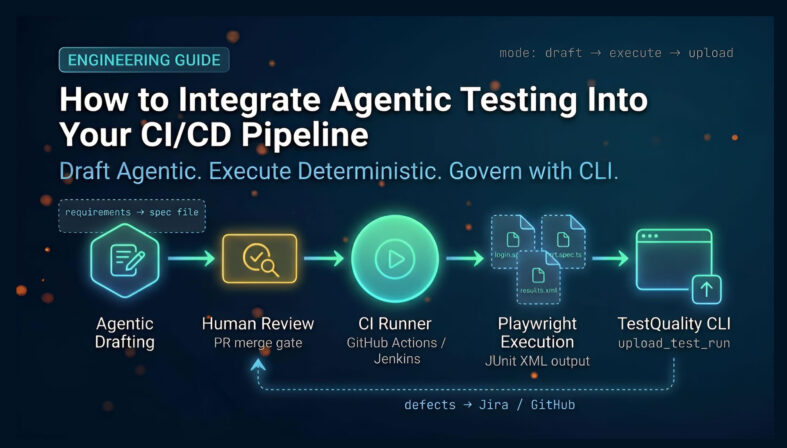
The workflow is sequential: Agent drafts → human reviews → pipeline executes → CLI uploads XML → TestQuality tracks results → engineer confirms defects → GitHub or Jira syncs. Every handoff is explicit.
The goal is not an AI-run pipeline. It is a faster path to deterministic, governed test coverage — with agents doing the drafting work that used to block QA engineers for days.
CI/CD test automation has a maintenance problem that framework upgrades alone cannot solve. Engineers write Playwright or Selenium scripts, update locators when the UI shifts, and debug flaky failures caused by network latency rather than genuine regressions. That maintenance overhead is the friction point most teams accept as the cost of automation — and it compounds as coverage grows. Agentic tools change the drafting economics without touching the execution model. An agent analyzes a Jira ticket, reads the acceptance criteria, and outputs a structured spec file. A human reviews it, adjusts the locators, and merges it. From that point, the script behaves identically to code written entirely by a senior QA engineer. The pipeline executes it deterministically, the TestQuality CLI uploads the JUnit XML output to a named project and cycle, and results feed into defect tracking without manual copy-paste. That is the architecture this article explains
What is the current State of CI/CD Test Automation?
CI/CD test automation today relies on deterministic execution frameworks running in structured pipelines, but the upstream work — requirement analysis, coverage planning, and script drafting — still consumes disproportionate engineer time. Agentic tools are being applied to this upstream layer, not to execution itself.
The execution side of the pipeline is mature. Teams run Playwright, Selenium, or Cypress on GitHub Actions, Jenkins, or CircleCI. They get binary pass/fail signals, parallel shard execution, and JUnit XML outputs. The tooling is stable. The bottleneck is not execution — it is the sustained engineering effort required to keep test coverage aligned with a codebase that ships weekly. According to the Stack Overflow Developer Survey 2025, 84% of developers are using or planning to use AI tools in their development process, an increase over last year (76%). That adoption extends directly into QA, where teams are using AI to draft test cases, analyze coverage gaps, and generate Gherkin scenarios from user stories rather than writing boilerplate from scratch.
By 2028, 33% of enterprise software applications will incorporate agentic AI capabilities — up from less than 1% in 2024 — and agentic AI will make at least 15% of day-to-day work decisions autonomously according to Gartner. Independently, that Stack Overflow data confirms the adoption wave is already happening at the practitioner level. In a QA context, this means agents will increasingly decide which tests to write based on pull request diffs, which edge cases require coverage, and which obsolete scenarios to flag for deprecation. For teams evaluating the right CI/CD automated testing tools, the question is no longer whether AI belongs in the workflow — it is where exactly it belongs.
Where Is the Exact Boundary Between Agentic Tools and Deterministic Frameworks?
The boundary lies strictly between test generation and test execution. Agentic tools handle the cognitive work of analyzing requirements, planning coverage, and drafting scripts. Deterministic frameworks like Playwright or Selenium execute that code with exact, binary outcomes. The two systems must not overlap during a live pipeline run.
This is not a philosophical distinction — it has direct consequences for pipeline reliability. AI agents are probabilistic systems. They excel at synthesizing unstructured inputs like Jira tickets, API documentation, and user stories into structured test code. An agent can read a new checkout flow requirement and generate a comprehensive spec file covering happy paths, invalid payment states, and session timeout scenarios. That output is genuinely useful and faster than writing it from scratch.
The problem starts when teams attempt to use agents during execution. If an agent evaluates DOM state during a live test run — deciding whether a button is "effectively" visible even if the CSS is broken — it introduces the risk of false positives. A misaligned button passes because the agent interprets semantic intent rather than asserting on literal coordinates. The test goes green. The broken UI ships. The feedback loop the pipeline exists to enforce is quietly destroyed.
Playwright, Cypress, and Selenium operate on exact rules. They wait for specific network idle states, assert against literal string values, and fail immediately when a selector is absent. There is no interpretation. If a selector is missing, the test fails — which is precisely the correct behavior for a deployment gate. By confining agents to drafting and humans to review, the execution layer stays mathematically reliable. The pipeline remains a gatekeeper, not a probability estimator. This is the core principle behind effective agentic QA.
Why Must Test Execution Stay Deterministic in a CI/CD Pipeline?
Test execution must stay deterministic because CI/CD pipelines require absolute binary outcomes to gate deployments safely. A test that sometimes passes and sometimes fails against identical code is not a quality signal — it is noise that trains engineers to ignore failures and erodes confidence in the entire pipeline.
A pipeline answers one question: is this build safe to deploy? To answer that reliably, the tests must produce the same result every time they run against the same codebase. This is the definition of determinism, and it is non-negotiable for deployment gating.
Self-healing tests are the most common violation of this principle. The appeal is obvious — an agent detects a broken locator and substitutes an alternative path to complete the test. The test passes. But an agent might route around a legitimate UI regression, confirming success through a fallback path that a real user can no longer access. The pipeline goes green. The defect ships. No one knows until a customer files a ticket.
Agentic execution also introduces latency that is incompatible with CI feedback expectations. A standard Playwright suite can execute hundreds of browser interactions in seconds. An agentic execution model that sends DOM snapshots to an LLM API for evaluation at each step will increase runtime by orders of magnitude. Developers expect pipeline feedback in minutes. Agents operating on DOM state in real time cannot deliver that. Keeping execution deterministic is not a limitation — it is what makes the pipeline trustworthy enough to automate deployment decisions.
How Do Agentic Tools Fit Into the Test Planning and Drafting Layer?
Agentic tools fit into the planning layer by parsing user stories and acceptance criteria, identifying edge cases, and outputting structured spec files. They operate asynchronously before the pipeline runs, and their output is reviewed, committed, and merged like any other code — making it deterministic from the moment it enters version control.
The most effective application of AI in AI in CI/CD pipelines occurs upstream, during planning and drafting. When a developer submits a pull request for a new authentication flow, an agentic tool can analyze the code diff alongside the linked Jira ticket. Based on that context, the agent drafts a suite of Playwright tests covering valid login, invalid credentials, rate-limiting, and session persistence edge cases.
This process is entirely asynchronous. The agent does not block the pipeline or interact with the running application. It outputs drafted scripts into a branch or code review tool. A QA engineer then reviews the generated code — checking logic, verifying locators align with the team's data-testid conventions, and adjusting any assertions that do not match the final implementation. Once the engineer approves and merges the file, it becomes a standard TypeScript or Python spec in version control. It will be executed by the CI runner exactly like code written entirely by a human. The agent accelerated authorship; the pipeline is none the wiser.
How Do You Integrate Test Management Into a CI/CD Pipeline?
You integrate test management by using the TestQuality CLI to upload standardized JUnit XML results directly from the CI runner into a named project and cycle. The CLI is the mechanism that transforms pipeline logs into a permanent, queryable test record — no custom API scripts required.
Executing tests in a pipeline is half the workflow. The other half is tracking results over time so teams can identify flakiness patterns, measure coverage trends, and audit release quality. Without a centralized test management system, execution logs vanish into the CI server and become inaccessible within days.
The TestQuality CLI closes that gap. Per the CLI overview documentation, the tool handles result upload, test run management, attachments, and defect linking from local environments or CI/CD pipelines. The integration mechanic is direct: configure your test framework to output JUnit XML, then invoke the CLI after execution completes.
Using the testquality upload_test_run command, you pass the XML file path and specify the target project name and cycle. The CLI authenticates with the TestQuality API and uploads the full result set — pass, fail, skip, execution duration, and failure messages — into the platform. Results are immediately visible in the dashboard, mapped to existing test definitions or auto-created if the test is new. This is how you integrate test management with CI/CD without maintaining brittle custom integrations.
What Does a Managed Workflow Look Like From Agent Draft to Pipeline Execution?
A managed workflow moves from agent draft to human review to pipeline execution to CLI upload in a fixed sequence of explicit handoffs. Each stage has a defined owner and a defined output, which prevents the probabilistic outputs of the drafting phase from contaminating the deterministic requirements of the execution phase.
Tracing a single feature through the full lifecycle makes the architecture concrete:
1. Requirement Analysis. A product manager creates a Jira ticket for a new "Forgot Password" flow, detailing acceptance criteria including valid submissions, invalid email formats, and rate-limiting behavior.
2. Agentic Drafting. An AI agent reads the ticket and any linked design references. It drafts a forgot-password.spec.ts file with five test cases mapped to the acceptance criteria.
3. Human Review. A QA engineer reviews the generated Playwright code, adjusts CSS selectors to match the final implementation, and merges the approved file into the main branch.
4. Pipeline Trigger. The merge event triggers the GitHub Actions workflow.
5. Deterministic Execution. The runner installs dependencies and executes the Playwright suite. Each test interacts with the application using exact selectors and assertions — no probabilistic evaluation.
6. Result Generation. Playwright finishes and outputs a results.xml file in JUnit format.
7. CLI Upload. The pipeline executes testquality upload_test_run results.xml with the project name and cycle specified. The CLI pushes the full result set to the TestQuality dashboard.
8. Defect Review. If a rate-limiting test failed, a tester reviews the failure in TestQuality, confirms it represents a genuine regression rather than a flake or expected change, and logs a defect. TestQuality's GitHub or Jira integration then syncs that logged defect to the team's tracker, linking it to the original feature ticket.
This sequence isolates the agent's probabilistic behavior to the drafting phase and enforces human judgment at the defect-confirmation step — which is where it belongs.
How Do You Configure GitHub Actions to Run This Hybrid Workflow?
You configure GitHub Actions by defining a YAML workflow that checks out code, runs the test framework with JUnit XML output enabled, then executes the TestQuality CLI as a post-execution step. Authentication uses a Personal Access Token stored in GitHub Secrets.
Create a workflow file at .github/workflows/test-execution.yml. The critical configuration points are: the Playwright reporter must be set to junit with an output file path in playwright.config.ts, and the TestQuality CLI step must reference the TQ_PAT secret for authentication.
A representative configuration looks like this:
name: CI Test Execution
on:
  push:
    branches: [ main ]
jobs:
  test:
    runs-on: ubuntu-latest
    steps:
      - name: Checkout code
        uses: actions/checkout@v4
      - name: Setup Node.js
        uses: actions/setup-node@v4
        with:
          node-version: '20'
      - name: Install dependencies
        run: npm ci
      - name: Install Playwright browsers
        run: npx playwright install --with-deps
      - name: Run Playwright tests
        run: npx playwright test
      - name: Install TestQuality CLI
        run: npm install -g @testquality/cli
      - name: Upload results to TestQuality
        env:
          TQ_PAT: ${{ secrets.TQ_PERSONAL_ACCESS_TOKEN }}
        run: testquality upload_test_run results.xml --project "Core Platform" --cycle "Nightly Build"
The Playwright reporter configuration in playwright.config.ts is:
reporter: [['junit', { outputFile: 'results.xml' }]]
Whether a test was written by an agent or a human engineer, the pipeline treats it identically. This consistency is what makes the hybrid workflow operationally sound and aligns with test automation best practices for CI/CD.
How Does the TestQuality CLI Process JUnit XML Test Results?
The TestQuality CLI processes JUnit XML by parsing the hierarchical file structure to extract test suite names, individual case names, execution times, and failure states. It maps these elements to existing test definitions in your project and auto-creates new definitions for cases it has not seen before — which covers agent-generated tests entering the system for the first time.
The JUnit XML format is the universal reporting standard across frameworks. Playwright, Cypress, Selenium, and pytest all output it. When Playwright generates results.xml, the structure looks like this:
<testsuites>
<testsuite name="Login Tests" tests="1" failures="1" time="4.02">
<testcase name="User can log in with valid credentials" classname="login.spec.ts" time="4.02">
<failure message="Timeout 30000ms exceeded." type="Error">
Error: locator.click: Timeout 30000ms exceeded.
Call log:
- waiting for locator('button[data-testid="submit"]')
</failure>
</testcase>
</testsuite>
</testsuites>
When testquality upload_test_run runs, the CLI reads each testcase node and matches the name against existing test definitions in the project. A match logs a new execution result — Pass, Fail, or Skip — within the designated cycle. When an agent-generated test case name has no match in the system, the CLI auto-creates the definition rather than failing the upload.
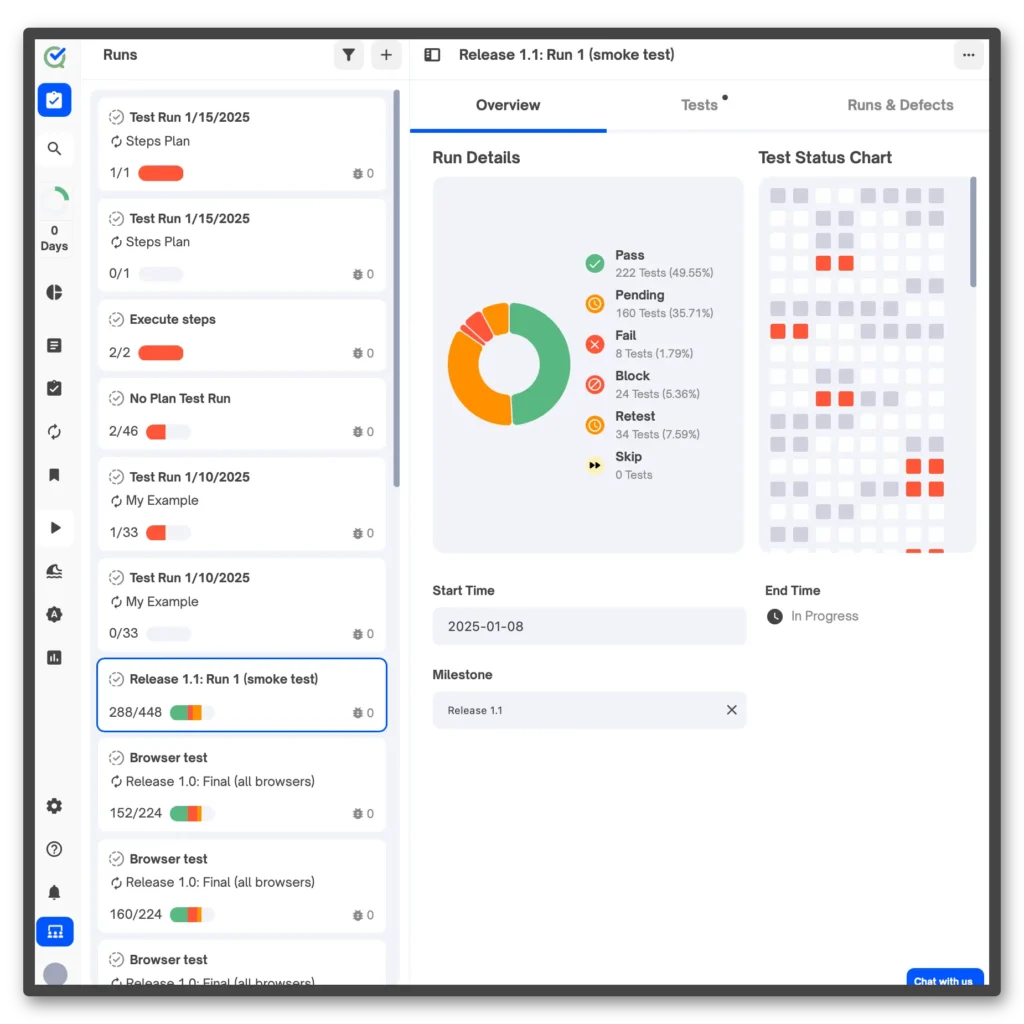
That auto-creation feature is practical: it means engineers do not need to manually register new test names in the dashboard before the pipeline runs for the first time. Execution duration and failure messages are extracted and attached to the run record for later analysis and trend tracking.
How Do You Handle Defect Tracking After a Pipeline Failure?
After a pipeline failure, a tester reviews the failed test result in TestQuality, confirms the failure represents a genuine defect rather than a flake or test infrastructure issue, and manually logs the defect. Once logged, TestQuality's native GitHub and Jira integrations sync the defect record to the team's tracker automatically.
This human-in-the-loop step is deliberate. Automated pipelines generate failures for multiple reasons: legitimate application regressions, expired test data, environment instability, and occasionally invalid agent-generated assertions that made it past review. Auto-creating a Jira ticket for every pipeline failure would flood the tracker with noise and train developers to ignore it. The tester's review step — confirming the failure before logging — is what keeps the defect tracker signal-clean.
The workflow in practice: Playwright generates a failed JUnit XML result. The TestQuality CLI uploads it. The dashboard surfaces the failure with the full stack trace from the XML failure node. A tester reviews the trace, reproduces the failure if needed, and logs the defect in TestQuality. At that point, the GitHub or Jira integration fires and creates a linked ticket in the team's tracker — complete with the test name, environment context, and failure message. When the developer fixes the code and the pipeline runs again, the test passes, and the resolved status syncs back through the integration.
What Are the Core Requirements for a Resilient Continuous Testing Pipeline?
A resilient continuous testing pipeline requires fast deterministic execution, standardized result output, centralized result tracking, and human-confirmed defect routing. The continuous testing pipeline architecture described here satisfies all four requirements without adding probabilistic risk to any deployment gate.
Speed matters because developers need feedback before context switches. Determinism matters because a deployment gate that produces ambiguous results is not a gate — it is a suggestion. Standardized output (JUnit XML) matters because it decouples the execution framework from the management platform, making the architecture framework-agnostic. Centralized tracking matters because execution logs that expire after 30 days inside a CI server cannot support trend analysis, flakiness detection, or release audits.
The agentic layer adds a fifth requirement: a clear drafting-to-execution handoff. Agents accelerate coverage creation, but agent-generated code enters the pipeline through version control after human review — not through a real-time API call during a live run. Maintaining that handoff sequence is what allows teams to scale test coverage with AI assistance without introducing probabilistic risk into the deterministic execution layer. When this architecture is implemented correctly, the pipeline answers the deployment question reliably whether a test was drafted by a human or an agent.
Try It Now
Generate Structured Test Cases From Your User Stories Instantly
Paste any user story into TestStory.ai and watch the orchestration layer generate structured, Gherkin-formatted test cases instantly — covering happy paths, edge cases, and the failure scenarios your team would typically miss. No account required.
No credit card required.
Pipeline Layer Comparison
| Pipeline Layer | Owner | Tool | Output | Risk If Misapplied |
|---|---|---|---|---|
| Requirement Analysis | AI Agent | TestStory.ai / LLM | Draft spec file | Missing edge cases if context is incomplete |
| Script Review | QA Engineer | Code review / PR | Approved spec merged | Fragile locators if review is skipped |
| Test Execution | CI Runner | Playwright / Selenium | JUnit XML results | False positives if agent runs during execution |
| Result Upload | Pipeline Step | TestQuality CLI | Tracked run in dashboard | Orphaned results if CLI step is skipped |
| Defect Confirmation | QA Engineer | TestQuality + Jira/GitHub | Linked defect ticket | Tracker noise if auto-logging every failure |
Technical Deep Dive FAQ
Key Takeaways
What to Implement, What to Avoid, and Where Each Tool Belongs
The architecture is simple. The discipline required to maintain it is not.
Agents belong upstream: Agentic tools draft test scripts from requirements asynchronously before the pipeline runs. They do not execute, evaluate DOM state, or make deployment decisions.
Self-healing tests are a false economy: An agent that routes around a broken UI regression passes the test while hiding the defect. The feedback loop is broken silently — no alerts, no failed build, just a broken UI in production.
The CLI is the integration layer: testquality upload_test_run is the single command that transforms a JUnit XML file into a tracked, queryable test run inside TestQuality — mapped to a named project and cycle without custom API scripts.
Defect logging stays manual: Automated pipelines should not auto-create Jira tickets for every failure. A tester reviews the result, confirms the defect is genuine, logs it — then the integration fires and syncs it to the tracker. This keeps the defect tracker signal-clean.
The workflow is CI-agnostic: GitHub Actions, Jenkins, CircleCI — the architecture is identical. Configure your framework to output JUnit XML, add the CLI upload step, store the auth token in secrets. The rest is standard pipeline configuration.
Adoption is already at scale: 76% of developers are using or planning to use AI tools in their workflows (Stack Overflow Developer Survey 2024). Teams that establish clean architectural boundaries now will scale agentic coverage without inheriting the reliability debt that comes from mixing probabilistic and deterministic systems.
Transition from script-writing to outcome-orchestration. Get 500 TestStory.ai credits monthly with your TestQuality subscription.
Start Free Today
Let Agents Draft. Let Playwright Run. Let TestQuality Govern.
TestStory.ai generates structured test cases from your user stories, acceptance criteria, or architecture diagrams — then syncs them directly into TestQuality for execution, tracking, and team collaboration. Skip the boilerplate drafting and spend your engineering time on the review and architecture decisions that actually require human judgment.
✦ Get 500 TestStory.ai credits every month included with your TestQuality subscription — no extra cost.
No credit card required on either platform.


