


Agile teams need test case management tools that move at sprint speed, not enterprise crawl.
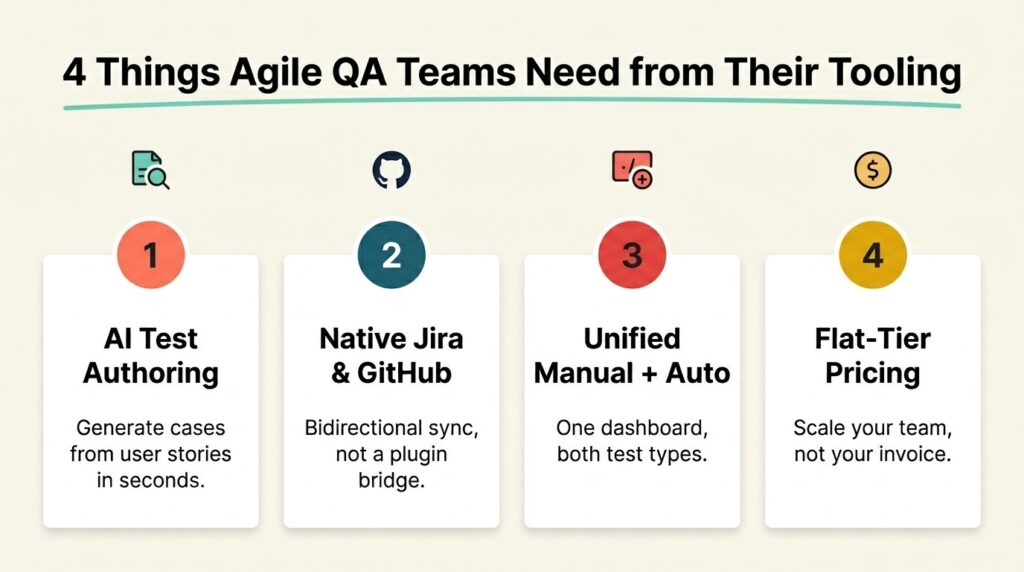
- AI-assisted authoring is the new baseline, with leading platforms generating test cases directly from user stories to cut sprint prep time.
- Native Jira and GitHub integration has shifted to a hard requirement for any tool worth evaluating.
- Unified manual plus automation tracking matters more than ever as agile teams run both inside the same sprint.
- Pricing transparency and right-sized tiers separate tools that scale with your team from ones that punish you for growing.
If your current tool feels like it's slowing your sprints down, it's time to upgrade.
Agile QA relies on how fast you can plan, execute, and report on tests inside a two-week sprint. The tooling matters. According to the Capgemini World Quality Report 2025-26, nearly 90% of organizations are actively pursuing generative AI in their quality engineering practices, yet integration complexity remains the top barrier to scaling. That gap between wanting AI-powered testing and deploying it cleanly inside an agile workflow is where modern test case management tools earn their keep.
You're not picking software for the next decade. You're picking it for your next sprint, your next release, and the next time a product manager rewrites the acceptance criteria three days before demo. Choosing well means understanding what agile teams actually need from a unified test management platform, and which platform categories in 2026 deliver on those needs. This guide breaks down the seven types worth evaluating and gives you a framework for matching the right one to your team's sprint cadence.

What Makes Agile QA Different from Traditional QA?
Traditional QA assumed a long runway. You'd write hundreds of test cases against a fixed spec, execute them over weeks, and file defects against a frozen build. Agile broke that model. Sprints are short, requirements change, and testing happens continuously alongside development rather than as a final gate.
Agility changes what you need from your tooling. A traditional test management tool that worked fine for waterfall teams becomes a bottleneck for agile ones. The acceptance criteria for an agile test case management software include speed of test authoring, tight coupling with the issue tracker, and the ability to run manual exploratory testing alongside automated regression in the same sprint.
The newest pressure comes from AI-generated code. When developers ship features faster with copilots, QA either keeps up or becomes the constraint. That's pushing the category toward AI-assisted test authoring and active test plans that update as user stories change.
What Should Agile Teams Look for in Test Case Management Tools?
Picking the right tool starts with knowing which features matter inside a sprint workflow. Plenty of platforms advertise agile support but were built around quarterly release cycles. Look for these capabilities first.
Sprint-Aligned Planning and Traceability
Your tool needs to map test cases to user stories, sprints, and releases without forcing manual cross-referencing. Strong test management tools surface test coverage per sprint and let you see at a glance which stories have tests written, executed, and passing. Bidirectional linking with Jira or GitHub issues is the bare minimum. When a defect ships to production, you want to trace it back to the user story, the test case that should have caught it, and the sprint where it slipped.
AI-Powered Test Case Generation
Manual test authoring is no longer the default. Modern platforms generate test cases from user stories, requirements, or feature descriptions, then let testers refine the output. According to the Capgemini WQR 2025-26, organizations report an average 19% productivity boost from Gen AI in quality engineering, with test case design now leading adoption use cases. This feature cuts sprint prep time and keeps coverage up to date as requirements change.
Look specifically for AI that outputs in formats your team already uses: Gherkin syntax for BDD-practicing teams or structured step-action-result for traditional case formats. Generic prompt boxes don't count.
Unified Manual and Automation Tracking
Agile teams run both manual exploratory testing and automated regression in the same sprint. QA test management software that treats these as separate worlds, with one tool for manual and a plugin bridge to automation results, creates exactly the integration complexity the WQR flagged as the top barrier to scaling. Native ingestion of automated test results from frameworks like Selenium, Playwright, Cypress, and JUnit should sit alongside manual execution in the same dashboard.
7 Categories of Test Case Management Tools Every Agile Team Should Evaluate
After reviewing the current market, test case management tools sort into seven distinct categories. Each solves a different problem and targets a different kind of agile team. Understanding which category fits your situation matters more than chasing a specific brand name.
1. Legacy Standalone Platforms
Legacy platforms include long-established names with broad market share, structured case management, reusable steps, and milestone tracking. Pricing typically runs $30 to $40 per user per month for professional tiers. They work well for QA-led teams that need formal case structures but can feel heavy for fast-moving agile squads. Integration with Jira and Git is usually delivered through plugins rather than native bidirectional sync.
2. Jira-Native Apps
These tools live inside Jira as installed apps, with test cases stored as Jira issue types. Pricing scales with your Jira user count, often starting around $10 per user per month for small teams. The biggest win is zero context-switching for developers already inside the Atlassian ecosystem. The tradeoff is total commitment to Jira and reporting that can feel constrained. Some Jira-native apps offer deep BDD and Gherkin support, making them the default pick for behavior-driven development teams.
3. Lightweight Modern SaaS Tools
This newer wave of platforms is built for smaller agile teams with clean interfaces, free tiers, and pricing around $11 to $25 per user per month. Most have added AI-assisted test creation in recent releases and integrate with Jira, GitHub, GitLab, and CI/CD pipelines via REST API. Best for teams that want minimal overhead and don't need enterprise compliance.
4. Enterprise ALM Suites
This category includes heavy, full-lifecycle application management platforms with test management alongside requirements, release management, and compliance modules. Pricing is custom and skews enterprise, typically multiple times the cost of standalone tools. Strong for regulated industries needing audit trails, eSignatures, and centralized governance. Overkill for a 10-person agile squad.
5. Open-Source Self-Hosted Tools
Open-source tools are the budget-conscious option for teams with engineering bandwidth to host, maintain, and customize their own tool. Zero license cost, but you absorb hosting, upgrades, and security patching. This category typically lacks AI-assisted authoring, modern Jira sync, and the reporting depth of paid platforms. They work for small teams with strict procurement constraints or regulatory requirements that prohibit SaaS.
6. Codeless Automation Platforms With Test Management Add-Ons
These platforms started as automation tools and added test case management as a feature. Pricing is usually enterprise-tier, and they shine if your QA strategy is automation-first. The tradeoff is that manual case management often feels bolted on. It's less suitable for teams that need a balanced manual-plus-automation workflow.
7. AI-Powered Unified QA Platforms
The newest category is built specifically for agile and DevOps workflows. These platforms feature native (not plugin) integration with GitHub and Jira, bidirectional sync of issues and test results in real time, and unified manual plus automation tracking in a single dashboard. AI test generation converts user stories into Gherkin-formatted or traditional test cases in seconds. Pricing is often flat-tier rather than per-user, making it competitive against legacy per-seat models.
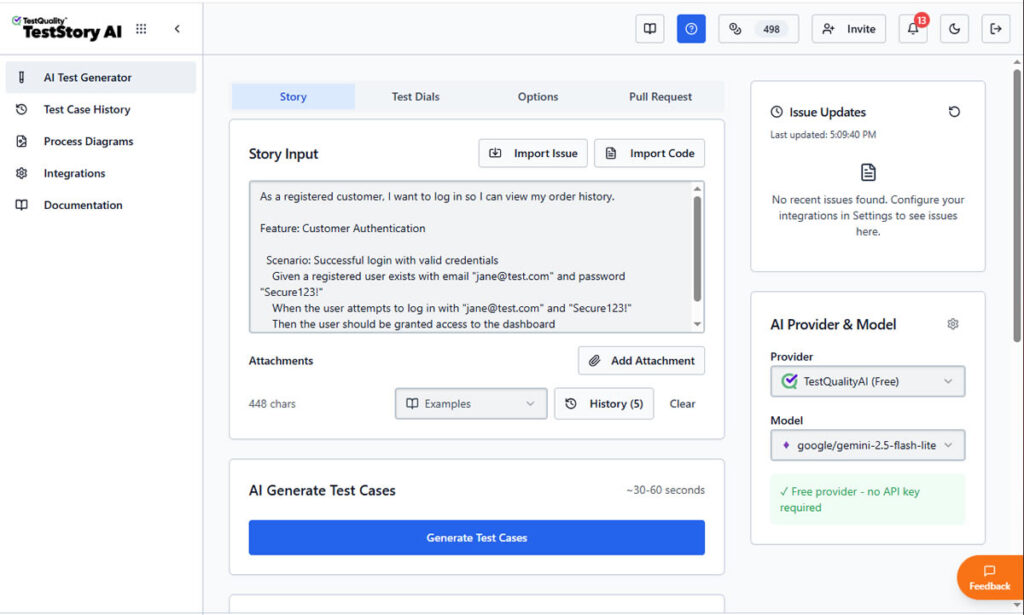
AI test case generation such as TestStory.ai and QA Agents assist throughout the test lifecycle. This category is best for agile teams that want AI-powered authoring and unified tracking without paying enterprise prices.
How Do These Categories Compare on Integrations and Pricing?
When you're evaluating test case management tools side by side, the integration matrix and pricing model usually decide the shortlist faster than feature lists do. The table below summarizes the seven categories on the dimensions that matter most for agile teams.
| Category | Native Jira | BDD/Gherkin | AI Test Generation | Manual + Auto Unified | Typical Pricing |
| Legacy standalone | Plugin | Limited | Limited | Yes | $30–$40/user/mo |
| Jira-native apps | Yes | Often strong | Limited | Yes | ~$10/user/mo |
| Lightweight modern SaaS | Plugin or partial | Yes | Yes (newer) | Yes | $11–$25/user/mo |
| Enterprise ALM suites | Plugin | Yes | Yes | Yes | Enterprise custom |
| Open-source self-hosted | Manual setup | Limited | No | Partial | Free + hosting |
| Codeless automation + TM | Plugin | Varies | Yes | Yes (auto-first) | Enterprise tier |
| AI-powered unified QA | Native | Native | Yes | Yes (native) | Flat-tier or low per-user |
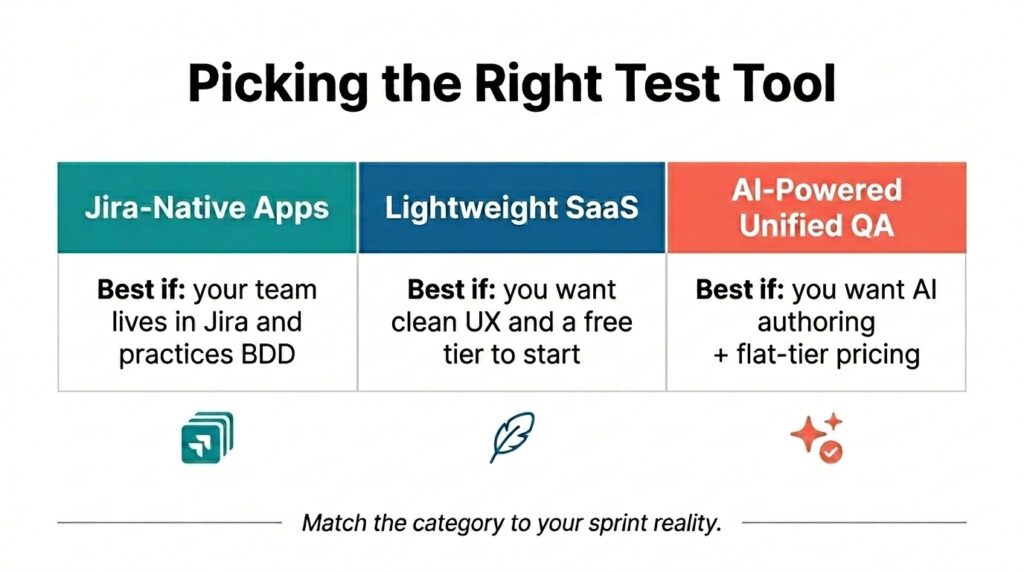
Read this matrix against your own constraints. If your team is fully Jira-committed and practices BDD, a Jira-native app probably belongs on your shortlist. If you're price-sensitive and want AI authoring without per-user creep, AI-powered unified platforms with flat-tier or free-tier options change the calculation.

How Do You Pick the Right Tool for Your Sprint Cadence?
The right tool depends on how your team works inside Jira (or doesn't), how much automation you're running alongside manual testing, and whether your sprint reporting demands burndown-style dashboards or just rolling pass/fail counts.
If your developers live in Jira and never want to leave, a Jira-native app removes the context-switching tax. If your QA team has its own workflow and you want a tool that integrates with Jira but doesn't depend on it, AI-powered unified QA platforms and lightweight modern SaaS tools give you more flexibility. According to the Stack Overflow 2024 Developer Survey, Jira leads the asynchronous collaboration tool category among professional developers at 57.5% usage, which is why native integration depth keeps showing up as a top filter for QA test management software.

Automation maturity is the second cut. If you're already running Selenium, Playwright, or Cypress suites in CI, the tool needs to pull those results in without a plugin chain. Platforms that handle CI/CD integration natively reduce the integration complexity. Finally, sprint-aligned dashboards and stakeholder-facing reports should come out of the box. If you're spending two sprints building custom reports just to get visibility, the tool wasn't built for agility.
Frequently Asked Questions
What's the difference between test case management software and test management tools?
The terms overlap heavily. Test case management software historically referred to tools focused on creating, organizing, and executing test cases. Test management tools are the broader category that also covers test planning, requirements traceability, defect tracking, and automation result aggregation. Modern platforms typically cover both functions in a unified workflow.
Do agile teams really need a dedicated test management tool, or can they use spreadsheets?
Small teams running short projects can survive on spreadsheets, but it doesn't scale. Once you have more than a handful of testers, multiple sprints in flight, or any automation pipeline producing results, the manual tracking overhead becomes the constraint. Dedicated QA test management software gives you traceability between requirements, tests, and defects that spreadsheets can't.
Which type of test case management tool has the best Jira integration?
Jira-native apps offer the deepest integration because test cases live as Jira issue types, but they lock you fully into the Atlassian ecosystem. AI-powered unified QA platforms with native bidirectional Jira sync give you most of the same workflow benefits while keeping your test workspace independent.
How important is AI-powered test generation in 2026?
It's the biggest single feature shift in the category. Tools with strong AI-assisted authoring can cut sprint prep time by generating test cases from user stories in seconds. Look for AI that outputs in your team's preferred format (Gherkin for BDD teams, structured cases for traditional), rather than a generic prompt interface.
Ready to Accelerate Your Agile QA Workflow?
If your current test case management software can't keep up with sprint velocity, AI-generated code, and the demand for unified manual and automation tracking, it's time to look at what an AI-powered QA platform can actually do for your team. TestQuality combines native GitHub and Jira integration, AI test case generation through TestStory.ai, and active test plans driven by QA Agents that assist throughout the workflow. Start a free trial and see how AI-driven test management changes what your agile team can ship per sprint.


