Test automation software runs your tests automatically so teams catch bugs sooner and ship faster.
- Automation covers repeatable, predictable, high-volume checks. Humans stay on the work that needs judgment.
- The tool landscape splits into a few clear categories: code-based frameworks, low-code platforms, AI-driven tools, and management layers that tie it all together.
- The right pick depends on your stack, your team’s coding comfort, and how cleanly the tool fits your CI/CD and issue-tracking workflow.
- AI and QA agents are shifting tools from passive script runners to active partners that generate, run, and maintain tests.
Start by mapping which tests actually deserve automation, then choose the tool that fits that work instead of the other way around.
Test automation software is a category of tools that executes your software tests through scripts and automated runs instead of a person clicking through them by hand. It compares actual results against expected outcomes, logs what passed or failed, and feeds those results back into your development pipeline.
The goal is not to replace testers. It is to take the repetitive, high-volume checking off their plate so they can focus on harder problems. That shift is now mainstream: in the latest World Quality Report from Capgemini, nearly 90% of organizations report piloting or deploying AI-augmented workflows inside their quality engineering practices. If you are evaluating where a modern test management approach fits into that picture, understanding the tool categories first makes the decision far easier.
What Is Test Automation Software, Exactly?
Test automation software is any tool that drives test execution programmatically. You define a test once, the tool replays it on demand, and it reports the outcome without a human babysitting each step. This is the core of test automation: write the check once, run it a thousand times.
The contrast with manual testing is straightforward. A manual tester interacts with the application directly, following steps and using judgment to spot issues. Automation testing hands those steps to a script. Manual testing wins for exploratory work, visual polish, and anything that needs a human read on the experience. Automation wins for speed, consistency, and scale, especially the boring stuff that breaks the moment you stop watching it.
A useful way to think about it: manual testing answers “does this feel right?” while test automation in software testing answers “did this still work after the last hundred code changes?” Most healthy teams run both, and the balance shifts as a product matures.
What Are the Main Categories of Automation Testing Tools?
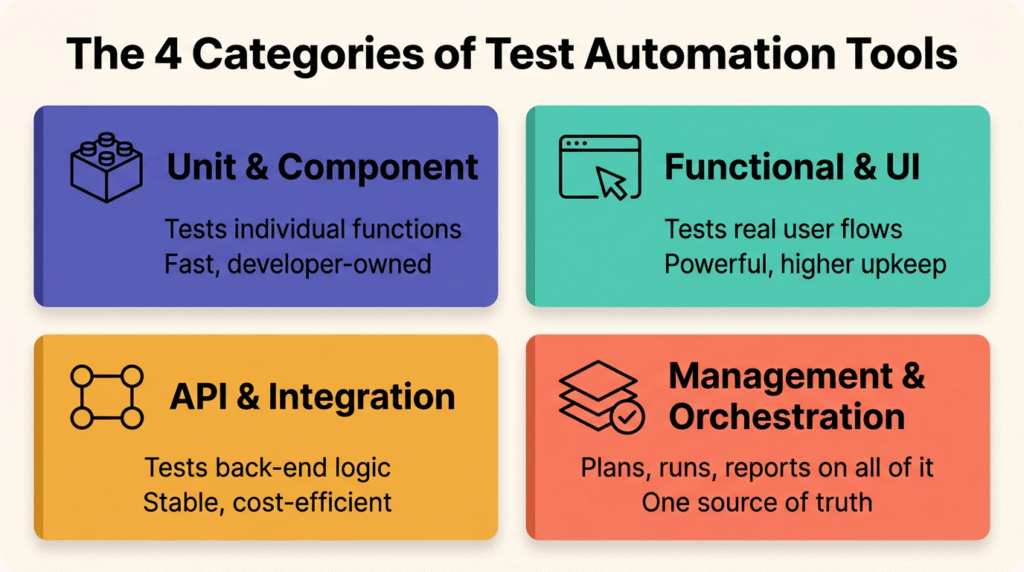
There is no single kind of automation tool, and pretending otherwise is how teams end up with the wrong one. The market sorts into a handful of categories, each built for a different layer of the application. Knowing which layer you are testing tells you which tool you actually need.
Before the breakdown, here is a quick reference table mapping common categories to what they test and where they fit best.
| Category | What it tests | Best fit |
|---|---|---|
| Unit and component tools | Individual functions in isolation | Developers, early in the dev cycle |
| Functional and UI tools | End-to-end user flows in a browser | QA engineers validating real journeys |
| API and integration tools | Back-end services and how modules talk | Teams with microservices or heavy APIs |
| Management and orchestration platforms | Planning, running, and reporting across all of the above | QA leads who need one source of truth |
Unit and Component Testing Tools
Unit testing isolates a single piece of your code and checks it on its own, with no database, network, or other dependencies in the way. These tests run fast and live closest to the developer, which is why they form the base of most testing strategies. Frameworks here are typically language-specific and code-based, so they assume comfort with writing test logic. The payoff is early bug detection, before a defect ever reaches a shared environment.
Functional and UI Testing Tools
Functional and UI tools simulate a real user moving through your application, clicking buttons, filling forms, and checking that the right thing happens. This category includes the well-known browser automation testing tools that record or script user journeys and replay them across browsers and devices. They are powerful for confirming that critical paths like checkout or login still work, though they tend to be more brittle and need more upkeep than lower-level tests.
API and Integration Testing Tools
API and integration tools verify the back-end logic and the way different modules communicate, without touching the user interface at all. Because APIs change less often than front-end layouts, these tests are usually more stable and cheaper to maintain, which is why many teams are investing here first. Integration testing extends the idea to whole groups of components, confirming they behave correctly as a system rather than in isolation.
Test Management and Orchestration Platforms
The categories above generate a lot of activity, and without something tying them together you end up with results scattered across tools and no clear picture of quality. Test management and orchestration platforms sit on top, organizing test cases, scheduling runs, pulling in automated results, and turning all of it into reports a team can act on. This is the layer that connects automation to planning, requirements, and your broader DevOps workflow.
What Can You Do With Test Automation?
The point of these tools is not “running tests” in the abstract. It is solving specific, recurring problems that eat engineering time. The real payoff of test automation in software testing shows up in a handful of repeatable jobs where automation consistently earns its keep:
- Regression testing. Every code change risks breaking something that worked yesterday. Automated regression suites catch that fast, which is why a solid regression testing strategy is one of the highest-ROI places to start.
- Smoke and sanity checks. Quick automated runs after each build confirm the core features still work before anyone invests time in deeper testing.
- CI/CD pipeline gates. Wiring tests into your pipeline means every commit gets validated automatically. Done well, test automation in CI/CD pipelines becomes a non-negotiable quality gate rather than a manual afterthought.
- Cross-browser and cross-device coverage. Automation runs the same checks across dozens of environments in parallel, which is impractical by hand.
- Data-driven testing. One script runs against many sets of input data, expanding coverage without multiplying the work.
The market reflects how central this has become. According to Fortune Business Insights, the global automation testing market was valued at around 20.6 billion dollars in 2025 and is projected to grow at roughly a 16.8% annual rate through 2034. Tools are proliferating because the demand is real.
Which Tests Should You Automate, and Which Should You Skip?
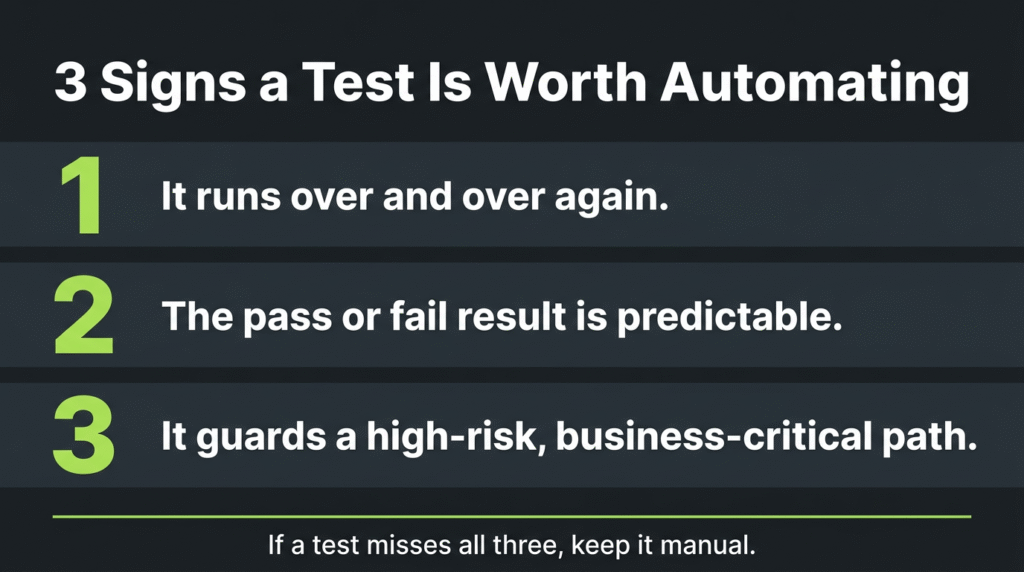
This is where teams waste the most money. Automating the wrong tests creates a maintenance burden that quietly drains more time than it saves. Effective test automation in software testing comes down to three things: repeatability, stability, and risk.
Good candidates for automation share a few traits. They run frequently, they have predictable pass or fail outcomes, they cover high-risk or business-critical paths, and they are tedious or slow to do by hand. When a test checks most of those boxes, automating it pays off quickly.
Some tests are better left manual, at least for now. Test cases that have never been run manually, requirements that change constantly, one-off ad hoc checks, and anything assessing real user experience belong with a human. This is the home of structured exploratory testing, usability testing, and visual review, where intuition and context matter more than speed. Automating an unstable test just bakes in rework every time the feature shifts.
How Do You Choose the Right Test Automation Software?
Choosing a tool is less about feature checklists and more about fit. Not all automation testing tools are built the same, and the strongest option for one team is the wrong call for another. Run any candidate through these criteria before you commit:
- Coding skill required. Code-based frameworks are flexible but demand engineering time. Low-code and codeless options open automation to less technical testers. Match the tool to your team’s actual skills, not aspirational ones.
- CI/CD and integration fit. A tool that does not slot cleanly into your pipeline, source control, and issue tracker creates friction that erodes adoption. Native integrations beat brittle workarounds every time.
- Maintenance burden. Every script is a long-term commitment. Ask how the tool handles changing locators and flaky tests before you scale, because maintenance is where automation programs usually go to die.
- Reporting and analytics. Tests are only useful if you can act on the results. Strong reporting turns raw pass or fail data into trends and decisions.
- Management and traceability. As suites grow, you need a way to connect tests to requirements and see overall coverage in one place.

To make this concrete, here is how the broad tool categories tend to stack up against those criteria.
- Code-based frameworks offer maximum control and zero licensing cost, but carry the steepest learning curve and the heaviest maintenance load.
- Low-code and codeless platforms lower the skill barrier and speed up authoring, at the cost of some flexibility for highly custom scenarios.
- AI-driven tools add self-healing scripts and AI-generated test cases that reduce upkeep, though they still need human oversight on what to test and why.
- Test management platforms like TestQuality handle the orchestration layer, organizing manual and automated tests in one place. TestQuality is built around native GitHub and Jira integration, supports Gherkin and BDD workflows, and connects to common automation frameworks, so results from your existing tools surface alongside your test plans and requirements rather than in a separate silo. For teams that want planning, execution, and reporting unified instead of stitched together, that orchestration layer is often the missing piece.
The honest answer is that most mature teams run a combination: a framework or two for execution, plus a management layer to keep it coherent.
How Do AI and QA Agents Change Automation Testing?
The biggest shift in the last two years is that automation tools are moving from passive script runners to active participants. Older tools waited for you to write and trigger everything. Modern platforms increasingly act as an intelligent layer that proactively assists across the workflow, from creating tests to maintaining them when the application changes.
This matters because AI is now woven through software development broadly. McKinsey’s State of AI research puts AI adoption across business functions near 88%, and QA is no exception. Practically, this shows up as AI test case generation that turns a user story into ready-to-run scenarios in seconds, self-healing tests that fix their own broken locators, and QA agents that can read a codebase and propose coverage. The same capability extends to newer workflows like agentic testing with terminal AI agents and the discipline needed to validate AI-generated code before it ships.
The teams getting real value treat AI as an accelerator, not an autopilot. AI handles the mechanical work of generating and maintaining tests. Humans keep the strategic calls about what to test, at what level, and at what priority. That division of labor pairs naturally with Gherkin and BDD best practices, where plain-language scenarios give both people and AI a shared, readable spec to work from.
Build a Faster, Smarter Testing Workflow
Test automation software has grown from a nice-to-have into the backbone of how quality teams keep pace with continuous delivery. Pick tools that match your stack and skills, automate the tests that actually pay off, and keep a management layer that turns scattered results into decisions.
When you’re ready to bring planning, manual testing, and automation under one roof, TestQuality is an AI-powered QA platform whose QA Agents help drive your workflow from test creation through execution. You can even generate test cases with AI using TestStory.ai to turn requirements into Gherkin-ready scenarios in seconds. Start a free trial of TestQuality and see how much faster quality moves when your tools work together.
Frequently Asked Questions
What is the difference between test automation and manual testing?
Manual testing has a person interact with the application directly, using judgment to find issues, while automation runs predefined scripts that check the same things repeatedly without human effort. Manual testing is better for exploratory and visual work, and automation is better for speed, scale, and repetitive checks. Most teams use both.
Is test automation software hard to learn?
It depends on the tool. Code-based frameworks require programming skill and have a steeper curve, while low-code and codeless platforms let less technical testers build automation through visual steps or keywords. Many teams start with the easier tools and add code-based options as their needs grow.
Can automation testing tools work with CI/CD pipelines?
Yes, and that is one of their biggest strengths. Most modern automation tools integrate with CI/CD systems so tests run automatically on every code change, giving teams fast feedback and acting as a quality gate before code reaches production.
Does AI replace human testers?
No. AI accelerates the mechanical parts of testing, such as generating and maintaining test cases, but humans still decide what to test, judge ambiguous results, and handle exploratory and usability work that needs context. The strongest teams pair AI speed with human judgment.