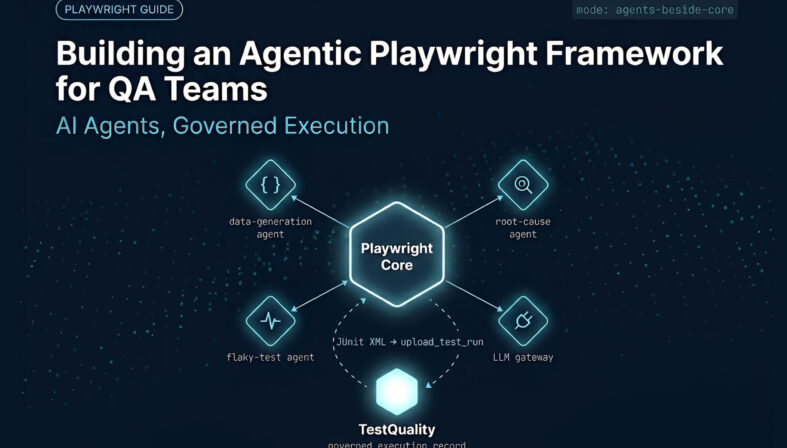
An agentic Playwright framework is a Playwright test suite extended with AI agents that handle bounded work around execution: generating schema-controlled test data, analyzing failure evidence, and surfacing flaky-test patterns. Playwright still owns browser automation, assertions, and pass/fail reporting — agents sit beside that loop, not inside it. Each agent reads a defined input, such as a JSON schema or a failure report, and returns an artifact — generated data or a root-cause hypothesis — that an engineer validates before it affects a release decision. This pattern earns its place once Faker-style libraries and manual triage stop scaling, and a test management platform gives those artifacts a governed home.
At a Glance
Adding AI agents to Playwright without destabilizing it
Use AI for interpretation and generation, not as a substitute for deterministic execution.
Architecture: Keep an AI layer separate from page objects, fixtures, and existing Playwright utilities.
First use case: Generate schema-controlled, domain-specific test data that Faker-style libraries can't model well.
Analysis: Use post-run agents for root-cause hypotheses, severity suggestions, and flaky-test signals.
CI/CD: Connect through Playwright's JUnit reporter and the TestQuality CLI — not automatic ingestion.
Governance: Treat every generated output as a reviewable artifact, with secrets and model selection kept outside source code.
A useful agent in a Playwright framework has a narrow purpose, reliable inputs, and an explicit place in the engineering workflow.
What does an agentic Playwright framework look like?
An agentic Playwright framework pairs deterministic Playwright execution with AI agents that generate test data, interpret failures, and flag flaky behavior around that execution. Playwright still drives the browser and renders the pass/fail verdict; agents produce supporting artifacts that engineers review before those artifacts influence any test or release.
A conventional Playwright suite follows predetermined steps: it loads data, drives the browser, performs assertions, and records results. An agentic layer adds a controlled decision-support capability before or after that loop, without changing how Playwright executes a test. This is a narrower pattern than the broader shift toward autonomous software testing, where AI takes on progressively larger portions of the QA lifecycle — an agentic Playwright framework is one concrete, execution-adjacent implementation of that trend.
For example, a data-generation agent can read a JSON schema and produce a connected customer, vehicle, and financing record for a car-purchase scenario. After a run fails, a separate analysis agent can read the failure details and return a structured record: a suspected cause, a severity suggestion, and a recommended next check. Neither output should silently change test logic or determine whether a release is safe.
This distinction matters because Playwright's reporter documentation shows that results can be emitted in machine-readable formats such as JSON and JUnit XML. Those deterministic records are a far better input to an analysis agent than a summary assembled by hand.
Gartner projects that 40% of enterprise applications will be integrated with task-specific AI agents by the end of 2026, up from less than 5% at the start of 2025 — an eight-fold increase in a single year. QA tooling is following the same curve, which is why the architecture decisions in this article matter now rather than later.
Why should AI agents sit beside, rather than inside, existing Playwright test code?
AI agents belong beside a Playwright framework, not inside it, because mature suites already contain working page objects, fixtures, and assertions. Isolating the agentic layer limits regression risk, keeps code review manageable, and lets a team disable AI capabilities entirely without touching standard test automation.
Create a dedicated branch for experimentation, then add new modules instead of rewriting existing framework components. A lightweight structure might include:
- LLM gateway: A single interface for model requests and provider configuration.
- Agent definitions: Focused modules for data generation, failure analysis, or flaky-test analysis.
- Prompt and schema files: Versioned inputs that describe required output.
- Generated-artifact storage: A predictable folder for timestamped data and analysis reports.
- Tests for the agent layer: Basic checks that validate file creation, schema conformance, and failure handling.
This design prevents a common mistake: embedding long prompts directly in page objects or test specs. Page objects should describe application interactions. Agent modules should describe AI-assisted quality tasks. The separation makes both easier to maintain and easier to remove if the experiment doesn't pay off.
What is the MCP server architecture for connecting agents to a Playwright framework?
The MCP (Model Context Protocol) server architecture lets an AI agent control a Playwright browser directly, using structured accessibility snapshots instead of screenshots or raw DOM. Playwright's official MCP server exposes browser actions as callable tools, so coding agents can navigate, fill forms, and extract page data.
This is a different integration path from the data-generation and analysis agents described elsewhere in this article. MCP lets a general-purpose coding agent — running inside an IDE or a chat interface — drive a Playwright browser as one of its available tools. An LLM gateway, by contrast, centralizes the calls a narrower, task-specific agent makes out to a model provider for generation or analysis work. The two patterns are complementary: a team might use MCP so a coding assistant can explore an application interactively, while still running the schema-constrained data and analysis agents described later in this article as part of the automated suite itself.
Teams building a full agent-driven browser automation layer — permission scoping, session handling, tool definitions, and multi-step navigation — should treat that as its own architecture decision. The deep dive on MCP server architecture for Playwright covers tool definitions, permission boundaries, and session handling in the depth that decision needs.
How should an LLM gateway support multiple model providers?
An LLM gateway should expose one stable request contract while the model endpoint, API key, and selected provider stay in external configuration. That separation lets an agentic Playwright framework switch providers or models per environment without rewriting the data-generation or analysis agents that call the gateway.
Many providers offer APIs that follow conventions similar to chat-completion APIs. The practical benefit is portability, not guaranteed interchangeability. Request fields, supported models, safety controls, pricing, rate limits, and response behavior still vary. Consult the provider documentation, such as the OpenAI Chat Completions API reference, before treating two endpoints as drop-in replacements.
A gateway should accept inputs such as a prompt, system instructions, desired model, and an expected output type. It should return either validated structured output or a clear error object. Keep API keys in environment variables or CI/CD secret stores, never in committed configuration files.
What belongs in configuration:
- Provider base URL and model identifier
- Environment variable name for the API key
- Timeout and retry policy
- Default temperature or equivalent generation setting
- Whether the caller requires JSON-only output
Do not make a model name a hidden constant inside a data generator. Configuration belongs outside the agent so CI/CD jobs can use a model appropriate to the environment and budget.
How can an AI data-generation agent improve Playwright test data while managing context?
An AI data-generation agent helps when a scenario needs coherent records that Faker-style libraries can't model, like a customer linked to vehicle and financing details. Constrain it with a schema and a scoped prompt, save the output to a JSON file, and validate it before a test reads it.
Generic generators remain useful for names, dates, addresses, and simple identifiers. They become less convenient once a test needs connected entities and business constraints — a car-sales workflow that needs a customer profile, a vehicle identification number, model details, purchase constraints, and financing information that agree with one another.
Feeding an agent unscoped project context to make its output "smarter" is a common mistake. The safer pattern is two narrow inputs: a schema or structure file that defines the fields, nesting, allowed values, and required types, and a scenario prompt that defines the test purpose, such as a customer buying a vehicle under a given budget. Keeping that payload small and specific is a matter of context and payload management — a bloated or stale context window degrades a data-generation agent's output the same way it degrades any other LLM task.
The agent should save its response to a unique JSON file in a generated-data folder and return that path to the calling test. The Playwright test then reads the file as ordinary data, which keeps the browser test deterministic once generation completes. Validate every generated artifact before use: check required fields, field types, business rules, and forbidden content. A syntactically valid JSON document can still be semantically wrong for the scenario.
How does an agentic execution loop connect back to your project control plane
When you design an agentic Playwright framework, you establish a clear boundary: Playwright executes the browser automation and handles assertions, while AI agents sit beside that loop to assist with analysis, test data generation, and failure diagnostics. This pattern maintains deterministic execution. However, once your local suite finishes running and the agent compiles its failure analysis, a practical question remains: where does this evidence live, and how does it relate back to your project requirements?
In a typical development stack, issues live in a tracker like Jira or Linear, while test cases and execution results live in a separate test-management tool or inside transient CI logs. When you introduce AI agents into this environment, the gap between the issue tracker and the execution platform becomes a bottleneck. The agent might run a local Playwright test and identify a failure, but updating the tracking ticket, linking the failing spec, and updating the traceability matrix still requires manual coordination.
Levr takes a different approach by collapsing these separate tools into a single project control plane. In Levr, issues, tests, and run results live within the same unified graph. Rather than forcing a connector to sync data between a tracker and a test tool, coverage is treated as a native, live relationship between an issue's acceptance criteria and its corresponding test cases.
This design matches the "agents beside the execution loop" pattern but scales it to your entire project. Just as your local agent interacts with Playwright, Levr exposes a dedicated set of tools over the Model Context Protocol (MCP) to your coding agents—specifically start_run, record_results, and finish_run. When an agent works on an issue, it reads the structured acceptance criteria, initiates a test run through the MCP interface, executes the test suite and records the results directly back to the control plane..
Crucially, this loop maintains strict human governance. Every change and run result recorded by an agent is explicitly attributed to that agent's identity, ensuring a clear audit trail across your entire team. While the agent can autonomously author tests against acceptance criteria, execute runs, and log the proof, it remains governed by defined quality gates and workflow states. Crucially, this loop stays governed. Every change and run result an agent records is explicitly attributed to that agent's identity, giving you a clear audit trail across the team. Whether an issue requires human sign-off before it can close, or is set to run fully autonomous with tests green as the only bar, is a configuration choice, but either way the gate holds until its conditions are actually met. You delegate the repetitive execution and documentation work; the release criteria stay exactly as strict as you define them. This allows you to delegate the repetitive execution and documentation work to your agents while maintaining final release authority.
If you want to see how this unified graph changes the way your team tracks test execution and requirements coverage, you can explore the underlying platform architecture.
Beyond the Test Run
Where does agent-generated evidence live once the run finishes?
Post-run agents can analyze failures and flag flaky tests — but that evidence still needs a home. Levr, an agent-first project control plane, keeps issues, tests, and run results in one graph, so a result an agent produces is never stranded in a CI log waiting to be manually linked back to the work it proves.
Exposed as agent-native actions over MCP:
start_run, record_results, and finish_run — no manual sync back to the tracker
Coverage stays a live relationship on the issue's acceptance criteria, not a separate report
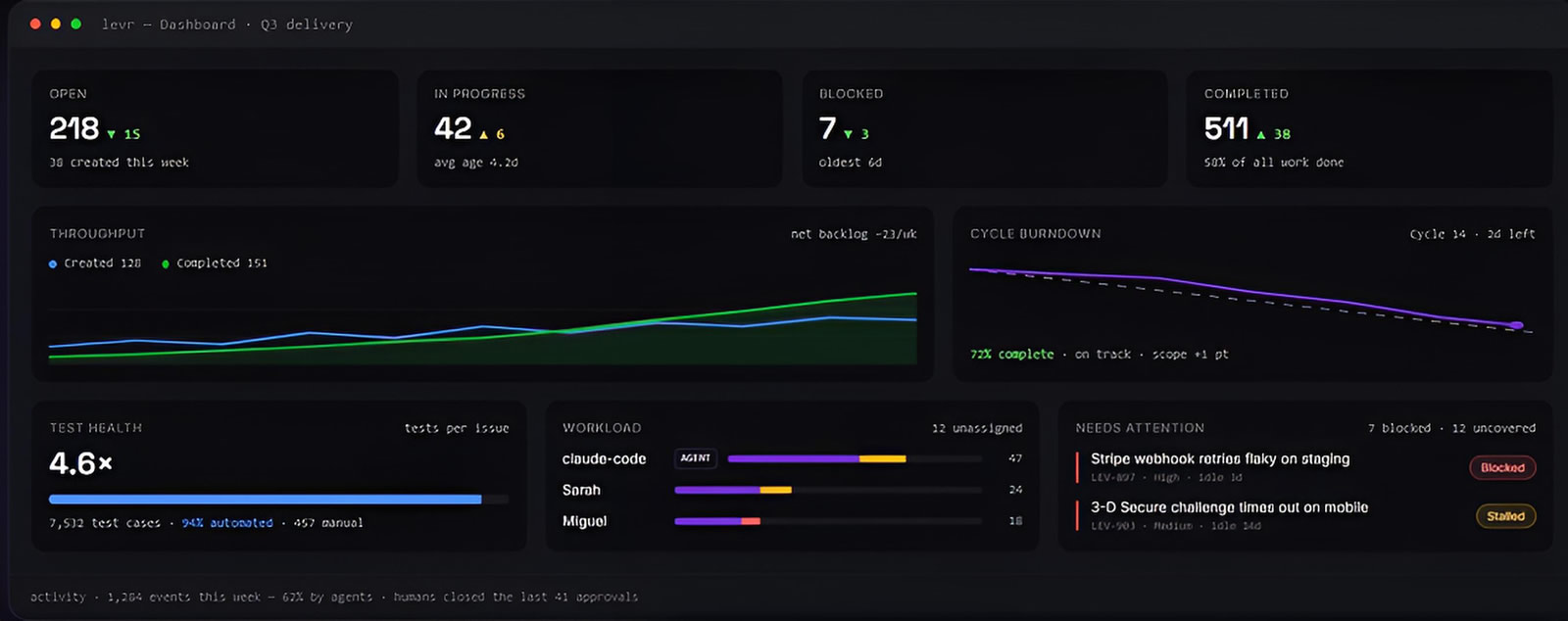
See Levr's agent-run execution →
What can post-run agents do with Playwright results?
Post-run agents turn structured Playwright failures into reviewable root-cause hypotheses, severity suggestions, and investigation notes. They're most valuable when they organize recurring evidence across a JUnit XML or JSON report — but no team should treat an agent's verdict as a confirmed defect diagnosis.
A root-cause analysis agent can receive the failed test name, error message, stack trace, environment metadata, screenshots or traces when available, and the relevant result JSON. It can return a structured record with fields such as:
- Suspected failure category
- Possible root cause
- Suggested severity and priority
- Recommended next check
- Confidence level or evidence gaps
The important word is suspected. An assertion failure could reflect an application defect, an outdated expectation, unavailable test data, a bad environment, or an automation issue. AI can speed up triage by organizing evidence, but the assigned engineer still verifies the conclusion.
One practical workflow is to attach the AI analysis to a custom report rather than overwrite the original result. Preserve the source error, timestamps, and execution status alongside the generated interpretation. This creates an audit trail and lets teams compare agent suggestions against eventual resolution.
How should teams detect and stabilize flaky Playwright tests with AI?
AI helps detect flaky Playwright tests by summarizing patterns across historical runs — intermittent pass/fail outcomes, retries, durations, and error signatures — and suggesting likely contributors such as timing or unstable selectors. A flake label still needs repeated evidence from comparable runs, not a single surprising failure.
Feed the agent records from multiple builds — retry outcomes, duration changes, error signatures, environment details, and affected areas — and ask it to classify likely patterns: timing sensitivity, unstable selectors, shared-state contamination, service dependency issues, or inconsistent test data. Do not let an agent auto-quarantine every intermittent test; that hides real regressions.
For a structured, step-by-step approach to isolating the cause once an agent flags a candidate, see the flaky test stabilization playbook, which covers retry-based confirmation, selector hardening, and shared-state isolation in more depth than a single section can. The final decision should distinguish a suspected flake from an uninvestigated failure — a distinction that stays with the engineer, not the agent.
How do you evaluate whether an agent's output is trustworthy enough to use?
Evaluating an agent's output means scoring it against a rubric before trusting it in a test suite — checking schema conformance, factual accuracy against source documents, and consistency across repeated runs on the same input. A single plausible-looking output is not the same as an agent that is reliably right.
That hesitation is well-founded. The 2025 Stack Overflow Developer Survey found that while 84% of developers now use or plan to use AI tools in development, only about 18% currently use AI mostly for testing tasks, and roughly 44% don't plan to use AI for testing at all — the widest adoption gap of any development activity the survey measured. Evaluation discipline is largely what separates those two groups.
Treat each agent role — data generation, root-cause analysis, flaky-test classification — as its own small model task with a dedicated test set: known-good schemas it should pass, known-bad payloads it should reject, and ambiguous cases where a human reviewer's judgment becomes the benchmark. For a deeper framework on building that test set and scoring rubric, see the guide to LLM evaluation. Re-run the evaluation set whenever a prompt, schema, or model version changes — a gateway upgrade that silently swaps models is a common source of regression in agent output quality.
How do you connect an agentic Playwright framework to CI/CD pipelines?
Connect an agentic Playwright framework to CI/CD the same way you connect any Playwright suite: configure the JUnit reporter to output XML, then use the TestQuality CLI's upload_test_run command to push results into a named TestQuality project and test cycle. Agent-generated artifacts travel alongside that upload as separate, linked files.
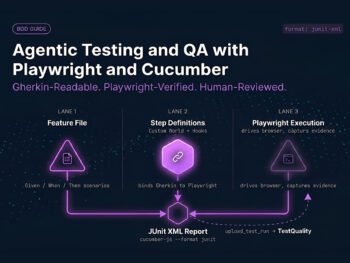
Playwright's JUnit reporter is the connector's input format. A minimal configuration looks like this:
// playwright.config.js
export default {
  reporter: [['junit', { outputFile: 'test-results/results.xml' }]],
};
Once Playwright writes that file, the TestQuality CLI uploads it from a local machine or a CI/CD job with a command such as testquality upload_test_run, targeting a specific project and test cycle. The CLI is what makes the integration operational — TestQuality does not auto-discover or auto-ingest Playwright runs without it. See the CLI command reference for project and cycle management, attachments, and defect-linking options beyond the basic upload.
Once results land in TestQuality, pass/fail status, execution metadata, and trend data flow into run history and reporting automatically. What stays manual, by design, is defect logging: a tester reviews a failure — potentially alongside the agent's root-cause hypothesis from earlier in this article — confirms it's a genuine defect rather than flake or expected change, and logs it in TestQuality. From there, TestQuality's GitHub and Jira integrations sync that defect record to the team's tracker without further manual copying.
How do you make agent prompts specific to your application?
Application-specific prompts come from grounding an agent in real workflow rules, existing tests, API helpers, and page-object conventions — not from a generic template. A project-aware test-planning agent can draft against the actual paths users and systems follow instead of producing broad, boilerplate suggestions.
A test-planning agent should know what the application does, which routes matter, how authentication works, what APIs exist, and what fixtures already provide. It also needs explicit boundaries. For example, tell it to identify coverage gaps and draft scenarios, but not to change tests automatically.
Useful project context includes:
- Existing end-to-end test files and naming conventions
- Reusable API request helpers and fixtures
- Known business workflows and preconditions
- Required assertions and risk areas
- Expected output format for a test plan or test cases
Store this guidance in version-controlled agent-definition files rather than relying on undocumented chat history. Review prompt changes as carefully as test-code changes. A broadly capable agent becomes useful only when its instructions match the system under test.
How can TestQuality support an agentic Playwright QA workflow?
TestQuality supports an agentic Playwright workflow by giving AI-generated artifacts — test cases, run results, defect records — a governed home instead of a scattered chat history. TestStory.ai generates structured test cases from project assets, syncs them into TestQuality, and keeps them linked to the GitHub and Jira work they cover.
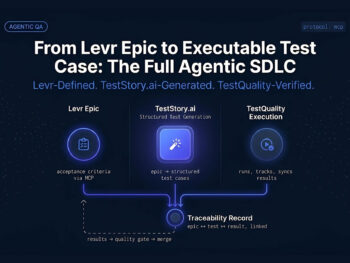
The canonical workflow: feed a supported input into TestStory.ai — a Jira issue, GitHub issue, user story, epic, process diagram, or source code — and it generates structured test cases from that input. The cases sync automatically into TestQuality, where a team groups them into a run or cycle for the current release, executes them, and records pass, fail, or blocked status. Coverage trends and reports follow, with defects linking back to Jira or GitHub automatically once a tester confirms them.
TestStory.ai also connects with MCP-compatible agentic developer tools — Cursor, Claude Code, VS Code with Copilot, and Roo — so a developer working inside one of those environments can generate test cases as a native step, rather than switching to a separate tool. According to the TestQuality documentation, teams can create test cases, launch runs, record actual results, complete runs, and review quality insights from the same project structure agent-generated cases land in.
This is the practical bridge between the data-generation and root-cause-analysis agents described earlier in this article and a durable execution record: keep generated test data separate from test cases, but link agent analysis and defects to the relevant run. That preserves traceability without confusing an AI suggestion with a confirmed outcome.
A practical handoff sequence: have the agent scaffold the framework and draft test cases or scenarios; review output and remove weak, duplicated, or incorrect entries; create the approved test cases in TestQuality under the appropriate project; group them into runs or cycles for the current release; execute and record pass, fail, or blocked status; and use built-in reports to track progress, defect trends, and coverage over time.
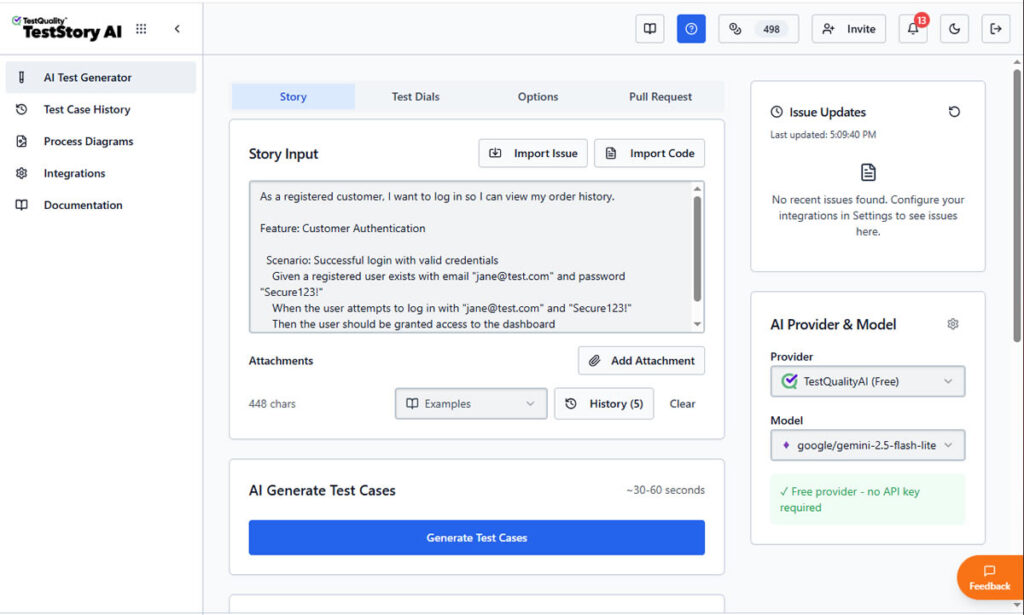
TestStory.ai, which is included with every TestQuality subscription, handles the same first-draft problem with governed output. It accepts project assets directly: Jira issues, GitHub issues, user stories, epics, process diagrams, or source code. From any of those inputs, it generates structured test cases that sync automatically into TestQuality. It also integrates with MCP-compatible agentic developer tools (Cursor, Claude Code, VS Code with Copilot, and Roo) so test generation becomes a native step inside the existing development workflow rather than a separate process. For teams already using Claude Code as a terminal agent, the TestStory.ai + TestQuality combination is the governed layer that sits alongside it.
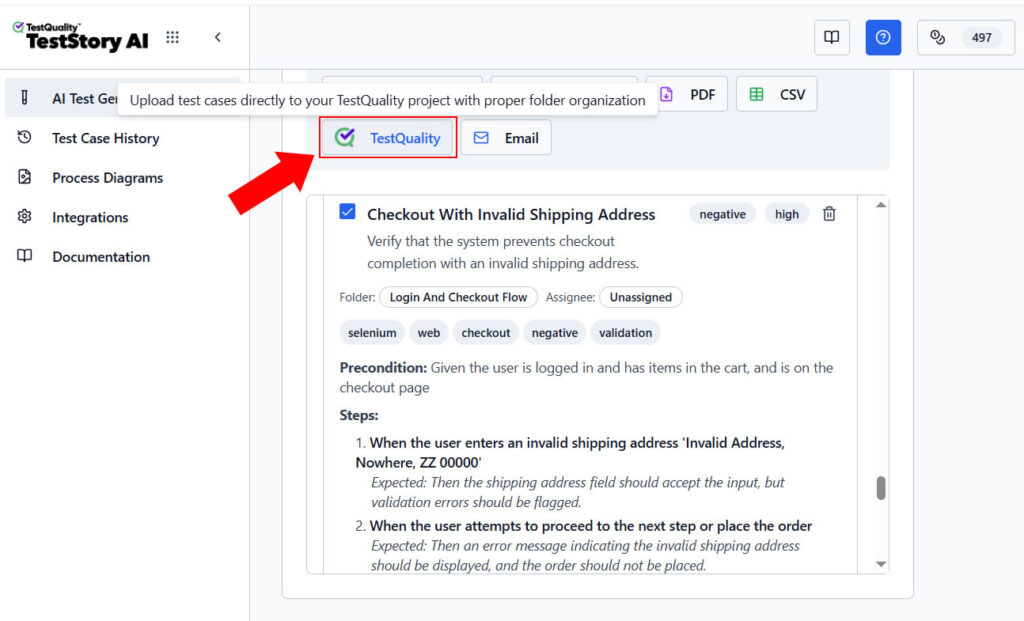
Because TestQuality integrates natively with GitHub and Jira, approved test cases stay linked to the issues, branches, and pull requests they cover.
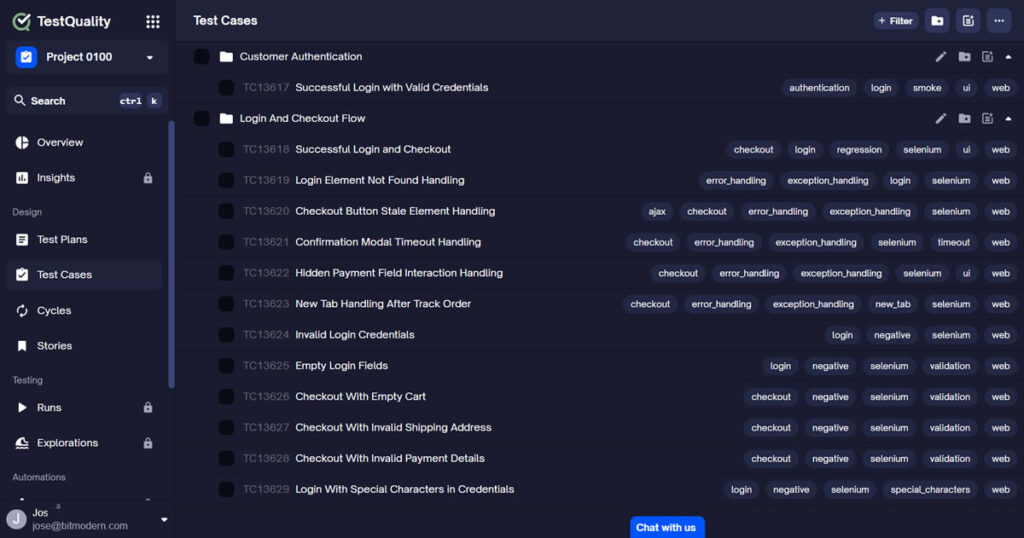
That linkage is what keeps agentic QA work from stranding valuable output in a folder no one opens again.
What mistakes can undermine an agentic Playwright framework?
An agentic Playwright framework fails when agents get unrestricted authority, vague prompts, unvalidated data, or secret access beyond their task. Start narrow: one gateway, one schema-constrained agent, one test proving the pattern works end to end, and logging detailed enough that a failure is easy to diagnose.
- Using free-form output as test data: Require a schema and validate the returned JSON before a test consumes it.
- Hardcoding credentials: Use environment variables and CI/CD secret management for all provider keys.
- Modifying stable framework code: Add agents as new modules until their value is proven.
- Calling every intermittent result a flake: Use historical evidence and human investigation, not a single surprising failure.
- Trusting AI root-cause labels blindly: Preserve source logs and treat analysis as a hypothesis.
- Skipping evaluation before trusting output: Score agent output against a rubric, not a first impression.
- Using generic prompts forever: Ground planning agents in application workflows and team conventions.
The most effective first implementation is modest: one gateway, one custom-data agent, one focused test proving the data can be generated and consumed, and logging that makes failures understandable. Expand only after the workflow is stable.
Technical Deep Dive FAQ
Key Takeaways
A practical path to an agentic Playwright framework
Start with a narrow workflow and make every output inspectable.
Separate concerns: Keep agents outside stable Playwright page objects, fixtures, and assertions.
Centralize access: Use an LLM gateway so credentials, endpoints, and models stay configurable.
Constrain context: Use schemas, scoped prompts, and validation for every AI-generated test-data artifact.
Connect deliberately: Route CI/CD through Playwright's JUnit reporter and the TestQuality CLI, not assumed auto-ingestion.
Keep humans accountable: AI suggestions inform QA decisions in a Playwright framework; they don't make them.
"The strongest agentic Playwright framework makes its assumptions, evidence, and limits easy to inspect."
Who is the author?
Jose Amoros is part of the TestQuality marketing team, focused on agentic QA, AI-powered test management, and the operational handoff between AI-generated test artifacts and governed execution workflows. He writes regularly about CI/CD integration, Gherkin/BDD practices, and shift-left testing.
What should you read next?
- Playwright test reporters documentation
- Playwright MCP official documentation
- 2025 Stack Overflow Developer Survey — AI section
- Gartner: 40% of enterprise apps will feature task-specific AI agents by 2026
- TestQuality CLI documentation
- TestQuality test management platform features
Start Free Today
Transition from script-writing to outcome-orchestration.
TestStory.ai generates structured test cases from your user stories, acceptance criteria, or architecture diagrams — then syncs them directly into TestQuality for execution, tracking, and team collaboration.
Get 500 TestStory.ai credits every month included with your TestQuality subscription — no extra cost.
No credit card required on either platform.