

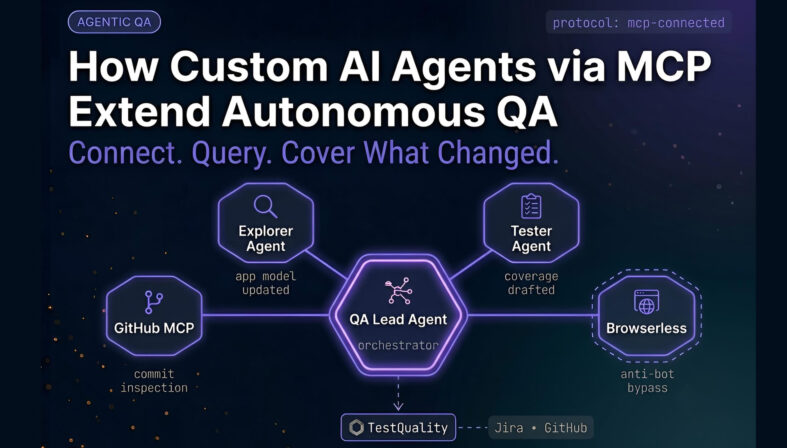
Custom AI agents via MCP (Model Context Protocol) let an autonomous QA system reach beyond its built-in skills by connecting to external tools such as GitHub and browser automation services. In practice, that means a QA agent can inspect source code changes, identify new features, compare them against existing test coverage, and create missing test cases automatically. For teams managing growing test suites, this turns AI from a closed assistant into a connected workflow engine. MCP is an emerging industry-standard interface for AI-to-tool connectivity — the same protocol that replaces one-off API integrations with a consistent, reusable connection layer. If you use a test management platform to organize manual and automated testing, MCP-connected agents matter because they keep test assets aligned with real application changes as they happen.
At a Glance
What MCP-connected QA agents actually add
The main shift is not smarter prompts. It is broader operational reach.
Definition: MCP lets QA agents call external tools and services instead of staying limited to native features.
Core use case: An agent can inspect a GitHub repository, detect recent feature changes, and add missing test cases.
Example tools: GitHub MCP servers and browser-focused agents such as Browserless can expand coverage and execution options.
Practical value: Connected agents can refine application models, create draft tests, and react to UI or logic changes.
Key caution: Better reach does not remove the need for governance, token scoping, and result review.
The useful question is not whether an agent can generate a test, but whether it can ground that test in the systems where change actually happens.
What are custom AI agents via MCP in QA?
Custom AI agents via MCP are external tool connections that allow a QA agent to use systems outside its native environment. Instead of working only from existing test assets and application exploration, the agent can query repositories, browser tools, and other connected services to make better testing decisions.
MCP, or Model Context Protocol, is increasingly used as a standard way for AI systems to connect with external tools. In a QA setting, that means an autonomous agent can ask another service to fetch commits, inspect repository content, or perform browser-related operations.

This matters because many testing gaps are not caused by weak test logic. They happen because the system creating tests cannot see the latest source changes, open pull requests, or operational signals outside the application itself.
When MCP is added, the QA workflow shifts from isolated automation to connected automation. According to the official MCP documentation, the protocol is meant to standardize how AI applications access tools and data sources, which is exactly the kind of structure autonomous QA needs.
Why do autonomous QA agents need external tools at all?
Autonomous QA agents need external tools because application behavior is only part of the testing picture. Real test coverage also depends on source code changes, repository history, environment details, and browser behavior that may sit outside the agent’s default scope.
An internal explorer can discover pages and flows. A tester agent can execute or draft coverage. A QA lead agent can coordinate. But without external context, those agents may miss the reason something changed.
For example, a new business rule might be merged into the repository hours ago, while the user interface still looks mostly unchanged. If the agent only explores the app visually, it may not infer the updated logic. A repository-aware workflow closes that gap.
This is one of the recurring limits in autonomous software testing workflows, the system is capable, but blind to the wrong places. Official GitHub API documentation shows how much operational context is available through commits, pull requests, repository contents, and metadata. Exposing that context to a QA agent makes its decisions more grounded.
How does the QA lead, tester, and explorer pattern work with MCP?
The multi-agent pattern works by assigning specialized responsibilities and letting one coordinating agent invoke external tools when needed. The QA lead typically decides what information is missing, the external MCP tool retrieves it, and tester or explorer agents act on that context.
This division of labor is useful because not every action belongs in the same reasoning loop.
- QA lead agent: Coordinates analysis, decides when external systems need to be queried, and routes work.
- Explorer agent: Investigates application areas, adapts to UI changes, and updates the application model.
- Tester agent: Drafts or executes test cases based on the current understanding of behavior and coverage.
- External MCP agents: Supply repository data, browser actions, or other contextual inputs the internal agents do not natively hold.
In practice, the QA lead becomes the orchestrator. It does not need direct built-in knowledge of every external system. It only needs access to tools that can fetch the right facts at the right time.
Research on multi-agent systems supports this division of labor. A 2026 arXiv study on multi-agent evaluation frameworks describes a validated hierarchical topology — a central Planner coordinating specialized Navigator and Executor agents — that maps directly to the QA lead, explorer, and tester roles described here. Teams running these patterns at scale also route approved test artifacts through automation tools built for DevOps to close the loop between agent-generated coverage and CI/CD execution.
How does a GitHub MCP agent improve test coverage?
A GitHub MCP agent improves test coverage by exposing recent repository changes to the QA workflow. That lets an agent compare new commits or features against the current test inventory and generate missing coverage where the application has evolved.
Teams already using GitHub for test case management with AI will recognize this as a natural extension — the agent is not just linked to GitHub, it actively queries it to reconcile coverage gaps. That pattern is gaining traction fast: according to the Stack Overflow 2025 Developer Survey, 34.4% of developers are now using MCP servers for agent orchestration, with 42.8% specifically citing the GitHub MCP Server for agent memory and data management.
This is the clearest example of why external agents matter. If a repository contains a newly merged feature, an internal QA system may not know about it yet. Once a GitHub MCP connection is available, the coordinating agent can inspect commits and identify what changed.
The workflow described in the source material follows a simple sequence:
- The QA lead agent is asked to inspect a repository.
- It invokes the GitHub MCP server and uses repository-oriented tools such as commit listing.
- It checks existing test cases in the QA system.
- It identifies features or updates not already covered.
- It creates a draft or new test case for the uncovered change.
- It may also trigger refinement or application model updates if the UI changed.
That is more than test generation. It is coverage reconciliation between code change and test inventory.
What did the repository-change example actually demonstrate?
The repository example demonstrated a practical coverage gap: a new feature-related update existed in source control, but the current autonomous QA setup had not yet covered it. After checking recent commits through GitHub, the system identified the missing area and created a new draft test case.
The specific scenario involved a recent application update related to PF contribution calculation. The testing system already had dozens of tests, but that newly added change was not represented in the existing set.
Once the connected GitHub agent exposed recent commits, the QA workflow recognized that the latest repository update had not been tested yet. It then created a test case targeting that change and continued with additional refinement steps.
The significance is not the specific business rule. It is the mechanism:
- Change detected from the repository
- Coverage checked against current tests
- Gap identified automatically
- Test drafted without manual handoff
- Model refined as the application evolved
That is a strong pattern for teams trying to reduce lag between merged code and meaningful test coverage.
How do you connect a custom GitHub MCP server?
Connecting a custom GitHub MCP server usually involves adding the server URL, naming the agent, authenticating with a GitHub access token, and saving the available tool configuration. Once connected, the QA agent can invoke repository tools as needed.
From the workflow shown in the source material, the setup looks like this:
- Find the GitHub MCP server endpoint from the relevant GitHub MCP repository or documentation.
- Open the autonomous QA system’s agent connection screen.
- Choose to connect a new external agent.
- Enter a server name such as GitHub agent.
- Paste the MCP server URL.
- Authenticate using a GitHub personal access token.
- Review the tools exposed by the server.
- Save the configuration.
The described setup also noted that the system could detect authentication needs and display available tools automatically. In that example, the connected GitHub server exposed dozens of tools, which suggests broad capability for repository analysis and related operations.
Keep token scope as narrow as your use case allows. Read access is often enough for commit and repository inspection.
Do you need to manually tell the system when to use each tool?
Usually, no. In the described workflow, the coordinating QA agent was capable of understanding the tool set and deciding when to invoke the relevant MCP action. Manual tool instructions are optional and more useful for edge cases than normal operation.
This is an important design detail. If every external tool required hand-written routing rules, the system would become brittle quickly. A capable orchestrating agent should infer that commit history belongs to a repository tool and that browser tasks belong to a browser-focused tool.
Still, there are cases where explicit tool guidance can help:
- When two tools can perform similar actions
- When you want to restrict certain operations
- When tool invocation has cost or security implications
- When the task requires deterministic behavior for auditing
Think of manual invocation guidance as policy, not as a default requirement.
What can a browser-focused MCP agent add to autonomous testing?
A browser-focused MCP agent can add capabilities that go beyond standard navigation, including page scraping and help with anti-bot friction such as CAPTCHA-related obstacles. That makes it useful when the application under test is difficult to access through ordinary automated flows.
The example highlighted Browserless as an external agent that can help when sites treat automation as a bot and restrict access. It was also described as useful for scraping pages automatically.
That does not mean every test suite needs this. But it does show the value of MCP as an extension mechanism. If a QA platform’s built-in browser layer is not enough for a specific class of site behavior, an external agent can fill the gap.
Teams should treat this carefully. Any tool that interacts with anti-bot controls or protected flows needs legal, ethical, and organizational review.
Turn changing requirements into structured test cases.
If your team already tracks stories and issues in GitHub or Jira, TestStory.ai can convert that change stream into usable test cases — no setup required.
Try the free test case builder →How can teams apply this pattern in a test management workflow?
Teams can apply this pattern by treating repository change, AI-generated tests, and governed execution as a single pipeline. The external agent finds relevant changes, the QA agent drafts coverage, and a test management platform organizes review, execution, traceability, and reporting.
This is where a connected workflow matters more than standalone generation.
One practical approach is:
- Use GitHub or another source system as the authoritative signal for change.
- Let an MCP-connected QA agent inspect recent commits or merged work.
- Generate or refine test cases for uncovered features.
- Sync approved test cases into your test management platform.
- Run them manually or through automation, then track outcomes over time.
In TestQuality’s feature set, the relevant pieces are the centralized repository for test cases, run tracking, reporting, and integrations with systems like GitHub and Jira.
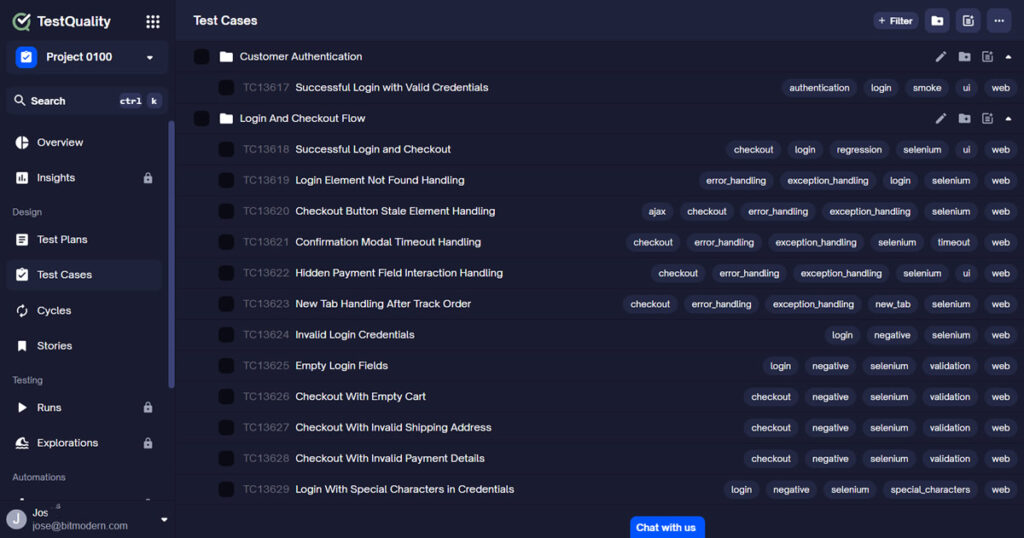
One way to handle this in TestQuality is to keep generated or revised test cases under controlled review before they are used in runs and cycles.

For teams new to the platform, the TestQuality docs show the core workflow: create test cases, create runs, execute, complete, and report. That governance layer is what keeps AI-generated artifacts useful instead of noisy.
What are the main limitations and risks of MCP-connected QA agents?
MCP-connected QA agents are useful, but they also add security, governance, and accuracy risks. The more systems an agent can access, the more carefully teams need to manage permissions, tool scope, review steps, and false confidence in generated coverage.
The common risks include:
- Over-scoped tokens: A broad GitHub token can expose more repository access than needed.
- Low-quality generated tests: A drafted test case may be structurally correct but strategically weak.
- Wrong inference from commits: A commit message or code diff may not fully represent business behavior.
- Tool sprawl: Too many connected agents can make workflows hard to reason about.
- Automation theater: Teams may assume a generated test equals validated quality.
This is why human review still matters. Even in a highly autonomous setup, someone should validate whether a new test case targets the right risk, the right user behavior, and the right acceptance boundaries.
What other MCP integrations are relevant beyond GitHub?
Beyond GitHub, other relevant MCP integrations include browser automation services, issue and project tools, and API-oriented services. The value depends on whether those systems hold signals that help your QA agents decide what to test, update, or investigate.
The source material mentioned a pipeline of possible MCP-compatible systems, including tools such as Atlassian, Linear, and Swagger-oriented integrations.
Those categories map to common testing needs:
- Issue tracking: Pull requirements, stories, or bug details from systems such as Jira or Linear.
- API description sources: Use schema or contract information to support API-focused test generation.
- Browser tooling: Reach sites and flows that basic automation struggles to handle.
- Repository systems: Inspect recent changes to keep tests aligned with application evolution.
If the topic is requirements-to-test mapping, this is where test management platforms like TestQuality often become the stable layer across changing upstream systems.
Key Takeaways
What matters most about MCP-connected QA
The real gain is not novelty. It is tighter alignment between change and coverage.
Scope: MCP extends autonomous QA by connecting external systems such as GitHub and browser tooling.
Coverage: Repository-aware agents can find recent feature changes and identify missing tests faster than app-only exploration.
Workflow: The strongest pattern is orchestrator agent plus external context plus governed test execution.
Control: Human review still matters for test quality, risk prioritization, and release confidence.
Implementation: Least-privilege access and clear integration boundaries are as important as the agent logic itself.
Good autonomous QA does not just create tests. It notices what changed, understands why it matters, and records the result in a way teams can trust.
Technical Deep Dive FAQ
About the Author
Jose Amoros is part of the TestQuality marketing team, focused on agentic QA, AI-powered test management, and the operational handoff between AI-generated test artifacts and governed execution workflows. He writes regularly about CI/CD integration, Gherkin/BDD practices, and shift-left testing. Author profile: Jose Amoros at TestQuality.
Further Reading
- Official Model Context Protocol documentation
- GitHub REST API documentation
- How to test and evaluate agentic systems for reliability — VirtusLab, Dec 2025
- TestQuality blog on QA, test management, and automation
- TestQuality features for test cases, runs, reporting, and integrations
- TestQuality documentation
Start Free Today
Transition from script-writing to outcome-orchestration.
TestStory.ai generates structured test cases from your user stories, acceptance criteria, or architecture diagrams — then syncs them directly into TestQuality for execution, tracking, and team collaboration.
Get 500 TestStory.ai credits every month included with your TestQuality subscription — no extra cost.
No credit card required on either platform.


