

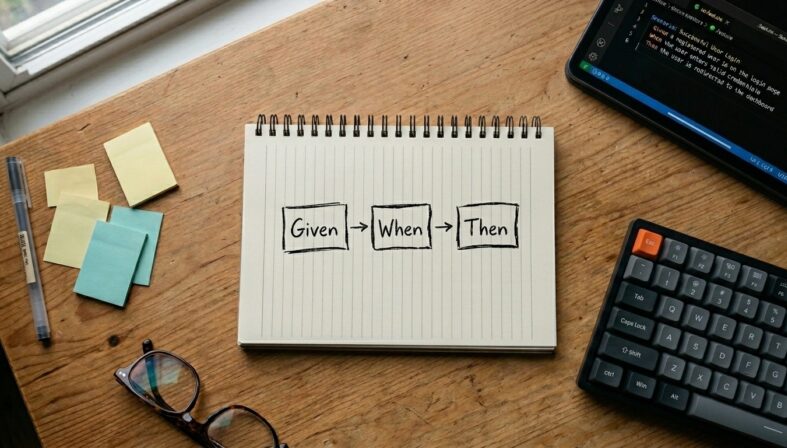
You can write a working Gherkin test in the next ten minutes, even if you've never opened a .feature file before.
- Gherkin tests use a Given-When-Then structure that reads like plain English but still drives real automation.
- The fastest way to learn is by writing one complete scenario, then layering in Background, Scenario Outline, and Tags.
- A reusable template removes the blank-page problem and gets your team productive on day one.
- Modern test management platforms turn isolated .feature files into a living, traceable test suite tied to your CI/CD pipeline.
If you're new to behavior-driven development and want a working example before you read another theory-heavy explainer, this walkthrough is for you.
Behavior-driven development is now mainstream, with test automation the leading area where Gen AI is making an impact. According to industry research, 72% of respondents reported faster automation processes as a result of Gen AI integration. Gherkin is the language that makes those automated specifications readable to humans. If you've landed here, you've probably read the theory and want to actually write something. The fastest way to learn how to write Gherkin tests is to write one, watch it run, then refactor it.
We'll start with a single scenario, build it up into a full feature file with multiple test cases, and finish with a reusable template you can drop into your repo today. By the end, you'll have working Gherkin test cases plus the mental model to write your own without copy-pasting Stack Overflow snippets.
What Is a Gherkin Test, Exactly?
A Gherkin test is a plain-text specification that describes how a piece of software should behave in a specific situation. It's written in a structured syntax that both humans and automation frameworks can read. The file lives in your repo as a .feature file, the framework (Cucumber, SpecFlow, Behave, pytest-bdd, and others) reads it, and each line is mapped to a piece of code called a step definition that actually exercises your application.
That's it. There's no magic. Gherkin is essentially a contract: when this happens, the system should do that. Your automation framework enforces the contract.
Gherkin software testing lets a product manager, QA engineer, and developer all read the same scenario and agree on what "done" means before anyone writes production code. That shared understanding is the whole point of BDD, and the official Gherkin reference documents the syntax that makes it possible across dozens of spoken languages and programming environments.
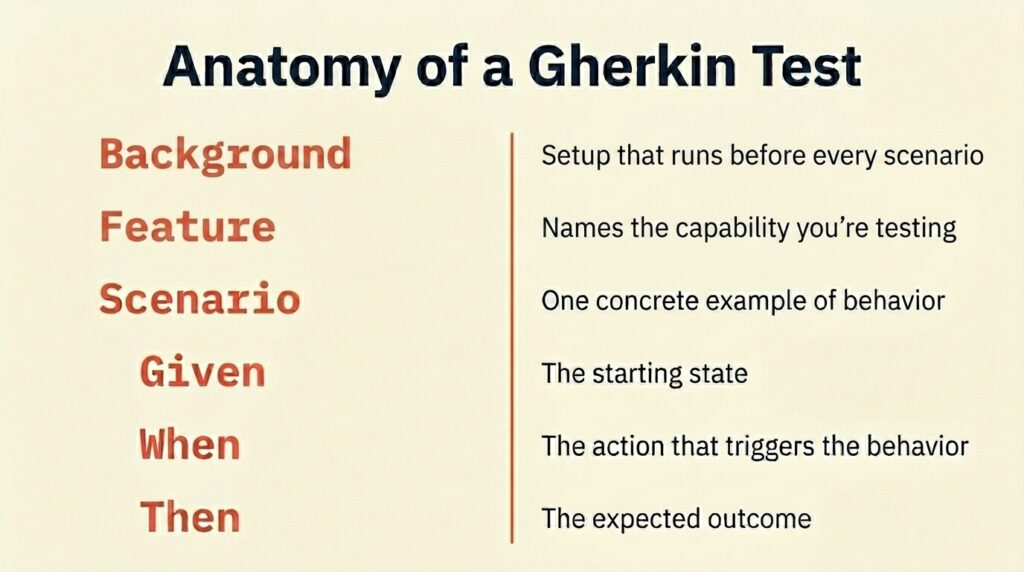
The Keywords You'll Actually Use
Before you write anything, here's the short list of keywords you'll touch every day:
| Keyword | What it does | When to use it |
| Feature | Names the capability being tested | Once per file, at the top |
| Scenario | Describes one concrete example of behavior | One per test case |
| Given | Sets up the starting state | Preconditions only, no actions |
| When | Describes the action that triggers behavior | The single thing being tested |
| Then | Asserts the expected outcome | What you're verifying |
| And / But | Chains additional Givens, Whens, or Thens | When one line isn't enough |
| Background | Steps shared across every scenario in a feature | DRY out repeated Given steps |
| Scenario Outline | Same scenario, many data inputs | Data-driven testing |
Memorize Given, When, Then. The rest you can look up.
How To Write Gherkin Tests Step by Step
Let's build a real .feature file. We're testing a login form because every app has one, and the behavior is universal. Open a new file called login.feature in your project's features/ directory.
Step 1: Start With the Feature Block
When learning how to write Gherkin tests, the first line is where you declare what you're testing and give context for everyone who'll read the file later.
Feature: User Login
As a registered user
I want to log into my account
So that I can access my dashboard
The "As a / I want / So that" pattern is borrowed from user stories. It's optional, but it forces you to write tests that map to user value rather than implementation details. Skip it, and your scenarios drift toward describing buttons and form fields instead of outcomes.
Step 2: Write One Happy-Path Scenario
Now add your first Gherkin test. Keep it short. One behavior, three to five steps, plain English.
Scenario: Successful login with valid credentials
Given I am on the login page
When I enter "jane@example.com" and "SecurePass123"
And I click the "Log In" button
Then I should be redirected to my dashboard
And I should see "Welcome back, Jane"
That's a complete, runnable scenario. Read it out loud. If a non-technical stakeholder couldn't tell you what this test verifies, you've written it wrong. The whole point of Gherkin software testing is that the spec is the documentation.
Step 3: Add the Failure Paths
Happy paths are easy. The bugs hide in the unhappy paths. Add a scenario for invalid credentials right below the first one.
Scenario: Login fails with invalid password
Given I am on the login page
When I enter "jane@example.com" and "WrongPassword"
And I click the "Log In" button
Then I should remain on the login page
And I should see an error message "Invalid email or password"
Notice the Given step is identical to the first scenario. That's a smell. We'll fix it in a second with Background.
Step 4: Refactor Shared Setup into Background
When two or more scenarios share the same Given steps, extract them. This keeps your file readable and prevents drift when setup changes.
Feature: User Login
Background:
Given the user "jane@example.com" exists with password "SecurePass123"
And I am on the login page
Scenario: Successful login with valid credentials
When I enter "jane@example.com" and "SecurePass123"
And I click the "Log In" button
Then I should be redirected to my dashboard
Scenario: Login fails with invalid password
When I enter "jane@example.com" and "WrongPassword"
And I click the "Log In" button
Then I should see an error message "Invalid email or password"
Cleaner. The Background runs before every scenario in the file, so each scenario stays focused on what makes it unique.
Step 5: Use Scenario Outline for Data-Driven Cases
You'll quickly run into situations where you want to test the same flow with five or ten different inputs. Writing five near-identical scenarios is painful. Use Scenario Outline with an Examples table instead.
Scenario Outline: Login validation with various inputs
When I enter "<email>" and "<password>"
And I click the "Log In" button
Then I should see "<message>"
Examples:
| email | password | message |
| jane@example.com | SecurePass123 | Welcome back, Jane |
| jane@example.com | WrongPassword | Invalid email or password |
| notanemail | SecurePass123 | Please enter a valid email |
| | SecurePass123 | Email is required |
One scenario, four test runs. This is how you go from a toy example to a real test suite without your .feature files ballooning past 500 lines. For deeper patterns, these best practices for maintainable Gherkin test cases walk through how to keep these tables sane as your app grows.
How Do You Connect Gherkin Tests to Actual Code?
Gherkin alone doesn't execute anything. Each step needs a step definition in your automation framework, the bit of code that knows what "I click the Log In button" actually means in your app.
Here's what a step definition looks like in a few common stacks. The exact syntax varies, but the pattern is the same: a regex (or pattern string) matches a Gherkin step, and a function runs.

Cucumber-JS (JavaScript):
const { Given, When, Then } = require('@cucumber/cucumber');
When('I enter {string} and {string}', async function (email, password) {
await this.page.fill('#email', email);
await this.page.fill('#password', password);
});
pytest-bdd (Python):
from pytest_bdd import when, parsers
@when(parsers.parse('I enter "{email}" and "{password}"'))
def enter_credentials(browser, email, password):
browser.find_element('id', 'email').send_keys(email)
browser.find_element('id', 'password').send_keys(password)
SpecFlow (C#):
[When(@"I enter ""(.*)"" and ""(.*)""")]
public void WhenIEnterAnd(string email, string password)
{
_page.Fill("#email", email);
_page.Fill("#password", password);
}
The framework matches the Gherkin line to the step definition, passes in the captured values, and runs your code. When you change a Gherkin step, you only change the spec. The step definition keeps working as long as the pattern still matches.
What Are the Rules for Writing Good Gherkin Tests?
You can technically know how to write Gherkin tests and still produce terrible Gherkin that's syntactically valid but useless in practice. These principles separate the Gherkin test cases that survive a year in production from the ones your team rewrites every sprint. Most of them come down to one idea: describe behavior, not procedure.
- Write declarative steps, not imperative ones. "When I log in" beats "When I click the email field, type my email, click the password field, type my password, and click submit." If a step describes what the user is doing, not how they're clicking, your scenarios survive UI redesigns.
- One behavior per scenario. If your Then block has more than two or three assertions about different things, you're testing two scenarios at once. Split them.
- Make scenarios independent. Each scenario should run on its own without depending on the state from a previous scenario. If scenario B only passes when scenario A runs first, you have a hidden dependency that will bite you in CI.
- Use a ubiquitous language. If the product team calls them "subscribers," don't call them "users" in your tests. Match the language stakeholders actually use so everyone is reading the same dictionary.
- Keep .feature files focused. One feature per file. If you're tempted to dump 15 scenarios about three different capabilities into one file, split it.
- Avoid UI specifics in the spec. "I should see the green checkmark in the top-right corner" is brittle. "I should see a confirmation message" is durable.
- Don't test the framework. You don't need a scenario that proves the database saves a record. Test the user-visible behavior. Trust your unit tests for the rest.
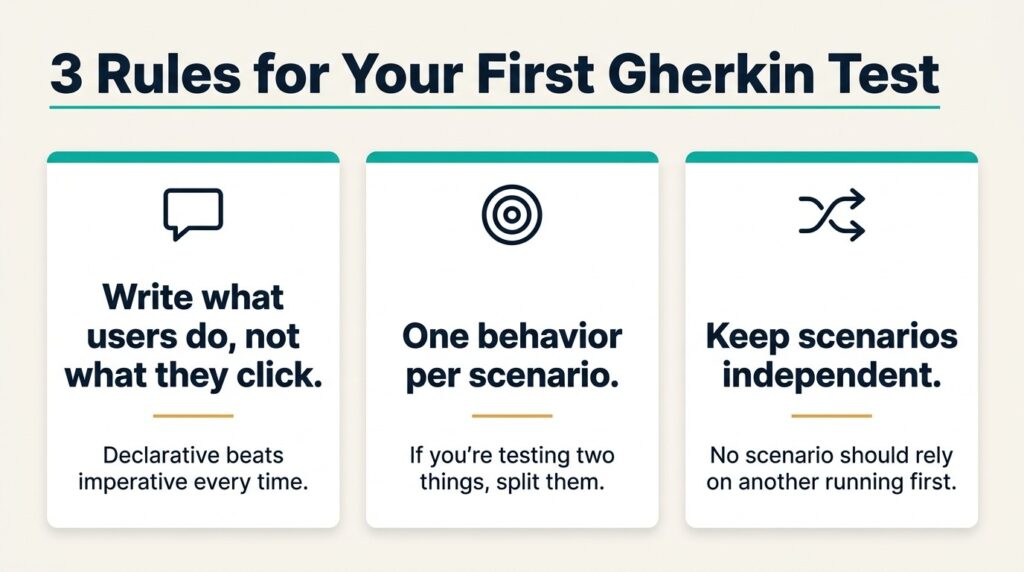
These rules are the difference between Gherkin that scales with your team and Gherkin that gets deleted six months in. The Gherkin language syntax best practices guide has more details on the patterns that hold up over time.
What Does a Complete, Reusable Gherkin Template Look Like?
Once you've written a handful of .feature files, the structure becomes muscle memory. Until then, work from a template. Copy this template into a new file, replace the bracketed sections, and you have a working starting point for almost any feature.
@feature_name @smoke
Feature: [Capability being tested]
As a [type of user]
I want to [perform some action]
So that [some business value is delivered]
Background:
Given [shared starting state]
And [other shared setup]
@happy_path
Scenario: [Happy path scenario name]
When [the user performs the main action]
Then [the expected outcome occurs]
And [any additional assertions]
@validation
Scenario Outline: [Behavior with multiple inputs]
When [the user performs the action with "<input>"]
Then [the system responds with "<expected_result>"]
Examples:
| input | expected_result |
| valid_value | success_message |
| invalid_value | appropriate_error |
@edge_case
Scenario: [Edge case or failure scenario]
Given [special precondition]
When [the action that triggers the edge]
Then [the expected handling]

Notice the tags at the top (@smoke, @happy_path, @validation, @edge_case). Tags let you run subsets of your suite. Smoke tests on every commit and full regression on nightly builds. Tags are one of the most underused Gherkin features, and they pay off the moment your suite gets big enough that running everything takes more than a minute.
How Do You Scale Gherkin Tests Across a Real Team?
Learning how to write Gherkin tests for a single .feature file is easy. A hundred files spread across 40 engineers, mapped to CI runs, linked to Jira tickets, and triaged after every failed pipeline is a different problem. Scaling Gherkin runs into traceability issues fast: which scenarios cover which requirements, which are flaky, which haven't been touched in six months, and which broke after the last release.
A dedicated test management platform earns its keep here. TestQuality ingests Gherkin .feature files directly, links each scenario to GitHub pull requests and Jira issues, and surfaces test results inside your existing DevOps workflow. The AI-powered QA Agents can also generate Gherkin scenarios from user stories using AI test case generation, which closes the gap between requirements and executable specs without the manual translation step. For teams already running Cucumber or SpecFlow, your existing automation keeps running, and you gain a layer of traceability, reporting, and test plan management on top.
Gherkin tests deliver the most value when they're connected to the rest of your quality picture: requirements, runs, failures, and releases. A .feature file sitting alone in a repo is just text. Connected to the workflow, it becomes living documentation.
Frequently Asked Questions
How long should a Gherkin scenario be?
Three to seven steps is the sweet spot. If you're consistently writing scenarios longer than ten steps, you're probably testing more than one behavior or describing UI procedure instead of business behavior. Refactor.
Do I need Cucumber to write Gherkin?
No. Cucumber is the most popular runner, but SpecFlow (.NET), Behave (Python), pytest-bdd (Python), Behat (PHP), and Cucumber-JS all parse Gherkin. The syntax is the same across all of them. Only the step definitions are framework-specific.
Can I use Gherkin for API testing, not just UI testing?
Absolutely. Gherkin describes behavior, not interface. API tests, contract tests, and even some performance tests can be expressed cleanly as Given-When-Then scenarios. The framework underneath decides what each step actually does.
Should every test in my suite be written in Gherkin?
No. Gherkin shines for behaviors that matter to business stakeholders. Unit tests, low-level edge cases, and pure technical validation are usually faster and clearer in your native test framework. Use Gherkin where collaboration and readability pay off.
What's the most common beginner mistake?
Writing imperative steps that describe clicks and field entries instead of declarative steps that describe user intent. If your scenarios read like a manual QA script, you're missing the point of BDD.
Start Writing Gherkin Tests Today
Writing your first Gherkin test isn't the hard part. The hard part is building a habit of writing scenarios that describe behavior cleanly enough to survive your next product pivot. Start with the template above, write one feature, get it running in your CI pipeline, and iterate from there.
TestQuality's AI-powered QA platform gives you a Gherkin-native test management layer with QA Agents that work alongside your team. Start your free trial and see how active test management transforms BDD from a documentation exercise into a real quality engine.


