AI trust in testing is the problem of deciding whether an AI system’s output is reliable enough to support release decisions, test creation, coverage analysis, or production workflows. For QA teams, the core issue is that large language model output is nondeterministic, persuasive, and only partially grounded in source evidence — meaning a simple pass or fail verdict is no longer enough. A more actionable approach scores AI responses across multiple dimensions: factual grounding, relevance, intent understanding, safety, and auditability. Teams managing these evaluations alongside manual and automated validation typically use a test management platform to keep prompts, source evidence, outputs, scores, and review decisions in one place.
At a Glance
A Practical Way to Evaluate Whether AI Output Deserves Confidence
Trust in AI is less about blind adoption and more about measurable review criteria.
Main problem: AI responses can change from run to run, even when the prompt and source material stay the same.
Core idea: Binary pass or fail is too shallow for LLM-based features such as chatbots and AI agents.
Evaluation model: Score responses on trust, relevance, understanding, safety, and transparency.
Operational reality: Acceptable thresholds depend on domain risk — especially in regulated industries like healthcare and insurance.
Practical outcome: Warning-level responses are the most dangerous because they sound convincing enough to slip through review.
The hardest AI defects are not obviously broken responses. They are plausible answers that hide unsupported claims.
Why Do So Many Testers Still Hesitate to Trust AI?
Many testers hesitate because AI output is inconsistent, hard to verify at a glance, and often sounds more certain than it really is. That combination creates risk even when organizations push AI adoption — teams still want human verification before release-critical decisions.
The trust gap is not just resistance to change. It reflects a real mismatch between traditional testing expectations and the way large language models behave.
For years, QA teams relied on deterministic systems. You provided input, expected a known result, and marked the outcome pass or fail. That model works well for conventional software. It breaks down when the system generates natural language, interprets intent, or responds probabilistically.
That tension is most visible in AI-powered features such as support chatbots, internal knowledge assistants, AI-generated test cases, coverage or risk summaries, and agent-style systems that make recommendations.
The Stack Overflow Developer Survey 2024 shows broad AI usage alongside continued concern about accuracy and trust. Adoption is real. Confidence is still conditional.
Why Is Pass or Fail No Longer Enough for AI Quality?
Pass or fail is no longer enough because an AI response can appear acceptable while still being unsupported, misleading, unsafe, or impossible to audit. Binary outcomes hide quality differences that only become visible when responses are scored across multiple dimensions.
This is the central challenge with LLM-based applications where standard baseline LLM testing and evaluation often falls short. A response may look polished and relevant, but still contain fabricated details, misread intent, or omit critical constraints from the source material
Consider a typical enterprwase question: What is our test coverage for the checkout service this quarter, and are there any release gaps to worry about?
If the system answers with confident percentages and a recommendation to proceed, many teams would treat that as a valid summary. But if those numbers are not grounded in actual coverage reports, the answer is worse than a visible error — it is persuasive misinformation.
This is why AI evaluation needs a layered scoring model rather than a single verdict. The NIST AI Risk Management Framework reinforces this approach by emphasizing validity, reliability, safety, transparency, and accountability — characteristics that map closely to what QA teams need in practice.
What Is a Practical Framework for Evaluating Trust in AI Responses?
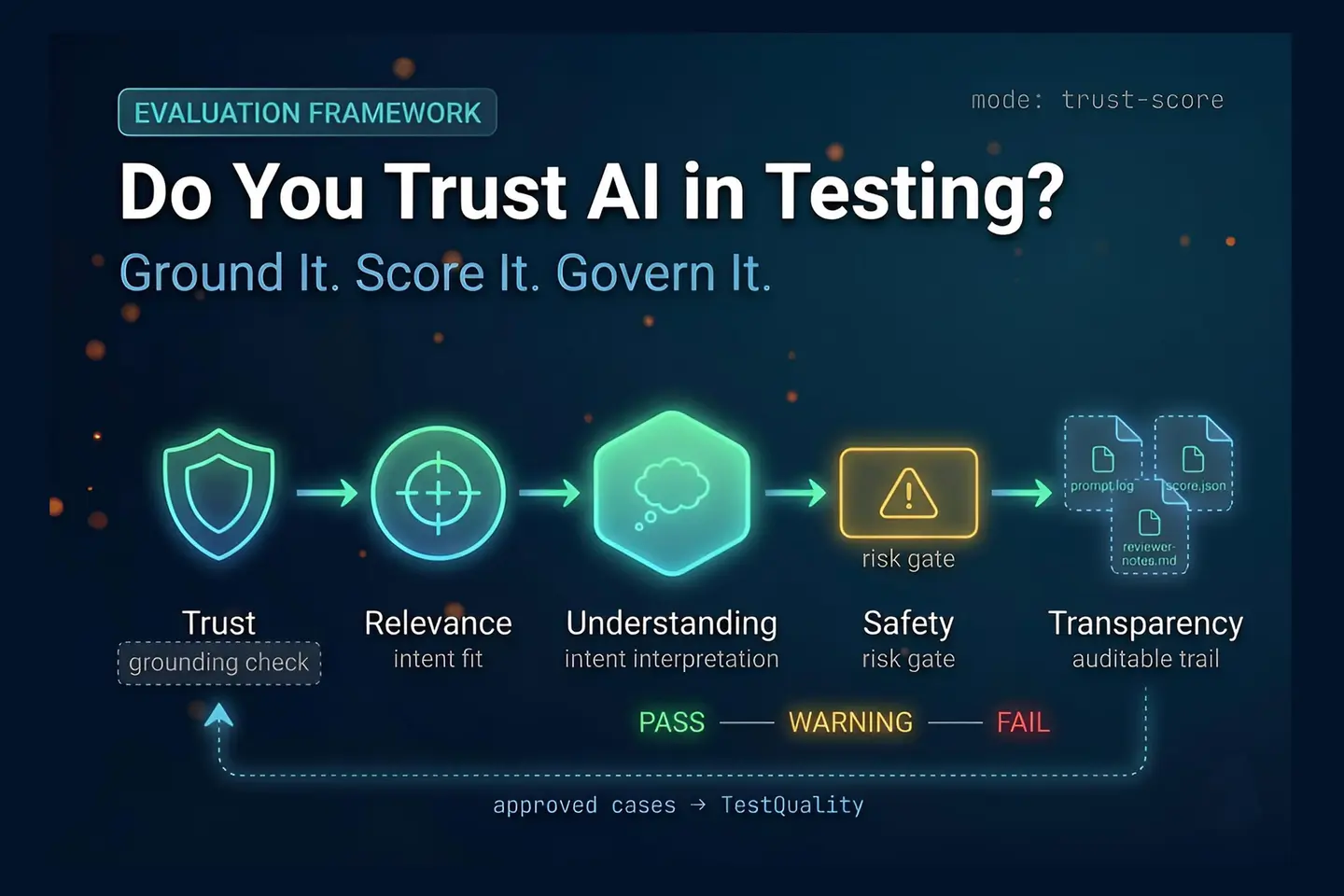
A practical framework evaluates each AI response across several dimensions instead of asking only whether it passed. One workable model uses five dimensions: trust, relevance, understanding, safety, and transparency. Together they give QA teams a clearer picture of whether a response is safe to use.
This kind of framework is useful because AI failures are not all the same. Some are factual failures. Others are interpretation failures. Some are business-risk failures. Some cannot be reviewed after the fact because the response offers no traceable basis.
Trust
Did the system answer from evidence, or did it hallucinate? If the answer includes claims not supported by the provided source material, trust should score low.
Relevance
Did the response answer the actual question asked? A fluent response can drift away from the user’s request. This dimension checks topical fit, not readability.
Understanding
Did the system interpret the user’s intent correctly? This matters when the prompt includes nuance, implied constraints, or domain-specific meaning. A response may be relevant at the surface level and still miss the intent.
Safety
Could the answer create harm, legal exposure, or reputational damage? In regulated environments, this dimension may outweigh everything else.
Transparency
Can the result be explained and audited? Enterprises often need to know where the answer came from, what evidence supported it, and whether it can be reviewed later. Without transparency, trust remains weak even when the content sounds right.
How Should QA Teams Score AI Responses in Practice?
QA teams should score AI responses by comparing the prompt, the source of truth, and the generated answer, then assigning dimension-level scores based on risk. The key is to judge each dimension separately rather than collapsing everything into a single verdict.
A workable workflow:
- Define the prompt. Use a realistic question a user, tester, analyst, or manager would ask.
- Identify the source material. This may include requirements, coverage reports, known gaps, or internal documentation.
- Capture the AI response. Save the exact output for review.
- Score each dimension. Rate trust, relevance, understanding, safety, and transparency.
- Apply thresholds. Decide which scores are acceptable for your risk level.
- Label the result. Pass, warning, or fail.
- Record the evidence. Store the prompt, sources, output, scores, and reviewer notes.
The last step is where many teams stop short. Evaluation without a record is just conversation. With a record, it becomes a repeatable, auditable process that can survive model changes and release pressure.
What Do Pass, Warning, and Fail Look Like for AI Outputs?
Pass, warning, and fail represent different confidence levels — not just different writing quality. A pass is well-grounded and safe. A warning sounds plausible but has meaningful weaknesses. A fail contains unsupported or risky claims that should block use.
The warning state is often the most dangerous because it does not look broken. It looks usable.
That is exactly why multidimensional scoring matters. A response may seem polished and broadly relevant, yet still earn poor marks for factual grounding, safety, or transparency. Teams relying only on surface plausibility may let warning-level output reach production decisions unchecked.
A practical interpretation:
- Pass: The answer is supported by evidence, addresses the prompt directly, interprets intent correctly, introduces no harmful guidance, and offers a traceable basis.
- Warning: The answer sounds reasonable but contains weak grounding, partial relevance, shaky interpretation, low transparency, or moderate risk.
- Fail: The answer fabricates facts, ignores documented gaps, misreads intent badly, or recommends an unsafe action.
This framing is more useful than asking whether the AI was “good.” It tells you why confidence is high or low — which is the information you actually need to act on.
Why Are Warning-Level AI Responses Often the Most Dangerous?
Warning-level responses are the most dangerous because they appear credible enough to gain acceptance while hiding factual or safety problems. They do not trigger the same skepticism as obviously wrong output, which makes them more likely to influence real decisions.
This is a recurring pattern with LLM systems. The output is fluent, organized, and confident. That style creates a false sense of correctness. If the system presents invented coverage numbers, overlooks documented release gaps, or smooths over uncertainty, the answer may still feel professional enough to pass casual review.
That is why experienced teams treat “sounds right” as a weak signal. Language quality is not evidence.
In QA terms, warning-level output deserves the same discipline as any other ambiguous test result: deeper inspection, comparison against source material, and often a human sign-off before use in production workflows.
How Should Risk Thresholds Change by Domain and Use Case?
Risk thresholds should change according to the consequence of error. In a low-stakes internal draft, moderate scores may be acceptable. In healthcare, insurance, or release-signoff workflows, teams usually need much higher thresholds for factual grounding, safety, and transparency before accepting AI output.
Not every dimension carries the same weight in every context:
- In a release readiness summary, trust and relevance may matter most.
- In a regulated customer-facing chatbot, safety and transparency usually need the strictest gates.
- In an AI test case generation workflow, understanding and traceability are the main concerns.
Domain expertise still matters here. The framework gives structure, but it does not replace judgment. A QA lead, product owner, or compliance stakeholder still needs to define what counts as acceptable for that specific system and context.
How Do You Operationalize AI Trust Testing Inside a QA Workflow?
To operationalize AI trust testing, define repeatable prompts, attach source evidence, create scoring rubrics, and store each evaluation like any other test artifact. The goal is not one-time inspection, it is a repeatable review process that survives model changes, prompt changes, and release pressure.
A workable process:
- Create scenario-based test cases. Each one represents a realistic AI interaction the system is expected to handle.
- Attach expected source material. This creates a clear baseline for grounding checks.
- Define dimension scores. Use trust, relevance, understanding, safety, and transparency.
- Add acceptance thresholds. Set different gates for low-risk and high-risk scenarios.
- Require reviewer notes for warnings and failures. This preserves reasoning, not just scores.
- Re-run the same cases over time. AI behavior can drift even when the prompt looks unchanged.
If you need to manage this at scale, a test management platform becomes useful because AI evaluation generates a lot of artifacts: prompts, source documents, outputs, scores, comments, defects, and reruns. Keeping that information connected matters as much as the scoring model itself.
How Does TestQuality Fit Into an AI Trust Testing Workflow?
TestQuality gives teams a governed place to run, track, and audit AI trust evaluations — the same environment where manual and automated test results already live. Instead of scoring AI responses in scattered spreadsheets or chat histories, each evaluation becomes a structured test case with attached source material, reviewer notes, dimension scores, and a run record that persists over time.
The operational fit is direct. Each AI scenario maps to a test case. The prompt and the source-of-truth document attach as evidence. Dimension scores go into reviewer notes or custom fields. Passes, warnings, and failures flow into the same run history as any other test execution. When a warning triggers a deeper review, that decision is recorded against the case — not lost in Slack or email.
Where TestStory.ai accelerates the setup work
Before you can run AI trust evaluations, you need test cases that represent the realistic interactions your AI feature is expected to handle. That is where TestStory.ai — included with every TestQuality subscription — does the heavy lifting.
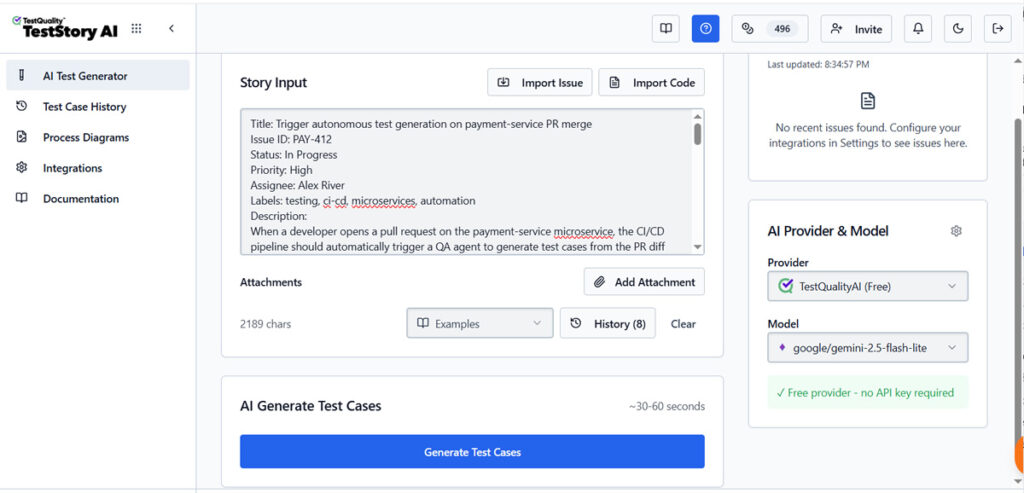
TestStory.ai accepts a wide range of project assets as inputs: User Stories, Jira issues, GitHub issues, Epics, Process Diagrams, Source Code, and full Repos. From those inputs, it generates structured, story-driven test cases that sync automatically into TestQuality. For AI trust testing, the practical workflow looks like this:
- Feed a supported input into TestStory.ai — for example, the user story or acceptance criteria behind an AI-powered feature.
- TestStory.ai generates structured test cases covering the interaction scenarios the AI is expected to handle.
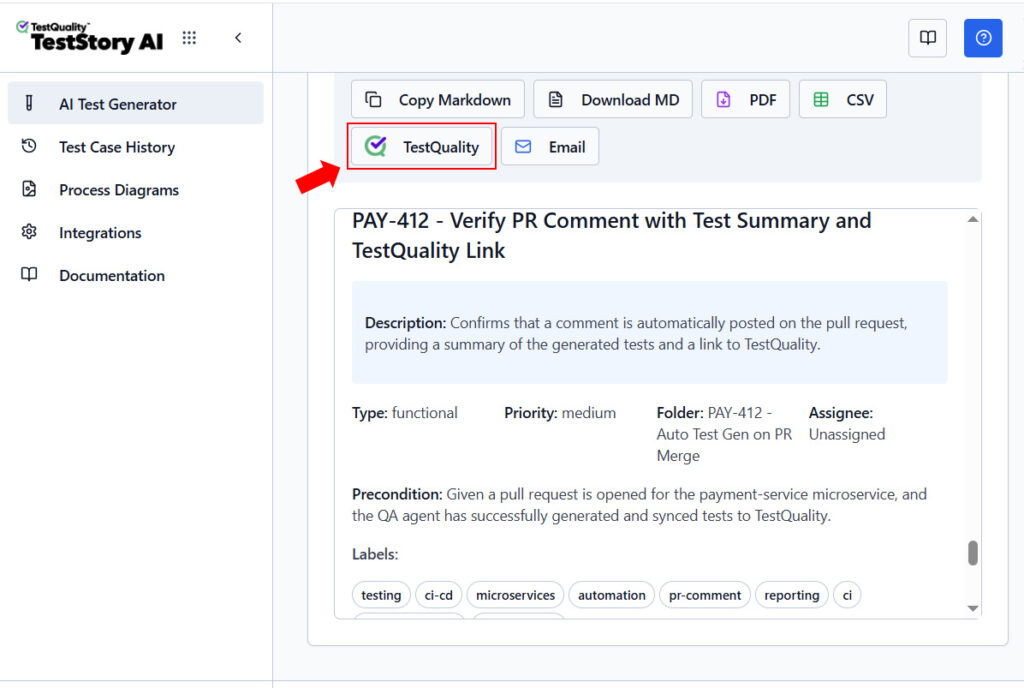
- Cases sync automatically into TestQuality.
- A tester attaches the source-of-truth document to each case and defines dimension thresholds.
- Execute evaluations and record pass, warning, or fail status with reviewer notes.
- Review coverage trends and reports — defects link back to Jira or GitHub automatically.
TestStory.ai also integrates directly with MCP-compatible agentic developer tools — Cursor, Claude Code, VS Code with Copilot, and Roo — so test case generation can happen inside the development environment where AI features are being built, without a separate step.
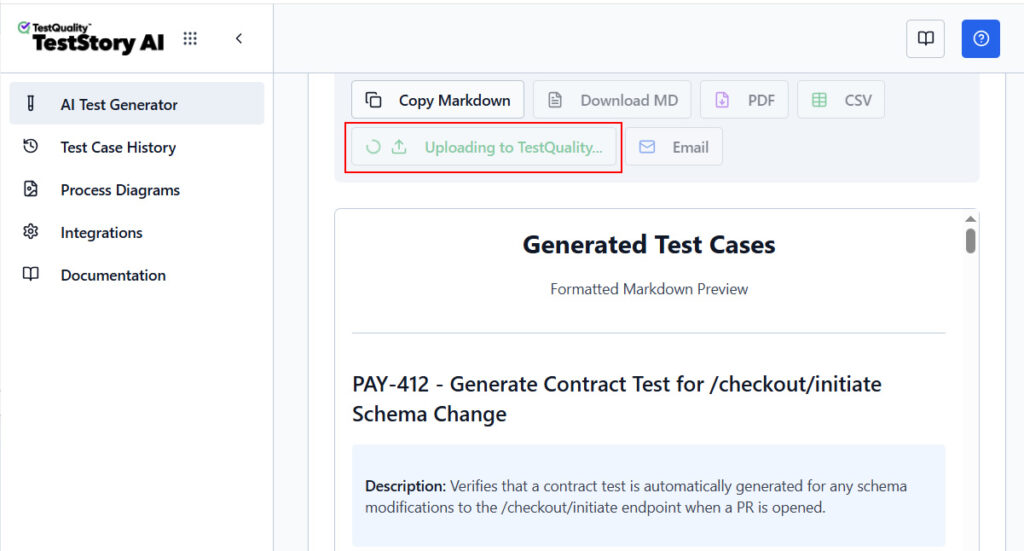
The result is a closed loop: structured test cases from your requirements feed into governed execution in TestQuality, and defects from failed AI evaluations flow back into Jira or GitHub where the engineering work is tracked.
What Mistakes Do Teams Make When Testing AI Systems?
Teams usually get into trouble when they over-trust fluency, treat one good result as stable behavior, skip source validation, or force AI evaluation into a traditional pass-fail model. Each mistake makes AI systems look more dependable than they really are.
The most common patterns:
- Equating confidence with correctness. Strong wording is not proof.
- Ignoring nondeterminism. The same prompt can produce different quality levels on different runs.
- Testing without a source of truth. You cannot judge grounding without reference material.
- Using a single acceptance gate. A composite score without dimension detail can hide critical weaknesses.
- Underweighting transparency. If the answer cannot be explained or audited, review becomes guesswork.
- Applying the same threshold everywhere. Risk tolerance should vary by domain and consequence.
These issues explain why AI testing often feels unfamiliar to experienced QA engineers. It is still testing. The artifacts and failure modes are different.
Turn AI evaluation ideas into trackable test cases.
Generate structured test cases from requirements or user stories, then review and execute them with a documented QA workflow.
Try the Free Test Case Builder →Technical Deep Dive FAQ
What does trust in AI testing actually mean?
Why is AI output harder to test than traditional software output?
What is the difference between trust and transparency in an AI evaluation?
How do you test the same prompt when AI answers differently each time?
What should count as source of truth when validating AI answers?
How high should your trust score threshold be before production use?
Can AI-generated test cases be evaluated with the same framework?
How do you document AI evaluation runs so they are auditable later?
Key Takeaways
What Matters Most When Deciding Whether to Trust AI in QA
Confidence should come from evidence, not fluent wording.
Binary verdicts are too shallow: AI systems need multidimensional evaluation because plausible output can still be wrong.
Five dimensions create useful structure: Trust, relevance, understanding, safety, and transparency cover the main failure modes.
Warnings deserve attention: The most dangerous outputs are the ones that sound accurate while hiding weak evidence.
Thresholds should vary by risk: Regulated or customer-facing use cases need stricter gates for safety and auditability.
Operational discipline matters: Save prompts, source materials, outputs, scores, and review notes so evaluations can be repeated and audited.
TestQuality closes the loop: Each AI evaluation scenario becomes a structured test case with attached evidence, reviewer notes, and run history — not a scattered spreadsheet tab.
The real question is not whether AI can answer, but whether your team can justify trusting the answer.
About the Author
Jose Amoros is part of the TestQuality marketing team, focused on agentic QA, AI-powered test management, and the operational handoff between AI-generated test artifacts and governed execution workflows. He writes regularly about CI/CD integration, Gherkin/BDD practices, and shift-left testing. Author profile →
Further Reading
- Stack Overflow Developer Survey 2024
- NIST AI Risk Management Framework
- TestQuality documentation
- TestStory.ai documentation
- TestStory.ai features
- TestQuality features overview
- TestQuality blog
Start Free Today
From AI evaluation ideas to governed test cases — without the spreadsheet chaos.
TestStory.ai generates structured test cases from your user stories, acceptance criteria, or architecture diagrams — then syncs them directly into TestQuality for execution, tracking, and team collaboration.
Get 500 TestStory.ai credits every month included with your TestQuality subscription — no extra cost.
No credit card required on either platform.