

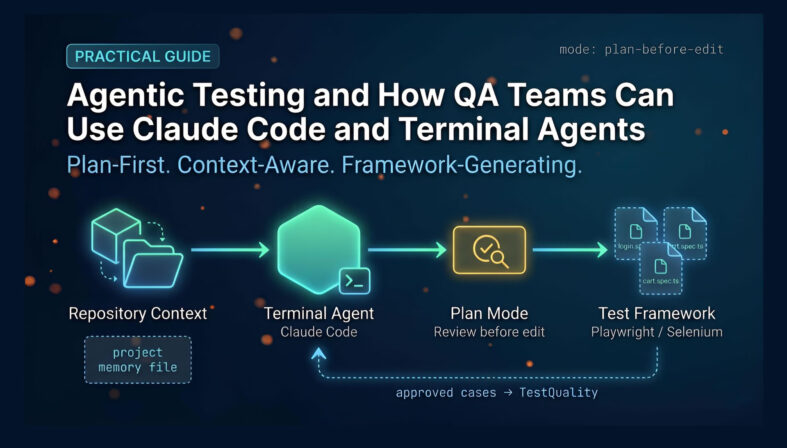
Agentic Testing and QA is a practice in which AI agents operate directly on a project — reading files, planning tasks, generating framework code, and interacting with a browser — rather than simply answering prompts inside a chat window. Tools like Claude Code bring this capability to the terminal, giving QA teams a command-line assistant that understands repository context, proposes changes before applying them, and generates test assets across Playwright, Selenium, and API testing workflows. For teams that manage structured QA work, the practical payoff is faster first drafts and framework scaffolding, paired with a test management platform that keeps approved cases traceable and executable.
At a Glance
Agentic Testing and QA with Terminal Agents
Plan-first, context-aware, framework-generating — not just autocomplete.
What it is: AI agents that operate in the terminal with access to your codebase, enabling project understanding, code generation, and browser interaction.
Best uses for QA: Framework scaffolding, test case drafting, page object generation, browser-connected exploration, CI/CD workflow setup.
Key operating habit: Use plan mode before edit mode. Review the agent's proposed approach before it touches any files.
Operational fit: Agent-generated assets are drafts. Move approved test cases into TestQuality for execution, tracking, and GitHub/Jira linkage.
Terminal agents speed up the work around test creation. They do not replace a maintainable automation framework, and every agent-generated draft needs human review before it becomes a test artifact.
What Is Agentic Testing and QA?
Agentic Testing and QA is the practice of using AI agents that can plan, reason, and act across a codebase — not just suggest snippets. Instead of responding to a single prompt in isolation, a terminal-based agent reads your repository, proposes a structured approach, generates framework code, and optionally interacts with a running browser. The shift from suggestion-based assistance to agentic behavior is what separates this from the familiar editor chat experience.
In practical terms, Agentic QA work may include creating a Playwright end-to-end framework from a target URL, scaffolding a page object model, drafting API test assets, generating login flows, and connecting to a browser to inspect real application behavior. The agent does not simply autocomplete — it reasons about the task, outlines the approach, and carries out actions in sequence across your project.
This is a meaningful step up from sidebar AI assistance for two reasons. First, the agent operates at the repository level, not just the file level. Second, it can be prompted to plan before it edits — giving you a review checkpoint before any code is written or changed.
Why Are QA Teams Adopting Terminal Agents Now?
QA teams are moving toward terminal agents because the bottleneck in modern testing is no longer test execution — it is planning, framework setup, and first-pass asset generation. Manually bootstrapping a Playwright project, writing initial page object classes, and documenting the framework structure takes hours a terminal agent can compress into minutes. The compounding effect across a sprint adds up fast.
The wider context matters too. According to the Stack Overflow Developer Survey 2025, 84% of respondents are using or planning to use AI tools in their development process, an increase over last year (76%). This year we can see 51% of professional developers use AI tools daily.
For QA specifically, the practical implication is that terminal agents become a productivity layer alongside test management and automation frameworks — not a replacement for either. On one of its articles, McKinsey reported that developers using generative AI–based tools to perform complex tasks were 25 to 30 percent more likely than those without the tools to complete those tasks within the time frame given.
A QA engineer who understands how to give an agent project context, structure a reusable skill, and review a proposed plan before approving edits will work faster and produce more consistent output than one prompting in the dark.
What Is Claude Code and How Does It Apply to QA?
Claude Code is an agentic coding tool built by Anthropic that runs in the terminal. For QA teams, it functions as a command-line assistant for project understanding, test framework generation, and browser-connected exploration. It is one of the clearest current examples of what terminal-based agentic QA looks like in practice.
Workflows where Claude Code is useful for QA include creating a new Playwright end-to-end project from scratch, generating login scripts and test flows, reading and summarizing an existing repository structure, using browser integration to inspect and interact with a live web application, and working through a plan-first approach before modifying any files. It is editor-agnostic — the intelligence runs in the terminal process, not inside a specific IDE, which means you can use it alongside VS Code, JetBrains, Neovim, or any other editor without locking into a paid extension.
For teams that cannot or will not use a hosted commercial agent, the broader category includes alternatives: Open Code, Kimi Code, and setups that connect local large language models through Ollama. The workflow patterns described in this article apply across all of them. The specific tool matters less than learning to use plan mode, context files, and reusable skills consistently.
What Prerequisites Does a QA Team Need Before Starting?
A QA team needs Node.js, npm, and Git installed before a terminal agent can operate reliably inside a real project environment. Those three cover most setup paths. JDK and Python are useful additions if the team works across multiple testing frameworks or language stacks. Access to the agent itself comes either through a paid subscription or through a local model approach using Ollama.
Beyond software, the prerequisites that actually determine early success are less obvious. The team needs a repository to work in — a blank folder or a hello-world project will produce generic output. The agent needs real project context to do useful work. Someone on the team also needs to spend time learning the agent's slash commands before attempting any QA-specific task. Slash commands expose available actions, attach tools, initialize project context, and trigger extensions. Skipping this step is the single most common reason early experiments produce underwhelming results.
Start with a test project that already has some structure — even a basic Playwright config and a couple of spec files — and the agent's output will be dramatically more useful than if you start from nothing.
What Are Skills, and Why Do They Matter for Test Automation?
A skill in the context of terminal agents is a reusable instruction package — typically a structured markdown file — that tells the agent how to generate or work with a specific testing pattern, framework structure, or workflow convention. It acts like a well-optimized prompt with quality standards and structural rules built in, rather than a loose one-off instruction.
A Playwright end-to-end skill, for example, might specify the folder structure, the principles the framework uses, how tests are named and organized, how page objects are structured, and how the test runner is invoked. When you ask the agent to scaffold a new project using that skill, the output is consistent and aligned with your team's conventions — not a generic default.
This is one of the most practical ideas in agentic QA: experienced engineers can encode framework knowledge into reusable skill files and share them across a team. Think of a skill as simultaneously a prompt, a framework blueprint, a quality standard, and a repeatable setup recipe. Once the skill is well-written, any team member can invoke it and get output that matches the team's standards without needing to know the framework internals themselves.
What Are Project Memory Files and Why Do They Help?
A project memory file is a repository-level markdown document that stores essential guidance about the codebase — structure, conventions, key commands, framework rules, and execution details. It serves as a memory anchor for the agent across longer sessions, because AI tools do not carry context automatically between terminal sessions the way a human engineer does.
Without a project memory file, the agent treats every session as a fresh start. It will ask about or make incorrect assumptions regarding the same framework decisions it handled correctly in a prior session. With a well-maintained project memory file, the agent can recover context quickly and produce output that is consistent with prior work.
For QA teams, this is especially important because testing projects often have framework conventions that are invisible to an outside tool — naming patterns, directory structures, helper utilities, and reporting configurations that took effort to establish. Documenting those decisions in a project memory file protects that investment and makes the agent meaningfully more useful after the first session.
What Is the Difference Between Plan Mode and Edit Mode?
Plan mode is an operating state in which the agent thinks through a task, outlines the approach, and presents proposed changes for review — without modifying any files. Edit mode applies the agreed changes. In agentic QA work, defaulting to plan mode first is a significant risk-reduction habit, not a formality.
QA projects are fragile in specific ways. Test frameworks have directory structures that break when files move. Environment configurations have naming dependencies. CI/CD pipelines expect specific artifact paths. A terminal agent that jumps straight to edits without planning can produce output that looks right on the surface but breaks downstream in ways that are time-consuming to untangle.
The correct sequence for most QA tasks is: describe the goal clearly, ask the agent to think through the best approach, review the proposed structure and file changes, ask clarifying questions if anything looks wrong, approve the plan, and only then allow the agent to apply edits. This is a better fit for test engineering than unconstrained prompt-based generation — and it is the habit that separates teams who find terminal agents genuinely useful from teams who give up after a few frustrating sessions.
Can Browser Control Replace a Formal Automation Framework?
No — browser-connected agent workflows are useful for exploration and prototyping, but they are not a substitute for a maintainable automation framework with proper assertions, version control, and CI integration. The distinction matters for how you deploy each capability.
When a terminal agent connects to Chrome, it can navigate to a web application, inspect pages, fill forms, extract visible data, and report findings. For QA, that is genuinely useful during exploratory sessions, smoke checks on staging environments, UI information extraction, and reproducibility checks on reported bugs. It speeds up evidence gathering and first-pass investigation.
What it is not is a Selenium or Playwright suite. Those tools produce deterministic, version-controlled, CI-integrated test runs. A browser-connected agent produces a single-session observation that has no assertion layer, no history, and no repeatability guarantee. Use the agent for exploration and prototype flows. Write and maintain the production automation separately in a proper framework. The two activities are additive, not interchangeable.
Skip the scaffolding step entirely.
TestStory.ai generates structured test cases from your user stories, Jira issues, GitHub issues, epics, or architecture diagrams — then syncs them directly into TestQuality for execution and tracking.
Try the Free AI Test Case Builder →How Do You Operationalize Agent-Generated QA Work in TestQuality?
Agent-generated test assets are drafts. Operationalizing them means moving approved drafts out of the agent's workspace and into a governed test management system where they can be assigned, executed, tracked, and reported against. TestQuality is built for exactly this handoff — whether cases arrive from an agent, from TestStory.ai, or from a human engineer, they land in the same project structure with the same execution and reporting workflow.
A practical handoff sequence: have the agent scaffold the framework and draft test cases or scenarios; review output and remove weak, duplicated, or incorrect entries; create the approved test cases in TestQuality under the appropriate project; group them into runs or cycles for the current release; execute and record pass, fail, or blocked status; and use built-in reports to track progress, defect trends, and coverage over time.
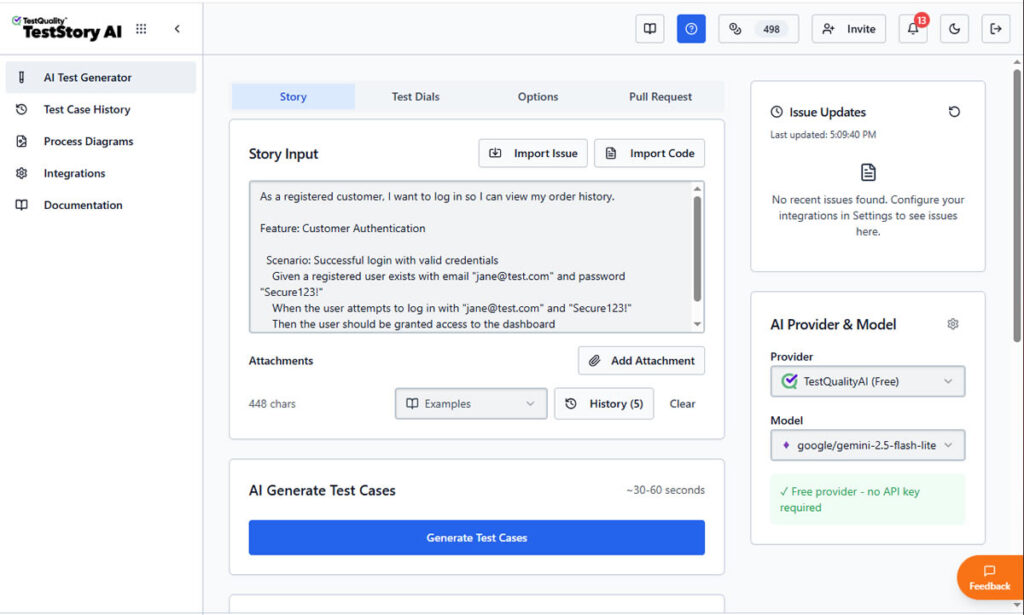
TestStory.ai, which is included with every TestQuality subscription, handles the same first-draft problem with governed output. It accepts project assets directly: Jira issues, GitHub issues, user stories, epics, process diagrams, or source code. From any of those inputs, it generates structured test cases that sync automatically into TestQuality. It also integrates with MCP-compatible agentic developer tools (Cursor, Claude Code, VS Code with Copilot, and Roo) so test generation becomes a native step inside the existing development workflow rather than a separate process. For teams already using Claude Code as a terminal agent, the TestStory.ai + TestQuality combination is the governed layer that sits alongside it.
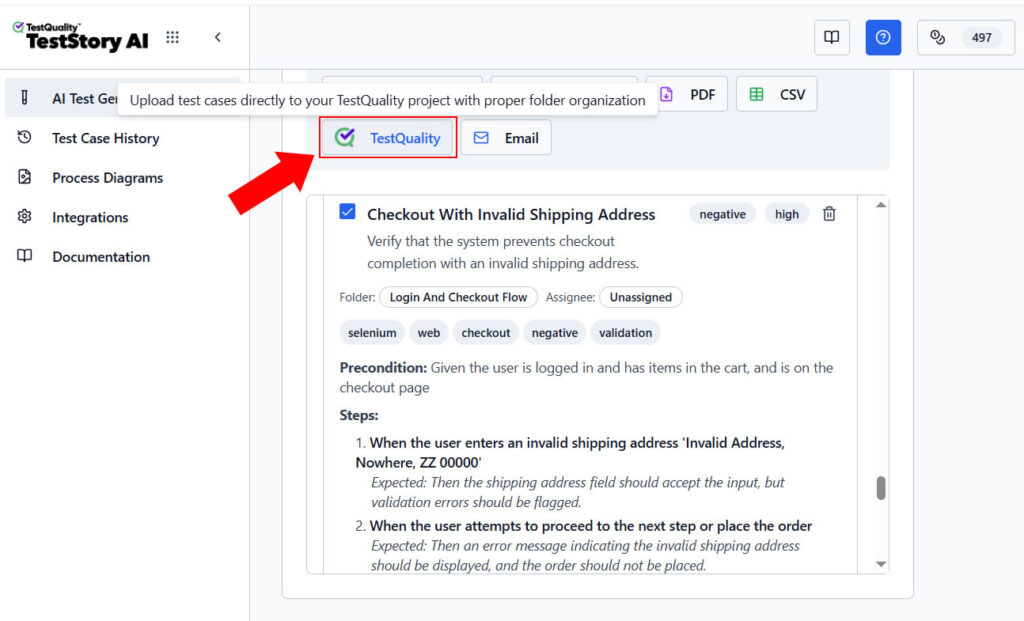
Because TestQuality integrates natively with GitHub and Jira, approved test cases stay linked to the issues, branches, and pull requests they cover. That linkage is what keeps agentic QA work from stranding valuable output in a folder no one opens again.
Technical Deep Dive FAQ
Key Takeaways
Agentic Testing and QA in Practice
Plan first, generate fast, govern what you keep.
Terminal agents go beyond autocomplete: They read repository context, propose structured plans, and generate framework code — not just inline suggestions.
Plan mode is not optional: Review the proposed approach before any file is touched. Skipping this step is the most common cause of broken output.
Skills encode team knowledge: Reusable skill files turn framework expertise into repeatable, consistent generation that any team member can invoke.
Project memory files protect context: Document conventions and structure at the repository level so the agent recovers them reliably across sessions.
Agent-generated work is a draft: Move approved test cases into TestQuality for execution, tracking, and GitHub/Jira linkage.
The combination that works is terminal agents for fast generation, human review for quality control, and a test management platform for everything that needs to be tracked, executed, and reported.
About the Author
Jose Amoros is part of the TestQuality marketing team, focused on agentic QA, AI-powered test management, and the operational handoff between AI-generated test artifacts and governed execution workflows. He writes regularly about CI/CD integration, Gherkin/BDD practices, and shift-left testing.
Further Reading
- Claude Code documentation — Anthropic's official overview of Claude Code capabilities and setup
- Stack Overflow Developer Survey 2024 — AI adoption data across development roles
- Playwright documentation — official Playwright getting-started guide
- Ollama — running local large language models for agent setups
- TestQuality features overview
- TestQuality CLI overview
- TestQuality documentation
- TestQuality blog
Start Free Today
Transition from script-writing to outcome-orchestration.
TestStory.ai generates structured test cases from your user stories, acceptance criteria, or architecture diagrams — then syncs them directly into TestQuality for execution, tracking, and team collaboration.
Get 500 TestStory.ai credits every month included with your TestQuality subscription — no extra cost.
No credit card required on either platform.


