

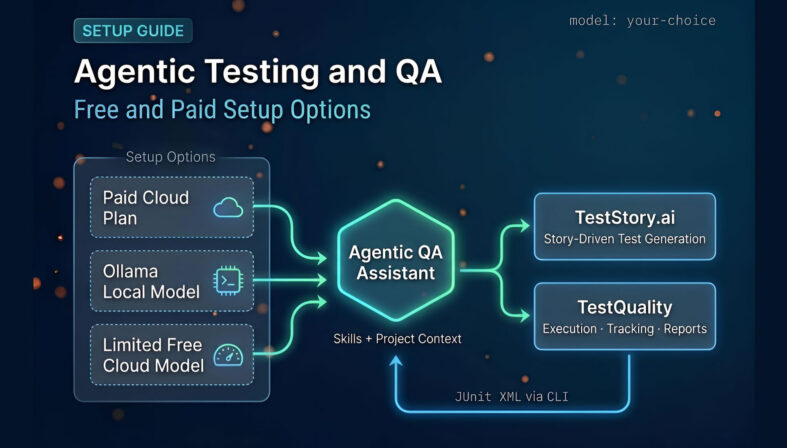
Agentic Testing and QA describes a testing workflow where an AI coding assistant does more than answer one-off prompts. It can inspect a project directory, reason over multiple files, propose test scaffolding, and work in a continuous loop with the engineer — rather than waiting to be prompted at each step. The practical bottleneck for most QA teams is not whether this works, but which setup is realistic given their machine, budget, and day-to-day workload. This guide explains the main options: paid cloud plans, free local models through Ollama, limited free cloud-backed models, and the Open Code path — each with honest tradeoffs for teams running these tools alongside a test management platform.
At a Glance
Your Agentic QA Setup Options
Four paths. Different tradeoffs in speed, cost, and hardware.
Paid cloud plan (~$20/month): Smoothest experience, best speed, no workarounds. The practical starting point for regular use.
Free local via Ollama: No subscription, but RAM is the bottleneck — most useful on machines with 32 GB or more.
Limited free cloud-backed model (e.g. Kimi): Best no-cost option for average hardware — usage-capped but lighter on RAM.
Open Code: Flexible model switching, free default path, skills support — good for multi-model workflows and teams that want control.
The right setup is the one that fits your actual machine and budget — not the one with the best benchmark scores.
What Does Agentic Testing and QA Actually Mean in Practice?
Agentic Testing and QA means an AI assistant that operates in a continuous loop rather than answering isolated prompts. It can read a project, propose test scaffolding, refine outputs across iterations, and work from reusable instruction files — with the engineer reviewing and steering throughout.
For QA teams, the practical use cases are: reading an existing codebase and summarizing its test structure, generating or extending Playwright and API test files, creating test cases from a description or ticket, switching between planning mode and active generation, and working from reusable skills or prompt templates that encode team conventions.
The question most teams land on quickly is not whether agentic QA works. It does. The question is which setup is realistic for their machine, budget, and the kind of iterative QA work they do day to day.
Why Are QA Teams Moving Toward Agentic AI Tooling Now?
The bottleneck in modern testing has shifted from execution to planning and first-pass analysis. According to the Stack Overflow Developer Survey 2024, 76% of developers are using or planning to use AI tools in their development process (with test-adjacent tasks among the fastest-growing use cases).
That adoption curve has context. Gartner projects that by 2028, at least 15% of day-to-day work decisions will be made autonomously through agentic AI, up from 0% in 2024. For QA, this points to a practical shift: agent-based assistance becomes a standard layer alongside test management and automation frameworks — not a replacement for them.
The result is that most QA teams are not evaluating whether to adopt agentic tooling. They are evaluating which setup is affordable, fast enough to be useful, and compatible with their hardware.
What Are the Main Ways to Run Agentic QA Tooling?
There are three broad paths: a paid cloud plan, a free local model through Ollama, and a free or usage-capped cloud-backed model. A fourth option — Open Code — sits across all three by letting you switch models depending on cost and availability.
Paid cloud plan — typically around $20/month for a Pro tier or $100/month for a higher tier. This is the smoothest daily experience: better speed, no hardware constraints, and fewer workarounds. For teams doing regular agentic QA work, the ~$20 tier is the most practical starting point if the budget allows it.
Free local via Ollama — install Ollama, connect the AI coding assistant, and run everything from your machine. No subscription required, but your RAM becomes the ceiling. Most larger recommended models need 32 GB or more; some configurations are more comfortable at 48 GB. A 16 GB machine will run smaller models slowly.
Free or limited cloud-backed model — avoids local hardware constraints by using a cloud model with a usage cap. Kimi is the specific option surfaced in the source material. More practical than forcing a large local model on average hardware, but quotas will surface during active workdays.
How Does Ollama Work for Agentic QA, and What Are Its Real Limits?
Ollama is the runtime layer for free local agentic QA. You install it, connect your AI coding assistant, and run a local model on your own hardware — with no subscription. The real constraint is memory: larger models need 32–48 GB RAM to run comfortably, making a 16 GB machine significantly limited.
Setup is straightforward. On Windows, the process runs through Command Prompt after installation. Once Ollama is running, you connect it to the coding assistant and select a model.
The model size decision matters more than most teams anticipate:
- Smaller models (viable on 16 GB): Will run, but noticeably slower and less capable than paid cloud options.
- GPT OSS 20B-scale local models: Usable on ~24 GB in some configurations; more reliable at 48 GB.
- Larger local models: Exceed typical developer laptop specs and are not practical for daily use.
The speed issue is the most important practical reality. Agentic QA is interactive work — you are iterating prompts, reviewing generated tests, making corrections, switching context across files. A slow local model makes all of this feel heavy. Running a slow local model while reading a project folder, generating a test file, and comparing alternatives adds enough friction that many teams abandon local setups quickly.
Free local agentic QA is possible. It is not the same experience as a properly resourced paid tool.
When Should You Use a Limited Free Cloud-Backed Model Instead?
A limited free cloud-backed model makes sense when your machine lacks the RAM for a strong local model and you are not ready to pay for a subscription. It reduces local hardware dependency while still providing a capable assistant — at the cost of usage quotas.
In the source material, Kimi cloud is the specific option described for this scenario. The practical assessment is direct:
- It works on lower-spec machines.
- It is a more realistic no-cost path than forcing a large model on insufficient RAM.
- Usage is tracked and capped — hitting quotas mid-task is a real risk during active QA workdays.
For learning the workflow, prototyping prompts, and evaluating whether agentic QA is worth investing in further, a capped free cloud model is often the right starting point. For sustained professional use across a full workday, the quota constraints will surface.
What Is Open Code and Why Does It Matter for QA Teams?
Open Code is an agentic coding assistant that supports multiple model backends (including free options) rather than tying you to a single paid provider. For QA teams, the value is flexibility: you can switch models based on task complexity, cost, or quota availability, and use reusable skills to encode QA-specific conventions.
Open Code is installed via npm after Node.js is already set up — a single prerequisite that works on Windows as well. Once running, it can:
- Read an existing project directory and answer repository-aware questions
- Generate or extend test files in a target folder
- Execute command-based workflows
- Work with skills: reusable instruction files that encode QA guidance specific to your project
The multi-model flexibility is the main differentiator. In practice, agentic QA work rarely requires the same model forever — you may want a faster, cheaper option for scaffolding simple tests, and a stronger model for reasoning over a complex integration. Open Code allows that without switching tools.
What Are Skills, and Why Do They Matter for Consistent QA Output?
Skills are reusable instruction files that tell the AI assistant how to behave on a specific project or task type. Without them, agentic QA output varies too much to be useful at scale — with them, the assistant applies consistent conventions every time.
A general-purpose prompt can produce a useful test case once. A well-written QA skill can do it every day, across different engineers and sessions. The difference is repeatability.
Useful QA skill examples:
- Playwright test conventions — assertion style, file naming, folder structure
- API testing patterns — endpoint coverage structure, contract validation approach
- Defect reproduction template — steps, environment, expected vs. actual
- Test case naming rules — how to title cases consistently across a project
- Test folder structure — where to put new tests relative to the existing suite
In the source workflow, a skill file is copied in and immediately used by the tool to understand how to operate on the project. That is how agentic QA moves from ad hoc generation to repeatable, team-level consistency.
Turn agentic drafts into governed test cases.
TestStory.ai generates structured test cases from user stories and acceptance criteria — then syncs them directly into TestQuality for execution and tracking.
Try the Free AI Test Case Builder →How Do You Choose Between Free and Paid for Agentic QA Work?
The decision is about matching the tool to the actual workload. Paid plans are faster and require fewer workarounds; free options — local or cloud-capped — work but carry tradeoffs in speed, quota, or hardware. The source material recommends the ~$20 tier as the most practical starting point for regular use.
A practical decision framework:
Choose paid if you want:
- Consistent speed across long sessions
- No hardware ceiling
- Reliable throughput for iterative QA work without quota interruptions
Choose free local (Ollama) if you want:
- No subscription spend
- Local control and privacy
- Hardware that can handle 32+ GB RAM comfortably
Choose limited free cloud-backed model if you want:
- Lower barrier to entry
- Less RAM dependency than local models
- A learning path before committing to a paid plan
In all cases: invest early in skills. Without reusable instruction files, output varies too much for consistent QA use regardless of which model or plan you choose.
What Are the Most Common Setup Mistakes Teams Make?
The most common mistakes are ignoring RAM requirements before choosing a local model, trusting outputs without verifying them, and skipping reusable skills. Each of these produces frustration or inconsistent results early — and erodes confidence in the tooling before it has a real chance.
The recurring failure modes:
- Assuming free means equal performance. Local models are technically free but often slow enough to make iterative QA work feel heavy.
- Ignoring RAM requirements. If your machine cannot handle the model, no configuration workaround changes that reality.
- Using heavy models for simple tasks. Scaffolding a basic Playwright file does not require the largest available model. Match model size to the task.
- Not using reusable skills. Output varies too much without them. Skills are where agentic QA becomes consistently useful rather than occasionally impressive.
- Forgetting usage caps. Free cloud-backed models may feel unlimited initially. They are not — and hitting a quota mid-task stalls active work.
en directly inside the platform: user stories and acceptance criteria go in, structured test cases come out, synced immediately into the TestQuality project.
How Does Agentic QA Fit Into a Managed Test Workflow?
Agentic tools help with generating and assisting. Managing what was generated, executed, and reported requires a separate layer. The practical pattern is: use agentic tooling to draft tests, review and refine with human judgment, then move approved cases into a test management system for execution and tracking.
There are two practical entry points into TestQuality depending on where your work starts.
If you start from code: use your agentic coding assistant to inspect the codebase and scaffold test scenarios. Review the output, remove weak cases, and create the approved test cases in TestQuality under the appropriate project.
If you start from requirements or logged issues: TestStory.ai — included with every TestQuality subscription — takes a different input entirely. You feed it a user story, acceptance criteria, a GitHub issue, or a Jira defect, and it generates structured, story-driven test cases directly.
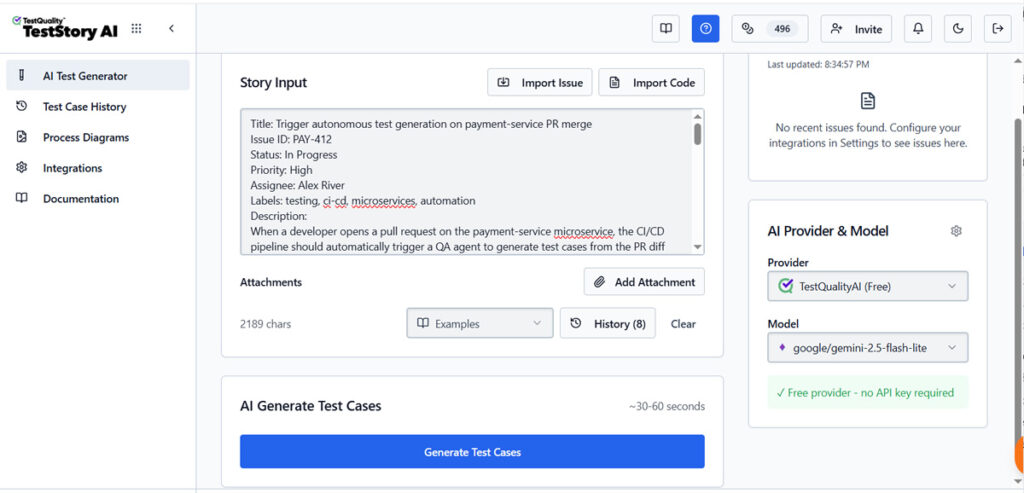
Those cases sync into TestQuality without a manual copy step, ready for execution.
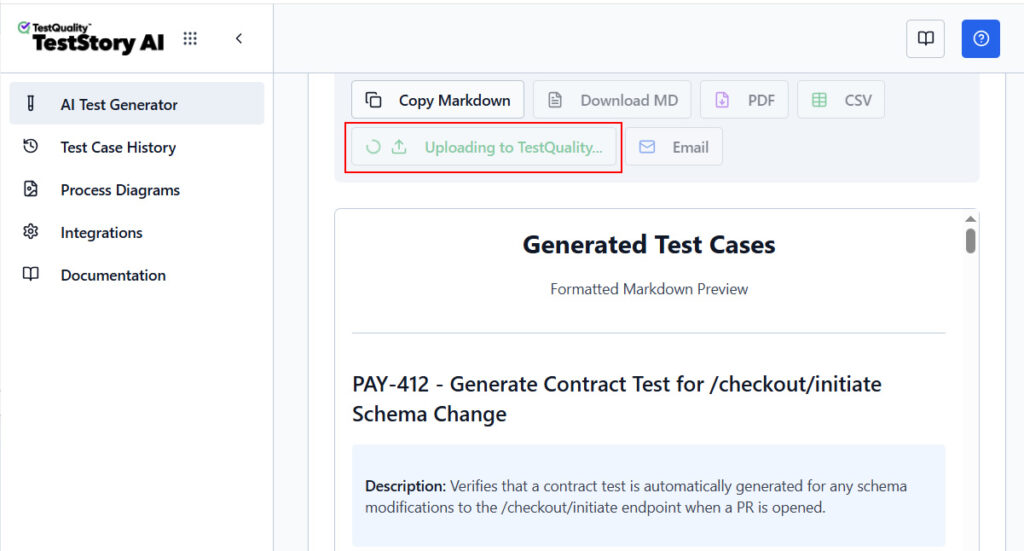
TestStory.ai test cases are stored in TestQuality's flexible OpenTest format and can be exported to Markdown, PDF, or CSV, sent to colleagues via email, or automatically synchronized with test management platforms like TestQuality, TestRail, or Zephyr
Both paths converge in the same place: TestQuality test repository to create test runs or Cycles, with pass/fail tracking, defect logging, and coverage reports that can be shared with any team members or stackholders.
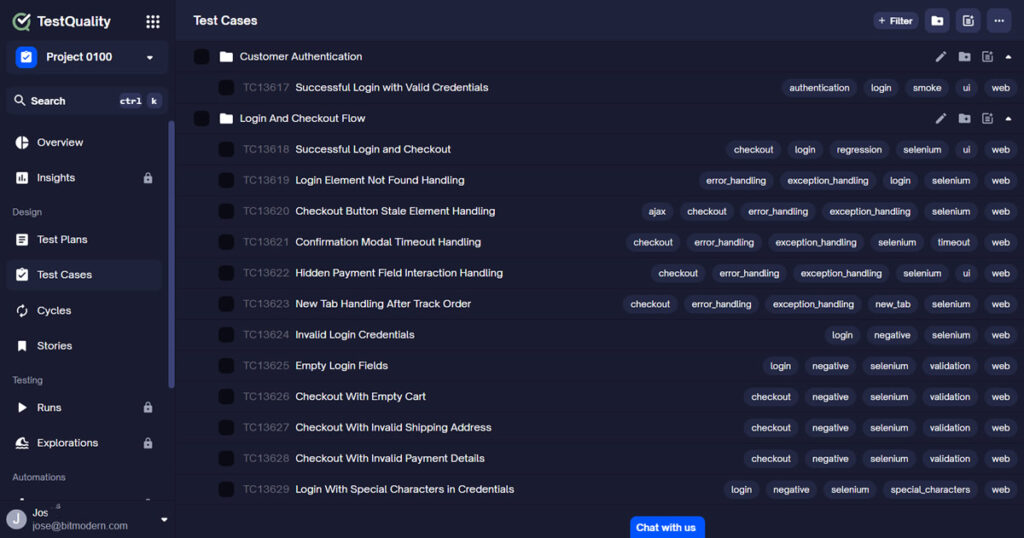
And because TestQuality integrates natively with GitHub and Jira, every test case stays linked to the issue or pull request it covers — rather than sitting isolated in a chat history or local folder.
TestStory.ai generates structured test cases from any of your existing assets (User Stories, Issues, Epics, Process Diagrams, Source Code, or Repos). It also integrates directly with MCP-compatible agentic developer tools (Cursor, Claude Code, VS Code/Copilot, Roo) so test generation fits inside your existing development workflow.
Combined workflow with TestQuality:
- Feed any supported input into TestStory.ai: a Jira issue, GitHub issue, user story, epic, process diagram, or source code.
- TestStory.ai generates structured test cases from that input.
- Cases sync automatically into TestQuality.
- Group cases into a run or cycle for the current release.
- Execute and record pass/fail/blocked status.
- Review test coverage and reports, defects link back to Jira or GitHub automatically.
Technical Deep Dive FAQ
Key Takeaways
Agentic QA Setup: What Actually Matters
Pick the setup that fits your machine and budget — then invest in skills.
Paid plans (~$20/month) are the smoothest path for regular agentic QA use — better speed, no hardware ceiling, no quota interruptions.
Ollama makes free local use possible — but RAM is the real constraint. Most capable models need 32–48 GB to run comfortably.
A limited free cloud-backed model is often the best no-cost option for average hardware — but usage quotas will surface during active workdays.
Open Code adds model flexibility — useful when you want to switch providers based on cost or task type without changing your overall workflow.
Skills are a force multiplier: reusable instruction files are what make agentic QA output consistent enough to be useful at team scale.
Agentic tools do not replace Playwright, Selenium, or manual testing. They accelerate the work around those disciplines — planning, generation, and first-pass analysis.
The right setup is the one that fits your actual machine and budget. Once the tooling is running, reusable skills are what determine whether output is consistently useful or just occasionally impressive.
Jose Amoros is part of the TestQuality marketing team, focused on agentic QA, AI-powered test management, and the operational handoff between AI-generated test artifacts and governed execution workflows. He writes regularly about CI/CD integration, Gherkin/BDD practices, and shift-left testing.
Further Reading
- Stack Overflow Developer Survey 2024 — AI section — source for the 76% AI adoption figure cited in this article
- Gartner: How Intelligent Agents in AI Can Work Alone — source for the 15% autonomous decisions by 2028 projection
- The Testing Academy — AI Meets QA: Master Claude Code as Manual Tester part 2 (original source video)
- TestQuality features overview
- TestQuality documentation
- TestQuality CLI overview
- TestQuality blog
Start Free Today
Transition from agentic drafts to governed test execution.
TestStory.ai generates structured test cases from your user stories, acceptance criteria, or architecture diagrams — then syncs them directly into TestQuality for execution, tracking, and team collaboration.
Get 500 TestStory.ai credits every month included with your TestQuality subscription — no extra cost.
No credit card required on either platform.


