

At a Glance
Seven operational pain points define Playwright at production scale.
None are framework failings — all are workflow architecture problems.
Async-state flakiness leads the list: Auto-waiting handles DOM readiness but never business-state synchronization, producing the optimistic-UI-rendering trap that Slack reduced from 57% to under 4% with dedicated stability work.
MCP integration is not free: Currents.dev benchmarked accessibility-tree workflows at 114K tokens per test versus 27K for CLI — a 4x cost inflation that requires a 200-test suite floor to justify.
Authentication and reporting are the silent taxes: A 5–15 second UI login multiplied across 50 tests wastes 4–12 minutes per run, and Slack's engineering team logged 553 hours per quarter triaging failures the default HTML reporter could not categorize.
Playwright is genuinely the best browser automation framework in 2026. The work that determines whether a team ships with confidence happens in the workflow architecture surrounding it — generation, execution, and management as three distinct layers.
Playwright is the standard for modern browser automation in 2026. It provides superior execution speed, native auto-waiting, and deep browser context control. However, running any automation framework at enterprise scale exposes operational friction. When engineering teams move from local execution to continuous integration, they encounter a consistent set of playwright pain points that the framework's official documentation rarely surfaces clearly.
These are not fundamental flaws in the framework. They are the realities of production testing. Industry data highlights the cost of ignoring them: Atlassian recorded over 150,000 hours of developer time lost annually to unstable tests, while the Slack engineering team logged 553 hours in a single quarter just triaging test failures. This diagnostic guide breaks down the seven operational challenges engineers face when scaling Playwright, backed by practitioner data, with root causes and the architectural workarounds required to maintain a stable deployment.

How does Playwright test flakiness from timing and async state actually break suites?
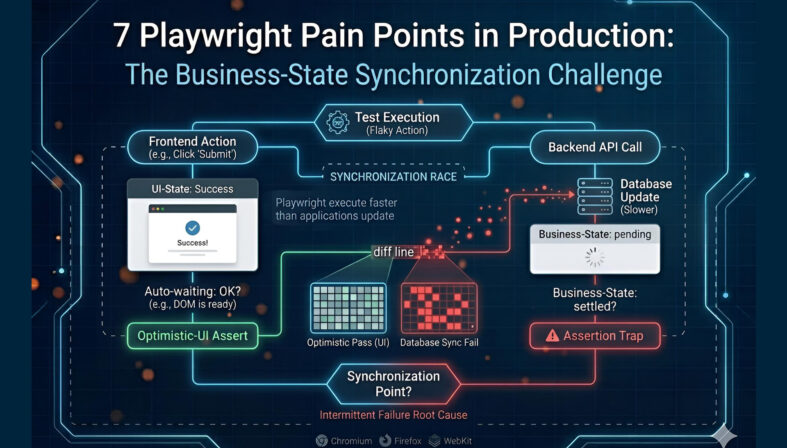
Playwright executes faster than modern applications update their state. Auto-waiting handles DOM readiness, but it does not handle business-state synchronization. This produces optimistic-UI-rendering traps where tests assert against a frontend success state before the backend settles, causing intermittent failures.
Modern frontend architectures built on React, Vue, or Next.js rely heavily on asynchronous state management. The user interface often updates optimistically to show a success state while the backend API is still processing the transaction. Sourojit Das frames this as the modern source of flakiness — Playwright's execution speed turns this architectural pattern into a vulnerability.
A common failure pattern occurs when an API response overwrites input field values mid-test. Bondar Academy documents a classic race condition: a test types "rabbit" into a field, but a delayed API response populates the field with "cat" a millisecond later. The test clicks update and asserts for "rabbit" — the assertion fails. Similarly, using textContent() fetches values instantly without waiting for the element to stabilize, producing highly intermittent playwright flaky tests.
The impact is measurable. Slack reported a 57% test failure rate before undertaking dedicated stability work, eventually reducing it to under 4%. GitHub achieved an 18x improvement in test stability metrics by addressing these exact timing discrepancies.
The consensus practitioner workaround is to abandon immediate value reads entirely. Engineers must use polling assertions like expect().toHaveText() instead of textContent(). Teams must also validate API mocks against real schemas to ensure tests do not pass against frozen mock data while the production application breaks.
For the full breakdown of root causes and fixes, see why Playwright tests become flaky.
Why do Playwright visual regression tests pass locally and fail in CI?
Native visual regression relies on strict pixel-by-pixel comparisons, which break across different operating systems. A test passing on macOS locally will fail on a Linux CI runner due to underlying differences in font rendering, anti-aliasing, and spacing — creating false negatives that erode trust in the pipeline.
Playwright includes built-in visual comparison capabilities, but the native implementation is highly sensitive to environment variables. The primary failure pattern is cross-OS rendering variance. Windows, macOS, and Linux utilize entirely different text rendering engines. When a developer generates a baseline snapshot on their local machine and pushes it to a repository, the CI pipeline running on Ubuntu will almost certainly fail the pixel comparison.
This cross-machine flake occurs even on identical hardware. Practitioners have documented instances where two M1 MacBook Pros with near-identical OS versions still produced visual flake at high pixel sensitivities. Compounding this is GitHub diff blindness: version control user interfaces cannot diff binary baseline images inline effectively, creating massive friction during pull request reviews.
The industry-standard workaround for cross-OS rendering issues is Docker normalization. By generating all baseline snapshots and running all visual tests inside an identical Docker container, teams eliminate the OS-level rendering variables. Practitioners also recommend component-level snapshots rather than full-page captures, since a smaller visual scope provides a clearer failure signal and reduces timeout risks on asset-heavy pages.
For the full production playbook on visual regression, see the visual regression deep dive.
What makes migration from Selenium to Playwright harder than expected?
Teams migrating from legacy frameworks fall into the auto-waiting assumption trap. They assume Playwright's native waiting eliminates all timing issues, but modern flakiness lives at the API and async-state layers. Porting Selenium patterns directly actively harms Playwright test stability.
When organizations move from Selenium or Cypress, they often treat the transition as a syntax port rather than an architectural redesign. Sourojit Das explicitly documents this assumption trap: engineers believe Playwright's auto-waiting mechanism is a silver bullet for timing issues. It is not. Auto-waiting ensures an element is attached to the DOM, visible, and capable of receiving events. It does not know if a GraphQL mutation has finished resolving..
Selenium-trained patterns are the root cause of many playwright production issues. Engineers frequently port long XPath expressions tightly coupled to the DOM structure directly into Playwright, producing immediate flake. Another destructive habit is carrying over hard waits. In Selenium, Thread.sleep() was a common brute-force fix. In Playwright, waitForTimeout() actively introduces flakiness by forcing the execution timeline out of sync with the application's natural event loop (Bondar Academy).
Successful migrations require a complete re-architecture of the locator strategy. Teams must adopt data-test attributes, role-based locators, and aria-labels instead of relying on structural CSS or XPath selectors. Playwright's locator-first model and polling assertions must entirely replace Selenium's WebDriverWait patterns to achieve stability.
For a detailed breakdown of the architectural differences, see the Playwright vs Selenium comparison.
What hidden costs do AI agents and MCP integration add to Playwright?
Integrating the Model Context Protocol introduces severe token cost inflation and performance overhead. Accessibility-tree snapshots consume roughly four times the tokens of CLI workflows, while Shadow DOM blindness and authentication hurdles make autonomous execution highly brittle in complex production environments.
The Model Context Protocol allows Large Language Models to control Playwright instances, enabling autonomous test generation and execution. However, the implementation cost is substantial. Currents.dev benchmarked MCP workflows at roughly 114,000 tokens per test compared to 27,000 tokens for standard CLI workflows. This 4x difference occurs because MCP streams full accessibility trees inline to the LLM rather than saving them to disk.
The complexity overhead requires a strict ROI calculation. Pramod Dutta, a senior SDET with over a decade of experience, established a clear suite-size threshold: under 200 tests, the complexity overhead is almost certainly not justified. Teams attempting to build foundational Playwright architecture and an MCP layer simultaneously consistently report failure. Framework maturity is a strict prerequisite.
At the execution layer, engineers face two critical playwright mcp problems. The first is authentication behind agents: testing behind a login wall breaks most AI agents, causing them to re-authenticate on every run, hit rate limits, and trigger security alerts. The second is Shadow DOM blindness: modern design systems encapsulate elements inside shadow roots, and the accessibility-tree snapshots that MCP relies on cannot see inside these roots, causing the AI to click empty space.
For teams adopting AI, the most stable architecture follows a three-layer pattern documented in Agentic SDLC workflows: an upstream generator like TestStory.ai builds test cases from user stories, Playwright executes them natively, and a dedicated management layer handles reporting. This bridges back to the broader shift to Agentic QA documented across the cluster.
For a complete analysis of protocol implementations, see the Playwright Test Agents and MCP deep dive.
Try It Now
Skip the boilerplate. Generate Playwright-ready test cases from a Jira story.
Paste any user story into TestStory.ai and watch the orchestration layer generate structured, Gherkin-formatted test cases instantly — covering happy paths, edge cases, and the failure scenarios your team would typically miss. No account required.
No credit card required.
Why is authentication the hidden tax on every Playwright test suite?
Treating login as a precondition for every test creates massive execution delays, triggers rate limiting, and masks real application defects. When session state expires or multi-role testing is required, authentication flows become the primary source of suite instability rather than the application itself.
Almost every enterprise application requires authentication. However, in test automation, the login flow is rarely the actual target of the test. Running a full UI login sequence before every test creates compounding playwright limitations. A standard UI login takes between 5 and 15 seconds. Across a suite of 50 tests, that equates to 4 to 12 minutes wasted entirely on authentication.
Beyond execution time, repetitive logins trigger security infrastructure. Hitting an authentication endpoint 50 times concurrently during a CI run frequently results in rate limiting or IP blocks. More critically, login-flow flakiness masks genuine application failures. As the team at Arrangility documented, engineers often receive a flood of test failure notifications only to discover that the test results they actually cared about were buried under login timeouts.
Managing multiple roles amplifies the friction. Butch Mayhew at playwrightsolutions.com documents the complexity of storing separate authenticated session files for administrators, standard users, and guests. Without careful fixture design, cross-test pollution occurs — or tests validating logout functionality inadvertently invalidate the shared session for subsequent tests.
Storage state expiration is the related second-order failure. Captured storageState files contain time-bound tokens. When CI runs longer than the token lifetime, mid-suite tests begin failing with authentication errors that look like application bugs. Marius Bernard documents the practitioner consensus: combine setup projects, capture storageState once via global setup, and reuse it across all tests via dependencies: ['setup']. Where possible, replace UI login entirely with API-based authentication, which is significantly faster and more stable. For applications enforcing 2FA, the otpauth package generates Time-based One-Time Passwords programmatically, bypassing UI friction.
How does CI/CD configuration overhead slow Playwright pipelines?
Scaling execution introduces a sharp tradeoff between speed and stability. Running parallel workers on a single CI machine quickly saturates CPU and memory, causing timeouts. Moving to horizontal sharding requires complex provider-specific configurations and custom reporting reconciliation steps to merge distributed results.
Playwright performs exceptionally well on a single developer machine. However, scaling playwright ci cd pipelines introduces a non-trivial configuration burden. Teams attempting to decrease build times typically increase the worker count. This works initially but eventually produces diminishing returns. As CPU and memory saturate, tests that passed locally begin failing with timeout errors.
Independently, the official Microsoft Playwright documentation highlights this speed-versus-stability tradeoff, recommending a worker count of 1 in CI environments to prioritize stability and reproducibility over raw throughput.
When vertical scaling on a single machine hits its limit, horizontal scaling via sharding becomes necessary. This introduces severe configuration variance. Every CI provider handles sharding differently. CircleCI uses 0-indexed sharding requiring a +1 adjustment, GitLab relies on the parallel: keyword, and GitHub Actions requires a matrix strategy. The configuration is not portable across platforms.
Distributed test runs also produce fragmented data. A sharded run generates separate reports for every machine. Merging them requires configuring the blob reporter and adding a dedicated consolidation step to the pipeline. Teams also fall into the fullyParallel configuration trap; without setting this to true, sharding splits at the file level, producing uneven shard distribution if test file sizes vary.
The practitioner consensus is a two-axis scaling strategy: workers for vertical scaling up to the machine's safe limit, and sharding for horizontal scaling across multiple machines. Engineers must also pin browser versions using official Playwright Docker images to prevent version-drift failures.
Why does Playwright's default reporter fail to scale beyond small teams?
The default HTML reporter indicates pass or fail, but it lacks historical trend visibility, flaky-versus-real-bug categorization, and defect linkage. Without cross-run pattern detection, engineering teams spend hundreds of hours manually triaging dense logs instead of fixing application code.
Playwright's execution engine is world-class, but its native observability layer is designed for individual developers, not enterprise engineering teams. When a test fails, the default HTML reporter shows the immediate error. It does not indicate whether the test has failed four times in the last twenty runs in different ways. This missing context is the core of the playwright reporting gap.
The cost is severe. The Slack Engineering Blog recorded that their team spent 553 hours per quarter specifically triaging Playwright failures because the default reporter could not distinguish between flaky tests and genuine defects. That equates to roughly 23 days of engineering time per quarter lost to log analysis.
At scale, QA leads, developers, and engineering managers require different views of the same test data. They need cross-cycle defect linkage to understand if a failure on Linux on Tuesday is related to a failure on macOS on Thursday. The default reporter provides a static, single-run view that forgets everything the moment the next pipeline executes.
Closing this gap requires a dedicated test management layer. Playwright outputs structured data via its reporter configuration — for example, reporter: [['junit', { outputFile: 'results.xml' }]] in playwright.config.js. Engineers then use the TestQuality CLI command testquality upload_test_run to upload results to a named project and cycle. Once ingested, TestQuality maps the run history, detects flake patterns, and surfaces historical trends automatically.
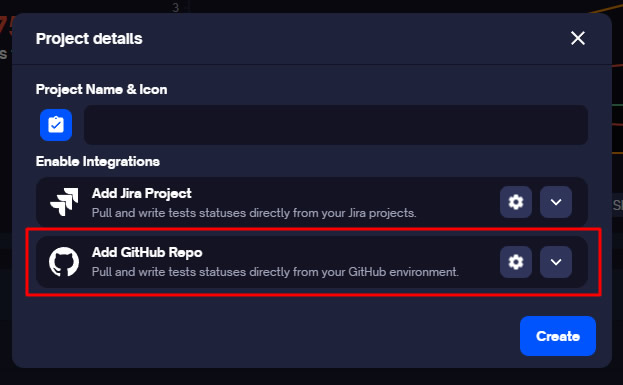
When a genuine failure requires action, the tester reviews the artifact and logs the defect manually — a deliberate human-in-the-loop step that prevents flake from auto-creating Jira noise. Once the defect is logged, TestQuality's GitHub and Jira integrations sync the defect record to the team's tracker, ensuring full traceability without ticket spam.
This structured integration forms the foundation of a mature Agentic QA pipeline and connects upstream to LLM regression pipelines when AI-generated code is in scope.
Decision Framework: which pain points hit which teams hardest?
Not every team hits all seven playwright challenges simultaneously. The friction scales with suite size and execution-environment complexity. Understanding where your team sits on this curve dictates which architectural investments to prioritize first — and which to defer until they actually matter.
Teams with under 50 tests primarily encounter Pain Points 1 and 5 — async-state flakiness and authentication overhead. CI infrastructure is rarely the bottleneck at this stage. Suites between 50 and 200 tests pick up Pain Points 2, 6, and 7: visual regression variance, single-machine CI saturation, and the first signs of the reporting gap. Suites between 200 and 500 tests have all seven points active simultaneously, and Pramod Dutta's MCP threshold (Pain Point 4) starts to make sense for teams with mature framework foundations. Beyond 500 tests, Pain Point 7 — reporting and observability — becomes existential: triage time outpaces development time without a management layer.
For teams still evaluating their base automation framework before going deep on Playwright, the earlier framework comparison covering Robot Framework and Katalon Studio provides useful context on industry alternatives.
Playwright Pain Point Matrix by Suite Size
| Suite Size | Primary Pain Points Active | Required Architectural Response |
|---|---|---|
| Under 50 tests | 1 (Flakiness), 5 (Authentication) | Implement storageState dependencies and polling assertions. CI overhead is minimal. |
| 50–200 tests | Add 2 (Visual), 6 (CI/CD), 7 (Reporting emerging) | Single CI machine saturates. Implement Docker normalization and JUnit XML ingestion via the TestQuality CLI. |
| 200–500 tests | All 7 active. MCP (4) viable per Dutta's threshold. | Horizontal sharding required. TestStory.ai generation and LLM regression pipelines justify their setup cost. |
| 500+ tests | 7 (Reporting) becomes existential. | Without a management layer mapping historical flake, triage time outpaces development time. |
Environmental factors amplify specific issues. Multi-browser matrix testing (Chromium, Firefox, WebKit) compounds Pain Points 2 and 6. Highly dynamic UIs amplify 1 and 2. Active AI-driven test generation makes Pain Point 4 the primary architectural hurdle.
Conclusion
The seven challenges outlined here are not failings of Playwright. They are the operational realities of running any highly concurrent browser automation framework at enterprise scale, and Playwright remains the most capable, performant tool for the job in 2026. The distinction between a team that spends 500 hours a quarter triaging logs and a team that ships with confidence lies entirely in the workflow architecture surrounding the framework. By implementing proper state management, normalizing visual environments with Docker, handling authentication via API, and closing the reporting gap with structured test management, engineering teams bypass these pain points and use Playwright's execution speed safely in production.
Technical Deep Dive FAQ
Key Takeaways
The seven pain points are workflow problems, not framework problems.
The architecture around Playwright is what determines whether teams ship with confidence.
Async state is the dominant flake source: Auto-waiting handles DOM readiness, never business-state synchronization — Slack reduced their failure rate from 57% to under 4% by addressing it directly, and GitHub recorded an 18x stability improvement on the same fixes.
Visual regression breaks across operating systems: Cross-OS font rendering and anti-aliasing differences make local-pass / CI-fail the default behavior. Docker normalization is the practitioner-consensus fix, not a workaround.
MCP economics require a 200-test floor: Currents.dev benchmarked 114K tokens per test on accessibility-tree workflows versus 27K on CLI. Below Pramod Dutta's threshold, the complexity overhead is rarely justified.
Authentication is the silent multiplier: A 5–15 second UI login across 50 tests wastes 4–12 minutes per run, triggers rate limiting, and masks real failures behind login timeouts. Setup projects, storageState reuse, and API-based auth eliminate the tax.
CI/CD scaling needs two axes: Single-machine worker counts saturate CPU and memory; Microsoft recommends one worker in CI for stability. Horizontal sharding across machines plus the blob reporter is how teams reclaim throughput without losing reliability.
Reporting is where management becomes existential: Slack's 553 hours per quarter of triage time is what happens when the default HTML reporter is the only observability layer. JUnit XML output piped through the TestQuality CLI into a structured management plane converts execution data into actionable engineering insight.
The three-layer architecture — TestStory.ai generates, Playwright executes, TestQuality manages — is what turns each of these seven pain points from a recurring tax into a one-time architectural decision.
Start Free Today
Move from triaging Playwright runs to managing them.
TestStory.ai generates structured test cases from your user stories, acceptance criteria, or architecture diagrams — then syncs them directly into TestQuality for execution, tracking, and team collaboration. Configure Playwright to output JUnit XML, push results through the TestQuality CLI, and replace 553-hour triage quarters with structured run history, flake-pattern detection, and clean GitHub or Jira defect linkage.
✦ Get 500 TestStory.ai credits every month included with your TestQuality subscription — no extra cost.
No credit card required on either platform.
Sources:
- Sourojit Das, "Why Your Playwright Tests Are Still Flaky (And It's Not Because of Timing)" — Medium / CodeToDeploy (Feb 2026).
- Sam Sperling, "How to Avoid Flaky Tests: Playwright Best Practices Every Test Automation Engineer Must Know" — Medium (Oct 2025).
- Bondar Academy, "How to Fix Playwright Flaky Tests: 3 Causes" (2026).
- Savan Vaghani, TestDino, "Playwright Flaky Tests: How to Detect & Fix Them" (Apr 2026).
- DEV.to / Playwright community, "Playwright Assertions: Avoid Race Conditions with This Simple Fix" (Feb 2025).
- Applitools — "Playwright Visual Testing Best Practices, presented by Applitools" (2024).
- CSS-Tricks — "Automated Visual Regression Testing With Playwright" (2025).
- Nora Weisser, "Visual testing with Playwright and Docker" — TechNotes (2026).
- Currents.dev, "State of Playwright AI Ecosystem in 2026" (Mar 2026).
- Bug0, "6 Most Popular Playwright MCP Servers for AI Testing in 2026" (2026).
- Pramod Dutta, ScrollTest.com, "Playwright MCP + LLM Architecture: Building AI-Augmented Test Automation That Actually Works" (Apr 2026).
- Marius Bernard, Roundproxies, "How to Maintain Authentication State in Playwright" (Nov 2025).
- Butch Mayhew, playwrightsolutions.com, "Handling Multiple Login States Between Different Tests in Playwright" (Jul 2023).
- Arrangility, "Playwright: Streamlining Authentication with storageState" (2025).
- TO THE NEW Blog, "How Session Storage Works in Playwright" (Oct 2025).
- Playwright.dev, official Continuous Integration documentation.
- Playwright.dev, official Sharding documentation.
- Atul Sharma, Medium, "Enhancing Playwright Tests Efficiency: Parallel Runs with Sharding on Docker via GitHub Actions" (Oct 2024).
- Vijay K, Medium, "Achieving Test Sharding in Playwright with GitLab CI/CD" (Jun 2025).
- TestDino, "The Playwright Reporting Gap: Why Test Reports Don't Scale" (Mar 2026).
- Arpita Patel, Slack Engineering Blog, "Handling Flaky Tests at Scale: Auto Detection & Suppression" (primary source for the 553 hrs/quarter triage data).


