

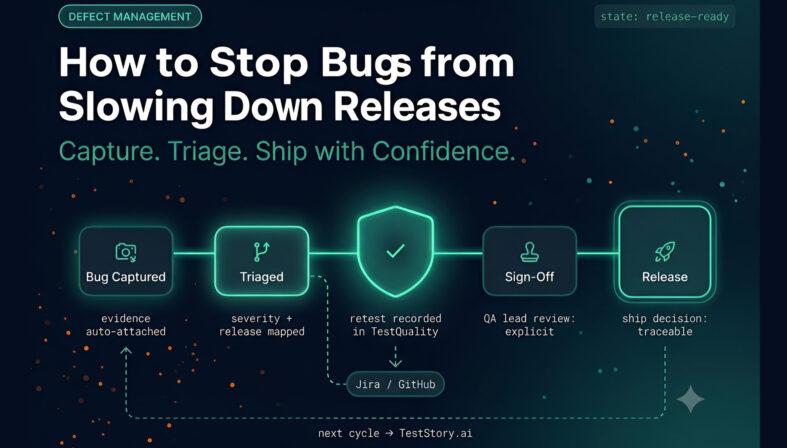
Defect management is the end-to-end process of capturing, triaging, routing, retesting, and closing software defects before they block a release. Most teams discover bugs fast enough — the delay comes in everything that happens after discovery: chasing reproduction details, clarifying which environment is affected, and confirming whether a fix actually holds before shipment. A fragmented post-report workflow, where screenshots live in one tool, test results in another, and sign-off happens informally in Slack, is the most common reason releases slip. A structured defect management workflow connects evidence capture, release mapping, and QA review into a single traceable chain — and a test management platform closes the loop between what was verified and what is ready to ship.
At a Glance
Why Post-Report Workflows Become Release Bottlenecks
Most release delays start after a bug is found, not before.
Core problem: Teams usually find bugs fast enough, but lose time chasing reproduction details, technical context, and ownership.
Essential evidence: Annotated screenshots, screen recordings, session replay, console errors, network requests, and environment data reduce back-and-forth.
Release control: Linking issues to the correct environment and release makes it easier to see what is blocking deployment.
QA governance: Structured sign-off gives QA leads a visible decision point instead of an assumption made in a chat thread.
Tooling fit: Bug tracking, release tracking, and test management work best when they share a clear workflow rather than living in separate silos.
A defect without context is rarely a quick fix — even when the bug itself is obvious.
Why do bugs slow down releases even after they have already been found?
Bugs slow releases when the reporting process leaves out the details needed to act. The delay usually comes from missing context, repeated reproduction attempts, disconnected QA workflows, and uncertainty about whether a release is actually ready to ship.
That pattern is common in teams shipping web applications. A bug report may say that something failed, but the engineering team still needs to know what happened in the browser, what environment was involved, what requests fired, and whether the issue affects the release currently under consideration.
This is one reason defect workflows remain a delivery problem even in mature teams. The DORA State of DevOps research has consistently found that software delivery performance correlates with workflow quality and feedback loop speed, not just code output — teams with faster recovery from defects ship more frequently and with lower change failure rates. Contrary to expectations, a 25% increase in AI adoption is associated with a 1.5% decrease in delivery throughput and a 7.2% decrease in delivery stability. Because AI allows developers to generate code much faster, it often leads to larger batch sizes, which are slower to review and more prone to creating system instability.
The actual bug may take ten minutes to fix. The coordination around it can easily take much longer.
What usually goes wrong after a bug report is submitted?
Most teams do not break down at bug discovery. They break down in the next steps: clarifying the problem, collecting evidence, routing ownership, and deciding release impact. That is where the familiar “can you reproduce this?” cycle begins.
Common failure points include:
- Missing technical context such as browser, device, environment, or network conditions
- Weak evidence such as a plain-text report without screenshots or a recording
- Disconnected artifacts where bugs, tests, and release notes live in separate tools with no obvious linkage
- Unclear release mapping so nobody knows which environment or version is affected
- No explicit sign-off workflow which turns release readiness into guesswork
For web applications, this becomes especially painful because defects can depend on client-side behavior, browser state, console output, or API responses. The written description alone is rarely enough.
Writing an effective software bug report is harder than it looks — informal reports do not scale once multiple teams share release responsibility. Official guidance from Atlassian reflects this too: Jira Software documentation emphasizes structured issue data and workflow states precisely because unstructured reports create routing confusion at scale.
What information should a good bug report capture automatically?
A high-quality bug report should gather evidence at the moment the problem occurs. The most useful reports include visual proof, session-level context, technical logs, and environment details so developers can diagnose the issue without starting from zero.
The most important captured details include:
- Annotated screenshots that show the exact UI problem
- Screen recordings that show the path to failure
- Session replay for reviewing user actions in context
- Console errors that point to front-end failures
- Network and API requests that expose backend or integration issues
- Browser, device, and environment information to identify where the issue occurred
Automatic capture matters because manual entry is inconsistent. Even disciplined QA teams can miss a crucial request payload or console exception when they are documenting a failure under time pressure.
This is also where a purpose-built reporting workflow is different from a plain issue form. It narrows the gap between what QA observed and what engineering needs to investigate.
How does tying a bug to the correct environment and release help?
Connecting every issue to its actual environment and release gives teams a reliable view of deployment risk. Instead of asking whether a bug is “important,” teams can ask whether it blocks the version currently moving toward production.
That distinction matters. A defect in staging for an unreleased build has a different impact than the same defect found in a production-hotfix candidate. Without release linkage, teams waste time debating severity in the abstract.
When issues are tied to the right release and environment, teams can answer practical questions quickly:
- Which defects are blocking deployment?
- Which areas have already been tested?
- Which fixes belong to the current release versus a later one?
- What is ready to ship now?
This is the difference between defect tracking and release coordination. One records problems. The other helps teams make a shipping decision.
How can QA sign-off reduce release guesswork?
QA sign-off creates an explicit decision point for release readiness. Instead of relying on scattered messages or assumptions, QA leads review the current defect state, testing status, and remaining blockers before approval is given.
Without a sign-off step, release approval often happens informally. A few people assume testing is complete, someone says a fix “looks good,” and the team moves forward with incomplete visibility.
A better workflow gives QA leads a structured review based on evidence:
- Open issues tied to the release
- What has been tested already
- Which risks are accepted versus unresolved
- Whether the environment under test matches the release candidate
In practice, sign-off is not about adding bureaucracy. It is about making the shipping decision traceable.
What does a practical workflow from report to release look like?
A practical workflow moves from defect capture to triage, verification, release mapping, and final approval without losing context. Each step should preserve the evidence gathered at report time and make status visible to the people making deployment decisions.
A workable model looks like this:
- Report the bug from the web application itself so technical details are captured immediately.
- Attach evidence automatically including screenshots, recording, session replay, logs, requests, and environment data.
- Triage the issue by severity, ownership, and release impact.
- Map the issue to the correct environment and release so teams know what deployment it affects.
- Retest after the fix using the original evidence to confirm the problem is resolved.
- Review release readiness based on blockers, completed tests, and accepted risks.
- Record QA sign-off so the approval decision is explicit.
That workflow matches how real delivery teams operate. It acknowledges that bug handling is not a one-step activity. It is part of release management.
Where does test management fit into a post-bug workflow?
Bug reporting explains what went wrong. Test management explains what has been verified. You need both if the goal is release confidence rather than just issue logging.
This is where a test management platform becomes useful. If a defect is linked to retesting activity, test runs, and readiness reporting, the release decision becomes clearer. Teams using TestQuality track what was executed, which defects were validated, and what remains open before sign-off.
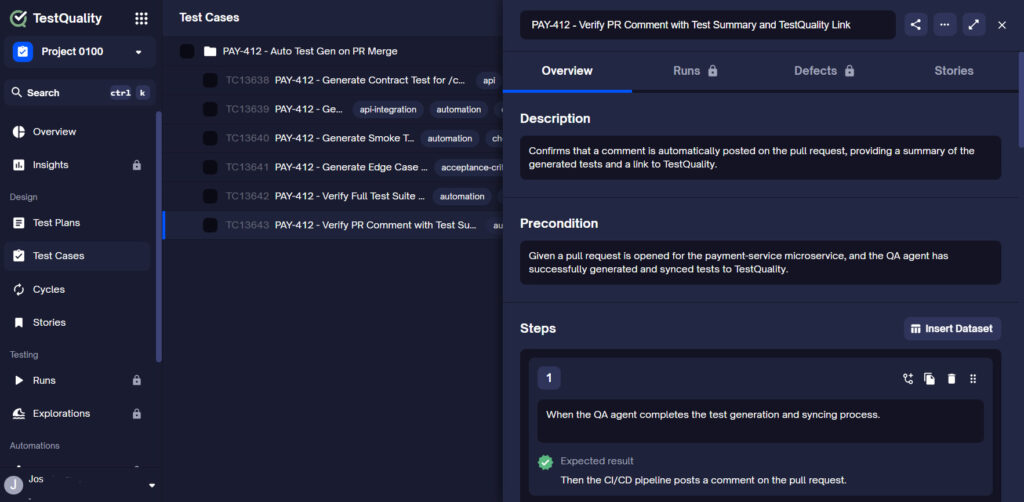
That coverage also extends upstream: catching issues at the pull request verification stage before they enter the deployment pipeline reduces the volume of defects that reach QA sign-off at all. For teams generating new test cases after a defect is closed,
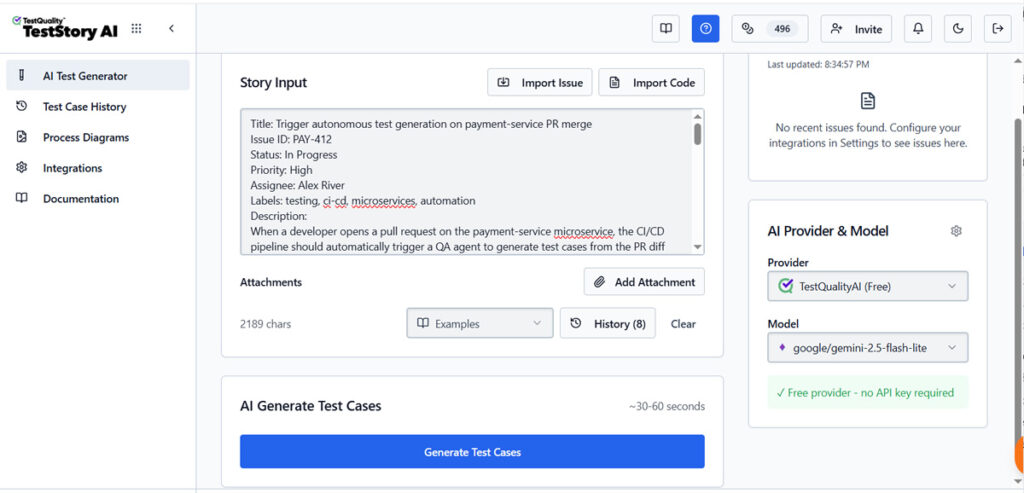
TestStory.ai (included with every TestQuality subscription) converts the fixed story or acceptance criteria back into structured test cases that sync directly into TestQuality for the next cycle.
One practical pattern is:
- Use a bug reporting workflow to capture evidence and route the defect.
- Use a test management platform to track retest coverage, execution status, and release-level reporting.
- Use shared integrations with GitHub and Jira where possible to keep engineering and QA aligned.
This split is sensible because bug reports and test evidence answer different questions.
Need faster retest coverage after defects are fixed?
Generate structured test cases from stories or requirements, then sync them into TestQuality for execution and release review — no setup required.
Try the Free Test Case Builder →How can teams avoid the classic “can you reproduce this?” loop?
The best way to avoid reproduction loops is to make reproduction evidence automatic, not optional. If the report already includes the user path, technical logs, and environment data, the engineering team can investigate immediately instead of reopening the same conversation.
Use this checklist when evaluating your current bug workflow:
- Can a report be created directly from the website under test?
- Does the report capture screen evidence automatically?
- Are console errors and network requests included?
- Is browser and device metadata attached by default?
- Can each issue be tied to a specific environment and release?
- Is there a visible QA sign-off step before shipment?
If several answers are no, the team is likely compensating with Slack threads, manual note-taking, and repeated clarification requests.
What integrations matter most for a bug and release workflow?
The right integrations are the ones that reduce handoff friction between QA, engineering, and delivery. In this type of workflow, issue tracker and team communication integrations matter because the work must move cleanly from report to action.
In a bug-and-release workflow, the integrations that matter most connect defects to the tools engineering already uses day-to-day:
- Jira
- Slack
- Azure DevOps
- Trello
- ClickUp
- Asana
What mistakes make release readiness harder to judge?
Release readiness becomes murky when teams use incomplete issue data, rely on memory, or treat testing and defects as unrelated streams of work. The result is a release process built on intuition rather than current evidence.
Watch for these common mistakes:
- Treating all bugs as equal instead of asking which release they block
- Using manual screenshots only without session replay, logs, or network details
- Keeping QA results separate from defect status so nobody sees the full picture
- Skipping formal sign-off and assuming silence means approval
- Testing one environment and shipping another without clear environment mapping
The fix is usually not more meetings. It is better workflow data.
Technical Deep Dive FAQ
Key Takeaways
What Actually Keeps Bugs from Stalling Delivery
Release speed improves when context travels with the defect.
Capture automatically: Bug reports should include screenshots, recordings, session replay, console errors, network requests, and environment details by default.
Map to releases: A defect becomes actionable faster when it is linked to the exact environment and release it affects.
Use explicit sign-off: QA review should be a visible decision based on current evidence, not an assumption made in chat threads.
Separate but connect workflows: Bug tracking records the issue, while test management records what was verified before release.
Reduce rework: The less your team asks for missing context after a report, the faster defects move from discovery to closure.
The fastest defect workflow is usually the one that removes clarification work, not the one that adds more status meetings.
About the Author
Jose Amoros is part of the TestQuality marketing team, focused on agentic QA, AI-powered test management, and the operational handoff between AI-generated test artifacts and governed execution workflows. He writes regularly about CI/CD integration, Gherkin/BDD practices, and shift-left testing. View author page →
Start Free Today
Transition from script-writing to outcome-orchestration.
TestStory.ai generates structured test cases from your user stories, acceptance criteria, or architecture diagrams — then syncs them directly into TestQuality for execution, tracking, and team collaboration.
Get 500 TestStory.ai credits every month included with your TestQuality subscription — no extra cost.
No credit card required on either platform.


