Test parameterization is a powerful testing technique that enables you to execute the same test case with multiple sets of data. Instead of creating separate test cases for different input values, parameterization allows you to maintain a single test case while validating how your application handles various scenarios. This approach not only reduces test maintenance overhead but also ensures comprehensive coverage of your application’s functionality.
To effectively run tests of all the important test-cases and guarantee that all the criteria are being met to the fullest extent feasible, testers must do more than just run the software through its paces; they must also manage, gather, and retain massive volumes of data. These testing datasets are used as input by test cases, from which anticipated and unexpected system behavior may be determined.
What’s Test Data?
In order to begin drafting test cases that will check and validate the specified features and user scenarios of the application under test, we must first gather the data that will serve as input when running those tests and ultimately lead to the discovery of bugs. To put it simply, we could define Test Data as “Required information for running tests.” It is important that this data be accurate and comprehensive so that the issues can be eliminated. The International Software Testing Qualifications Board (ISTQB) provides a little more in-depth explanation: “
Datasets, parameters and variables created or selected to satisfy the execution preconditions and input content required to execute one or more test cases.”
You can’t create test cases without the necessary test parameterization to run the tests. This input data may be provided by the tester while running the test cases, or it can be fetched automatically by the program from one or more predetermined data sites.

Why Test Parameterization Data is important in Software Testing
If the test case does not produce an error when given test parameterization data that is not what was expected—for example, if the data supplied is alphanumeric but the requirements merely specifies it should only take numbers—then the test case did not detect the problem. The test case’s boundaries may be discovered via the use of negative situations simulated using test data.
Since test data is the Input feed for testing the application, it is crucial that tests be properly crafted to ensure that the right outputs are produced. It’s important to emphasize the significance of creating test data alongside other development and testing tasks. Indeed, unreliable test findings cannot be obtained from poorly constructed test data.
Nowadays, it is more important than ever to thoroughly test software using a comprehensive collection of test data. These days, Continuous Delivery, Test Coverage, Automation, and Continuous Testing can’t exist without accurate, relevant, high-quality data. Remember that finding issues sooner in the development lifecycle with reliable test data means fewer costly problems in production and easier fixes. As a result, if the data quality fails during testing and QA, the final product will also fail.
How to use DataSets with TestQuality
You can now use a Dataset Format in your test creation process using TestQuality.
One of the benefits of usign data sets is to reduce duplication. With the help of TestQuality, you can have multiple variations created by pulling different data from the table.
https://youtube.com/watch?v=3eLp0H6VUsY%3Fenablejsapi%3D1%26origin%3Dhttps%3A
As shown in the video, that you can find in our TestQuality YouTube channel, it’s easy to implement just by adding curly brackets {{title}} around the title of a column in the dataset will automatically create variations of a test when the test is sent to a run.
The use of sets of data increases the confidence of the testers since incomplete test cases, missing requirements and defects may all be found early in the product development process. Therefore, Test Coverage may be improved by using high-quality test data as a result of this, your dev team will be more productive as it will involve less dev time to fix issues found.
TestQuality’s import capabilities allows you to import requirements, tests, and issues by uploading Gherkin Feature Files easily with an import data option menu even when using a Gherkin based Test results JSON file. Gherkin feature files can be uploaded via TestQuality REST interface via curl, a popular command line tool.
Once your file has been added, you can optionally choose a Cycle and Milestone that you would like to link to your Test Run result.
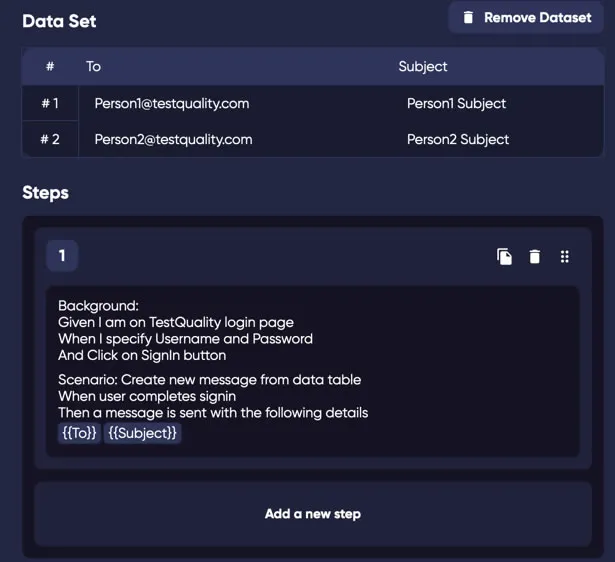
Example of using data sets while creating a Test with Gherkin
TestQuality Cycles will be more optimized and productive when used for both functional or regression testing since you may even simplify your test cases by using up-to-date sets of data.
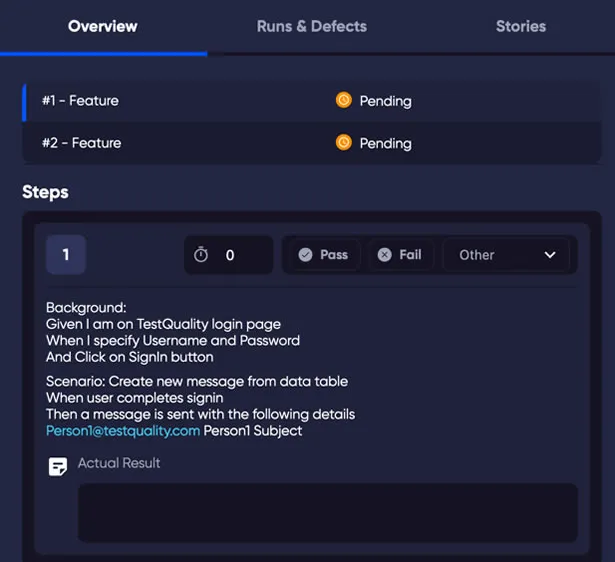
Example of a test case status as a result of using data sets with Gherkin
A big challenge when working with data sets is found in the difficulty to keep track of datasets specially when the test data sources are not avaliable to all the team of testers. In this sense, TestQuality is the perfect collaborative test management solution that offers customizable user roles and permissions that you can easily tailor and scale up to your dev and QA team’s needs.
Also, a collaborative tool such as TestQuality helps to avoid the risk of corrumpting the data specially when multiple groups share the same project.
In conclusion
Using TestQuality as your Test Management system allows testers and QA teams to simply maintain and produce data, which not only saves time but also allows the test team to reuse and exploit test data to its full potential.
TestQuality is designed around a live integration core that allows TQ to communicate directly with GitHub and integrate with Jira in real-time linking issues and requirements with the key tools in your DevOps workflows.

TestQuality Team