
Key Takeaways
Selecting the right test plan tools can transform your QA efficiency and reduce testing bottlenecks by up to 40%.
- Feature alignment matters most - prioritize tools that match your specific testing methodology and team workflows
- Integration capabilities are non-negotiable - seamless connectivity with existing development tools prevents workflow disruption
- Team size and project complexity should drive your selection - what works for a 5-person startup won't scale for enterprise teams
- Start with a clear evaluation framework - defining requirements upfront prevents costly tool switching later
The right test plan tools don't just organize your testing—they accelerate your entire development lifecycle.
Choosing test plan tools shouldn't feel like solving a puzzle with missing pieces. Yet many QA teams find themselves drowning in a sea of options, each promising to revolutionize their testing process. With test automation projected to reach $55.2 billion by 2028 at a 14.5% CAGR, organizations are under increasing pressure to select tools that support both manual and automated testing workflows.
The challenge isn't a lack of options but rather knowing which test plan tools will actually solve your specific problems without creating new ones. With test automation adoption rapidly accelerating across organizations, the pressure to select platforms that support both manual and automated testing has never been higher.
This guide cuts through the marketing noise to help you make an informed decision. We'll explore the essential features that separate good solutions from great ones, examine how different types of test planning software serve different needs, and provide a practical framework for evaluating options based on your team's unique requirements.
What Are Test Plan Tools and Why Do They Matter?
Test plan tools are specialized software platforms designed to streamline the creation, management, and execution of comprehensive testing strategies. Unlike simple documentation tools, these platforms provide structured frameworks for organizing test cases, tracking progress, managing resources, and ensuring complete test coverage across software projects.
Modern test planning software goes beyond static document creation. These solutions enable teams to build dynamic, interactive test plans that evolve with project requirements and integrate seamlessly with development workflows. They serve as the central hub where testing strategy meets execution, bridging the gap between high-level planning and detailed test case management.
The importance of robust planning platforms becomes clear when you consider the cost of poor planning. According to the Consortium for Information and Software Quality, poor software quality costs US companies at least $2.41 trillion annually, with costs increasing exponentially as defects move through the development lifecycle. Effective test planning solutions help teams identify potential issues early, allocate resources efficiently, and maintain clear visibility into testing progress.
For example, platforms like TestQuality provide visual test plan builders that allow teams to create modular, reusable test components. This approach reduces redundancy while ensuring consistent testing standards across multiple projects, making it easier for teams to scale their testing efforts as they grow.
What Features Should Every Test Plan Tool Have?
The foundation of any effective test planning software lies in its core capabilities. While different platforms may excel in specific areas, certain features are non-negotiable for maintaining efficient, comprehensive testing processes.
Comprehensive Test Case Organization
Your test plan tools must provide intuitive ways to structure and categorize test cases. This includes hierarchical organization, custom tagging systems, and filtering capabilities that allow team members to quickly locate relevant tests. Look for tools that support both manual and automated test cases within the same framework, as hybrid testing approaches become increasingly common.
Real-Time Collaboration and Communication
Modern development teams are often distributed across different locations and time zones. Your chosen platform should enable real-time collaboration, with features like shared workspaces, comment systems, and notification mechanisms that keep all stakeholders informed of changes and progress.
Requirement Traceability
Effective QA planning requires clear connections between business requirements and test cases. The best testing platforms provide bidirectional traceability, allowing teams to verify that all requirements are adequately tested while identifying the impact of requirement changes on existing test suites.
Progress Tracking and Reporting
Visibility into testing progress is crucial for project management and stakeholder communication. Look for platforms that offer customizable dashboards, automated progress reporting, and analytics that help identify bottlenecks and optimize resource allocation.
Version Control and Change Management
As projects evolve, test plans must adapt accordingly. Robust version control ensures that changes are tracked, documented, and reversible when necessary. This feature becomes particularly important in regulated industries where audit trails are mandatory.
Template and Reusability Support
Efficiency comes from avoiding redundant work. The best solutions provide template systems and component libraries that allow teams to reuse proven test structures across different projects while maintaining consistency in testing approaches.
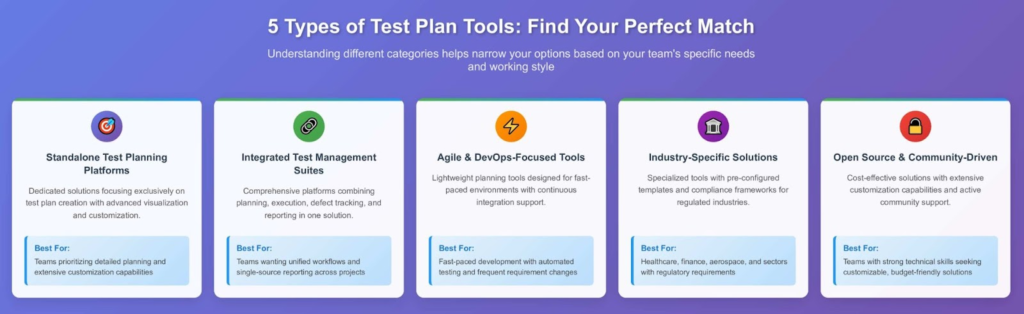
Which of These 5 Types of Test Plan Tools Is Right for You?
Understanding the different categories of test planning software helps narrow your options based on your team's specific needs and working style. Each type serves different purposes and excels in particular scenarios.
1. Standalone Test Planning Platforms
These dedicated solutions focus exclusively on test plan creation and management. They typically offer the most comprehensive planning features, including advanced visualization capabilities, extensive customization options, and sophisticated reporting mechanisms. Standalone platforms work well for teams that prioritize detailed planning and need extensive customization capabilities.
The main advantage is depth of functionality specifically for test planning. However, they may require additional integrations to connect with your existing development toolchain, potentially creating workflow gaps.
2. Integrated Test Management Suites
These comprehensive platforms combine test planning with execution, defect tracking, and reporting capabilities. They provide end-to-end testing workflow management, reducing the need for multiple solutions and minimizing context switching for team members.
Integrated suites excel when teams want unified testing workflows and single-source reporting. They're particularly valuable for organizations seeking to standardize testing processes across multiple projects and teams.
3. Agile and DevOps-Focused Tools
Designed specifically for fast-paced development environments, these tools emphasize lightweight planning, continuous integration, and rapid iteration. They typically feature simplified interfaces, automated workflow triggers, and strong integration with popular development tools like Jira, GitHub, and Jenkins.
These tools shine in environments where testing plans need to adapt quickly to changing requirements and where automated testing plays a significant role in the overall strategy.
4. Industry-Specific Solutions
Certain sectors require specialized testing approaches due to regulatory requirements or unique technical challenges. Industry-specific tools provide pre-configured templates, compliance frameworks, and specialized reporting capabilities tailored to sectors like healthcare, finance, or aerospace.
While more expensive and potentially less flexible, these tools can significantly reduce setup time and ensure compliance with industry standards.
5. Open Source and Community-Driven Platforms
These tools offer cost-effective solutions with active community support and extensive customization capabilities. They're particularly attractive for teams with strong technical skills who can adapt the tools to their specific needs.
The trade-off typically involves higher setup and maintenance overhead in exchange for lower licensing costs and greater flexibility.
Matching Test Plan Tools to Your Team Size and Project Complexity
The scale of your operations significantly influences which test planning software will serve you best. What works perfectly for a small, agile team can become unwieldy for enterprise organizations, and vice versa.
Small Teams (5-15 People)
Small teams typically need simplicity and speed over extensive customization. The ideal testing platforms for this segment offer intuitive interfaces, minimal setup requirements, and cost-effective pricing models. Cloud-based solutions often work best, eliminating infrastructure concerns and enabling rapid deployment.
Focus on platforms that provide essential planning features without overwhelming complexity. The ability to grow with your team is important, but avoid over-engineering your initial selection. Many small teams benefit from freemium models that allow experimentation before committing to paid features.
Medium Teams (15-50 People)
Medium-sized teams face unique challenges around coordination and standardization. They need more sophisticated organization capabilities than small teams but aren't ready for enterprise-level complexity. The sweet spot lies in tools that offer structured workflows while maintaining flexibility.
Look for platforms that support multiple projects simultaneously, provide role-based access controls, and offer integration capabilities with your existing development tools. This is often where teams transition from simple planning to more comprehensive test management approaches.
Large Teams (50+ People)
Large organizations require robust testing platforms that can handle complex hierarchies, extensive customization, and sophisticated reporting requirements. Enterprise features like advanced user management, audit trails, and compliance reporting become essential.
Consider solutions that offer dedicated support, training programs, and professional services to ensure successful adoption across large teams. The total cost of ownership should include implementation and training expenses, as well as licensing fees.
Project Complexity Considerations
Beyond team size, project complexity significantly impacts tool selection. Simple web applications have different testing requirements than complex enterprise software or safety-critical systems. Consider factors like the number of testing environments required, integration points with external systems, regulatory compliance requirements, and the mix of manual versus automated testing approaches.
High-complexity projects often benefit from tools that provide extensive customization capabilities and advanced workflow management, even if they require longer implementation periods.
Integration and Automation: The Modern QA Imperative
Modern software development relies on interconnected toolchains where seamless integration capabilities can make or break your testing efficiency. With test automation projected to reach $55.2 billion by 2028 at a 14.5% CAGR, your chosen platforms must not only support automated testing but actively facilitate its implementation.
Development Tool Integration
Your chosen platform should integrate natively with your existing development ecosystem. This includes version control systems like Git, issue tracking platforms such as Jira, and continuous integration tools like Jenkins or GitHub Actions. The goal is creating smooth data flow between planning and execution without manual intervention. Platforms designed with this in mind, like TestQuality, prioritize these native integrations to ensure a cohesive development and testing workflow.
Consider how test plan updates trigger automated workflows and how test results feed back into planning cycles. The best tools create bidirectional connections that keep planning documents synchronized with actual testing activities.
API and Webhook Support
Robust API capabilities enable custom integrations and automated workflows that extend beyond pre-built connectors. Look for platforms that provide comprehensive API documentation, webhook support for real-time notifications, and the ability to integrate with custom internal tools your team has developed.
This flexibility becomes particularly important as your testing processes mature and you need to connect test planning with specialized solutions or internal systems.
Automation Framework Compatibility
Modern test planning goes beyond documenting manual test cases. Your tools should support automated test case imports, results integration from multiple testing frameworks, and the ability to link manual and automated test coverage in unified reports.
Platforms like TestQuality excel in this area by providing seamless connections between test planning and popular automation frameworks like Selenium, Playwright, and Cucumber.
Furthermore, look for tools that support behavior-driven development (BDD) frameworks and Gherkin syntax, enabling clear communication between technical and non-technical stakeholders and facilitating automated testing.
This integration ensures that your test plans remain accurate reflections of both manual and automated testing efforts.
CI/CD Pipeline Integration
Effective test planning in DevOps environments requires tight integration with continuous integration and deployment pipelines. Your tools should enable automated test plan updates based on code changes, trigger appropriate test subsets based on affected components, and provide real-time feedback to development teams.
How Do You Budget for Test Plan Tools and Calculate ROI?
Selecting test plan tools involves more than comparing feature lists—it requires understanding the total cost of ownership and potential return on investment. Smart financial planning ensures you choose tools that deliver measurable value while fitting within budget constraints.
Understanding Total Cost of Ownership
Beyond licensing fees, consider implementation costs, training requirements, ongoing maintenance, and potential customization expenses. Cloud-based solutions typically offer lower upfront costs but may have higher long-term expenses for large teams. On-premise solutions require infrastructure investment but provide more predictable ongoing costs.
Factor in the cost of migration if you're replacing existing tools. Data migration, user training, and workflow adaptation can represent significant hidden expenses that affect your timeline and budget.
Calculating ROI Through Efficiency Gains
Effective test planning tools deliver measurable productivity improvements. Calculate potential time savings from automated report generation, reduced planning cycles, and improved test coverage. Many teams see significant efficiency improvements in their testing processes after implementing appropriate tools.
Consider soft benefits like improved communication between teams, reduced defect escape rates, and faster time-to-market for new features. These factors often provide significant value but can be challenging to quantify directly.
Pricing Model Considerations
Different pricing structures serve different team needs. Per-user pricing works well for small teams but can become expensive at scale. Flat-rate or tiered pricing may offer better value for larger organizations. Some tools offer hybrid models that combine base costs with usage-based charges.
Evaluate pricing scalability as your team grows. Tools that require significant price jumps at certain user thresholds may not be sustainable long-term choices.
Budget Allocation Strategies
Consider a phased implementation approach that spreads costs over time while delivering incremental value. Start with core functionality and add advanced features as teams become comfortable with the platform and demonstrate clear ROI.
Many organizations find success with pilot programs that test tools with small teams before broader rollouts. This approach reduces risk while providing concrete data for larger investment decisions.

Your Step-by-Step Test Plan Tool Evaluation Framework
A systematic evaluation approach prevents costly mistakes and ensures your selected tools align with actual team needs rather than perceived requirements. This framework guides you through the decision-making process with clear, actionable steps.
Phase 1: Requirements Definition
Start by documenting your current testing challenges and desired outcomes. Involve key stakeholders from development, QA, and project management to ensure comprehensive requirement gathering. Create priority rankings for different capabilities to guide trade-off decisions during evaluation.
Document technical requirements including integration needs, security requirements, and compliance considerations. Understanding these constraints early prevents eliminating viable options late in the evaluation process.
Phase 2: Market Research and Initial Screening
Compile a comprehensive list of potential tools based on your requirements. Use industry reports, peer recommendations, and vendor websites to create initial profiles for each option. Apply basic screening criteria to eliminate obviously unsuitable choices.
Focus on 5-7 tools for detailed evaluation to maintain manageable comparison scope while ensuring thorough analysis of viable options.
Phase 3: Hands-On Evaluation
Request trials or demos for your shortlisted tools. Create standardized evaluation scenarios based on real testing challenges your team faces. This ensures consistent comparison criteria across different platforms.
Involve actual users in the evaluation process. Tools that seem intuitive to administrators may prove challenging for daily users, and user adoption ultimately determines implementation success.
Phase 4: Technical and Financial Analysis
Conduct detailed technical evaluations including security assessments, integration testing, and performance analysis. Review pricing structures and calculate total cost of ownership for realistic usage scenarios.
Consider both current needs and future growth requirements. Tools that work well initially but lack scalability can become expensive mistakes as your team expands.
Phase 5: Reference Checks and Final Selection
Contact existing customers in similar organizations to understand real-world experiences with your top choices. Focus on implementation challenges, ongoing support quality, and actual ROI achieved.
Create a weighted scoring matrix that combines technical capabilities, user experience, and financial considerations to make objective final decisions.
What Mistakes Should You Avoid When Selecting Test Plan Tools?
Learning from others' mistakes can save significant time and resources during your selection process. These common pitfalls represent the most frequent reasons why test plan tool implementations fail to deliver expected value.
Over-Engineering the Solution
Many teams select overly complex tools that provide more functionality than needed, leading to lengthy implementation periods and poor user adoption. The most sophisticated tool isn't always the best choice—effectiveness comes from matching capabilities to actual requirements.
Start with core functionality and expand capabilities over time rather than implementing comprehensive solutions immediately. This approach reduces complexity and allows teams to build competency gradually.
Ignoring User Experience
Tools with impressive feature lists may fail if daily users find them difficult or frustrating to use. Poor user experience leads to resistance, workarounds, and ultimately tool abandonment. Prioritize intuitive interfaces and smooth workflows over extensive feature sets.
Include actual end users in evaluation processes rather than relying solely on administrative or management perspectives. The people who use tools daily often have different priorities than those who purchase them.
Underestimating Integration Requirements
Failing to thoroughly evaluate integration capabilities can result in disconnected toolchains that reduce rather than improve efficiency. Modern development requires seamless data flow between different tools, and gaps in integration create manual work and opportunities for errors.
Test integration capabilities thoroughly during evaluation, including both standard connectors and API-based custom integrations. Verify that data flows correctly in both directions and that updates propagate appropriately across systems.
Inadequate Change Management Planning
Even excellent tools fail without proper change management and user adoption strategies. Teams often focus on technical capabilities while neglecting the human factors that determine implementation success.
Develop comprehensive training plans, identify internal champions, and create support structures that help users transition to new tools effectively. Technical success requires organizational success.
Focusing Only on Current Needs
Selecting tools based solely on immediate requirements often results in solutions that become inadequate as teams and projects grow. Consider future scalability requirements and growth trajectories when making selections.
Balance current needs with reasonable future projections, but avoid over-engineering solutions for hypothetical future requirements that may never materialize.
Making the Transition: Implementation Best Practices
Successfully implementing new test plan tools requires careful planning and execution. These best practices help ensure smooth transitions that deliver expected benefits while minimizing disruption to ongoing projects.
Phased Implementation Strategy
Avoid "big bang" implementations that attempt to change everything simultaneously. Instead, implement new tools gradually, starting with pilot projects or specific teams before broader rollouts. This approach allows you to identify and resolve issues while maintaining stability for critical projects.
Use pilot implementations to refine processes, identify training needs, and build internal expertise before expanding usage. Success with early adopters creates momentum and provides examples for broader team motivation.
Data Migration and Legacy System Handling
Plan data migration carefully, especially when replacing existing tools. Develop clear migration strategies that preserve historical information while avoiding data quality issues that can undermine new tool effectiveness.
Consider running parallel systems temporarily during transitions to ensure business continuity and provide fallback options if issues arise. This approach reduces risk while allowing thorough validation of new tool functionality.
Training and Support Infrastructure
Invest in comprehensive training programs that address different user roles and experience levels. Effective training goes beyond basic tool functionality to include best practices and workflow optimization techniques.
Establish internal support structures including super users, documentation, and help desk capabilities. External vendor support is important, but internal expertise ensures responsive help for daily questions and issues.
Measuring Success and Optimization
Define clear success metrics before implementation and track progress regularly. Focus on both quantitative measures like efficiency improvements and qualitative factors like user satisfaction and adoption rates.
Use initial results to optimize configurations and processes. Most tools offer extensive customization capabilities, and fine-tuning based on actual usage patterns improves effectiveness over time.
FAQ
What's the difference between test plan tools and test management tools?
Test plan tools focus specifically on creating and managing test planning documents and strategies, while test management tools typically provide broader functionality including test execution, defect tracking, and reporting. Many modern platforms combine both capabilities, but understanding this distinction helps clarify your specific needs.
How much should we budget for test plan tools?
Pricing varies significantly based on team size and feature requirements. Small teams might spend $20-100 per user monthly, while enterprise solutions can range from $50-200+ per user. Remember to factor in implementation, training, and integration costs when budgeting.
Can we migrate data from our existing test planning tools?
Most established platforms provide data migration capabilities, though the complexity varies depending on your source and target systems. Plan for migration time and potential data cleanup requirements. Request migration support during vendor evaluations to understand what's included versus additional services.
Should we choose cloud-based or on-premise test plan tools?
Cloud-based solutions offer faster deployment, automatic updates, and lower infrastructure requirements, making them ideal for most teams. On-premise solutions provide greater control and may be necessary for organizations with strict security or compliance requirements. Consider your IT capabilities and security policies when deciding.
How do we ensure good user adoption of new test plan tools?
Success depends on involving users in the selection process, providing comprehensive training, and demonstrating clear value from day one. Start with willing early adopters, address concerns promptly, and celebrate early wins to build momentum for broader adoption.
Final Thoughts: Transform Your QA with the Right Test Plan Tool
Selecting the right test plan tools represents more than a software decision—it's an investment in your team's ability to deliver consistent, high-quality software efficiently. The platforms you choose today will shape your testing processes, team collaboration, and ultimately, your product quality for years to come.
The key to success lies in understanding your specific needs, evaluating options systematically, and implementing solutions thoughtfully. Don't be swayed by extensive feature lists or aggressive sales pitches. Instead, focus on platforms that solve your actual problems while supporting your team's growth trajectory.
Remember that the best testing solutions are those your team actually uses effectively. A simple platform that fits your workflow perfectly will always outperform a sophisticated solution that creates friction and resistance. Start with clear requirements, evaluate systematically, and prioritize user experience alongside technical capabilities.
For teams seeking a solution that truly embodies these principles, TestQuality's comprehensive test management platform offers a powerful blend of planning capabilities and intuitive user experience, specifically designed for modern development. Ready to see the difference? Start your free trial today and discover how TestQuality can revolutionize your QA efficiency.