
Introduction
We have all sat in that "Three Amigos" meeting. The Product Owner reads a user story that sounds perfectly reasonable. The Developer nods, visualizing the database schema. You, the QA professional, are already picturing the edge cases where the whole thing explodes.
Three weeks later, the feature lands in staging. It works exactly how the developer interpreted it, which is vaguely similar to what the product owner wanted, but it fails the specific boundary tests you wrote. The culprit? Ambiguous acceptance criteria.
In the world of Behavior Driven Development (BDD), Gherkin user stories acceptance criteria serve as the single source of truth. They transform abstract requirements into binary pass/fail conditions. However, writing them manually is time-consuming, and maintaining them as your suite grows is a massive operational overhead.

In this guide, we are going to deconstruct the perfect Gherkin format, look at real-world examples that bridge the gap between requirements and code, and finally, explore how the industry is shifting toward AI-Powered QA to generate and execute these scenarios automatically.
The Bridge Between User Stories and Validation
To write effective tests, we must first understand the relationship between the user story and the Gherkin user stories acceptance criteria.
A User Story describes the value (As a user, I want X, so that Y).
Acceptance Criteria describe the boundaries of that value.
Gherkin transforms those boundaries into executable specifications.
Why "Good Enough" Criteria Fails
The highest performing teams don't just use Gherkin as a documentation tool; they use it as a contract. When acceptance criteria are written in plain paragraphs, they are open to interpretation.
- Vague Criteria: "User cannot register with a weak password."
- Dev Interpretation: I'll block passwords under 5 characters.
- QA Interpretation: I need to block no special characters, common dictionary words, and sequences.
When we apply the Gherkin syntax, we force the conversation to happen before a line of code is written. We move from ambiguity to precision. But writing this syntax requires a strict adherence to formatting rules that many teams struggle to maintain.
Decoding the Gherkin Format for User Stories Acceptance Criteria
The query regarding Gherkin format user stories acceptance criteria is common because the syntax looks simple, but is deceptive. It is easy to write Gherkin; it is hard to write maintainable Gherkin.
The standard Gherkin structure relies on the Given-When-Then formula. However, for acceptance criteria to be effective, they must focus on behavior, not implementation.
The Anatomy of a Scenario
1. Given (The Context)
This describes the state of the system before the user interacts with it.
- Bad: Given I am on the login page at url /login.
- Good: Given I am an unauthenticated user on the login portal.
2. When (The Action)
This describes the specific behavior the user performs.
- Bad: When I click the button with ID #submit-btn. (This makes tests brittle; if the ID changes, the test breaks).
- Good: When I submit my credentials.
3. Then (The Outcome)
This is the acceptance criterion manifested. It is the observable result.
- Bad: Then I wait 5 seconds and check for text.
- Good: Then I should be redirected to the user dashboard.
The Imperative vs. Declarative Trap
The most common mistake engineers make when formatting Gherkin is writing Imperative scenarios (clicking buttons, filling fields) rather than Declarative scenarios (describing business logic).
If your Gherkin reads like a manual test script from 2010, you are creating technical debt. Your acceptance criteria should describe what the system does, not how it does it. This distinction is vital when we look at how modern tools, including AI agents, interpret these stories.
Real-World Gherkin Acceptance Criteria Examples
Let’s move from theory to practice. You need reference material to standardize your team's output. Below are Gherkin acceptance criteria examples ranging from simple UI interactions to complex logic.
Example 1: The "Happy Path" Authentication
User Story: As a registered customer, I want to log in so I can view my order history.
Acceptance Criteria (Gherkin syntax):
Feature: Customer Authentication

  Scenario: Successful login with valid credentials
    Given a registered user exists with email "jane@test.com" and password "Secure123!"
    When the user attempts to log in with "jane@test.com" and "Secure123!"
    Then the user should be granted access to the dashboard
    And a "Welcome back, Jane" notification should be displayed
How Does TestStory.ai Transform a User Story into an Executable Reality?
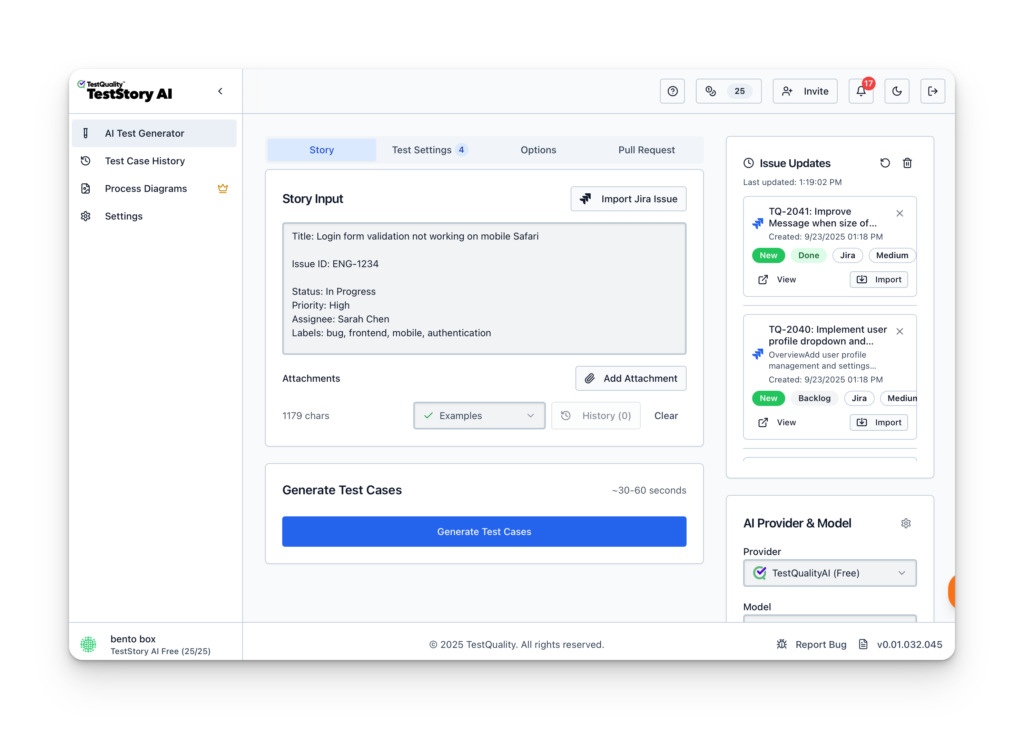
To understand the impact of an AI-powered QA workflow, let’s trace a standard requirement through the platform. We'll start with the common, yet often under-specified, authentication story example shared above to demostrate moving a user story through TestStory.ai agentic pipeline directly into TestQuality.
Step 1: Contextual Input for Gherkin Acceptance Criteria
The process begins by defining the human intent. In the main input field of TestStory.ai, we paste our primary Gherkin user story:
As a registered customer, I want to log in so I can view my order history."
At this stage, most traditional tools would simply store this requirement as a static text string. However, TestStory.ai treats it as a logical blueprint for generating Gherkin acceptance criteria. By adjusting the Test Dials, we can instruct the AI Agent to go beyond a simple "Happy Path."
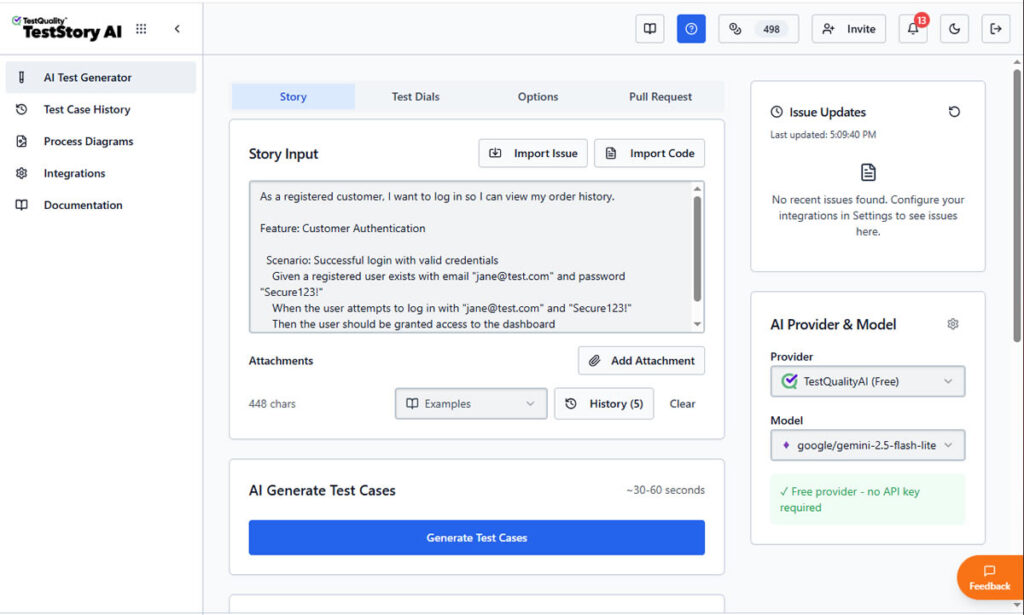
We can guide it to think like a Senior SDET by automatically incorporating boundary values, security validations, and edge cases into the Gherkin scenarios.
Step 2: Generating Executable Gherkin Scenarios
Once "Generate Test Cases" is triggered, TestStory.ai produces structured steps with clear Preconditions and Expected Results.
the AI parses the story to create structured Gherkin format user stories acceptance criteria. As shown in the screenshots, the platform doesn't just "write" steps; it builds an executable specification.
The AI identifies the necessary preconditions (Given), the specific user triggers (When), and the verifiable outcomes (Then). This ensures that your Gherkin acceptance criteria examples are declarative and behavior-focused, following 2026 industry best practices.
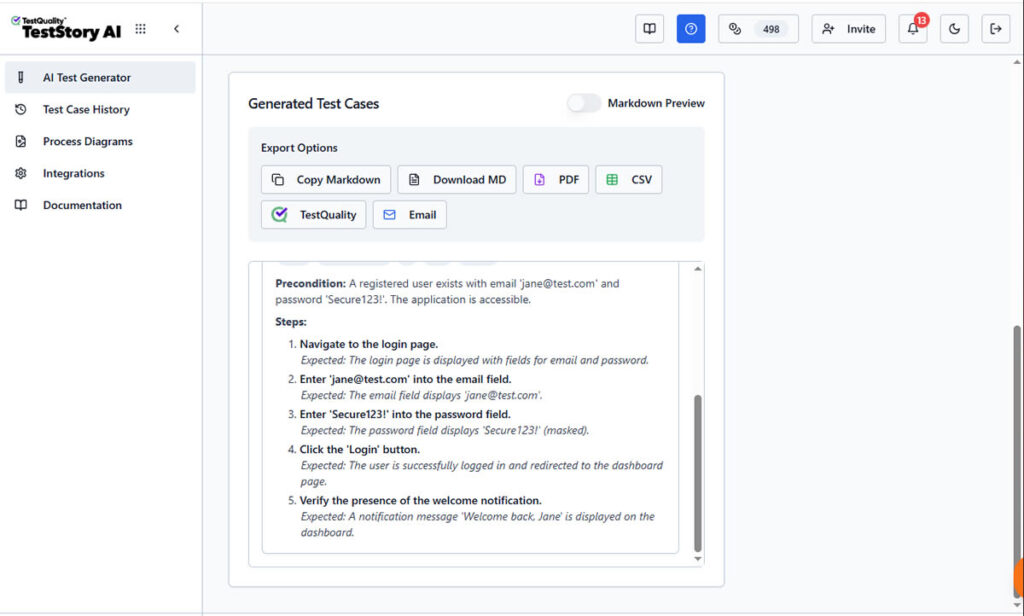
Unlike a static document, this output is ready for the "last mile" of testing. The interface provides immediate Export Options, allowing you to download the Gherkin as Markdown, PDF, CSV, share it by Email, downloaded it or, what's most important, sync it directly to TestQuality as your option as test management stack.
Step 3: Synchronizing Gherkin Scenarios to TestQuality
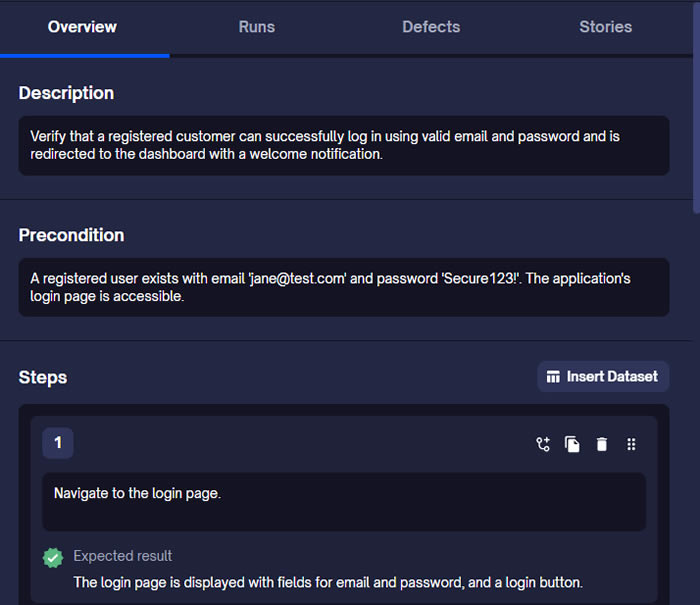
By selecting the TestQuality export button, the AI-generated scenario is instantly synchronized with our live project within TestQuality with the proper folder organization. As shown in the final view, the Gherkin story is now a formal Test Case within TestQuality, fully populated with:
- Traceability: Linked back to the original User Story requirement.
- Structured Steps: Ready for manual execution or automation mapping.
- Organization: Automatically filed into the correct "Customer Authentication" folder.
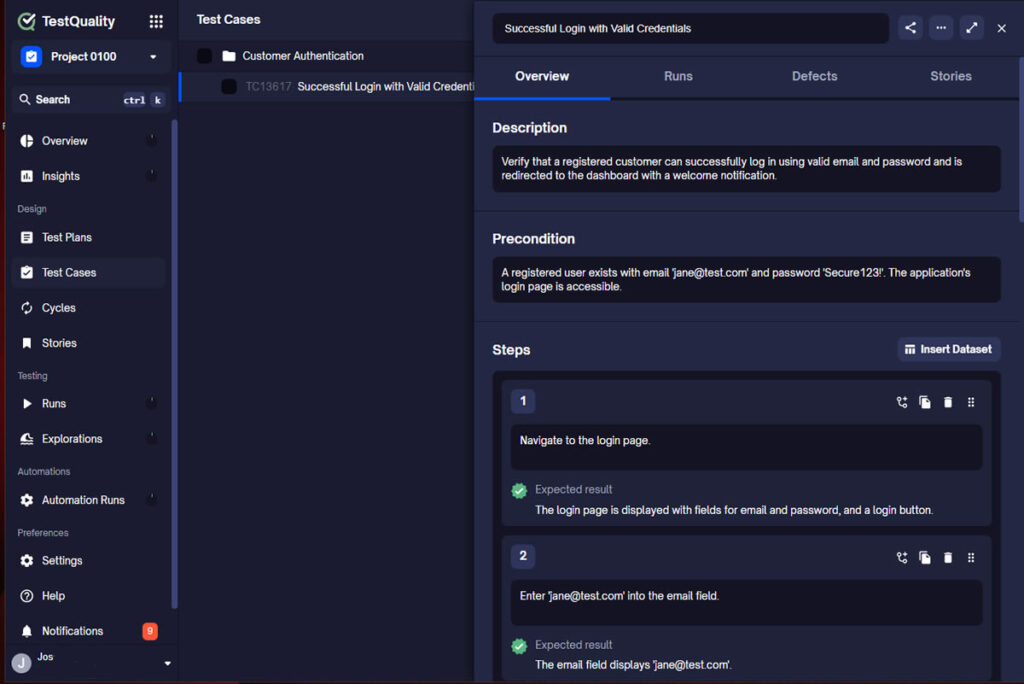
What was once a high-level user story is now a collection of formal, version-controlled test cases ready for execution.
Summary: The Evolution of a Requirement
| Stage | Input | Tool Action | Output |
| Discovery | Simple User Story | TestStory AI Analysis | Logical Blueprint |
| Drafting | Intent & Dials | Gherkin Generation | Gherkin Acceptance Criteria |
| Execution | One-Click Sync. | TestQuality Integration | Executable Test Case |
Example 2: Complex Business Logic (Cart Discounts)
User Story: As a marketing manager, I want to apply a 10% discount when the cart total exceeds $100.
Acceptance Criteria (Gherkin syntax):
Scenario Outline: Apply automatic discount based on cart total
    Given a customer has a cart session with a subtotal of <TotalAmount>
    When the customer proceeds to the "Order Summary" screen
    Then the calculated "Grand Total" should be <FinalPrice>
    And the "Discount Applied" badge <Visibility> be displayed

    Examples:
      | TotalAmount | FinalPrice | Visibility |
      | 50.00       | 50.00      | should not |
      | 100.00      | 100.00     | should not |
      | 101.00      | 90.90      | should     |
Example 3: API State Validation
User Story: As an admin, I want to revoke API keys so that former employees cannot access data.
Acceptance Criteria (Gherkin syntax ):
Feature: API Key Revocation

  Scenario: Attempted access with revoked key
    Given an API key "KEY_123" is marked as "Revoked" in the database
    When a GET request is sent to "/api/v1/users" using "KEY_123"
    Then the system returns a 401 Unauthorized status
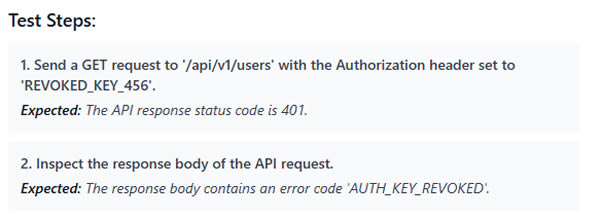
    And the response body contains error code "AUTH_KEY_REVOKED"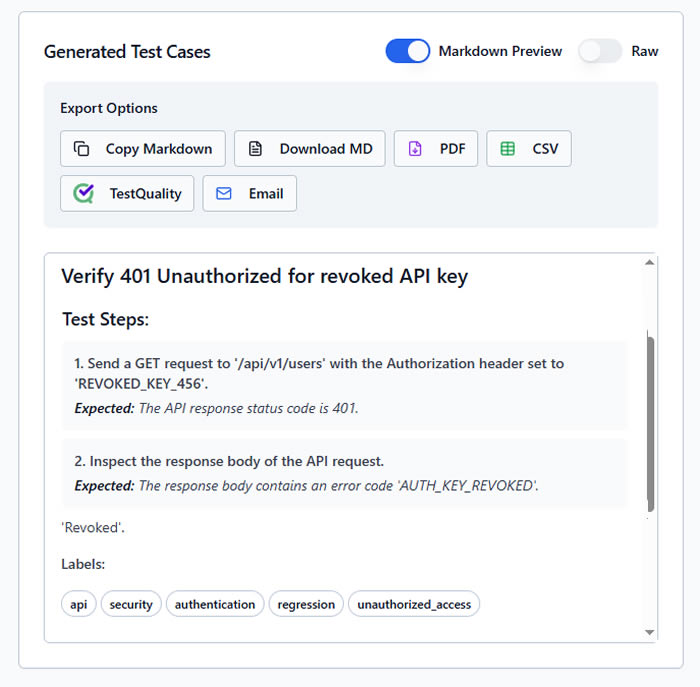
The AI Optimization Loop: Moving from "Draft" to "Bulletproof"
While the examples above are technically correct, a Senior QA knows that a single "Happy Path" scenario isn't a complete test suite. This is where the gap between a human drafter and an AI-Powered QA Agent becomes visible.
Let’s look at how TestStory.ai transforms a basic human-written scenario into an enterprise-grade test suite.
The Human Draft (Focusing on the Happy Path)
Most teams start here. It’s functional, but leaves the "side doors" wide open.
Scenario: User updates profile picture
  Given I am logged in
  When I upload a new photo
  Then my profile should show the new image
The TestStory.ai Enhanced Version (The "Expert" Output)
When you run this through TestStory, the AI identifies missing context and security risks, automatically generating a structured Feature file:
Feature: Profile Image Management

  Background:
    Given a user is authenticated with a "Standard" account
    And the user is on the "Account Settings" page

  @positive @smoke
  Scenario: Successful profile picture update with valid JPEG
    When the user uploads a 2MB "profile.jpg"
    Then the image should be processed and resized
    And the "Success" toast notification should appear

  @negative @security
  Scenario: Prevent upload of unsupported file types
    When the user attempts to upload a "malicious_script.exe"
    Then the system should reject the file
    And an error message "Invalid file format" must be displayed
    And the original profile picture should remain unchanged
The Difference: The AI version introduces a Background to keep scenarios DRY (Don't Repeat Yourself), adds Metadata Tags for execution filtering in TestQuality, and identifies a Negative Security Scenario that the human drafter missed. It isn't just formatting text; it’s applying a QA strategy.
These examples serve as the "Problem → Relief" pathway. They clarify exactly what needs to be built. But as any QA Lead knows, writing these for every single feature, executing them, and keeping them updated as the product evolves is where the bottleneck occurs.
Configuring the QA Brain: The Power of Test Dials
While the user story provides the "what," the Test Dials in TestStory.ai define the "how." This is where the QA professional transitions from a writer to an architect, setting the constraints and depth for the generated Gherkin acceptance criteria.
How to Use Test Dials for Better Gherkin Scenarios
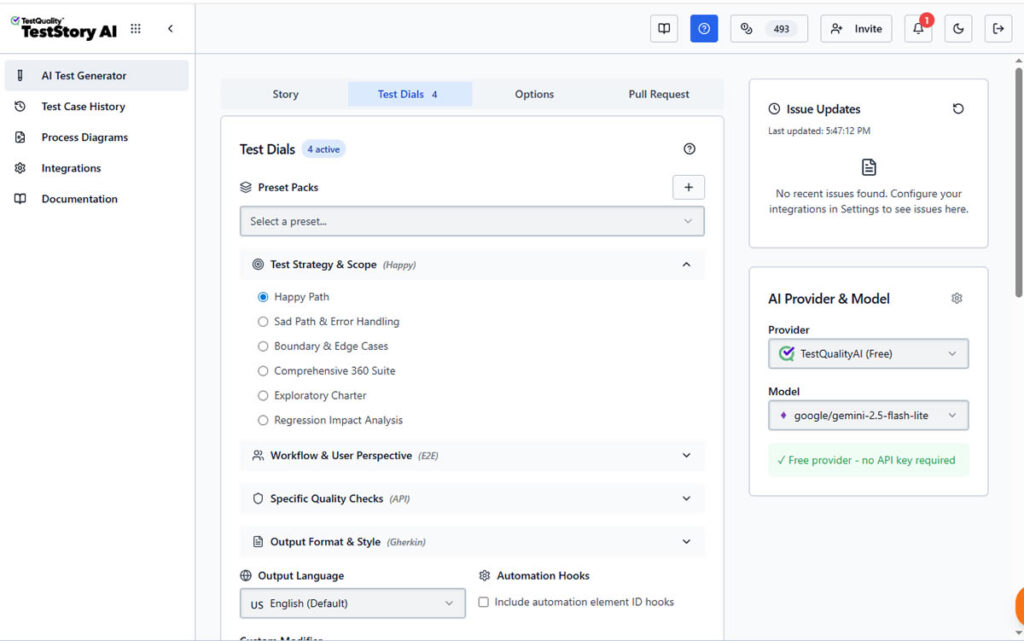
To generate high-quality Gherkin acceptance criteria examples, you can tune the AI using four primary categories of controls:
- Test Strategy & Scope: Instead of a generic test, you can set the scope to "Regression Impact Analysis" or "Boundary & Edge Cases." This forces the AI to look for the "hidden" bugs that a standard happy-path draft would miss.
- Workflow & User Perspective: Quality happens in the real world. By adjusting these dials, you can instruct the AI to consider Multi-Role Personas or simulate Network Interruptions—crucial for testing modern, resilient web applications.
- Specialized Quality Lenses: With a single toggle, you can inject Security (OWASP focus), Accessibility (WCAG 2.1), or Performance checks directly into your Gherkin scenarios. This ensures your acceptance criteria are comprehensive from day one.
- Output Style: For the BDD purist, you can lock the output to a strict Gherkin (Given/When/Then) format. This guarantees that every generated scenario is compatible with automation frameworks like Cucumber or Behave.
The "Senior QA" Advantage
By using the Test Dials, you aren't just automating the writing process; you are automating the QA Strategy. You can move the "Coverage" dial from Basic to Exhaustive, allowing the AI to brainstorm dozens of permutations in seconds—a task that would manually take a Senior SDET hours of deep focus.
The Evolution, From Manual Gherkin to AI-Powered QA
We have established that Gherkin is the ideal format for acceptance criteria. But in 2025, hand-crafting hundreds of Gherkin scenarios and manually mapping them to automation code is becoming obsolete.
The industry is shifting. We are no longer just managing test cases; we are orchestrating AI-Powered QA.
This represents a fundamental shift. Instead of spending hours manually translating your expert Gherkin into Selenium or Playwright scripts, tools like TestStory.ai allow you to bridge the gap between human intent and automated execution in seconds...
Accelerating the "Action" Phase
The friction point has always been the translation:
User Story → Human Brain → Gherkin Syntax → Automation Code.
Newer technologies are compressing this pipeline. For example, at TestQuality, we realized that while the Gherkin format is essential for clarity, the creation and execution of it shouldn't bog down your day.
This led to the development of TestStory.ai.
How AI Agents Interpret Gherkin
Imagine taking the user stories we discussed above and simply feeding them to a QA agent.
With TestStory.ai, you can leverage powerful QA agents to create and run test cases directly from a chat interface. It analyzes the acceptance criteria and generates the necessary test steps automatically. It doesn't just "write" the test; it understands the semantic intent behind "User logs in" and can execute that against your application.
This represents a fundamental shift in Test Management:
- Drafting: You provide the rough acceptance criteria; the AI formats it into perfect Gherkin scenarios or executable test steps.
- Execution: Instead of writing Selenium or Playwright scripts manually for every new story, the AI agent interprets the test case and interacts with your web application to verify it.
- Analysis: When a test fails, the AI analyzes the results to distinguish between a flaky test and a genuine bug in the code.
The "Human in the Loop"
Does this replace the need for Gherkin knowledge? Absolutely not. As shown in our examples, the logic comes from you—the QA professional. You define the what (the acceptance criteria). The AI handles the how (the formatting and execution).
This allows you to focus on high-value tasks: exploratory testing, edge-case analysis, and strategy, rather than debugging syntax errors in your feature files.
FAQ: Quick Guide to Gherkin & Acceptance Criteria
To help you standardize your process, here are direct answers to the most common questions regarding Gherkin user stories acceptance criteria.
What is the standard Gherkin format for user stories?
The standard Gherkin format relies on a strict syntax to describe software behavior. It connects the user story to the test outcome using three primary keywords:
- Given: Describes the initial context or state of the system (e.g., "Given the user is logged in").
- When: Describes the specific action taken by the user (e.g., "When they click the 'Checkout' button").
- Then: Describes the expected outcome or validation point (e.g., "Then the order success modal appears").
How do I write good acceptance criteria examples in Gherkin?
Effective Gherkin acceptance criteria examples should be declarative, not imperative. They should describe what happens, not how.
- Do: Write "When the user submits the form."
- Don't: Write "When the user types 'John' in field ID #name and clicks the green button."
Keeping criteria high-level ensures the test remains valid even if the UI design changes.
Can AI generate Gherkin acceptance criteria automatically?
Yes. Modern AI-Powered QA tools like TestStory.ai can parse a plain text user story and automatically structure it into valid Gherkin syntax.
- Input: You provide the requirement (e.g., "Users need to reset passwords via email").
- AI Output: The AI generates the Given-When-Then scenario, creates the negative test cases, and can even execute the test steps against the application to verify the criteria.
Conclusion: Quality at the Speed of AI
Gherkin remains the gold standard for defining user stories and acceptance criteria. It aligns the "Three Amigos" and ensures that what is built matches what was requested. However, the days of manually typing out Given-When-Then for eight hours a day are behind us.
By mastering the principles of declarative Gherkin and pairing them with AI-Powered QA agents, you ensure your testing strategy is not just accurate, but infinitely scalable. You move from being a "writer of tests" to an "architect of quality."
Whether you are writing your first feature file or managing a suite of thousands, the goal remains the same: accelerating software quality. The difference is, now you have an Intelligent QA Agent to carry the heavy lifting of formatting, edge-case discovery, and execution..
Ready to bridge the gap between your requirements and verified code? Experience how TestStory.ai transforms your user stories into executable Gherkin directly within TestQuality. Stop managing manual overhead and start building your agentic testing workflow today.