


Choosing the right AI test case builder requires evaluating integration depth, not just feature lists.
- The AI-enabled testing market is projected to grow from $1.01 billion in 2025 to $3.8 billion by 2032, making tool selection vital.
- Integration-first platforms that connect with GitHub, Jira, and CI/CD systems outperform feature-heavy tools that treat connectivity as an afterthought.
- A structured scoring framework across five categories helps teams objectively compare AI testing software options.
- QA workflow optimization depends more on how AI fits existing processes than on the sophistication of AI features alone.
Evaluate AI test case builders based on how they enhance your current workflow rather than how many features they advertise.
Your QA team is drowning in test cases. Requirements change daily, releases accelerate weekly, and manual test creation has become the bottleneck everyone acknowledges but nobody has time to fix. An AI test case builder seems like the obvious solution. Every vendor claims their tool transforms testing efficiency, yet most teams discover after implementation that shiny AI features mean nothing without proper workflow integration.
The AI-enabled testing market is projected to reach $3.8 billion by 2032. This expansion reflects a genuine transformation in how teams approach quality assurance. However, rapid market growth also means an overwhelming number of options, each promising to revolutionize your testing process. Making an informed decision requires moving beyond marketing claims toward evaluation criteria that account for your specific workflow requirements.
What Makes an AI Test Case Builder Worth Your Investment?
Before diving into evaluation criteria, understanding what distinguishes genuinely useful AI test case builders from glorified autocomplete tools sets the foundation for meaningful comparison. The core value proposition centers on transforming how test cases move from requirements to execution.

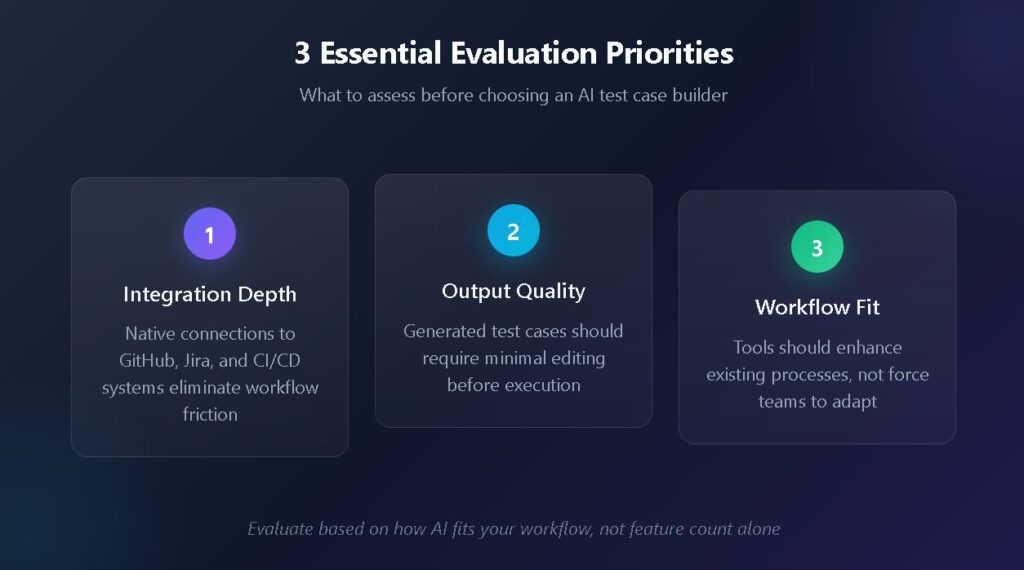
An effective AI test case builder understands context, recognizes patterns in your existing test library, and produces cases that align with your team's established conventions. This contextual awareness separates tools that actually reduce workload from those that simply shift the burden from writing tests to editing AI-generated content that misses the mark.
Understanding Natural Language Processing Capabilities
The best AI testing software leverages natural language processing to interpret requirements documents, user stories, and acceptance criteria. When you feed a Jira ticket describing a login flow into a capable system, it outputs structured test cases formatted consistently with your existing documentation. This capability bridges the gap between how stakeholders describe features and how QA teams validate them.
Look for tools that can parse multiple input formats, including plain text specifications, structured data from issue trackers, and visual design files. The flexibility to accept requirements in whatever format your organization already uses determines how quickly teams can adopt the tool without overhauling existing processes.
Evaluating Output Quality and Consistency
Generated test cases need review before execution. The question becomes whether that review takes five minutes or fifty. High-quality AI test case builders produce output requiring minimal editing because they learn from your existing test library and maintain consistent formatting, terminology, and detail levels across generated cases.
Test the output quality by providing identical requirements to multiple tools and comparing results. Does the generated case include appropriate preconditions? Are the steps specific enough for execution without ambiguity? Does the expected result match what a knowledgeable tester would define? These practical assessments reveal more than feature comparison spreadsheets.
How Should You Evaluate AI Testing Software for Your Team?
Evaluation should account for technical capabilities, workflow compatibility, and long-term sustainability. Random feature comparisons waste time because they fail to weigh what actually matters for your specific situation. According to recent industry analysis, 33% of companies now aim to automate between 50% and 75% of their testing processes, with approximately 20% targeting even higher automation levels. This trend toward automation makes choosing the right AI test case builder increasingly consequential for long-term competitiveness.
Workflow Compatibility Assessment
Start by mapping your current testing process from requirement receipt through test execution and reporting. Identify the handoff points, the tools involved at each stage, and the pain points your team experiences most frequently. An effective test management approach seamlessly integrates at these critical junctions rather than requiring process changes to accommodate the tool.
Consider where your test cases originate. If requirements live in Jira, the AI test case builder must pull directly from Jira issues without manual copy-paste steps. If your developers work primarily in GitHub, test management should naturally extend into that environment. The goal is to reduce context switching, not add another tool that operates in isolation.
Team Skill Level Considerations
AI testing software varies in complexity. Some tools require prompt engineering expertise to produce useful output, while others guide users through structured interfaces that generate quality cases without specialized knowledge. Match tool complexity to your team's current capabilities and realistic training investment.
Junior QA engineers benefit from tools with guided workflows and templates. Senior automation engineers may prefer more flexible systems that allow custom prompt configurations. The ideal solution accommodates both use cases within the same platform, scaling sophistication with user expertise.
What Integration Capabilities Do Top Test Creation Tools Require?
Integration capabilities distinguish test creation tools that enhance workflows from those that create additional administrative overhead. The following table outlines essential integration points and their impact on QA workflow optimization.
| Integration Category | Essential Capabilities | Impact on Workflow |
| Issue Tracking | Bidirectional sync with Jira, Linear, or Azure DevOps; automatic test case linking to requirements | Eliminates manual traceability documentation; ensures coverage visibility |
| Source Control | Native GitHub or GitLab integration; pull request test status visibility | Enables shift-left testing; provides developers with immediate quality feedback |
| CI/CD Pipelines | Automated test result import from Jenkins, CircleCI, or GitHub Actions | Connects automated execution with test management; reduces manual reporting |
| Test Automation Frameworks | Support for Selenium, Playwright, and Cypress result formats | Unifies manual and automated test tracking in a single dashboard |
| Communication Tools | Slack or Teams notifications for test failures and coverage changes | Keeps stakeholders informed without requiring dashboard access |
Without these integrations functioning smoothly, teams end up maintaining separate systems that drift out of sync. Modern test management platforms treat integration as foundational architecture rather than optional add-ons.

Evaluating API Flexibility
Even with strong native integrations, unique organizational needs require API access for custom connections. Evaluate whether the tool provides comprehensive REST APIs that allow importing test results from any source, exporting data for external analysis, and triggering test case generation programmatically from your existing automation.
The API documentation quality signals vendor commitment to integration flexibility. Sparse documentation with limited examples suggests integration will require significant reverse engineering. Comprehensive guides with working code samples indicate the vendor prioritizes developer experience.
QA Workflow Optimization: A Scoring Framework
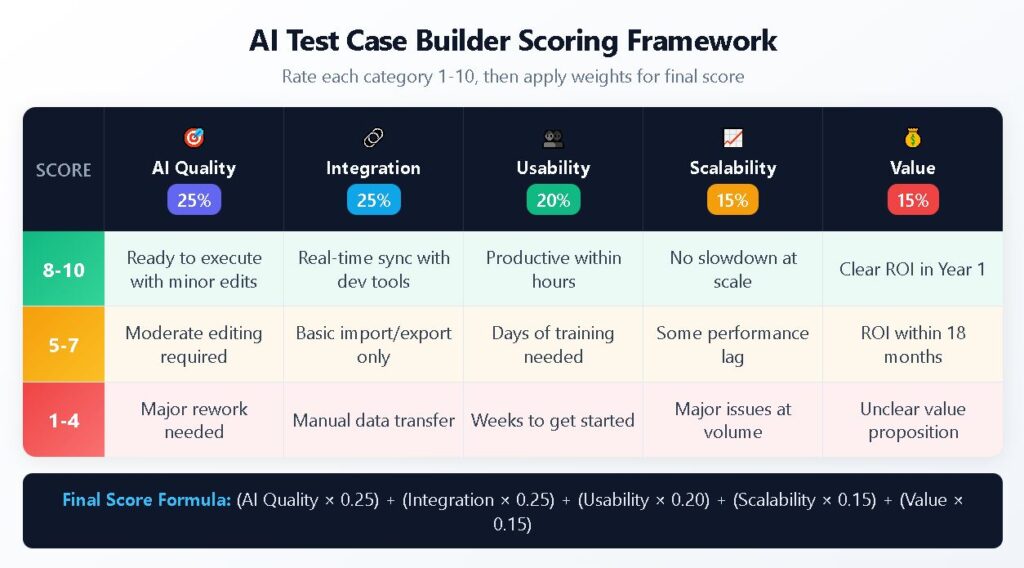
Rather than relying on emotional decision-making, adopt a systematic evaluation to provide a defensible justification for selecting your AI tools. The following scoring framework covers five critical categories, each rated on a ten-point scale.
Category 1: AI Quality and Relevance (Weight: 25%)
Rate the tool's ability to generate contextually appropriate test cases that require minimal editing. Consider whether output quality remains consistent across different requirement types, from simple functional tests to complex integration scenarios. Award higher scores to tools that learn from feedback and improve over time.
- 8–10 points: Generated cases ready for execution with minor formatting adjustments
- 5–7 points: Cases require moderate editing but capture core scenarios accurately
- 1–4 points: Generated content needs substantial rewriting or misses key scenarios
Category 2: Integration Depth (Weight: 25%)
Assess how deeply the tool connects with your existing toolchain. Surface-level integrations that only import and export data score lower than bidirectional synchronization that maintains real-time accuracy across systems. Automated test case management depends on these connections functioning reliably.
- 8–10 points: Native integrations with primary tools; real-time sync; minimal manual intervention
- 5–7 points: Basic import/export functionality; some manual sync required
- 1–4 points: Limited integration options; significant manual data transfer needed
Category 3: Usability and Adoption (Weight: 20%)
Evaluate the learning curve for different team members. Tools that only power users can operate effectively limit organizational adoption. Consider the quality of documentation, availability of training resources, and intuitiveness of the interface for common tasks.
- 8–10 points: New users productive within hours; excellent documentation; intuitive interface
- 5–7 points: Moderate learning curve; adequate documentation; some training required
- 1–4 points: Steep learning curve; sparse documentation; extensive training needed

Category 4: Scalability and Performance (Weight: 15%)
Test how the tool performs as test libraries grow. What works for 500 test cases may struggle at 5,000. Cloud-based solutions typically scale better than self-hosted alternatives, though some organizations have specific deployment requirements. Test case management at scale requires architecture designed for growth.
- 8–10 points: Performance remains consistent at scale; flexible deployment options
- 5–7 points: Adequate performance with some degradation at high volumes
- 1–4 points: Notable slowdowns at scale; limited deployment flexibility
Category 5: Cost and Value Alignment (Weight: 15%)
Calculate the total cost of ownership, including subscription fees, integration development, training investment, and ongoing maintenance. Compare this cost against quantified time savings from AI-assisted test creation and reduced manual effort throughout the testing lifecycle.
- 8–10 points: Clear ROI within first year; transparent pricing; reasonable scaling costs
- 5–7 points: ROI achievable within 18 months; some hidden costs
- 1–4 points: Unclear value proposition; significant hidden costs; poor scaling economics
What Are the Hidden Costs of Choosing the Wrong Tool?
Poor tool selection creates cascading problems beyond subscription fees. Understanding these hidden costs helps justify the evaluation investment upfront.
Workflow Fragmentation
When AI testing software fails to integrate properly, teams resort to manual workarounds. Test cases generated in one system get copied into spreadsheets, results tracked in separate documents, and traceability maintained through heroic individual effort. This fragmentation erodes the efficiency gains AI was supposed to provide.
The organizational knowledge trapped in disconnected systems becomes invisible to leadership. Quality metrics derived from partial data misrepresent the actual project status. Decisions made on incomplete information lead to preventable production incidents.
Adoption Failure
Tools that prove difficult to use get abandoned. The initial excitement around AI capabilities fades when teams discover the learning curve exceeds available training time. Partial adoption creates its own problems as some team members use the tool while others work around it.
The sunk cost of abandoned implementations impacts more than direct financial investment. Team morale suffers when tools that were promised to help instead create additional frustration. Skepticism toward future tool evaluations increases, making necessary improvements harder to champion.
Technical Debt Accumulation
Some AI test case builders generate technically correct but maintainability-poor test cases. These cases work initially but become brittle as applications evolve. The maintenance burden accumulates invisibly until teams spend more time updating AI-generated cases than they saved creating them.
Evaluate the generated case maintainability by examining how updates propagate. When a common workflow changes, how many test cases require modification? Tools that support reusable components and shared test steps reduce this maintenance overhead compared to those that generate standalone cases with duplicated logic.
Build Your Evaluation Strategy
Effective evaluation combines structured scoring with practical trial experience. Reading documentation and comparing feature lists provides only part of the picture. Real insight comes from testing tools against your actual requirements and workflows.
Structuring Proof of Concept Testing
Select representative requirements from current projects spanning different complexity levels. Provide identical inputs to each tool under consideration and compare outputs systematically. Document not just what the tools produce but how the production process felt to team members who will use the tool daily.
Include stakeholders from different roles in the evaluation. Developers, QA engineers, and project managers each bring perspectives that reveal different strengths and weaknesses. A tool that impresses automation engineers may frustrate manual testers or prove incomprehensible to project managers reviewing test coverage.

Making the Final Decision
Weight your scoring framework based on organizational priorities. Teams with strong existing automation may prioritize integration depth over AI quality if their primary need is consolidating test management rather than generating new cases. Organizations starting fresh may weigh AI capabilities more heavily.
Consider the vendor's trajectory alongside current capabilities. Review recent release notes, roadmap publications, and customer feedback. A tool with moderate current capabilities and strong development momentum may outperform a feature-rich tool from a vendor showing signs of stagnation.
TestQuality's free test case builder offers a starting point to experience how purpose-built tools transform testing efficiency. Start your free trial and discover how the right AI test case builder makes QA workflow optimization achievable rather than aspirational.
Frequently Asked Questions
How long should an AI test case builder trial period last for adequate evaluation? Two to four weeks provides sufficient time for meaningful evaluation. The first week familiarizes team members with basic functionality. Subsequent weeks reveal how well the tool handles varied requirement types and integrates with daily workflows. Shorter trials rarely expose maintenance and scalability concerns that emerge over time.
What team size benefits most from AI test case generation tools? Teams of five to fifty members typically see the greatest return on investment. Smaller teams may find that the tool overhead exceeds time savings. Larger organizations benefit but require more complex implementation planning. The sweet spot combines enough test volume to justify automation with a manageable change management scope.
Can AI test case builders replace manual test creation entirely? No. AI excels at generating routine functional tests from well-defined requirements but struggles with exploratory scenarios, edge cases requiring domain expertise, and tests validating subjective user experience elements. The most effective approach uses AI to handle repetitive creation tasks while preserving human judgment for complex and creative testing work.
How do AI test case builders handle requirements written in multiple languages?
Capability varies across tools. Some AI test case builders generate framework-agnostic test cases that teams then adapt to their specific tech stack, whether that's Java with Selenium, Python with Pytest, or JavaScript with Playwright. Others produce executable code directly for supported frameworks but offer limited language coverage. If your organization works across multiple programming languages or plans to migrate frameworks, evaluate whether the tool produces portable test logic or locks you into specific technical implementations.


