


Key Takeaways
Choosing the right test automation tools for DevOps determines whether your CI/CD pipeline ships fast or stalls under flaky tests, slow execution, and integration headaches.
- The automation testing market is projected to grow from $17.71 billion in 2024 to over $63 billion by 2032, signaling that DevOps teams are doubling down on test automation, not retreating from it.
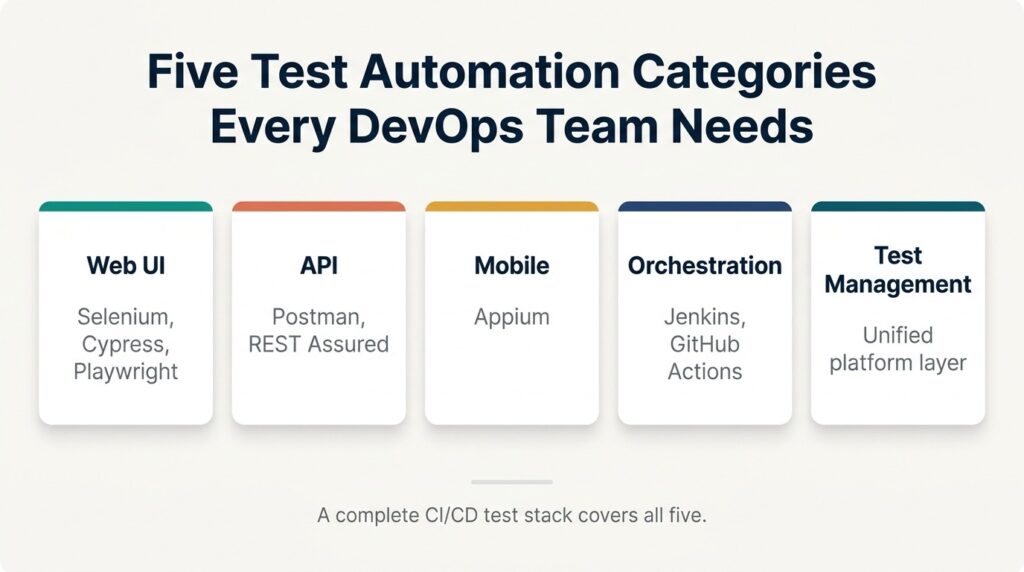
- The strongest CI/CD toolchains in 2026 combine specialized executors (Selenium, Cypress, Playwright, Postman, Appium) with a CI orchestrator (Jenkins, GitHub Actions) and a unified test management layer that ties results back to requirements.
- AI-powered QA agents are reshaping how teams create and run test cases, and analyze test results automatically from agentic workflows or chat interfaces. Platforms that ignore this shift are getting passed over in evaluations.
- Don't pick tools in isolation. Pick a stack where executors, orchestrators, and the management layer integrate natively, or you'll spend more time wiring glue code than shipping features.
If your test automation stack still treats CI/CD as an afterthought, you're building tomorrow's bottleneck today.
DevOps teams ship code multiple times a day, and that pace exists because of test automation. According to the Continuous Delivery Foundation's State of CI/CD Report, 83 percent of developers are now involved in DevOps activities, which means automated quality gates are the default, not a nice-to-have. Picking the right test automation tools for DevOps is the difference between a pipeline that catches regressions before they hit production and one that becomes the reason engineers stop trusting their tests.
This guide breaks down the categories of automation testing tools that matter in 2026, where each one fits in a CI/CD pipeline, and what the AI-driven shift toward QA Agents means for how you structure your stack.
Why Do DevOps Teams Need Specialized Test Automation Tools?
Manual testing cannot keep pace with continuous integration. The moment a team adopts feature branches, pull request gates, and multi-stage deployments, the testing pyramid stops being a theoretical model and becomes a survival requirement. Tests have to run on every commit, return results within minutes, and produce signals the team actually trusts.
The test automation software category has expanded because the surface area of modern applications has expanded. A single product might span a React frontend, a half-dozen microservices, a mobile app, and a public API, and each layer needs its own test executor. According to Fortune Business Insights, the global automation testing market reached $17.71 billion in 2024 and is projected to hit $63.05 billion by 2032, reflecting how central automation has become to software delivery.
The test automation tools for DevOps that survive evaluation in 2026 share a few traits: native CI/CD integration, parallel execution by default, structured reporting (JUnit XML, JSON, or richer formats), and increasingly, some flavor of AI assistance baked into authoring or maintenance.
What Should You Look for in Test Automation Tools for DevOps?
Tool selection is where most teams go wrong. They fixate on which framework is "best" instead of asking which framework fits their pipeline, their stack, and their team's existing skills. A few criteria separate the tools that earn their place from the ones that get ripped out six months later.
Pipeline-native integration. Your test automation software has to plug into Jenkins, GitHub Actions, GitLab CI, or Azure DevOps without a pile of custom shell scripts. Look for command-line runners, standardized result formats, and webhook support out of the box.
Parallel execution at scale. A test suite that takes 90 minutes serial and 8 minutes parallel is the difference between developers waiting and developers shipping. Confirm the framework supports sharding, distributed execution, and intelligent load balancing.
Language and framework alignment. Don't force your team to learn a new language just to write tests. If your stack is JavaScript, pick a JavaScript-native tool. If it's Java, lean on JUnit, TestNG, and REST Assured.
Beyond the basics, evaluate how the tool handles flaky tests, test maintenance, and reporting. Tools with self-healing capabilities, intelligent waits, and clear failure diagnostics dramatically reduce the long-tail cost of automation. And critically, evaluate how test results flow into a unified test management layer so QA leads, developers, and stakeholders all see the same picture.
Which Test Automation Tools Work Best in CI/CD Pipelines?
There is no single "best" tool, but there is a best stack for most DevOps teams. Below are the automation testing tools worth evaluating in 2026, grouped by where they fit in a CI/CD pipeline.
Selenium WebDriver
Selenium is still the workhorse of browser automation. Its WebDriver API is a W3C standard, it supports every major browser, and it speaks Java, Python, C#, JavaScript, and Ruby. For teams with legacy test suites or polyglot codebases, Selenium offers continuity and a massive community. The tradeoff is configuration overhead and slower execution compared to newer frameworks, particularly on dynamic UIs that need explicit wait strategies.
Cypress
Cypress changed expectations for CI/CD testing by running tests directly inside the browser and giving developers real-time debugging, time-travel snapshots, and automatic waiting. For JavaScript and TypeScript teams testing single-page applications, Cypress is the path of least resistance. Its main limitations are around multi-tab and cross-origin scenarios, and its browser support, while expanded, isn't as broad as Selenium's.
Playwright
Playwright is the framework most often replacing Selenium in greenfield projects. It supports Chromium, Firefox, WebKit, and Edge with native APIs, executes faster than Selenium, ships with auto-waiting, and offers powerful tooling like trace viewers and codegen. Playwright's parallel execution model is particularly strong for CI/CD testing because it scales horizontally with minimal configuration.
Postman and Newman
For API testing, Postman's Newman CLI is the default. Teams design and document requests in Postman's interface, then export collections and run them in CI via Newman. It handles environment variables, authentication schemes, and assertion logic, and it produces JUnit-compatible reports. For microservices-heavy stacks, this is non-negotiable infrastructure.
Appium
Mobile test automation lives or dies on Appium. It uses the same WebDriver protocol as Selenium and supports native, hybrid, and web apps on iOS and Android. CI integration typically routes through device farms like AWS Device Farm to handle the infrastructure overhead of real devices and emulators.
Jenkins and GitHub Actions
Strictly speaking, these are orchestrators, not test executors, but no list of test automation tools for DevOps is complete without them. Jenkins offers maximum flexibility and a plugin ecosystem that handles virtually anything. GitHub Actions offers tight integration with source control, simpler YAML configuration, and a marketplace of pre-built actions. Most teams pick one and stay there.
How Do These Test Automation Tools Compare?
Picking among these frameworks comes down to matching capabilities to your pipeline. The table below summarizes how the most common test automation tools for DevOps stack up across the criteria that matter most in CI/CD environments.
| Tool | Best For | CI/CD Integration | Parallel Execution | Maintenance Overhead |
| Selenium | Cross-browser web at scale | Excellent | Good (with Grid) | High |
| Cypress | JavaScript SPA testing | Good | Good | Low |
| Playwright | Modern cross-browser web | Excellent | Excellent | Low |
| Postman/Newman | API and microservices | Excellent | Good | Low |
| Appium | iOS and Android mobile | Good | Moderate | Moderate |
| Jenkins | Orchestration and complex pipelines | N/A (is the pipeline) | Excellent | Moderate |
| GitHub Actions | GitHub-native orchestration | N/A (is the pipeline) | Good | Low |
Treat the table as a starting point, not a verdict. A team running a JavaScript stack on GitHub will get more value from Playwright plus GitHub Actions than the same team forcing Selenium plus Jenkins. The right combination depends on your stack, your existing skills, and how you've structured your Gherkin and BDD workflows.
How Are AI and QA Agents Changing Test Automation Software?
The biggest shift in automation testing tools since the rise of Selenium itself is the arrival of AI-powered authoring and maintenance. Modern teams are no longer writing every test by hand. They're feeding user stories, requirements, or even Figma mockups into AI generators that produce executable test cases in Gherkin or framework-native syntax, then refining from there.
Three categories of AI capability matter for CI/CD pipelines in 2026. First, AI test generation that converts requirements into executable scenarios in seconds. Second, self-healing tests that detect interface changes and update selectors automatically rather than failing on every cosmetic refactor. Third, intelligent prioritization that uses historical failure data to decide which tests run first when pipeline budget is tight.

The Stack Overflow Developer Survey 2024 reported that developer access to AI-assisted tools at work doubled to 32.4 percent in a single year, and QA tooling is one of the categories absorbing that growth fastest. Teams adopting AI-powered QA Agents are seeing test creation time collapse from hours to minutes, particularly when they pair generation with structured outputs like Gherkin that humans can still review and edit.
What Are the Best Practices for CI/CD Testing in 2026?
Tools alone do not deliver reliable pipelines. The teams getting the most out of their test automation tools for DevOps follow a small set of practices that scale across stacks and tool choices.
Start with the testing pyramid. Most of your tests should be unit tests that run in seconds, a smaller layer of integration tests that validate service contracts, and a focused top layer of end-to-end tests for critical user flows. Inverting the pyramid (running mostly end-to-end tests) is the fastest way to a slow, flaky pipeline.
Design for parallel execution from day one. That means test isolation, independent data fixtures, and no shared mutable state between tests. Tests that need to run in a specific order are tests that will eventually break in CI.
Track flakiness deliberately. A test that fails one in 50 runs is a test that erodes pipeline trust. Quarantine flaky tests, fix the root cause (almost always timing or data dependencies), and put them back in the main suite. Don't let "rerun the job" become standard operating procedure.
Finally, connect your test results to your test management layer. Executors generate raw pass/fail data; a proper test management platform connects that data to requirements, user stories, and release readiness signals. Without that layer, you have automation. With it, you have a quality system.
Frequently Asked Questions
What is the best test automation tool for DevOps in 2026? There isn't a single winner. The best test automation software for your team depends on your stack: Playwright or Cypress for JavaScript-heavy web apps, Selenium for polyglot teams needing maximum browser coverage, Postman or REST Assured for APIs, and Appium for mobile. Pair whichever you pick with a CI orchestrator (Jenkins or GitHub Actions) and a unified test management layer that ties results back to requirements.
How do I integrate test automation tools into my CI/CD pipeline? Most modern frameworks ship with command-line runners that integrate naturally with Jenkins, GitHub Actions, GitLab CI, and Azure DevOps. The pattern is consistent: trigger the runner from your pipeline configuration, publish results in a standard format like JUnit XML, and gate merges on pass/fail status. For deeper visibility, route results into a test management platform that supports native GitHub and Jira integration.
How many test automation tools should a DevOps team use? Most successful teams run three to five categories of tools: a CI/CD orchestrator, a web automation framework, an API testing tool, optionally a mobile testing framework, and a test management layer that unifies the outputs. Running more tools than that usually signals tool sprawl and creates integration debt.
Can AI replace test automation engineers? Not in 2026. AI is replacing the most repetitive parts of test authoring and maintenance, freeing engineers to focus on test strategy, exploratory testing, and edge cases that require human judgment. Teams treating AI as a force multiplier are shipping faster. Teams treating it as a full replacement are accumulating low-quality tests they don't understand.
Build a CI/CD Test Stack That Actually Ships
The right test automation tools for DevOps turn quality from a release-day scramble into a continuous signal that travels with every commit. Pick executors that match your stack, an orchestrator that matches your workflow, and a management layer that gives you visibility across the whole pipeline.
That last layer is where TestQuality fits. TestQuality is an AI-powered QA platform that unifies test management with native GitHub, Jira, Jenkins, Selenium, Cypress, and Playwright integrations, while TestStory.ai lets your team generate Gherkin-ready test cases from requirements in seconds and feed them straight into your CI/CD workflow. If you want to see how AI-driven test management and QA Agents accelerate quality for both human-written and AI-generated code, start your free trial today and put it in front of your real pipeline.


