


Key Takeaways
Agile QA teams need specialized test management tools that support continuous testing, seamless integrations, and rapid iteration cycles.
- Modern test management tools must integrate with CI/CD pipelines, support real-time collaboration, and provide actionable analytics
- The right tool selection depends on team size, existing tech stack, automation requirements, and budget constraints
- Leading solutions like TestRail, Zephyr, TestQuality, and other specialized platforms offer different strengths for specific agile workflows and integration requirements
Implementation success requires careful planning, stakeholder buy-in, and gradual rollout with proper training
The test management tools market is experiencing unprecedented growth, expanding from $8.46 billion in 2024 to a projected $14.74 billion by 2030 at a CAGR of 9.68%. This explosive growth reflects the critical importance of quality assurance in modern software development, where agile methodologies dominate the landscape.
For QA teams operating in agile environments, selecting the right test management tools for agile workflows can make the difference between shipping high-quality software on schedule and struggling with missed deadlines and escaped defects.
The shift toward agile development has fundamentally changed how QA teams approach testing. Traditional waterfall testing methods, with their sequential phases and extensive documentation requirements, simply don't align with the rapid iteration cycles and collaborative nature of agile projects.
Instead, modern QA teams need tools that support continuous testing, enable seamless collaboration between developers and testers, and provide real-time visibility into quality metrics. The most effective approach involves adopting unified test management platforms that integrate directly with development workflows rather than forcing teams to adapt their processes to rigid tooling constraints.
Why Do Agile QA Teams Need Specialized Test Management Tools?
Agile development thrives on continuous feedback and rapid iteration, introducing unique challenges that generic project management tools or spreadsheet-based tracking systems often cannot adequately address.
The core principles of agile methodology—prioritizing individuals and interactions over processes and tools, working software over comprehensive documentation, customer collaboration over contract negotiation, and responding to change over following a plan—inherently demand test management solutions that fully embrace flexibility, collaboration, and speed.
Traditional testing approaches often create bottlenecks in agile workflows. When QA teams rely on disconnected tools or manual processes, they struggle to keep pace with development sprints. Test cases become scattered across multiple systems, requirements traceability becomes nearly impossible, and teams lose critical visibility into testing progress and quality trends.
The consequences of inadequate test management in agile environments are significant. Teams experience increased defect escape rates, longer feedback cycles, reduced test coverage, and diminished confidence in release readiness. These issues ultimately impact product quality, customer satisfaction, and time-to-market objectives that are central to agile success.
Modern agile test management tools must support continuous integration and continuous delivery (CI/CD) pipelines, provide real-time collaboration capabilities, and offer flexible workflows that adapt to changing requirements. They need to bridge the gap between technical testing activities and business objectives, ensuring that quality remains a shared responsibility across the entire development team.
Essential Features Every Agile Test Management Tool Must Have
Selecting the right agile qa tools requires understanding the specific features that enable effective testing within agile workflows. These capabilities go beyond basic test case management to encompass the collaborative, iterative, and automated aspects of modern software development.
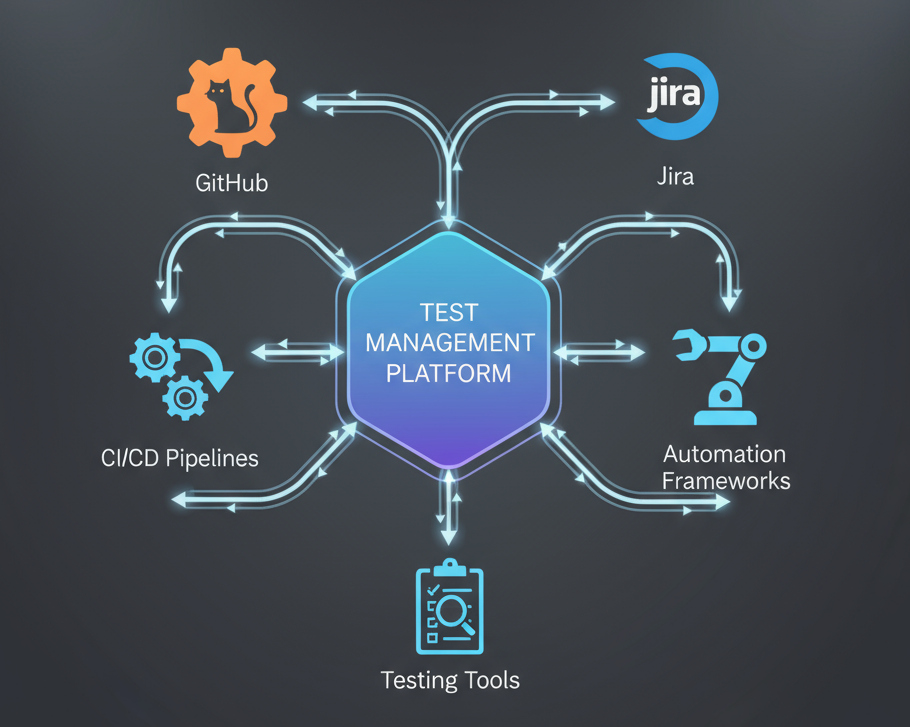
Integration Ecosystem and API Support form the foundation of any effective agile test management solution. The tool must seamlessly connect with existing development tools, including version control systems like GitHub and GitLab, project management platforms such as Jira and Azure DevOps, and automation frameworks including Selenium, Cypress, and Playwright.
Platforms can demonstrate how native integration design can eliminate complexity — for example, TestQuality is built from the ground up with native integrations to commonly used development tools to eliminate the complexity often associated with connecting multiple tools, while solutions like Xray and Zephyr provide deep ecosystem integration within their respective platforms. Without robust integration capabilities, teams face the constant friction of context switching and manual data synchronization.
Real-Time Collaboration Features enable distributed teams to work together effectively during sprint cycles. This includes shared test repositories, concurrent editing capabilities, commenting systems, and notification mechanisms that keep stakeholders informed of testing progress and issues.
The ability to link test cases directly to user stories and requirements ensures that testing efforts remain aligned with business objectives throughout the development process. For instance, TestQuality offers a modern interface with real-time collaboration features designed for agile teams, providing shared test repositories and transparent workflows.
Flexible Test Execution and Reporting capabilities must accommodate both manual and automated testing approaches. Agile teams need to execute exploratory testing sessions, manage automated test results, and generate actionable reports that provide insights into quality trends and release readiness. The reporting system should offer customizable dashboards that serve different stakeholder needs, from detailed technical metrics for QA engineers to high-level quality indicators for project managers and executives.
Traceability and Requirements Management features ensure that every test case connects to specific requirements or user stories, enabling teams to assess coverage and identify gaps quickly. This bidirectional traceability becomes particularly important when requirements change frequently, as is common in agile environments. Teams need to understand the impact of requirement changes on existing test cases and identify areas that may need additional testing coverage.
Here's a comparison of essential features across different tool categories:
| Feature Category | Cloud-Based Tools | On-Premise Solutions | Hybrid Platforms |
| Setup Time | Minutes to hours | Days to weeks | Moderate setup required |
| Scalability | Automatic scaling | Manual scaling required | Flexible scaling options |
| Security Control | Provider managed | Full organizational control | Customizable security levels |
| Integration Speed | Rapid deployment | Custom development needed | Balanced approach |
| Maintenance Overhead | Minimal | High | Moderate |
Top Test Management Tools for Agile Teams
Understanding the landscape of available solutions helps teams make informed decisions based on their specific requirements, budget constraints, and technical environments. From established enterprise solutions like TestRail to modern, integration-focused platforms like TestQuality, the market provides options for every team size and technical approach. Each tool offers distinct advantages and potential limitations that teams should carefully evaluate.
TestRail remains one of the most established players in the test management space, offering comprehensive features specifically designed for structured testing approaches. Its strength lies in detailed test case management, robust reporting capabilities, and extensive integration options. TestRail excels in environments where teams need comprehensive documentation and audit trails, making it particularly suitable for regulated industries or larger organizations with formal QA processes. However, its traditional interface and pricing model may present challenges for smaller agile teams seeking more lightweight solutions.
Zephyr Scale and Zephyr Squad provide native Jira integration that appeals to teams already embedded in the Atlassian ecosystem. Zephyr's tight integration with Jira enables seamless connection between test cases and user stories, making it easier to maintain requirements traceability throughout sprint cycles. The platform offers both cloud and server deployment options, providing flexibility for organizations with different infrastructure preferences. The visual test execution interfaces and real-time reporting capabilities align well with agile transparency principles.
Xray distinguishes itself through its native Jira implementation, essentially extending Jira's capabilities to include comprehensive test management features. This approach eliminates the need for separate tools while maintaining familiar workflows for teams already using Jira. Xray's support for behavior-driven development (BDD) and Gherkin syntax makes it particularly appealing for teams implementing collaborative testing approaches.
The platform's ability to handle both manual and automated testing within a single interface streamlines workflow management. While Xray offers Jira-native capabilities, other platforms like TestQuality focus on broader ecosystem integration, offering similar BDD support and streamlined workflows for teams using GitHub and other agile tools.
Tricentis qTest targets enterprise-level agile transformations with its comprehensive ALM capabilities and AI-powered insights. The platform excels in complex environments where multiple teams need to coordinate testing activities across various projects and releases. qTest's advanced analytics and predictive capabilities provide valuable insights into testing effectiveness and quality trends, supporting data-driven decision making in agile environments.
Qase represents the emerging category of modern, user-friendly test management solutions designed specifically for agile and DevOps workflows. Its clean interface, flexible customization options, and competitive pricing make it attractive for startup and scale-up environments. Qase's focus on ease of use and rapid implementation aligns well with agile principles of simplicity and working software over comprehensive tooling.
Testmo offers a streamlined approach to test management that emphasizes speed and simplicity without sacrificing essential functionality. Its modern interface and focus on automation integration appeal to teams seeking to minimize tool complexity while maintaining comprehensive testing capabilities. Testmo's pricing model and feature set target mid-market organizations looking for professional test management capabilities without enterprise-level complexity.
TestQuality takes a different approach by focusing specifically on GitHub and Jira integrations from the ground up. Unlike tools that retrofit integrations as afterthoughts, TestQuality is purpose-built for these workflows, offering native connectivity that eliminates friction between development and testing activities. The platform combines the simplicity that agile teams prefer with comprehensive test management capabilities, including automated test result importing, real-time collaboration features, and flexible test plan creation. Its modern interface and competitive pricing make it particularly appealing for teams seeking a balance between functionality and ease of use.
Azure Test Plans integrates directly with Microsoft's development ecosystem, providing seamless connectivity for teams using Azure DevOps Services. This native integration enables unified project management, development, and testing workflows within a single platform. The tool's strength lies in its comprehensive ALM capabilities and natural fit within Microsoft-centric development environments.
Quick Tool Positioning Guide:
- Enterprise/Regulated Industries: TestRail, Tricentis qTest
- Jira-Native Integration: Xray, Zephyr Scale/Squad
- GitHub-First Workflows: TestQuality
- Modern/Startup-Friendly: Qase, Testmo
- Microsoft Ecosystem: Azure Test Plans
How to Choose the Right Test Management Tool for Your Agile Team?
Selecting the best test management software requires a systematic evaluation process that considers both immediate needs and long-term strategic objectives. Teams should begin by conducting a thorough assessment of their current testing processes, identifying pain points, and defining success criteria for tool adoption.

Team Size and Structure Considerations significantly impact tool selection decisions. Small agile teams (5-15 members) often benefit from lightweight, easy-to-implement solutions that minimize administrative overhead and enable rapid adoption. These teams typically prioritize ease of use, quick setup, and cost-effectiveness over extensive customization capabilities. Medium-sized teams (15-50 members) require more sophisticated collaboration features, role-based access controls, and integration capabilities to coordinate testing activities across multiple projects or product areas.
Large organizations and enterprise environments need comprehensive solutions that support complex organizational structures, advanced security requirements, and extensive integration ecosystems. These environments often require features like single sign-on (SSO), advanced user management, compliance reporting, and enterprise-grade support levels.
Existing Tool Ecosystem Integration plays a crucial role in determining the most suitable solution. Teams already invested in specific platforms (such as Jira, GitHub, or Azure DevOps) should prioritize test management tools agile teams use that offer native integration with their existing infrastructure. The cost and complexity of maintaining multiple tool integrations can quickly outweigh the benefits of using best-of-breed solutions that don't work well together.
Automation Strategy Alignment influences tool selection based on the team's current and planned automation initiatives. Teams with extensive automation frameworks need tools that provide robust API support, automated test result importing, and comprehensive reporting across both manual and automated testing activities. Organizations just beginning their automation journey may prioritize tools that offer built-in automation capabilities or guided automation implementation paths.
Budget considerations extend beyond initial licensing costs to include implementation time, training requirements, ongoing maintenance, and potential customization needs. Cloud-based solutions typically offer more predictable operational costs but may present concerns around data security and vendor lock-in. On-premise solutions provide greater control but require significant infrastructure investment and ongoing maintenance responsibilities.
Implementation Best Practices for Test Management Tool Adoption
Successfully implementing test management for agile requires careful planning, stakeholder engagement, and a phased approach that minimizes disruption to ongoing development activities. The implementation process should align with agile principles of iterative improvement and collaborative decision-making.
Pilot Program Strategy allows teams to validate tool selection and implementation approaches before committing to organization-wide rollouts. Successful pilot programs typically involve a single team or project that can serve as a test case for tool effectiveness and implementation challenges. The pilot phase should include clear success metrics, regular feedback collection, and documentation of lessons learned that can inform broader implementation efforts.
Training and Change Management initiatives ensure that team members can effectively utilize new tools and adapt their workflows accordingly. Comprehensive training should address not only tool functionality but also best practices for test management in agile environments. Change management strategies should recognize that tool adoption represents a significant workflow change that may encounter resistance from team members comfortable with existing processes.
Data Migration and Historical Preservation considerations become important for teams transitioning from existing test management solutions or manual processes. The migration strategy should preserve critical historical data while avoiding the complexity of attempting to migrate unnecessary legacy information. Teams should establish clear criteria for what information needs to be migrated and develop appropriate data cleansing and validation processes.
Continuous Improvement and Optimization practices ensure that tool usage evolves to meet changing team needs and take advantage of new platform capabilities. Regular retrospectives should include discussions about tool effectiveness, workflow optimization opportunities, and emerging requirements that might benefit from additional tool features or integrations.
Overcoming Common Challenges in Agile Test Management
Test management tools for agile environments often encounter predictable implementation challenges that teams can address through proactive planning and systematic problem-solving approaches. Understanding these common obstacles enables teams to develop mitigation strategies and maintain momentum during tool adoption.
Resistance to Process Change frequently occurs when team members perceive new tools as adding complexity or bureaucracy to their existing workflows. Successful change management addresses these concerns through clear communication about benefits, involvement of team members in tool selection processes, and demonstration of how the new approach will solve existing pain points rather than create new ones.
Integration Complexity can overwhelm teams attempting to connect multiple tools and systems simultaneously. A phased integration approach, starting with the most critical connections and gradually expanding integration scope, typically proves more successful than attempting comprehensive integration from the beginning. Teams should prioritize integrations that provide immediate value and build confidence in the tool's capabilities.
Balancing Documentation with Agility represents an ongoing tension in agile environments where comprehensive documentation can conflict with the preference for working software. Effective test management solutions should enable appropriate documentation without creating excessive overhead. The key lies in identifying the minimum viable documentation that supports testing effectiveness while maintaining agile velocity.
What Are the Latest Trends Shaping Agile Test Management?
The evolution of agile test management tools continues to accelerate, driven by advances in artificial intelligence, cloud computing, and development methodology innovations. Understanding these trends helps teams make forward-looking decisions that will remain relevant as their organizations grow and mature heading into 2026.
AI-Powered Test Generation and Optimization capabilities are becoming increasingly sophisticated, offering teams the ability to automatically generate test cases from requirements, identify gaps in test coverage, and optimize test execution sequences. These capabilities particularly benefit agile teams by reducing the manual effort required to maintain comprehensive test suites as requirements evolve rapidly. Modern QA practices increasingly incorporate AI tools to enhance efficiency in test generation, debugging, and documentation.

Cloud-Native Architectures and Microservices Testing introduce new challenges around distributed system testing, service integration validation, and performance monitoring. Modern test management platforms are evolving to support these architectural patterns through enhanced API testing capabilities, service virtualization integration, and distributed test execution coordination.
Shift-Left Testing and Developer Collaboration trends continue to blur the traditional boundaries between development and testing activities. Test management tools for agile teams increasingly need to support developer-friendly interfaces, integration with development environments, and collaborative workflows that enable shared responsibility for quality across the entire team. Agile testing methodologies emphasize early testing integration and continuous collaboration between stakeholders.
Continuous Testing and DevOps Integration require test management platforms that can orchestrate testing activities across complex CI/CD pipelines, provide real-time feedback to development teams, and support automated decision-making about build promotion and deployment readiness.
FAQ
What's the difference between agile test management tools and traditional testing tools? Agile test management tools prioritize flexibility, collaboration, and continuous feedback over comprehensive documentation and sequential workflows. They integrate with development tools, support iterative testing approaches, and enable real-time communication between team members, while traditional tools focus on detailed documentation, formal approval processes, and phase-gate testing approaches.
How much should teams expect to invest in test management tools? Pricing varies significantly based on team size, feature requirements, and deployment preferences. Small teams might spend $50-200 per month for cloud-based solutions, while enterprise organizations could invest thousands of dollars monthly for comprehensive platforms with advanced features and support. The total cost of ownership should include licensing, implementation, training, and ongoing maintenance expenses.
Can agile teams use free or open-source test management tools effectively? Yes, several open-source and freemium solutions provide adequate functionality for small to medium-sized agile teams. However, teams should carefully evaluate limitations around support, scalability, integration capabilities, and advanced features that might become important as their testing needs evolve. The reduced licensing costs might be offset by increased implementation and maintenance efforts.
How long does it typically take to implement a new test management tool? Implementation timelines depend on organizational complexity, data migration requirements, and integration scope. Simple cloud-based deployments for small teams might be operational within days, while enterprise implementations with extensive customization and integration requirements could take several months. Most teams should expect 4-8 weeks for a complete implementation including training and workflow optimization.
Transform Your Agile Testing with the Right Tools
The landscape of test management tools continues to evolve rapidly, driven by the increasing adoption of agile methodologies and the growing recognition that quality assurance represents a competitive advantage rather than a cost center. As we approach 2026, teams that invest in appropriate test management solutions position themselves to deliver higher quality software more consistently while maintaining the velocity and flexibility that define successful agile organizations.
The key to success lies not just in selecting the right tool, but in implementing it thoughtfully and continuously optimizing its use to support evolving team needs. As the testing landscape becomes increasingly complex with the adoption of microservices architectures, cloud-native development, and AI-powered quality assurance approaches, having a solid foundation in effective test management becomes even more critical.
Ready to transform your agile testing process and overcome the complexities discussed? TestQuality is purpose-built to offer the modern test management capabilities your team needs to succeed in today's fast-paced development environment. With truly native GitHub and Jira integrations, comprehensive automation support, and flexible workflows designed for agile teams, TestQuality provides a robust foundation for scalable, high-quality software delivery.your free trial today to experience how AI-powered test management transforms agile delivery.


