
AI tools for software testing have evolved from experimental add-ons into essential components of modern QA workflows.
- Teams using AI-powered testing report faster test case creation and improvement in defect detection rates.
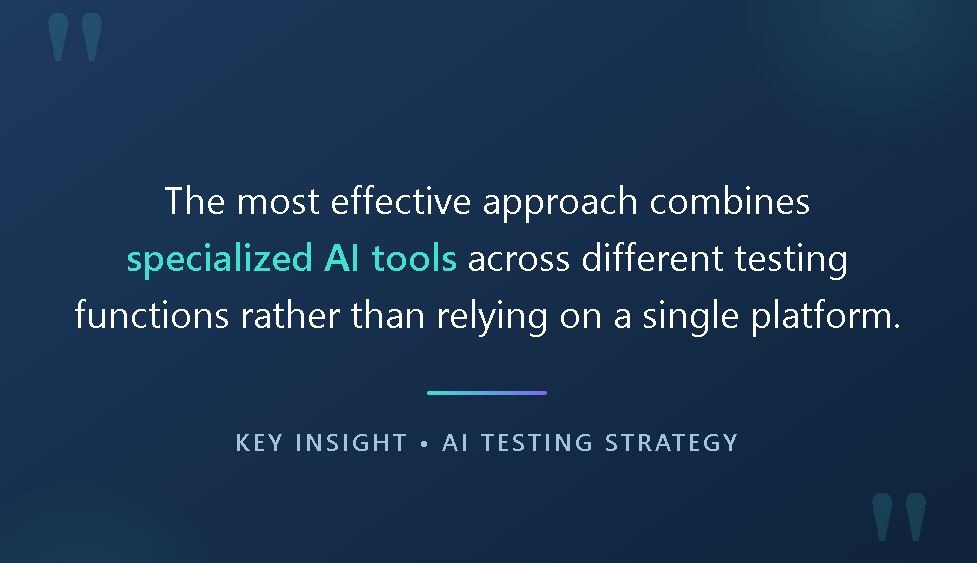
- The most effective approach combines specialized AI tools across different testing functions rather than relying on a single platform.
- QA Agents and agentic workflows are transforming how teams generate, execute, and maintain test suites.
- Successful AI adoption requires human oversight and clear integration with existing test management processes.
Start by identifying your biggest testing bottleneck, then select AI tools that address that challenge while integrating with your test management platform.
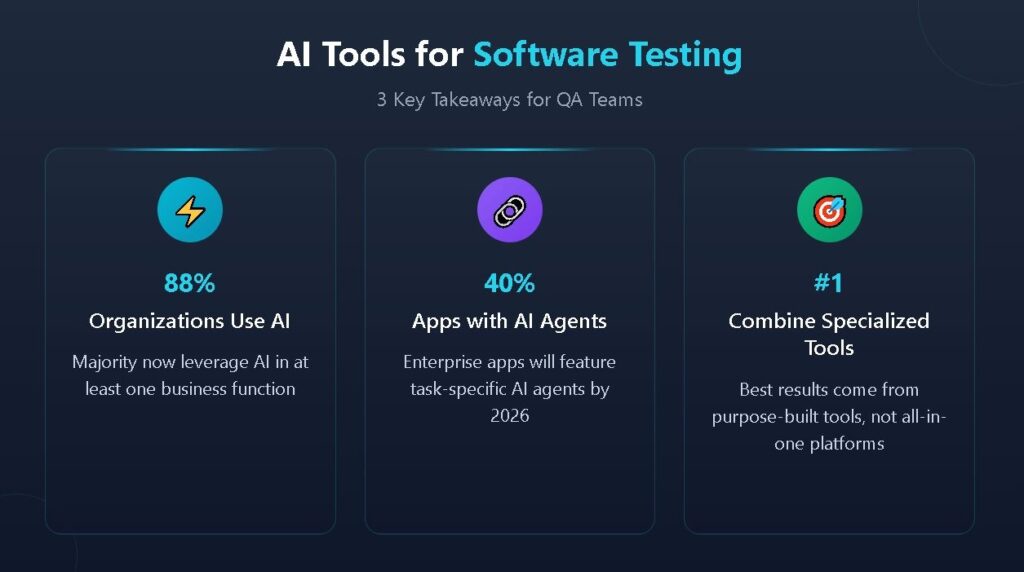
Software testing teams are under intense pressure. Release cycles keep shrinking while application complexity continues to grow. According to McKinsey's 2025 State of AI report, 88% of organizations now regularly use AI in at least one business function. QA teams are recognizing that AI tools for software testing can transform how they approach test creation, execution, and maintenance.
The real challenge is building a coherent toolkit where each AI tool serves a specific purpose and integrates smoothly with your test management workflows. Generic "all-in-one" solutions often underdeliver across specialized functions. Teams achieving the best results typically combine purpose-built AI tools that excel at specific tasks while maintaining centralized visibility through a unified test management platform.
This guide examines the best AI testing software across distinct categories. These complementary solutions address different phases of the testing lifecycle. Whether your team struggles with test case creation, visual validation, API testing, or regression suite maintenance, you'll find targeted recommendations for tools that genuinely solve those problems.
What Makes AI Tools for Software Testing Essential?
The explosion of AI-generated code has changed testing dynamics. Tools like GitHub Copilot, Cursor, and other AI coding assistants are helping developers write more code faster than ever. But more code means more testing requirements. Traditional manual approaches can't scale to match this velocity.
The Velocity Challenge
Consider a typical sprint. Developers might push dozens of pull requests containing thousands of lines of code. Each change potentially introduces new functionality requiring test coverage or modifies existing features that demand regression validation. Manual test case creation that takes hours per feature can't keep pace with code that ships in minutes.
AI QA tools address this velocity mismatch by automating the repetitive aspects of testing while freeing human testers to focus on strategic quality decisions. Self-healing scripts adapt to UI changes without manual intervention. Intelligent test generators produce comprehensive scenarios from requirements in seconds rather than hours. Predictive analytics identify high-risk areas that deserve focused attention.
Beyond Speed: Intelligence and Adaptability
Speed alone doesn't define the value of AI testing software. The more impactful advantage is intelligence. Machine learning models trained on millions of test cases recognize patterns that human testers might overlook. They identify edge cases, boundary conditions, and failure modes that slip through manual review processes.
Gartner predicts that 40% of enterprise applications will feature task-specific AI agents by 2026, a huge leap from less than 5% in 2025. This shift toward agentic AI means testing tools are evolving from passive script executors into active participants in quality assurance. They don't just run tests; they analyze results, suggest improvements, and adapt strategies based on what they learn from each execution.
What Are the Categories of AI Tools for Software Testing Teams?
Building an effective AI testing toolkit requires understanding which tools address which challenges. The testing lifecycle includes distinct phases, and specialized tools outperform generalist solutions at each stage.
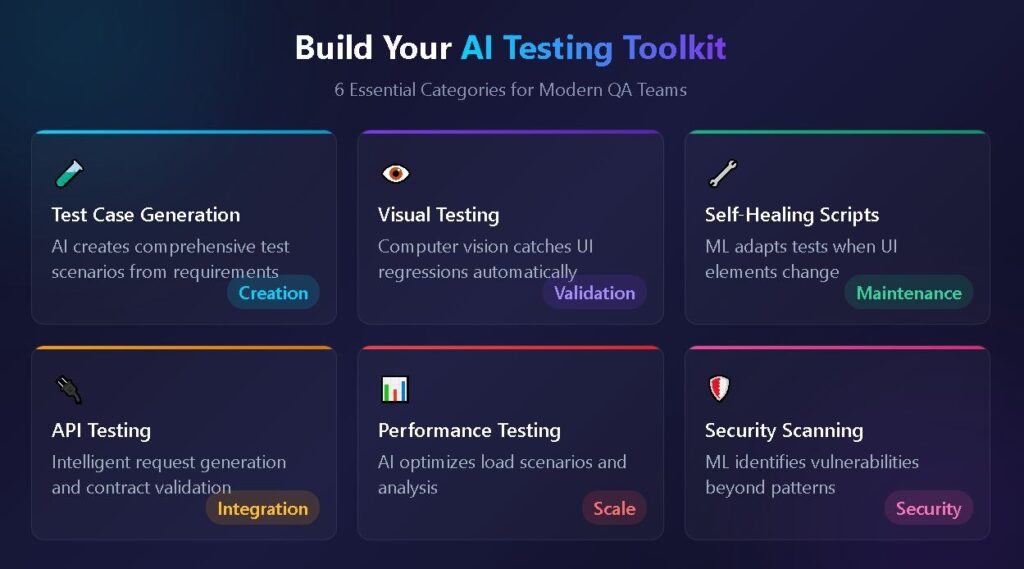
AI Test Case Generation Tools
Test case creation remains one of the most time-consuming aspects of QA. Writing comprehensive test scenarios from requirements, user stories, and acceptance criteria demands expertise and effort. AI test case generators accelerate this process.
These tools analyze input requirements using natural language processing to understand what needs testing. They then apply machine learning models trained on extensive test case datasets to generate relevant scenarios covering happy paths, edge cases, and failure conditions.
What to look for: Effective AI test case generators should integrate directly with your requirements management tools. If your user stories live in Jira, the generator should pull directly from Jira issues without manual copy-paste. Look for tools that output in formats compatible with your existing workflows, whether that's step-by-step manual test instructions or Gherkin scenarios for BDD frameworks.
The best implementations combine AI generation with human review workflows. AI excels at producing comprehensive baseline coverage, but human testers remain essential for validating business logic alignment and designing creative exploratory tests.

Visual Testing and Validation Platforms
Visual regression testing has become critical as user interfaces grow more complex. A single CSS change can cascade through hundreds of screens. Manual visual inspection doesn't scale, and pixel-perfect comparison tools generate excessive false positives.
AI-powered visual testing platforms use computer vision and machine learning to understand UI components contextually. They distinguish between meaningful visual changes that indicate defects and acceptable variations caused by dynamic content, slight rendering differences, or intentional design updates.
Key players in this space: Applitools remains the leader with its Visual AI technology that processes visual information the way humans perceive it. Percy (now part of BrowserStack) offers solid visual testing with straightforward CI/CD integration. Chromatic specializes in visual testing for component libraries and design systems.
These tools integrate with your existing automation frameworks. Run your Selenium, Playwright, or Cypress tests, and the visual testing layer captures screenshots at each step, comparing them against baselines with AI-powered analysis that reduces false positives.
Self-Healing Test Automation Platforms
Test maintenance consumes enormous QA resources. UI changes break selectors. Application updates invalidate test logic. Teams spend more time fixing broken tests than writing new ones. Self-healing automation platforms address this maintenance burden directly.
AI testing software with self-healing capabilities uses machine learning to identify UI elements even when their properties change. When a button ID changes from "submit-button" to "btn-submit," intelligent locators recognize the element based on multiple characteristics and update automatically.
Leading platforms in this category include Testim (now part of Tricentis), which uses AI to create stable tests that adapt to application changes. Mabl provides intelligent test maintenance alongside its broader automation capabilities. Functionize applies AI throughout the testing process, from test creation through maintenance.
These tools reduce but don't eliminate maintenance entirely. Complex application changes still require human judgment. However, for the routine maintenance that previously consumed hours, self-healing automation delivers genuine time savings.
API Testing and Intelligent Contract Validation
API testing has become vital as microservices architectures dominate modern applications. AI enhances API testing through intelligent request generation, response validation, and contract testing.
AI-powered API testing tools can analyze API schemas and automatically generate comprehensive test cases covering valid requests, invalid inputs, boundary conditions, and security scenarios. They identify missing test coverage and suggest additional scenarios based on API structure analysis.
Look for tools that integrate with your CI/CD pipelines and support both REST and GraphQL APIs. The best solutions combine intelligent test generation with robust automation frameworks that execute tests as part of every deployment pipeline.
Performance and Load Testing with AI Optimization
Traditional performance testing involves creating realistic load scenarios, executing tests, and analyzing results. AI enhances each phase. Intelligent workload modeling analyzes production traffic patterns to create more representative test scenarios. ML algorithms optimize test execution for faster feedback. Advanced analytics identify performance bottlenecks and predict scaling issues before they impact users.
Modern performance testing platforms incorporate AI for both test design and result analysis. They can correlate performance metrics across infrastructure layers to pinpoint root causes rather than just symptoms.
Code Analysis and Security Scanning
Static analysis tools have incorporated AI to improve accuracy and reduce false positives. AI-powered code analysis goes beyond pattern matching to understand code context and behavior. Security scanning tools use machine learning to identify vulnerabilities that rule-based systems miss.
These tools integrate into development workflows, providing feedback during code review rather than after deployment. Early detection reduces remediation costs and prevents security issues from reaching production.
7 Essential AI QA Tools to Consider
Here's a focused list of AI-powered testing tools that excel in their respective categories:
- Applitools – Visual AI testing that reduces false positives in UI validation
- Mabl – Intelligent test automation with self-healing capabilities and built-in analytics
- testRigor – Plain English test creation that makes automation accessible to non-technical testers
- Katalon – Comprehensive platform supporting web, mobile, and API testing with AI assistance
- Diffblue Cover – Automated unit test generation specifically for Java codebases
- Functionize – NLP-powered test creation with ML-based maintenance
- BrowserStack Test Management – Cloud-based testing with AI-enhanced test authoring
Each tool addresses specific pain points. Select based on where your team experiences the greatest friction rather than chasing feature counts.
How to Build Your AI Testing Toolkit
Building an effective toolkit requires strategic thinking rather than tool accumulation. Start by mapping your current testing process from requirement receipt through test execution and reporting.
Identify Your Integration Points
The most important decision involves how tools connect with each other and with your broader development workflow. Isolated tools that don't share data create information silos and duplicate effort. Look for tools with robust APIs and native integrations with your existing platforms.
If your development team lives in GitHub, your testing tools should connect directly to GitHub. If requirements live in Jira, test management should integrate seamlessly with Jira. The goal is to reduce context switching, not add another disconnected tool.
Prioritize Test Management as Your Foundation
Individual AI tools generate tremendous value, but that value multiplies when results flow into a unified test management platform. A centralized system provides visibility across automated and manual testing efforts, tracks test case history, and maintains traceability between requirements and validation.
QA Agents embedded within test management platforms represent the next evolution. Rather than passive repositories, these active AI-driven systems automatically analyze results, suggest test improvements, and drive workflows. They connect AI-generated test cases with execution frameworks and produce actionable insights from test results.
Start Small and Expand Strategically
Resist the temptation to implement multiple AI tools simultaneously. Begin with the tool addressing your most pressing pain point. If test case creation bottlenecks your team, start there. If maintenance consumes excessive resources, prioritize self-healing automation.
Once the initial tool demonstrates value and integrates smoothly into workflows, expand to adjacent categories. This incremental approach builds organizational capability while effectively managing change.

What Criteria Should You Use for Selecting AI Testing Tools?
When evaluating AI tools for software testing, consider these factors against your specific requirements:
| Criteria | What to Evaluate | Why It Matters |
| Integration Depth | Native connections to your existing tools (GitHub, Jira, CI/CD) | Reduces manual data transfer and context switching |
| Output Formats | Support for your preferred test formats (Gherkin, step-by-step, automation scripts) | Ensures generated tests fit existing workflows |
| Learning Curve | Time to productive use for your team's skill level | Affects adoption speed and ongoing value |
| Human Oversight | Review and approval workflows for AI-generated content | Maintains quality control and business logic alignment |
| Scalability | Performance with your test suite size and execution frequency | Prevents bottlenecks as testing grows |
| Vendor Trajectory | Recent releases, roadmap, and community activity | Indicates long-term viability and continued improvement |
What Should Teams Prioritize When Choosing AI Testing Software?
The most successful teams share common approaches to AI tool selection that go beyond feature comparison.
Match Tool Complexity to Team Capability
Some AI testing tools require prompt engineering expertise to produce useful output. Others guide users through structured interfaces that generate quality results without specialized knowledge. Match tool complexity to your team's current capabilities and realistic training investment.
Junior QA engineers benefit from tools with guided workflows and templates. Senior automation engineers may prefer more flexible systems that allow for custom configurations. The best tools accommodate both user types.
Validate Integration Claims Through Testing
Vendors claim seamless integration, but implementation reality often differs. Request trial access and build actual tests against your applications. Connect to your actual CI/CD pipelines. Import real requirements from your actual Jira instance.
This hands-on validation reveals friction points that marketing materials obscure. Integration quality varies, and discovery during evaluation prevents painful surprises after purchase.
Consider the Vendor's AI Investment
AI capabilities require ongoing investment. Models need retraining. Features need enhancement as the field evolves. Evaluate whether vendors demonstrate genuine AI commitment or have bolted superficial AI features onto legacy platforms.
Review recent release notes. Examine the vendor roadmap. Look for evidence of active development in AI capabilities specifically. A tool with moderate current capabilities and strong development momentum may outperform a feature-rich tool from a stagnant vendor.
Frequently Asked Questions
Can AI completely replace human testers?
No. AI excels at generating comprehensive standard scenarios, identifying systematic edge cases, and handling repetitive maintenance tasks. Human testers remain essential for validating business logic, designing creative exploratory tests, and ensuring generated tests align with actual quality objectives. The most effective approach combines AI generation with human review and strategic oversight.
How long does it take to see ROI from AI testing tools?
Initial value can emerge within weeks for targeted use cases like test case generation or test prioritization. Full pipeline integration typically requires 2–3 months for meaningful workflow changes. Teams with mature requirements documentation and existing automation foundations see faster time to value than those starting from manual processes.
Should teams standardize on a single AI testing platform?
Generally, no. Specialized tools outperform all-in-one platforms at specific functions. The optimal approach combines best-of-breed tools for different testing types while maintaining centralized visibility through a unified test management platform. This strategy captures specialized capabilities without sacrificing coordination.
What skills do QA teams need to leverage AI testing effectively?
Teams benefit from understanding how to evaluate AI-generated output, craft effective prompts for tools that use natural language input, and integrate AI tools with existing automation infrastructure. Deep machine learning expertise isn't required for most tools, but critical evaluation skills remain essential since AI suggestions require human validation.
Transform Your QA Process with Intelligent Testing
AI tools for software testing continue to evolve. Teams that establish strong foundations now position themselves to seamlessly absorb future advances. The key is selecting tools that solve real problems today while integrating into workflows that can accommodate tomorrow's innovations.
Effective AI adoption combines specialized execution tools with intelligent test management that provides the coordination layer. Generating test cases from requirements accelerates creation. Self-healing scripts reduce maintenance burden. Visual AI catches regressions that manual review misses. But the full value emerges when these capabilities connect through a unified platform providing visibility, traceability, and workflow automation.
TestQuality delivers that coordination layer. With TestStory.ai for AI-powered test case generation, native GitHub and Jira integrations, and QA Agents that automatically drive workflows, TestQuality provides the foundation for modern AI-enhanced testing. Start your free trial and experience how intelligent test management accelerates quality for both human and AI-generated code.