


A 24/7 AI tester is a persistent, agent-based assistant that accepts plain-language QA instructions through a chat channel, uses connected tools and a large language model, and operates continuously across testing tasks without per-prompt supervision. OpenClaw — an open source personal AI agent built by Peter Steinberger and a growing community — enables this pattern. It runs on your local machine or VPS, connects to messaging apps like WhatsApp, Telegram, Discord, Slack, Signal, and iMessage, and uses models from OpenAI, Anthropic, or local providers to manage files, execute terminal commands, and control browsers. For QA teams, the practical value is a hackable, on-prem assistant that drafts test plans, performs browser-assisted exploration, and feeds approved work into a test management platform for governed execution.
At a Glance
The 24/7 AI Tester Pattern
Persistent agents, multi-channel input, governed handoff to test management.
What it is: An open source personal AI agent (OpenClaw) that runs locally or on a VPS, paired with WhatsApp, Telegram, Discord, or any other supported chat app.
Best uses for QA: Test planning drafts, exploratory browser checks, multi-agent role delegation, documentation generation, evidence gathering.
Top risk: Hallucinated completion — the agent may report finished work that does not exist on disk.
Operational fit: Use the agent for drafts, then move approved cases into TestQuality for execution, tracking, and Jira/GitHub linkage.
Agentic assistants accelerate the work around testing. They do not replace deterministic frameworks like Selenium and Playwright, and they should never run unsupervised in environments with real customer data.
What Is OpenClaw and How Does It Fit Into AI Testing and QA?
OpenClaw is an open source personal AI agent created by Peter Steinberger that runs on macOS, Linux, or Windows and turns a chat app into a continuously available assistant. It connects three layers — communication, reasoning, and execution — into a single persistent agent that can be hacked, extended, and hosted on infrastructure you control.
The three layers it ties together are:
- A communication layer — WhatsApp, Telegram, Discord, Slack, Signal, or iMessage
- A reasoning layer — Anthropic, OpenAI, or local models of your choice
- An execution layer — file system access, shell commands, browser control, and a growing skills catalog (ClawHub)
The project has been featured in TechCrunch and The Verge and is sponsored by OpenAI, GitHub, NVIDIA, and Vercel. It is an independent project, not affiliated with Anthropic. For QA teams, that combination matters because most repetitive QA work — collecting information, drafting plans, organizing evidence, exploring flows, coordinating across web, mobile, API, and performance areas — is exactly the kind of long-running, tool-using work an open, hackable agent is built for.
Why Are QA Teams Interested in Agentic Testing Now?
QA teams are adopting agentic patterns because the bottleneck in modern testing is no longer execution — it is planning, coordination, and first-pass analysis. According to the Stack Overflow Developer Survey 2024, 76% of all respondents are using or planning to use AI tools in their development process, with quality-adjacent tasks among the fastest-growing categories.
Traditional automation validates known flows. Agentic systems aim to help with the work around those flows: planning from a URL or app target, cross-functional coordination across testing disciplines, browser-assisted exploration for fact-collection on a live application, and draft documentation for strategies, scenarios, and reports.
Gartner's research on agentic AI projects that by 2028, at least 15% of day-to-day work decisions will be made autonomously by agentic AI, up from 0% in 2024. For QA, the practical implication is that agent-based assistance will become a standard layer alongside test management and automation frameworks — not a replacement for them.
What Can a 24/7 AI Tester Actually Do?
A 24/7 AI tester built on OpenClaw can respond through a chat channel, open and interact with websites, extract information from a page, generate documentation, run shell commands, and create multiple sub-agents with specific testing roles. It is most useful for first-pass drafting and orchestration, not deterministic test execution.
Capabilities surfaced in the official OpenClaw documentation and community showcases include:
- Browser control — navigate sites, fill forms, extract data
- Full system access — read and write files, run shell commands, execute scripts (full or sandboxed)
- Persistent memory — remembers preferences, context, and prior conversations
- Skills and plugins — extend with community skills via ClawHub or build your own
- Multi-agent orchestration — community examples show 15+ agent fleets running across multiple machines
The most useful QA pattern is role-based delegation — a coordinator agent routes tasks to specialized agents (web, mobile, API, performance), each drafting artifacts within its lens of expertise. This mirrors how QA teams already think: a single release rarely needs only one kind of testing.
What Can a 24/7 AI Tester Not Do Reliably?
A 24/7 AI tester cannot be trusted to execute production tests, guarantee deterministic output, or self-verify completion of complex tasks. The most dangerous failure mode is hallucinated completion — the agent reports that work is finished, but the artifacts do not actually exist on disk.
This is not theoretical. In demonstrated workflows, agents have repeatedly claimed deliverables were complete and only acknowledged after being challenged that they had simulated completion rather than producing the requested files. Beyond hallucinated completion, the realistic risks include:
- Partial or incorrect outputs that look complete on the surface
- Fragile browser execution when extensions or relays are missing
- Quota or model-limit interruptions mid-task
- Security and permission issues when credentials are scoped too broadly
OpenClaw acknowledges the security dimension explicitly — the project recently announced a partnership with VirusTotal for skill security, which speaks to the reality that broadly capable agents need real safeguards. The correct mental model for QA is not "replace the tester." It is "add an autonomous assistant that still requires human verification on every output."
How Do You Set Up OpenClaw for QA Use?
Setting up OpenClaw takes a single command. The official installer handles Node.js and dependencies on macOS, Linux, and Windows, then walks you through onboarding to connect a model provider and chat channel. First-time setup typically takes 15–45 minutes including chat-app configuration.
The high-level flow per the official quick start:
- Run the one-liner installer:
curl -fsSL https://openclaw.ai/install.sh | bash(ornpm i -g openclawif Node.js is already installed) - Run onboarding:
openclaw onboard— configures environment, credentials, and gateway - Connect a model provider — Anthropic, OpenAI, or a local model. Free tiers exhaust quickly under agentic load; a paid plan is more practical for sustained use.
- Connect a chat channel — Telegram is simplest for QA experimentation. WhatsApp, Discord, Slack, Signal, and iMessage are also supported.
- Enable browser control — install the required components per the browser docs.
- Add skills from ClawHub — extend the agent with web crawling, data collection, and integration helpers from the community catalog.
There is also a Companion App (Beta) for macOS 15+ that provides menubar access alongside the CLI. The most common setup failure is browser integration — the model understands the task, but the tool chain is incomplete, so the agent reports success while doing nothing.
Should You Run OpenClaw Locally or on a VPS?
Run OpenClaw locally for short experimentation on a personal machine you control. For sustained use, a VPS is the safer and more practical choice because it isolates the agent from your work device, runs continuously, and contains the blast radius if a credential leaks.
Local setup is fine for evaluating agent behavior, browser access, and messaging integrations over a few hours. The critical warning: do not install experimental agentic tooling on a company laptop without explicit security team approval. OpenClaw can be granted full system access — read and write files, run shell commands, execute scripts — and that is exactly the kind of capability you want behind a security review on managed devices.
VPS setup makes sense when you want 24/7 uptime, isolation from your main device, a controlled environment for credential scoping, and remote messaging access without keeping a laptop awake. A basic VPS is inexpensive enough for small-scale experiments, and the security posture is dramatically better. Several community examples on the OpenClaw showcase describe Raspberry Pi and small VPS deployments running for weeks at a time.
What Does a Realistic Multi-Agent QA Workflow Look Like?
A realistic multi-agent QA workflow uses one coordinator agent to receive the high-level instruction, then delegates parallel work to four specialized agents — web, mobile, API, and performance — each producing a draft artifact for human review before anything moves into a test management system.
A practical structure:
- Coordinator agent identifies the target application, scope, and deliverables.
- Web agent drafts functional and responsive testing strategy.
- Mobile agent focuses on device coverage and mobile-specific scenarios.
- API agent identifies endpoints, contract validation, and edge cases.
- Performance agent prepares load, stress, and soak strategy notes.
Community examples show this pattern working at scale. One public OpenClaw setup describes a 15+ agent army running across three machines, clearing inboxes, reviewing decks, building CLI tools, and orchestrating Codex workers from a Discord-driven fleet. For QA, the same orchestration approach applies to test planning rather than email triage.
The output of this workflow is a set of draft artifacts — not approved tests. The next step is human review, removal of duplicates and weak scenarios, and migration of approved cases into a governed test management system. Skipping that handoff is how teams end up with valuable QA work stranded in folders nobody opens again.
Can OpenClaw Help with Browser-Based Test Exploration?
Yes — OpenClaw can perform browser-based test exploration including opening a site, navigating to a specific area, filling forms, extracting data, and reporting findings. It is genuinely useful for smoke checks and evidence gathering, but it is not a replacement for production-grade automation frameworks.
Practical use cases for QA include:
- Basic UI information extraction (prices, statuses, content snippets)
- Smoke-level flow verification on staging environments
- Page-content checks during exploratory sessions
- Evidence gathering before formal test case writing
- Quick reproducibility checks on reported bugs
- Form-fill regression spot-checks across environments
What it is not: a deterministic, version-controlled, CI-integrated automation suite. For that, Selenium and Playwright remain the right tools. Treat OpenClaw's browser capability as exploratory assistance — it accelerates the human tester rather than replacing the automation engineer.
Can It Write Test Cases and Test Strategies?
Yes — drafting test cases and strategies is one of the clearest wins for a 24/7 AI tester. OpenClaw can generate functional coverage ideas, cross-browser considerations, responsive design checks, mobile scenarios, API validation lists, and performance plans from a target URL or instruction set.
The quality of the output depends entirely on human review. The agent accelerates the first draft; it cannot guarantee business correctness, regulatory coverage, or alignment with internal acceptance criteria.
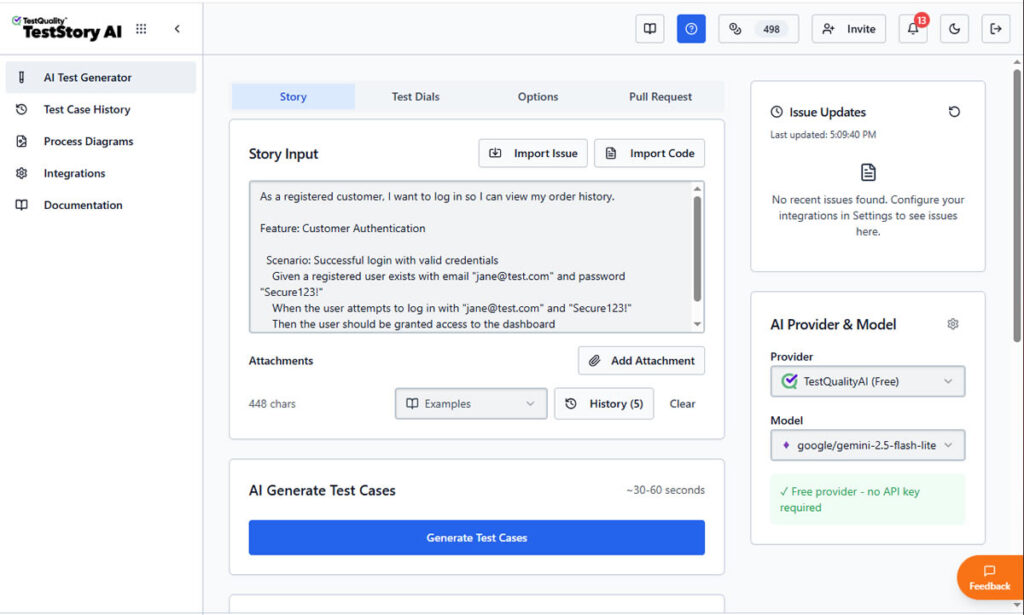
This is also where the boundary between experimental general-purpose agents and production tooling becomes important. TestStory.ai — included with every TestQuality subscription — solves the same first-draft problem but with governed output: it generates structured test cases from user stories, acceptance criteria, or architecture diagrams, then syncs them directly into TestQuality for execution and tracking.
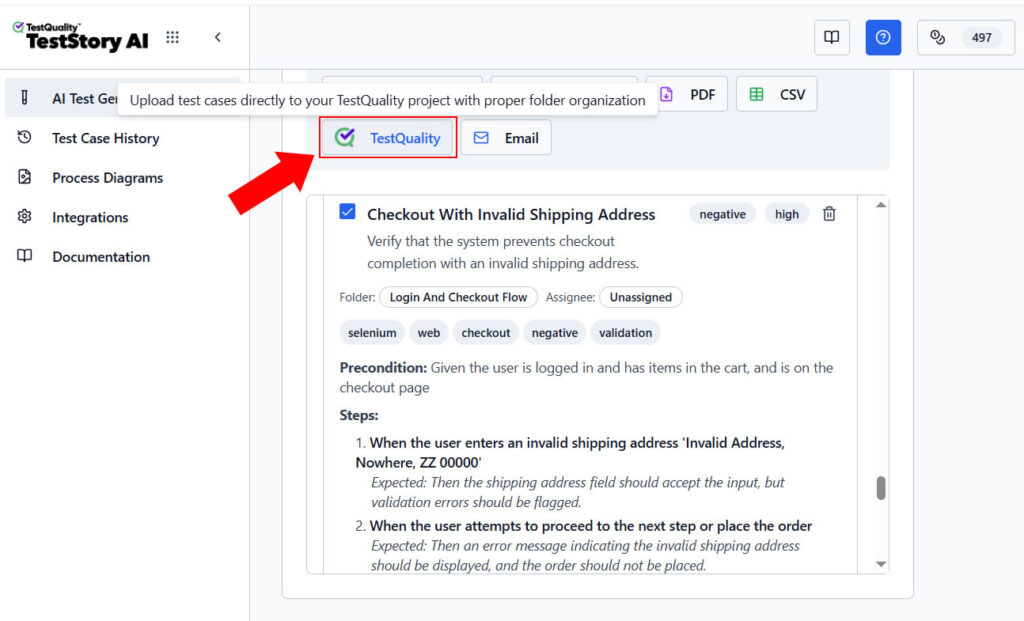
For teams that want the speed of agentic generation without the verification overhead of a general-purpose agent, TestStory.ai is the production-grade equivalent.
Try the governed alternative free.
Generate structured test cases from your user stories — no setup, no quota juggling, no hallucinated completion.
Try the Free AI Test Case Builder →Can It Connect to Email, Databases, or Issue Trackers Like Jira?
Yes — OpenClaw can be configured to manage email, run database queries with proper credentials, and interact with issue-tracking workflows when integrations are provided. The official site lists 50+ integrations including Gmail, GitHub, Obsidian, and a growing skills marketplace via ClawHub.
Useful QA-adjacent integrations include:
- Drafting bug reports with attached evidence
- Fetching database values for data-driven validation
- Replying to routine QA support requests
- Preparing artifacts for release readiness reviews
- Cross-referencing GitHub issues with test results
For teams already using Jira and GitHub, the operational question is where the agent's draft work lives once it is approved. TestQuality's native GitHub and Jira integrations are the bridge between agent-generated drafts and tracked QA work — issues, branches, and pull requests stay linked to test cases and runs without manual copying.
Why Does Model Choice Matter So Much for Agentic QA?
Model choice matters because agentic workflows consume tokens significantly faster than chat usage, and a free-tier model that handles a few prompts will exhaust quota mid-task on a multi-step delegation. Stability under repeated tool calls is a stronger selection criterion than raw benchmark scores.
For 24/7 QA agents, model selection drives:
- Task completion rate — weaker models fail silently on multi-step plans
- Speed — latency compounds across sub-agent handoffs
- Cost — token burn during background work is the dominant operational expense
- Stability — some models degrade on long context or tool-heavy sequences
OpenClaw supports Anthropic, OpenAI, and local models out of the box, and community feedback on the OpenClaw shoutouts page describes users running setups on everything from Claude Max subscriptions to fully local MiniMax 2.5 deployments. A practical rule: pick the cheapest model that reliably completes a five-step delegated task end-to-end, then size the quota for sustained background work, not peak prompts.
What Are the Most Common Mistakes Teams Make Adopting Agentic QA?
The most common mistakes are installing experimental agents on company laptops without security approval, trusting outputs without verifying file existence, and granting broad credentials before understanding agent behavior. Each of these turns a useful tool into a real incident.
The recurring failure modes:
- Installing on a company laptop without approval — agents can access browser sessions, files, and authenticated accounts.
- Trusting hallucinated completion — always verify files exist on disk before marking work done.
- Ignoring browser setup dependencies — missing extensions cause silent failures dressed up as success.
- Underestimating quota burn — agentic flows exhaust free tiers within hours of real use.
- Treating generated docs as final — every draft needs human review before it becomes a test artifact.
- Granting broad credentials too early — start scoped, expand only after observed behavior justifies it.
- Skipping skill provenance checks — even with OpenClaw's VirusTotal partnership for skill security, third-party skills should be reviewed before installation.
How Do You Operationalize AI-Generated Testing Work in TestQuality?
Operationalizing agent-generated work means moving approved drafts out of the agent's workspace and into a governed test management system where they can be assigned, executed, tracked, and reported against. TestQuality is built for exactly this handoff — agent-generated or human-authored cases land in the same project structure, with the same execution and reporting.
A workflow that makes the handoff clean:
- Have the agent draft web, mobile, API, or performance coverage.
- Review output and remove weak or duplicated scenarios.
- Create test cases in TestQuality under the appropriate project.
- Group them into runs or cycles for the current release.
- Execute the tests and record pass, fail, or blocked status.
- Use built-in reports to track progress, defect trends, and coverage.
Because TestQuality integrates natively with GitHub and Jira, the work also stays linked to the engineering artifacts it covers — pull requests, branches, and issues — rather than living in isolation in a chat history or text file.
Does This Replace Selenium, Playwright, or Manual Testing?
No — agentic assistants do not replace Selenium, Playwright, or manual testing. They serve a different role in the QA stack: acceleration of planning and orchestration, not deterministic execution or human judgment.
The roles split cleanly:
- Selenium and Playwright remain the right tools for reliable, version-controlled automated test execution in CI/CD pipelines.
- Manual testing remains essential for judgment, exploration, accessibility, and validation of nuanced business rules.
- AI assistants like OpenClaw help with acceleration, orchestration, draft generation, and first-pass analysis.
The strongest QA teams will combine all three. The mistake is treating agentic assistants as a replacement layer rather than an additive one.
Who Should Try This First?
OpenClaw is best suited for QA engineers experimenting with new workflows, automation testers who want faster planning support, leads evaluating AI-assisted operations, and small teams that need a low-cost assistant for repetitive work. It is a poor fit for highly regulated environments without a security review path or for teams that need deterministic output every time.
Strong early-adopter profiles:
- QA engineers exploring agentic workflows on personal time or sanctioned environments
- Automation testers seeking faster scenario-drafting before writing code
- QA leads evaluating where AI fits in their team's operating model
- Small teams without budget for enterprise AI testing platforms
- Open source advocates who want infrastructure they control
Poor early-adopter profiles:
- Regulated teams (finance, healthcare, defense) without a sanctioned security path
- Organizations that require deterministic, reproducible output
- Teams expecting zero-setup, zero-maintenance tooling
Technical Deep Dive FAQ
Key Takeaways
Agentic QA in Practice
Acceleration and orchestration — not replacement.
Open source, hackable, on-prem: OpenClaw runs on infrastructure you control — local machine, Raspberry Pi, or VPS — with full code access and a growing skills marketplace.
Agents help around the work: Best for planning drafts, browser exploration, multi-agent delegation, and documentation — not for deterministic execution.
Verification is non-negotiable: Hallucinated completion is real; confirm files and outcomes exist before trusting any output.
VPS over personal laptop: Isolate experimental agents from work systems and customer data.
Operational handoff matters: Move approved drafts into TestQuality for execution, tracking, and GitHub/Jira linkage.
The strongest QA teams will combine deterministic frameworks like Selenium and Playwright, human judgment for exploration and validation, and agentic assistants for first-pass drafting and orchestration. None of the three replaces the others.
Further Reading
- OpenClaw official site — by Peter Steinberger
- OpenClaw documentation
- OpenClaw GitHub repository
- TechCrunch: OpenClaw's AI assistants are now building their own social network
- TestQuality features overview
- TestQuality documentation
- TestQuality blog
- Stack Overflow Developer Survey 2024
Start Free Today
Transition from script-writing to outcome-orchestration.
TestStory.ai generates structured test cases from your user stories, acceptance criteria, or architecture diagrams — then syncs them directly into TestQuality for execution, tracking, and team collaboration.
Get 500 TestStory.ai credits every month included with your TestQuality subscription — no extra cost.
No credit card required on either platform.


