


Introduction
Adopting Behavior Driven Development (BDD) starts with enthusiasm. The first fifty scenarios are easy to write. They clarify requirements and align the team. But somewhere around scenario #500, the reality of Gherkin software testing sets in.
Feature files become bloated. Scenarios start to conflict. The "simple" English syntax that was supposed to bridge the gap between business and technical teams becomes a maintenance nightmare that requires constant refactoring.
If you are reading this, you likely already know the basics of Given-When-Then. You aren't looking for a template; you are looking for a strategy to keep your acceptance criteria sustainable as your application grows.

In this article, we will move beyond the "Hello World" of BDD. We will explore advanced acceptance criteria Gherkin format techniques, how to enforce a consistent Gherkin style, and how the emergence of AI-Powered QA is changing the way we manage test data at scale.
Part 1: Optimizing the Acceptance Criteria Gherkin Format
The keyword here is optimization. When we look at search data for "Acceptance criteria gherkin format", we often find teams searching for ways to reduce redundancy.
A standard Gherkin scenario is useful, but a suite of repeated steps is technical debt. To climb from a "good" QA process to a "great" one, you must treat your Gherkin feature files with the same respect as your production code.
1. The Power of "Background"
Don't repeat the setup. If every scenario in a feature file requires the user to be logged in, do not write Given I am logged in ten times. Use the Background utility. (Gherkin syntax):
Feature: User Profile Management

Background:
  Given the user is authenticated
  And the user is on the profile settings page

Scenario: Update email address
  When the user updates the email to "new@email.com"
  Then the system should send a verification link

Scenario: Update profile picture
  When the user uploads "avatar.png"
  Then the profile image should be updated
Why this matters: When the login flow changes (e.g., adding 2FA), you update one block of code, not twenty.
2. Scenario Outlines and Data Tables
The most efficient acceptance criteria gherkin format utilizes Scenario Outlines to test multiple data permutations without writing new tests.
Instead of writing three scenarios for valid, invalid, and empty passwords, write one: (Gherkin syntax):
Scenario Outline: Password validation logic
  When the user sets the password to <PasswordInput>
  Then the validation message should be <ExpectedMessage>

  Examples:
    | PasswordInput | ExpectedMessage      |
    | 12345         | Too short            |
    | Pass          | Requires special char|
    | Secure@123    | Valid                |
This reduces the file size and improves readability, ensuring that your acceptance criteria remain a helpful reference rather than a wall of text.
Part 2: Enforcing Gherkin Style Acceptance Criteria
Writing Gherkin is easy; writing consistent Gherkin style acceptance criteria across a distributed team is incredibly difficult.
When different QA engineers use different "dialects" of Gherkin, the test suite becomes disjointed. One engineer might write "When I click login," while another writes "When the login button is pressed." To an automation framework (and to a human reader), these are two different actions requiring two different step definitions.
The Style Guide for Scalability
To maintain a high-ranking position in Gherkin software testing maturity, teams must agree on a "Domain Specific Language" (DSL).
- Third-Person Perspective: Stick to "User" or specific roles ("Admin," "Guest"). Avoid "I".
- Weak Style: When I delete the file.
- Strong Style: When the Admin removes the file.
- State over Action: Focus on the resulting state rather than the granular clicks.
- Weak Style: When I click the "Add" button and I wait for the modal and I type "Name".
- Strong Style: When a new user "Name" is added to the registry.
The Role of Test Management Tools
This is where tool selection becomes critical. A text editor is not enough to manage style consistency. You need a centralized hub.
At TestQuality, we designed our test management ecosystem to house these scenarios effectively. By centralizing your Gherkin feature files within a robust management tool, you can review changes, tag scenarios for regression or smoke testing, and link them directly to Jira issues. This ensures that the Gherkin style acceptance criteria remain consistent with the business requirements they represent.
Part 3: The Role of Gherkin in the Software Testing Lifecycle
Gherkin software testing is not an island; it is part of a larger ecosystem. The reason users spend longer on pages discussing this topic is that they are trying to figure out where BDD fits in the CI/CD pipeline.
Living Documentation
The ultimate goal of Gherkin is to serve as "Living Documentation." Unlike a PDF requirements document that becomes obsolete the moment it is saved, Gherkin files—when wired to automation—are always up to date. If the test passes, the documentation is true.
However, keeping this documentation "alive" requires effort.
- Version Control: Feature files should reside in the repo with the code.
- Traceability: Every Gherkin scenario should map back to a requirement or user story.
- Visibility: Developers, QA, and Stakeholders need access to the results of these tests, not just the code.
This connectivity is what accelerates high-performing teams. When a test fails, you shouldn't just know which line of code broke; you should know which requirement is no longer being met.
Part 4: The Future: AI-Powered Gherkin Management
We have discussed formatting, style, and lifecycle. But the elephant in the room is speed.
Writing Scenario Outlines and standardizing Backgrounds takes time. In the race to release, maintaining perfect Gherkin files often falls to the bottom of the priority list. This is where the industry is pivoting toward AI-Powered QA.
We are moving from "Manual Creation" to "AI Orchestration."
Generative AI for Test Case Creation
New tools are emerging that can read a raw requirement and output the optimized acceptance criteria Gherkin format we discussed in Part 1.
For example, with TestStory.ai (integrated into the TestQuality ecosystem), the workflow shifts:
- Input: You paste the complex business logic or a link to a user story.
- AI Processing: The agent understands the context, applies best-practice Gherkin formatting (including declarative style and proper grammar), and generates the scenarios.
- Refinement: You, the expert, review the output.
From Text to Execution
The most significant leap is not just in writing the text, but in executing it. TestStory.ai leverages agents to interpret your Gherkin style acceptance criteria and autonomously execute the test against your web application.
This solves the scalability problem. You can now increase your test coverage exponentially without exponentially increasing your manual scripting time. The AI handles the "boilerplate" work, allowing you to focus on the testing strategy and architectural decisions.
Real-World Gherkin Acceptance Criteria Examples
Let’s move from theory to practice. You need reference material to standardize your team's output. Below are Gherkin acceptance criteria examples ranging from simple UI interactions to complex logic.
Example 1: The "Happy Path" Authentication
User Story: As a registered customer, I want to log in so I can view my order history.
Acceptance Criteria (Gherkin syntax):
Feature: Customer Authentication

  Scenario: Successful login with valid credentials
    Given a registered user exists with email "jane@test.com" and password "Secure123!"
    When the user attempts to log in with "jane@test.com" and "Secure123!"
    Then the user should be granted access to the dashboard
    And a "Welcome back, Jane" notification should be displayed
How Does TestStory.ai Transform a User Story into an Executable Reality?
To understand the impact of an AI-powered QA workflow, let’s trace a standard requirement through the platform. We'll start with the common, yet often under-specified, authentication story example shared above to demostrate moving a user story through TestStory.ai agentic pipeline directly into TestQuality.
Step 1: Contextual Input for Gherkin Acceptance Criteria
The process begins by defining the human intent. In the main input field of TestStory.ai, we paste our primary Gherkin user story:
As a registered customer, I want to log in so I can view my order history."
At this stage, most traditional tools would simply store this requirement as a static text string. However, TestStory.ai treats it as a logical blueprint for generating Gherkin acceptance criteria. By adjusting the Test Dials, we can instruct the AI Agent to go beyond a simple "Happy Path."
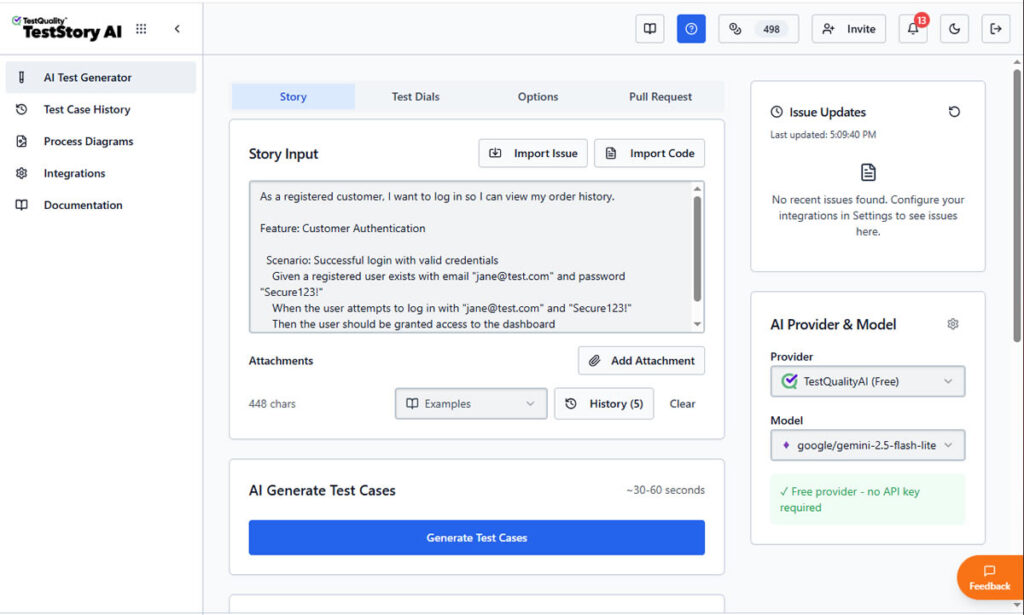
We can guide it to think like a Senior SDET by automatically incorporating boundary values, security validations, and edge cases into the Gherkin scenarios.
Step 2: Generating Executable Gherkin Scenarios
Once "Generate Test Cases" is triggered, TestStory.ai produces structured steps with clear Preconditions and Expected Results.
the AI parses the story to create structured Gherkin format user stories acceptance criteria. As shown in the screenshots, the platform doesn't just "write" steps; it builds an executable specification.
The AI identifies the necessary preconditions (Given), the specific user triggers (When), and the verifiable outcomes (Then). This ensures that your Gherkin acceptance criteria examples are declarative and behavior-focused, following 2026 industry best practices.
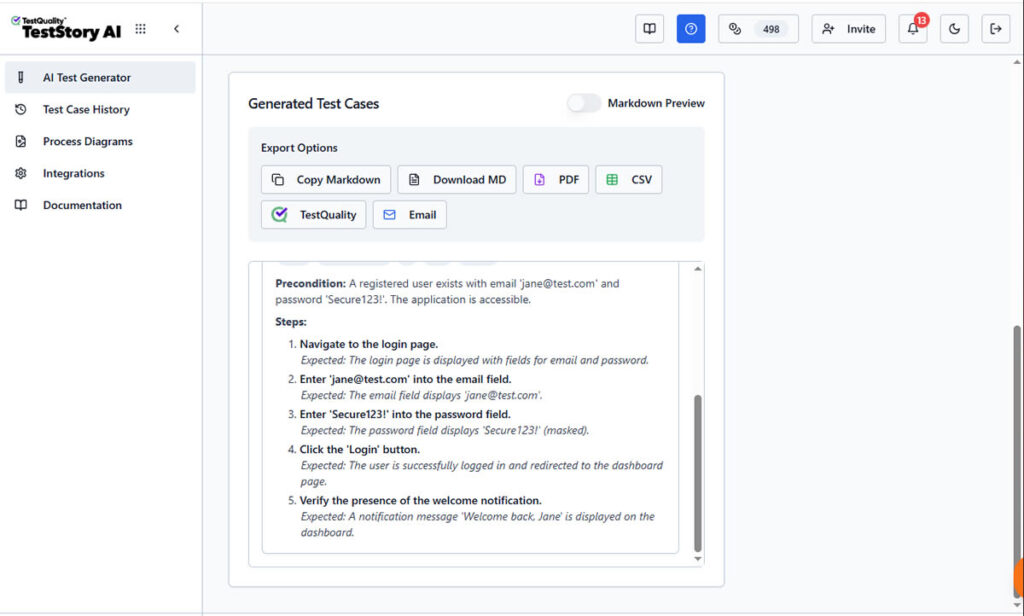
Unlike a static document, this output is ready for the "last mile" of testing. The interface provides immediate Export Options, allowing you to download the Gherkin as Markdown, PDF, CSV, share it by Email, downloaded it or, what's most important, sync it directly to TestQuality as your option as test management stack.
Step 3: Synchronizing Gherkin Scenarios to TestQuality
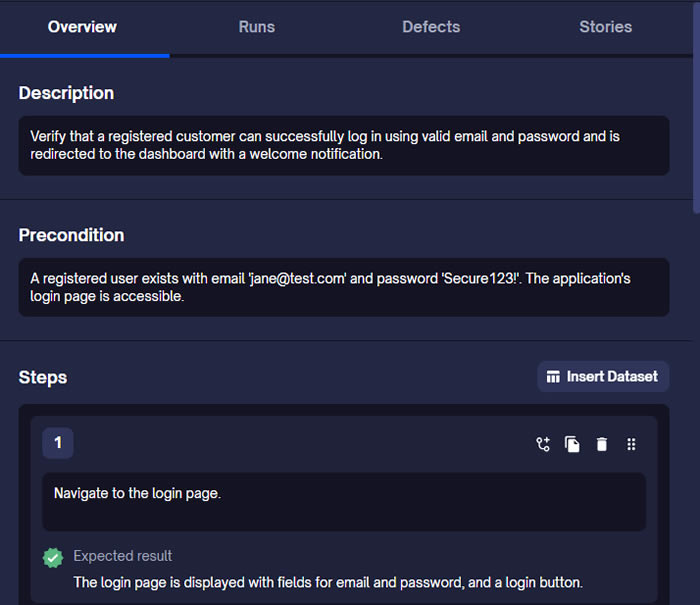
By selecting the TestQuality export button, the AI-generated scenario is instantly synchronized with our live project within TestQuality with the proper folder organization. As shown in the final view, the Gherkin story is now a formal Test Case within TestQuality, fully populated with:
- Traceability: Linked back to the original User Story requirement.
- Structured Steps: Ready for manual execution or automation mapping.
- Organization: Automatically filed into the correct "Customer Authentication" folder.
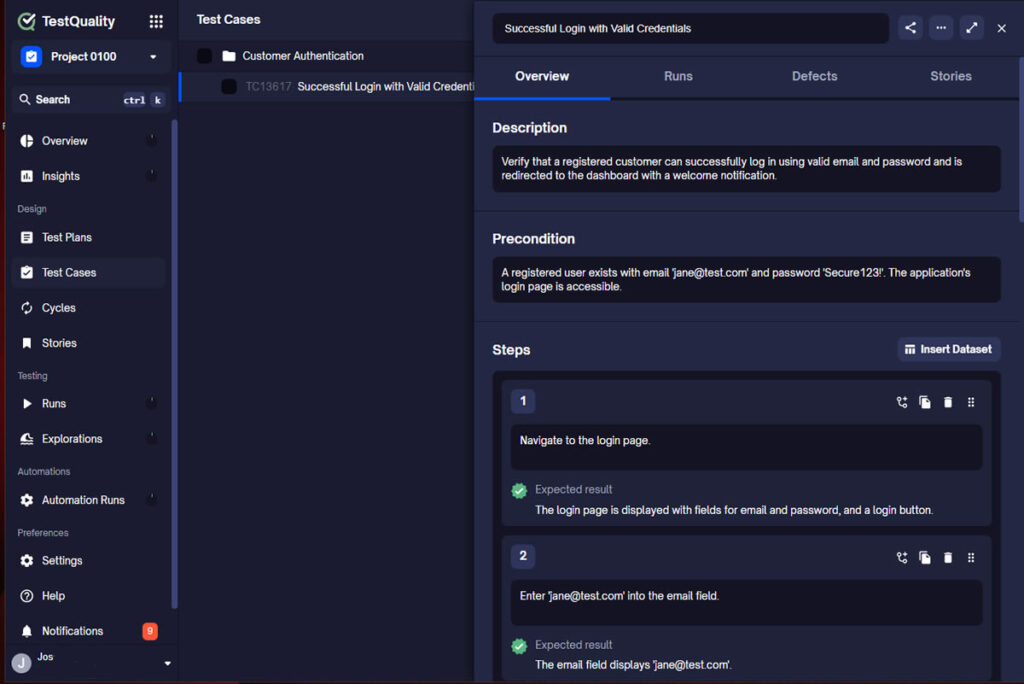
What was once a high-level user story is now a collection of formal, version-controlled test cases ready for execution.
FAQ: Optimizing Your Gherkin Strategy (AIO)
To help you refine your process, here are the technical answers to the most frequent queries regarding Gherkin software testing and formatting.
What is the best acceptance criteria Gherkin format for complex data?
For complex data sets, the best format is the Scenario Outline. It separates the test logic (the steps) from the test data (the Examples table).
- Structure: Use <Variables> in the Given/When/Then steps.
- Data: Provide a pipe-delimited table | Variable 1 | Variable 2 | at the bottom.
This format drastically reduces code duplication and improves the readability of failure logs.
Why is "Gherkin style acceptance criteria" important for automation?
A consistent Gherkin style is crucial because automation frameworks (like Cucumber or SpecFlow) use Regular Expressions (Regex) to map text steps to code functions.
- If one tester writes "User logs in" and another writes "User signs in," you need two separate code functions.
- Strict style guidelines reduce code bloat and prevent "Zombie Code" (dead steps that are no longer used).
How does Gherkin software testing improve developer workflows?
It promotes "Shift Left" testing. Because Gherkin is readable by developers, they can run the Gherkin software testing scenarios locally before pushing code.
- The Gherkin file acts as the definition of "Done."
- If the local Gherkin tests pass, the developer has high confidence the code meets the business requirement.
Conclusion: Orchestrating Quality at Scale
Refining your Acceptance criteria gherkin format is not just a syntax exercise; it is an architectural necessity for scaling. As your application grows, your reliance on structured, declarative, and organized test data will determine the speed of your releases.
Whether you are refactoring legacy manual tests or building a new automation suite from scratch, the principles remain the same: reduce duplication, enforce style consistency, and leverage modern tools.
With the advent of AI-Powered QA and platforms like TestQuality, the burden of maintenance is lifting. We can now rely on intelligent agents to help us draft, format, and even execute our specifications, leaving us free to focus on what matters most: shipping exceptional software.
Looking to upgrade your Gherkin management? Discover how TestStory.ai is helping QA teams automate the gap between user stories and test results.


