


Selecting the right automation framework impacts your CI/CD pipeline speed, test reliability, and team productivity.
- Playwright delivers the fastest execution and best CI/CD integration for modern web applications, while Selenium remains essential for enterprises requiring broad browser coverage and multi-language support.
- Cypress excels at developer experience with real-time debugging but faces limitations in cross-browser testing and multi-tab scenarios.
- Your framework should align with your team's technical expertise, application architecture, and deployment frequency rather than chasing trends.
Start by evaluating your pipeline requirements and team capabilities before committing to any framework.
The test automation CI/CD market has exploded. The continuous integration tools market is expected to grow from $1.73 billion in 2025 to over $4.5 billion by 2030, driven by organizations compressing release cycles to hours rather than weeks. Despite this massive investment, many teams still struggle to select an automation framework that actually delivers value in their pipelines.
The framework you choose determines everything from test execution speed to maintenance burden. This guide breaks down the three dominant automation frameworks for CI/CD environments and gives you practical criteria for making the right choice.

Why Does Test Automation CI/CD Framework Selection Matter?
Your automation framework is the backbone of your quality gate. Every code change flows through it, every release depends on it, and every production incident you prevent traces back to tests that ran successfully in your pipeline.
Research indicates that 72% of DevOps-based enterprises achieved faster releases and reduced bugs after investing in automated continuous integration development pipelines. But that success rate depends heavily on choosing tools that match your actual needs rather than following industry hype.
Modern CI/CD pipelines demand frameworks that can reliably execute at scale, quickly provide meaningful feedback, and seamlessly integrate with your existing DevOps tooling. The difference between a well-matched framework and a poor choice shows up in deployment frequency, test stability, and developer productivity.
Teams running test automation CI/CD pipelines with the wrong framework often experience cascading problems. Slow execution times mean developers wait longer for feedback. Flaky tests erode confidence in the entire testing process. Integration headaches consume engineering time that should go toward building features.
How Do Selenium, Cypress, and Playwright Compare for CI/CD Pipelines?
While Selenium dominated for years, Cypress and Playwright are serious contenders with distinct advantages for modern development workflows.
Each framework approaches browser automation differently, and those architectural choices have real implications for CI/CD pipelines.

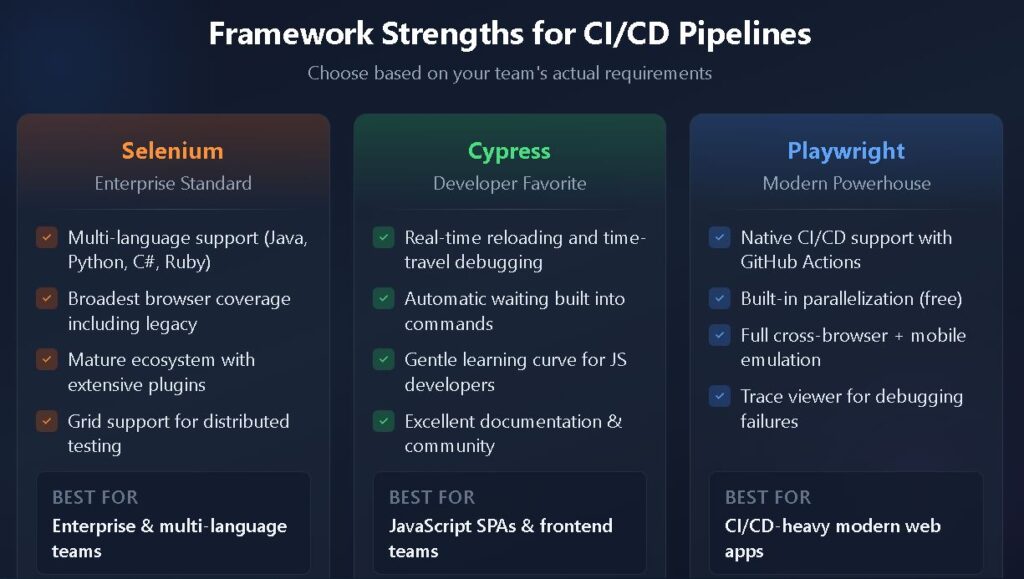
Selenium: The Enterprise Standard
Selenium uses the WebDriver protocol to communicate with browsers through an external driver. This architecture provides maximum compatibility across browsers, operating systems, and programming languages.
For enterprise environments requiring broad coverage, Selenium remains hard to beat. It supports Java, Python, JavaScript, C#, Ruby, and more. You can test against Chrome, Firefox, Safari, Edge, and legacy browsers when necessary.
The trade-off is complexity. Selenium requires more setup, more maintenance, and more explicit waits in your test code. Running Selenium in CI/CD environments typically means managing browser drivers, configuring grids for parallel execution, and handling the infrastructure overhead.
Despite these challenges, Selenium's test automation foundation serves organizations that need flexibility and broad compatibility. If your team works across multiple programming languages or requires testing on browsers that other frameworks don't support, Selenium is often the only viable option.
Cypress: Developer-Friendly Testing
Cypress takes a different approach by running directly inside the browser. This architecture enables features that developers love: real-time reloading, time-travel debugging, automatic waiting, and instant feedback during test development.
For JavaScript-focused teams building modern web applications, Cypress offers an exceptional developer experience. Tests are easier to write and debug. The learning curve is gentler. And for smaller test suites, execution speed is excellent.
However, Cypress has meaningful limitations for CI/CD pipelines at scale. It primarily supports Chromium-based browsers, with experimental Firefox and WebKit support. Multi-tab scenarios, cross-origin testing, and mobile testing require workarounds or aren't possible. And while Cypress offers parallel execution through their cloud dashboard, it comes with additional costs.
Teams choosing Cypress should ensure their testing requirements fit within its constraints. For single-page applications with primarily Chromium users, it's an excellent choice. For complex enterprise applications requiring comprehensive browser coverage, the limitations become problematic.
Playwright: The Modern Contender
Playwright, developed by Microsoft, is the newest generation of automation frameworks. It combines Selenium's cross-browser support with Cypress's developer experience and adds capabilities neither framework offers.
The architecture uses direct browser engine connections, enabling features like auto-wait, trace viewers, network interception, and mobile emulation. Playwright supports Chromium, Firefox, and WebKit out of the box, providing genuine cross-browser testing without additional configuration.
For CI/CD pipelines specifically, Playwright was designed with automation in mind. Built-in parallelization, test isolation through browser contexts, and native GitHub Actions templates make integration straightforward. Teams report reduced flakiness compared to both Selenium and Cypress.
The comparison between Playwright and Selenium shows Playwright's adoption growing by over 200% in the past year, largely driven by its CI/CD capabilities and modern feature set.
Framework Comparison Table
Understanding the practical differences between automation frameworks helps teams make informed decisions. The following table summarizes key characteristics relevant to CI/CD pipeline integration:
| Feature | Selenium | Cypress | Playwright |
| Browser Support | Chrome, Firefox, Safari, Edge, IE | Chromium, Firefox (partial), WebKit (partial) | Chromium, Firefox, WebKit (full support) |
| Language Support | Java, Python, JS, C#, Ruby | JavaScript/TypeScript only | JavaScript, Python, Java, C# |
| CI/CD Integration | Requires plugins and configuration | Good with paid dashboard features | Native support, built-in templates |
| Parallel Execution | Grid setup required | Dashboard-based (paid) | Built-in, free |
| Auto-Wait | Manual implementation | Built-in | Built-in |
| Mobile Testing | Via Appium | Viewport emulation only | Mobile emulation built-in |
| Learning Curve | Steep | Gentle | Moderate |
| Test Stability | Requires careful setup | Good for supported scenarios | Excellent |
| Best For | Enterprise, multi-language teams | JavaScript SPAs, developer-focused teams | Modern web apps, CI/CD-heavy workflows |
What Should You Consider When Choosing an Automation Framework?
Selecting an automation framework involves matching its capabilities to your specific requirements, constraints, and team dynamics.
Here are the critical factors that should drive your decision:
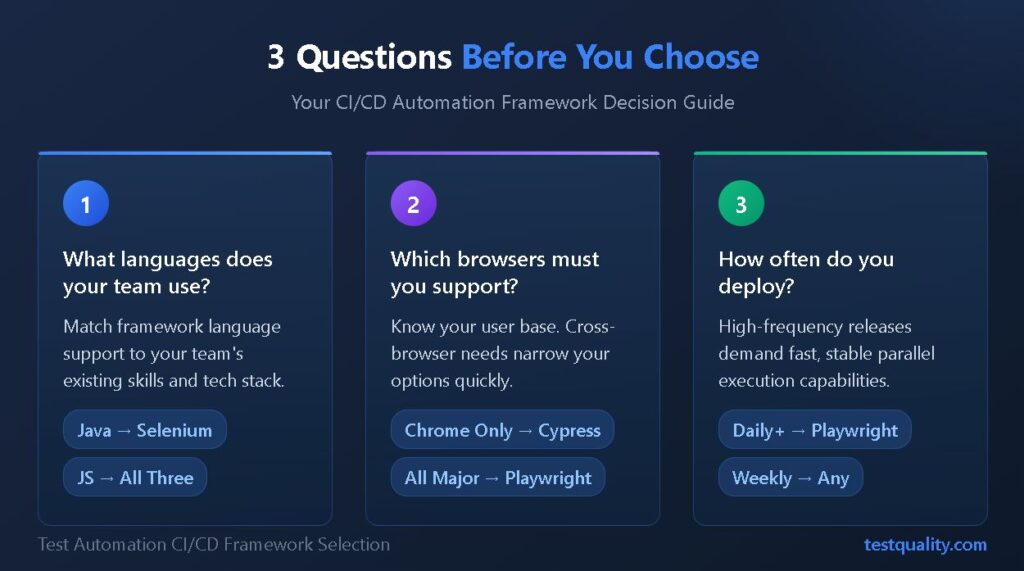
- Team technical expertise: Consider your team's programming language proficiency. A Java shop will struggle with Cypress's JavaScript-only approach, while a frontend team might find Selenium's verbosity frustrating.
- Application architecture: Single-page applications with modern JavaScript frameworks play to Cypress's strengths. Complex enterprise applications with multiple browser requirements favor Selenium or Playwright.
- CI/CD pipeline requirements: If you're running thousands of tests per day across multiple environments, parallel execution capabilities and stability are paramount. Playwright and well-configured Selenium grids handle these criteria better than Cypress.
- Browser coverage needs: Know your user base. If 95% of your users are on Chrome, Cypress might suffice. If you need genuine cross-browser testing, Playwright or Selenium is necessary.
- Budget and infrastructure: Selenium's open-source grid requires infrastructure investment. Cypress's advanced features require paid plans. Playwright is fully open-source with no paywalls on core functionality.
- Maintenance capacity: Consider the advantages of automation testing against the maintenance burden each framework creates. Playwright's auto-wait features reduce flakiness, while Selenium often requires more explicit handling.
How Do You Optimize Test Automation for DevOps Testing Workflows?
Choosing the right framework is step one. Optimizing how that framework operates within your DevOps testing pipeline determines whether you realize the promised benefits.

Structure Tests for Pipeline Speed
Organize your test suite into tiers that run at appropriate stages. Unit tests and API tests should gate every commit. End-to-end UI tests can run less frequently or against specific branches. This structure prevents slow full-suite runs from blocking developer workflow.
Automation frameworks for CI/CD pipelines perform best when tests are independent and parallelizable. Avoid test dependencies that force sequential execution. Use data isolation to enable concurrent runs without conflicts.
Implement Smart Test Selection
Running your entire test suite on every commit wastes resources and slows feedback. Modern CI/CD pipelines should implement test impact analysis or selective test execution based on changed files.
Some teams use file-based heuristics. Others leverage more sophisticated dependency analysis. Either approach reduces average pipeline time while maintaining coverage for meaningful changes.
Leverage Framework-Specific CI/CD Features
Each framework offers capabilities specifically designed for automation frameworks in pipeline environments. Playwright's trace viewer captures detailed execution information for debugging failures. Cypress's dashboard provides test analytics and failure screenshots. Selenium Grid 4 supports observability integrations.
Configure these features for your CI/CD environment. Automated screenshot capture, video recording, and detailed logging transform debugging from guesswork into systematic analysis.
Integrate with Test Management
Your automation framework generates data. Test management platforms help you understand that data across runs, releases, and time. Integration enables trend analysis, flaky test detection, and requirements traceability.
Teams practicing Gherkin-based testing can connect behavior specifications directly to automated test results, creating visibility from requirement to execution.

FAQ
Which automation framework is best for CI/CD beginners? Cypress offers the gentlest learning curve for teams new to test automation. Its built-in features reduce configuration complexity, and the documentation is exceptionally clear. However, be aware of its browser limitations before committing.
Can I use multiple automation frameworks in the same CI/CD pipeline? Yes, many teams use different frameworks for different testing needs. You might use Playwright for end-to-end testing, a unit testing framework like Jest for component tests, and specialized tools for API testing. The key is maintaining clear boundaries and avoiding unnecessary complexity.
How do I migrate from Selenium to Playwright? Migration requires rewriting test code, but the conceptual patterns transfer well. Start with new tests in Playwright while maintaining existing Selenium tests. Gradually migrate high-value, frequently run tests first. Playwright's similar selector strategies make translation straightforward.
What causes flaky tests in CI/CD pipelines? Common causes include race conditions from missing wait logic, test data dependencies, shared state between tests, and environment inconsistencies. Playwright's auto-wait reduces many flakiness sources, while proper test isolation addresses data-related issues.
Start Building Reliable CI/CD Pipelines Today
Test automation CI/CD success depends on matching the right framework to your team's needs, then optimizing how it operates within your pipeline. Selenium provides enterprise-grade flexibility. Cypress delivers exceptional developer experience for JavaScript teams. Playwright offers the most modern approach with native CI/CD support.
Whatever framework you choose, visibility into your automated test results is essential for continuous improvement. TestQuality provides unified test management that integrates with Selenium, Cypress, Playwright, and your existing DevOps workflow, giving your team the insights needed to ship confidently. Start your free trial and see how streamlined test management accelerates your CI/CD pipeline.


