


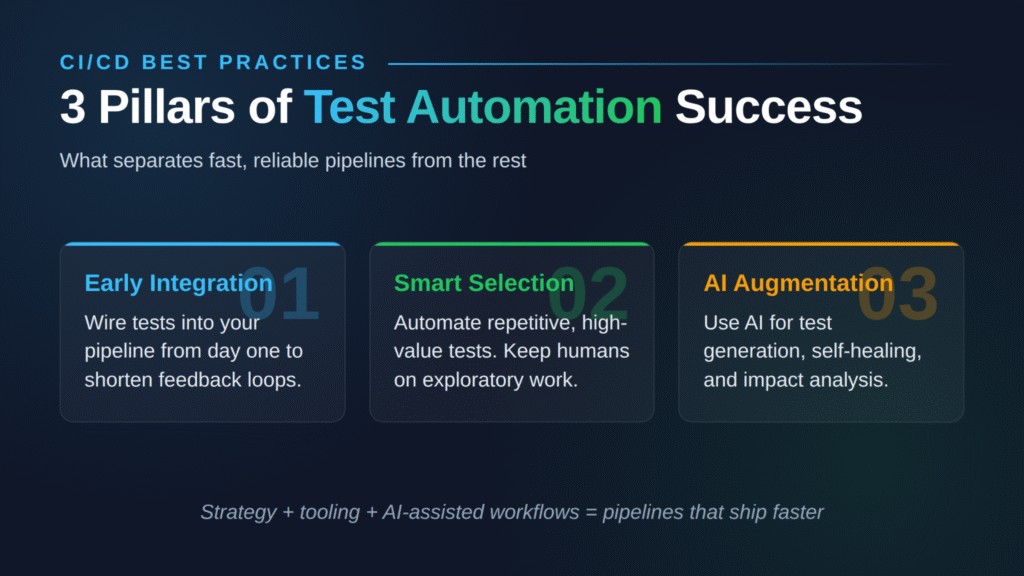
Effective test automation in CI/CD pipelines blends strategy, smart tooling, and AI-assisted workflows to ship faster without breaking quality.
- Early integration wins: Wiring automation into your pipeline from day one shortens feedback loops and catches defects before they snowball.
- Be picky about what you automate: Repetitive, high-value tests belong in the pipeline. Exploratory and usability checks still need human eyes.
- AI is rewriting the playbook: Generative AI now writes test cases, heals broken selectors, and prioritizes which tests to run based on code changes.
- Unified tooling beats tool sprawl: Platforms that connect test management, CI/CD, and automation frameworks reduce friction and keep everyone looking at the same data.
Pick a strategy that matches your delivery velocity, then layer in AI-assisted test generation as your automation maturity grows.
Software teams are shipping more code than ever, and a lot of that code is now written by AI agents. The automation testing market hit $40.44 billion in 2026 and is projected to nearly double by 2031, driven by enterprises pulling testing earlier in the lifecycle and fusing it with DevOps pipelines. The way teams approach test automation in CI/CD has changed.
Adding automated tests to your build process is just the starting line. Real wins come from thinking strategically about what to automate, when to run tests, how to handle AI-generated code, and how to keep your pipeline fast as your codebase grows. This guide walks through what's working in 2026, including the AI-assisted approaches changing how QA engineers and developers ship software through unified test management workflows.
Why Does Test Automation in CI/CD Matter Right Now?
DevOps adoption has gone from niche to mainstream. The DevOps market reached $19.57 billion in 2026 and is forecast to hit $51.43 billion by 2031, fueled by demand for shorter release cycles and AI-assisted workflows.
That growth creates real pressure on testing teams. You can't keep up with weekly (or daily) releases by running manual regression cycles. Automation in DevOps testing lets teams run thousands of test cases in parallel, catch defects earlier, and maintain quality standards even when developers are constantly merging code. Most importantly, automation testing removes the manual bottleneck that traditionally slowed releases to a crawl.
There's also a new wrinkle: AI-generated code. With a large share of new code written or substantially assisted by AI coding agents, manual QA simply can't keep pace. The constraint has shifted from writing code fast enough to verifying it fast enough.
How Do You Build Your CI/CD Test Automation Foundation?
A solid pipeline strategy starts with clarity, not tooling. Teams that skip the planning phase often end up automating the wrong things and wondering why their pipeline is slow and flaky.
Defining Clear Automation Objectives
Before picking a single tool, lock in what success looks like. Common goals include shrinking regression cycles from days to hours, enabling true continuous deployment, expanding coverage across browsers and devices, or supporting shift-left testing initiatives where developers test pull requests before merge.
Your objectives drive every downstream decision. Teams chasing fast iteration prioritize unit and integration tests that run in seconds. Regulated industries lean harder on end-to-end validation and compliance reporting. There's no universal right answer, just a right answer for your context.
How Do You Assess Your Current Testing Landscape?
Take stock of what you're already doing manually. Not everything should be automated. Focus on scenarios that are repetitive, time-consuming, and prone to human error. Good starting points are regression suites, smoke tests for deployment validation, and data-driven scenarios with many input variations.
Then look at your team's actual skills and bandwidth. A great test automation strategy accounts for skill gaps, tool training needs, and the long-term maintenance that automation creates.
Strategic Technology Stack Selection
Your tooling needs to play nice with the rest of your dev ecosystem. Look at programming language compatibility, supported test types, maintenance burden, and how the tool scales as your team grows. The best framework supports unit testing for rapid feedback, API testing for service validation, and end-to-end testing for the critical user journeys you can't afford to break.
What Does the CI/CD Testing Pyramid Look Like in 2026?
The testing pyramid still holds up in 2026, even if AI has changed what each layer looks like.
Unit Testing: Your Fast Feedback Layer
Unit tests are the foundation and should run in milliseconds on every commit. They validate individual functions in isolation and catch obvious mistakes before code even gets reviewed. Aim for high coverage on business logic, edge cases, and integration points, without wasting cycles testing framework code or trivial getters and setters.
This layer is also where AI test generation shines brightest. Modern tools can scan a function signature, infer intent, and generate unit tests in seconds.
Integration Testing for System Validation
Integration tests verify that components talk to each other correctly: API contracts, database interactions, message queues, and service-to-service communication. These run after unit tests pass and validate the seams that break when someone changes a dependent service.
Design your integration tests to use containerized services or test doubles so they behave consistently across environments. Flaky integration tests are usually a sign of environmental drift, not bad code.
When Should You Use End-to-End Testing?
End-to-end tests simulate full user workflows and give you confidence that critical paths work. They're also slow, expensive to maintain, and a common source of flakiness, so use them surgically. Reserve end-to-end coverage for revenue-critical user journeys and use parallel execution to keep runtimes manageable.
Some teams schedule comprehensive end-to-end suites overnight rather than blocking every PR. That's a reasonable trade-off when your unit and integration coverage are strong.
Performance and Security Testing Integration
Modern CI/CD test automation has to cover non-functional requirements too. Integrate performance baselines to catch slowdowns before users notice them. Security scans should run on every build, checking both known CVEs and your own code for vulnerabilities. Synthetic data and representative test environments keep these checks reliable without exposing anything sensitive.
Why Has AI-Assisted Test Generation Changed the Game?
AI has moved to production-grade infrastructure for QA teams, and ignoring it now is a competitive disadvantage.
According to the Capgemini World Quality Report, 68% of organizations are actively using or planning to use Gen AI in quality engineering, and test automation is the leading area of impact, with 72% reporting faster automation processes thanks to AI integration.

What AI Actually Does in Your Pipeline
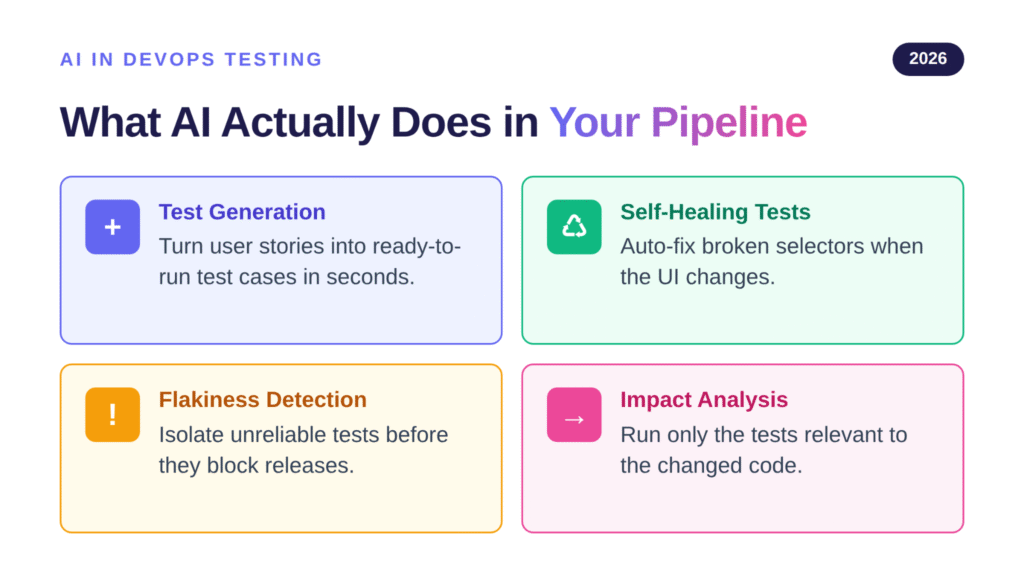
Generative AI in DevOps testing workflows shows up in a few concrete ways:
- Test case generation: Tools convert user stories, requirements, or feature descriptions into ready-to-run test cases, often in Gherkin format, in seconds rather than hours.
- Self-healing tests: When a selector breaks because someone changed a CSS class, AI-powered tools automatically find the new element and update the test instead of failing the build.
- Predictive flakiness detection: Algorithms identify which tests fail inconsistently and isolate them so they don't gate releases.
- Test impact analysis: Instead of running your full suite on every PR, AI determines which tests are actually relevant to the changed code and runs only those.
Validating AI-Generated Code
There's a feedback loop forming. AI writes more code, so QA teams need AI-powered validation to keep up. The smartest approach pairs AI-powered test case generation with your existing automation framework so that when developers ship AI-assisted features, the test coverage scales alongside.
Shifting from passive test repositories to active QA agents matters. Modern test management platforms are intelligence layers that proactively suggest tests, identify coverage gaps, and orchestrate execution across your pipeline.
How Do You Implement CI/CD Test Automation Step-by-Step?
The teams that succeed with automation roll it out in phases.
Phase 1: Pipeline Integration Setup
Start with unit tests on every commit. Configure your build system, whether that's Jenkins, GitHub Actions, GitLab CI, or CircleCI, to fail fast when tests detect issues. The faster you surface failures, the cheaper they are to fix.
Set conventions for result reporting and failure handling so your team responds consistently. Inconsistent responses to red builds are how teams end up ignoring their pipelines entirely.
Phase 2: Environment and Data Management
Reliable automation needs consistent environments. Use infrastructure as code to keep test environments aligned with production, and containerize everything you can so tests run the same way locally, in CI, and in staging.
Test data is the other half of this equation. Mix data masking, synthetic data generation, and snapshot-based approaches to give your tests realistic inputs without leaking production secrets.
Phase 3: Advanced Automation Techniques
Once your basics are solid, layer in optimizations: parallel test execution to shrink runtimes, dynamic test selection based on what code changed, and retry mechanisms for legitimate flakiness (while you fix the underlying issues).
AI-driven impact analysis pays off here, reducing how long your pipeline takes without sacrificing coverage.
Phase 4: Monitoring and Optimization
Treat your pipeline like a product. Track test execution time, failure rates, coverage trends, and how often the pipeline blocks releases versus catching real bugs. Schedule regular suite reviews to delete obsolete tests, refactor automation code for maintainability, and update test data as your application evolves.
What Are the Best Practices That Actually Move the Needle?
Some patterns separate teams whose pipelines deliver value from those whose pipelines feel like an anchor.
Maintaining Test Independence and Reliability
Design tests to run in any order without depending on shared state. This method unlocks parallel execution and makes individual failures easier to debug. Address flakiness immediately. A flaky test that runs in your pipeline for two weeks teaches your team to ignore failures, which is the worst possible outcome.
How Can You Optimize for Fast Feedback?
Structure your pipeline so the cheapest, most valuable feedback comes first. Unit tests in seconds, integration tests in minutes, and end-to-end checks last. Cache results where you can, and use smart selection to skip irrelevant tests on small changes. Developers who get feedback in under five minutes write better code than developers who wait 45 minutes per PR.
Quality Gates and Comprehensive Reporting
Quality gates stop bad code from advancing. Set clear criteria for each pipeline stage, and make sure failures include enough context for a developer to act on them. Dashboards showing test trends, coverage, and root-cause analysis are how QA managers prove the value of automation to leadership.
A unified test management solution helps by centralizing data from manual and automated runs into one view, so reporting isn't scattered across several tools.
How Do You Overcome Common CI/CD Test Automation Challenges?
Most teams hit the same handful of problems as their automation matures. Here's how to address them:
| Challenge | Impact | Solution |
| Test maintenance overhead | High ongoing effort to update tests | Page object patterns, stable locators, AI-assisted self-healing |
| Flaky test results | Erodes confidence in the entire pipeline | Robust waits, isolated test environments, root-cause investigation |
| Slow pipeline execution | Delays feedback and bottlenecks deployments | Parallel runs, smart test selection, AI-driven impact analysis |
| Environment inconsistencies | Tests pass locally but fail in CI | Infrastructure as code, containerization, environment parity |
| Skill gaps | Limited capacity to build and maintain automation | Training programs, low-code tools, AI-assisted authoring |
Managing Test Maintenance at Scale
As your suite grows, maintenance becomes the highest cost. Treat test code like production code: use design patterns like page objects, enforce code review on test changes, and refactor regularly. AI self-healing helps, but it's not a substitute for clean architecture.
Handling Modern Application Architectures
Microservices, serverless functions, third-party APIs, and event-driven architectures all complicate testing. Service virtualization lets you test components in isolation when dependencies are unstable or expensive to spin up. Contract testing catches integration breakages before they reach production.
Which Tools and Frameworks Lead to CI/CD Test Automation Success?
Picking the right stack matters. Here's how the major players line up in 2026.
Automation Frameworks
Selenium has long been the default for web testing, but Playwright is winning ground fast thanks to faster execution, built-in auto-waits, and better debugging tools. Cypress remains popular for developer-friendly UI tests. For APIs, Postman and REST Assured cover most use cases, and Appium is still the go-to for cross-platform mobile testing.
CI/CD Platforms
Jenkins keeps a huge installed base thanks to its plugin ecosystem and flexibility, especially in regulated enterprises. GitHub Actions has surged in popularity because it lives inside your repo, triggers on PR events, and removes the need for a separate CI tool. GitLab CI and CircleCI round out the field with their own strengths around integrated DevOps and parallel execution speed.
Test Management Platforms
Effective CI/CD test automation needs a place where manual and automated results live together with traceability back to requirements. Here are the main categories of test management platforms worth knowing:
- Traditional standalone platforms: Established test management tools with broad framework integration and large user bases. Strong on core test case management but often slower to adopt AI capabilities.
- Jira-embedded platforms: Native Jira apps that live inside your issue tracker. Good fit for teams heavily invested in the Atlassian stack who want test management without leaving Jira.
- AI-powered QA platforms: Modern platforms that combine native GitHub and Jira integration, Gherkin BDD support, and QA Agents that proactively assist with test creation, execution, and maintenance across your pipeline.
What you want from any of these categories is a single source of truth that connects automated test results from Jenkins or GitHub Actions to your manual test plans and surfaces both in the workflows your team already uses.

How Do You Measure CI/CD Test Automation Success?
Metrics keep your program honest. Track both leading indicators (coverage, execution time, test creation velocity) and lagging indicators (production defect rates, deployment frequency, customer-reported issues). Without measurement, automation becomes a cost center instead of a value driver.
Run regular retrospectives with developers, testers, and operations. Their pain points are usually the highest-leverage improvements you can make to your pipeline.
What Does the Future of Test Automation in CI/CD Look Like?
AI is the dominant trend, but it's not the only one. Cloud-native architectures, edge deployments, and the explosion of AI-generated code are all reshaping what testing needs to cover.
Low-code and no-code testing platforms are bringing automation to QA professionals without deep coding backgrounds, expanding who can contribute to test creation. And as pipelines themselves become more intelligent, expect to see more agentic workflows where AI agents make decisions about what to test, when to test it, and how to respond to failures.
The teams positioning themselves to win are treating their test management integration as a strategic capability, not just a tooling decision.
Frequently Asked Questions
What percentage of testing should be automated in a CI/CD pipeline? There's no magic number, but most mature teams automate 70–90% of regression and smoke tests while keeping exploratory, usability, and edge-case validation manual. Your exact split depends on application complexity, release frequency, and team skills.
How long should automated tests run in a CI/CD pipeline? Unit tests should finish in seconds, integration tests within minutes, and full end-to-end suites in under 30 minutes for healthy developer productivity. Beyond that, you'll see developers context-switch and lose flow while waiting.
Can AI replace traditional test automation engineers? No, but it changes the job. AI handles boilerplate test creation, self-healing, and impact analysis. Engineers focus on test strategy, complex scenarios, and reviewing AI-generated tests for correctness. It's augmentation, not replacement.
What's the biggest challenge when implementing test automation in CI/CD? Test maintenance overhead is usually the long-term killer. Apply the same coding standards to test code that you apply to production code, and lean on AI self-healing where it makes sense.
Which tools are essential for CI/CD test automation? A CI/CD platform (Jenkins, GitHub Actions, GitLab CI), automation frameworks matching your stack (Playwright, Selenium, Cypress, Appium), and a unified test management platform that connects manual and automated results to your development workflow.
How do you handle flaky tests in automated CI/CD pipelines? Investigate the root cause immediately rather than retrying blindly. Common culprits include race conditions, environmental drift, and timing-dependent assertions. AI-powered flakiness detection can help isolate problem tests, but the fix still needs human judgment.
Ready to Modernize Your Pipeline?
Building effective test automation in CI/CD is a strategic investment that pays back in faster releases, fewer production incidents, and a development team that trusts its pipeline. The teams winning right now are combining strong fundamentals with AI-assisted workflows that scale to match modern release velocity.

TestQuality is becoming the AI-powered QA platform built for exactly this kind of pipeline. With native GitHub and Jira integration, QA Agents that proactively assist throughout the testing workflow, and TestStory.ai for instant test case generation from your requirements, TestQuality helps you accelerate quality for both human-written and AI-generated code. Start your free trial today and see what unified, AI-driven test management can do for your delivery cycles.


