


Effective sample software test cases transform chaotic testing efforts into systematic quality assurance that catches defects before production.
- Organizations using standardized test case libraries experience up to 35% fewer critical defects in production environments
- AI-powered test generation can reduce test creation time significantly while improving coverage of edge cases
- Real QA cases should include clear preconditions, step-by-step instructions, and measurable expected outcomes
- Modern test scripts examples must balance thoroughness with maintainability across manual and automated execution
Start building a reusable test case library today to accelerate your QA process and maintain consistency across all projects.
Poor software quality costs the U.S. economy an estimated $2.41 trillion annually, according to the Consortium for Information & Software Quality. Much of this waste stems from inadequate testing documentation that fails to catch defects before they reach production. Writing effective sample software test cases provides the foundation for systematic quality assurance that prevents these costly failures. Whether you're validating a login form or testing complex API integrations, having well-structured QA test examples accelerates your testing process while ensuring comprehensive coverage.
This guide delivers 10 real test case examples you can implement immediately, along with proven formats and templates that work across manual and automated testing scenarios. You'll also learn how AI is transforming test case generation and discover best practices that top QA teams follow to maintain high-quality test documentation.
What Makes Sample Software Test Cases Effective?
Strong sample software test cases share several critical characteristics that separate useful documentation from paperwork that gathers dust. Understanding these elements helps teams create test cases that actually improve quality outcomes rather than simply checking compliance boxes.
Clear and Measurable Objectives
Every test case needs a specific, measurable objective that anyone on the team can understand. Vague objectives like "test the login feature" create ambiguity that leads to inconsistent execution. Compare that to "verify that valid credentials grant dashboard access within 3 seconds" where the expected outcome is crystal clear. This specificity ensures different testers achieve consistent results when executing the same real QA cases.
The objective should trace directly back to a requirement or user story. This traceability ensures your testing effort covers actual business needs rather than imaginary scenarios. When defects surface later, this connection helps teams quickly identify which requirements need attention.
Reproducible Steps and Preconditions
Test scripts examples must include every precondition and step necessary for another tester to reproduce the scenario exactly. Missing preconditions represent one of the most common test case failures. If your test assumes a specific database state or user role, document it explicitly. Testers working months later should be able to execute your test case without hunting down tribal knowledge.
Keep step counts manageable. Industry best practices suggest limiting test cases to 10-15 steps maximum. Longer test cases become difficult to maintain and prone to errors during execution. Break complex scenarios into multiple smaller test cases that can be combined into test suites.
Which Sample Software Test Cases Should Every Team Have?
The following table presents sample software test cases covering common testing scenarios across different application types. Each example demonstrates proper structure and can serve as a template for your own testing documentation.
| Test Case | Scenario | Preconditions | Test Steps | Expected Result |
| TC-001 | Valid Login Authentication | User account exists, browser cleared | 1. Navigate to login page 2. Enter valid email 3. Enter valid password 4. Click Login | User redirected to dashboard within 3 seconds |
| TC-002 | Invalid Password Handling | User account exists | 1. Navigate to login page 2. Enter valid email 3. Enter incorrect password 4. Click Login | Error message displayed, login blocked |
| TC-003 | Shopping Cart Addition | User logged in, product in stock | 1. Browse to product page 2. Select quantity 3. Click Add to Cart | Cart updates, shows correct item and total |
| TC-004 | Payment Processing | Items in cart, valid payment method | 1. Proceed to checkout 2. Enter payment details 3. Submit order | Order confirmed, confirmation email sent |
| TC-005 | Search Functionality | Application loaded, test data seeded | 1. Enter search term 2. Click search button 3. Review results | Relevant results displayed within 2 seconds |
| TC-006 | Form Validation | Registration page loaded | 1. Leave required fields empty 2. Click Submit | Validation errors shown for each required field |
| TC-007 | Session Timeout | User logged in, session configured for 30 min | 1. Login successfully 2. Wait 31 minutes 3. Attempt navigation | User redirected to login with timeout message |
| TC-008 | API Response Validation | API endpoint accessible | 1. Send GET request 2. Validate response code 3. Verify JSON structure | 200 status, valid JSON with required fields |
| TC-009 | File Upload | User on upload page, test file ready | 1. Click upload button 2. Select valid file 3. Confirm upload | File uploaded, confirmation displayed |
| TC-010 | Mobile Responsiveness | Application loaded on mobile viewport | 1. Resize browser to 375px width 2. Navigate key pages 3. Test interactions | All elements accessible, no horizontal scroll |
These QA test examples cover functional, validation, performance, and usability scenarios that most applications require. Adapt them to your specific context while maintaining the clear structure that makes test cases executable and maintainable.
How Can AI Generate Better Test Scripts Examples?
According to Capgemini's World Quality Report 2024, 68% of organizations are actively utilizing or developing roadmaps for AI in quality engineering, with test case generation emerging as a primary use case.
Natural Language Processing for Test Creation
Modern AI systems analyze requirements documents, user stories, and existing test patterns to automatically generate diverse test scripts examples. Unlike manual approaches, AI can explore thousands of input combinations and edge cases simultaneously, ensuring comprehensive coverage that would be impractical to achieve through human effort alone.
These systems excel at identifying boundary conditions and unusual input combinations that frequently expose production defects. When you provide a user story describing checkout functionality, AI can generate positive paths, negative scenarios, edge cases, and error handling tests within seconds. The technology particularly benefits teams struggling to maintain adequate test coverage as applications grow more complex.
AI-Generated Test Case Example
Consider how AI might generate test cases from a simple requirement: "Users should be able to reset their password via email."
An AI system would produce multiple real QA cases covering:
- Valid email triggering reset link delivery
- Invalid email format rejection
- Unregistered email handling
- Expired reset link behavior
- Password complexity validation on reset
- Rate limiting for reset requests
- Multi-factor authentication integration
Human testers might miss several of these scenarios during manual test case creation, particularly edge cases involving security considerations. AI assistance ensures more thorough coverage while reducing the time investment required from QA teams.
Balancing AI Generation with Human Review
While AI dramatically accelerates test case creation, human oversight remains essential. AI-generated test scripts examples should undergo review to ensure they align with actual business requirements and don't include redundant or irrelevant scenarios. The most effective approach combines AI's ability to generate comprehensive coverage with human judgment about priority and relevance. Teams using intelligent test case builders report faster initial documentation with fewer gaps in coverage.
What Are the Key Components of Real QA Cases?
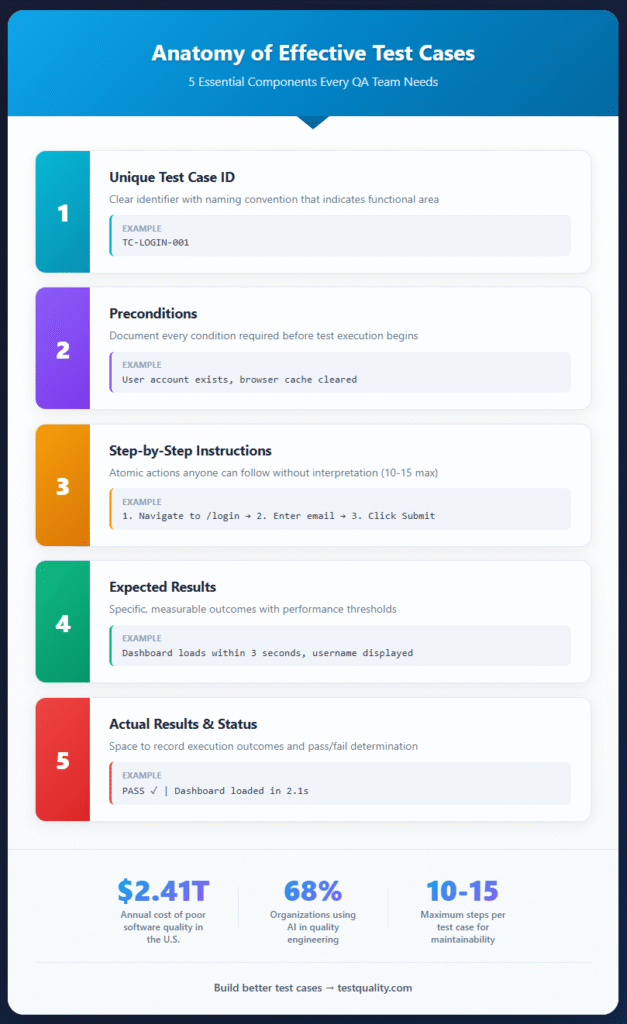
Every sample software test case should include specific components that ensure clarity, traceability, and consistent execution. Missing components lead to confusion, inconsistent results, and wasted effort during test execution.

Identification and Metadata
Test cases need unique identifiers that follow consistent naming conventions. TC-LOGIN-001 communicates more than TC-47 because it indicates the functional area being tested. Include metadata such as creation date, author, last modified date, and version number. This information becomes crucial when maintaining test cases over time and tracking which tests need updates after application changes.
Priority and severity classifications help teams focus limited testing time on the most critical scenarios. High-priority test cases covering core functionality should execute first, with lower-priority edge case tests following when time permits.
Prerequisites and Test Data
Document every condition that must exist before test execution begins. This includes user account states, database configurations, environment settings, and any test data requirements. Incomplete prerequisite documentation represents one of the most common reasons test cases fail during execution by different team members.
Specify exact test data values rather than generic descriptions. "Enter a valid email" creates ambiguity while "Enter test@example.com" provides the precise value needed. Consider creating test data sets that can be reused across multiple sample software test cases to improve consistency.
Steps, Expected Results, and Actual Results
Test steps should be atomic actions that a tester can perform without interpretation. "Verify the page loads correctly" requires judgment calls, while "Confirm the dashboard header displays username within 3 seconds" provides measurable criteria.
Expected results must be specific and verifiable. Include performance thresholds, exact message text, UI element states, and data values that should appear. Leave space for testers to record actual results during execution, noting any deviations from expected behavior.
What Best Practices Should Guide Your Test Case Writing?
Following established best practices ensures your QA test examples remain useful, maintainable, and effective over time. These guidelines come from experienced QA teams who have learned what works through years of testing complex applications.
- Write from the user's perspective: Frame test cases around what users need to accomplish rather than technical implementation details. This approach ensures testing validates actual user value rather than internal functionality that users never see.
- Maintain independence between test cases: Each test case should execute independently without relying on the outcome of previous tests. Dependent test cases create brittle test suites that fail unpredictably when execution order changes.
- Use consistent language and terminology: Establish a glossary of terms used across all test case documentation and enforce consistent usage. Inconsistent terminology confuses testers and leads to incorrect interpretations.
- Review and update regularly: Test cases require maintenance as applications evolve. Schedule regular reviews to retire obsolete tests, update changed functionality, and add coverage for new features. Outdated test cases waste execution time and generate misleading results.
- Include both positive and negative scenarios: Comprehensive test scripts examples cover expected usage patterns and error conditions. Negative tests that verify appropriate error handling often catch more defects than positive path testing alone.
When Should You Use Manual vs. Automated Test Cases?
Choosing between manual and automated execution for your sample software test cases depends on several factors including test frequency, complexity, and the stability of the feature under test.

Automation Candidates
Repetitive tests that execute frequently represent prime automation candidates. Regression tests that run with every build, smoke tests that verify basic functionality, and performance tests that measure response times all benefit from automation. The initial investment in scripting pays dividends through faster feedback and consistent execution.
API tests and data validation tests typically automate well because they involve predictable inputs and outputs without complex UI interactions. Tests requiring large data volumes or many iterations become impractical for manual execution but handle easily through automation.
Manual Testing Strengths
Exploratory testing, usability evaluation, and tests involving subjective judgment require human testers. Automation cannot assess whether a user interface feels intuitive or whether error messages communicate clearly. New feature testing often starts manual while teams understand the functionality before investing in automation scripts.
Tests for features that change frequently may not justify automation investment. If the UI redesigns every sprint, maintaining automation scripts becomes more expensive than manual execution. Wait until features stabilize before automating their real QA cases.
The most effective QA strategies combine both approaches, automating stable repetitive tests while preserving manual testing for scenarios requiring human judgment and adaptability.
Frequently Asked Questions
What should a sample software test case include at minimum?
At minimum, every test case needs a unique identifier, clear objective, preconditions, step-by-step instructions, expected results, and space for recording actual results. Additional metadata like priority, author, and traceability links to requirements improve usefulness but aren't strictly required for basic execution.
How many test cases do I need for adequate coverage?
Coverage requirements vary based on application complexity and risk tolerance. Focus on covering all critical user paths, boundary conditions, and error scenarios rather than hitting arbitrary numbers. Use coverage metrics like code coverage and requirements traceability to identify gaps rather than counting total test cases.
Can AI completely replace human test case writers?
AI excels at generating comprehensive test scripts examples from requirements but cannot replace human judgment about business priorities, user experience quality, and strategic test planning. The most effective approach uses AI to accelerate initial test case generation while humans review, prioritize, and maintain the resulting documentation.
How often should test cases be reviewed and updated?
Review test cases whenever the associated feature changes and conduct comprehensive reviews at least quarterly. Outdated test cases waste execution time and can mask real defects when expected results no longer match current behavior. Build test case maintenance into your regular sprint activities rather than treating it as separate overhead.
Start Building Your Test Case Library Today
Building an effective library of sample software test cases requires the right tools and processes to maintain organization as your test suite grows. Scattered test documentation in spreadsheets and documents creates version control nightmares and makes it impossible to track coverage effectively.
Modern test management platforms centralize your QA test examples in searchable repositories with version control, execution tracking, and reporting capabilities. These platforms integrate with CI/CD pipelines to execute automated tests and record results automatically.
TestQuality provides a unified platform for creating, organizing, and executing test cases with native GitHub and Jira integration. The platform supports both manual and automated testing workflows while providing visibility into quality metrics that drive continuous improvement. Ready to streamline your test case management? Start your free trial and experience the difference systematic test management makes.


