


Key Takeaways
Test management and Jira integration transforms disconnected testing workflows into unified quality engines that accelerate delivery and reduce manual work.
- Two-way real-time synchronization eliminates data silos and keeps development and QA teams perfectly aligned
- Native integrations offer a familiar Jira experience, while specialized standalone tools provide more comprehensive and customizable testing capabilities
- Effective setup with leading automation frameworks (e.g., Selenium, Playwright) and CI/CD tools ensures end-to-end traceability from requirements through automated tests to defects
- Strategic implementation eliminates manual status updates and speeds up issue resolution across teams
Stop treating test management as an afterthought. Integrate early and watch your QA efficiency soar.
Quality assurance teams waste countless hours switching between tools, manually updating test statuses, and hunting for requirements buried in different systems. The solution isn't working harder or hiring more testers. It's implementing a robust test management solution with strong Jira integration that unifies your entire quality workflow. When testing and project management operate in sync, teams ship faster without sacrificing quality. Modern development demands seamless integration between Jira and your testing tools to maintain velocity while scaling agile workflows.

The stakes are higher than ever. Development cycles compress while quality expectations rise. Manual processes that worked for small teams crumble under the weight of continuous deployment. Your testing infrastructure needs to evolve, and Jira integration is the backbone of that transformation.
Why Does Test Management and Jira Integration Matter?
Testing in isolation creates blind spots that torpedo releases. When QA teams work in separate systems from development, critical information gets lost in translation. A developer marks a user story complete while testers discover three blocking issues that never made it into Jira. Sound familiar?
Effective test management and Jira integration solves this coordination nightmare by creating a single source of truth. Requirements flow directly into test cases. Failed tests automatically generate Jira issues with full context. Status updates sync instantly in both directions. No more duplicate entries, no more outdated information, no more "I didn't know about that bug" conversations during standups.
The business impact goes beyond convenience. Organizations implementing proper integration see measurable improvements across multiple metrics. Test execution cycles accelerate because testers spend less time on administrative overhead. Teams that structure their Jira projects with clear organization and consistent issue tracking see dramatic improvements in project delivery efficiency. Defect resolution speeds up because developers receive rich context automatically. Release confidence increases because stakeholders access real-time quality metrics without scheduling meetings.
Modern software delivery depends on tight feedback loops. Your CI/CD pipeline triggers automated tests, results flow into your test management system, failures create Jira issues instantly, and developers see exactly what broke. This level of integration transforms testing from a bottleneck into an accelerator.
What Are Your Integration Options?
Choosing between native Jira apps and standalone test management tools with Jira integration determines your team's flexibility and capabilities. Neither approach is universally superior. The right choice depends on your specific needs, team size, and testing complexity.

Native Jira Applications
Native apps live entirely within Jira's ecosystem. They add custom issue types for test cases, test executions, and test plans directly into your Jira instance. Teams already comfortable with Jira workflows find native apps intuitive because they leverage familiar interfaces and permissions.
The advantages are compelling for Jira-centric teams. Setup takes minutes instead of days. Users work within the tool they already know. Permissions and authentication come free since you're using Jira's built-in systems. Native apps can often be more cost-effective for smaller teams as their pricing may bundle with your existing Jira subscription.
However, native solutions have limits. Jira wasn't designed specifically for test management, so native apps sometimes feel like they're working around constraints rather than delivering purpose-built testing experiences. Advanced features like sophisticated test analytics, complex test suite management, or extensive automation integrations may feel bolted on rather than seamlessly integrated.
Standalone Test Management Tools
Standalone platforms with Jira integration take the opposite approach. They provide comprehensive test management capabilities first, then connect to Jira through robust two-way synchronization. Purpose-built test management platforms exemplify this approach with live integration cores designed specifically for DevOps workflows.
These tools excel when testing complexity demands specialized capabilities. You get powerful test case libraries, advanced reporting dashboards, flexible test execution management, and deep automation framework integration. The testing experience feels polished because the entire platform focuses on QA workflows rather than adapting project management software.
The tradeoff involves additional setup overhead and potentially higher costs for comprehensive features. Teams need to learn a new interface alongside Jira. But for organizations with sophisticated testing requirements, the investment pays dividends through dramatically improved testing efficiency.
Essential Features of Jira Test Case Tools
Not all jira test case tools deliver equal value. Some check boxes on feature lists while failing at the fundamentals. Others nail the basics but lack advanced capabilities that mature QA teams require. Here are the non-negotiable features that separate powerful integrations from disappointing ones:
1. Bidirectional Real-Time Synchronization
One-way synchronization inherently creates consistency problems. For instance, updating a test case in your test management tool without the linked Jira requirement reflecting that change, or developers modifying requirements in Jira while testers continue to work with outdated specifications. Real-time, bidirectional synchronization is crucial to ensure both systems remain perfectly aligned without manual intervention.
2. Comprehensive Traceability
You need to trace from business requirements through test cases to test executions to defects to code commits. This end-to-end visibility isn't optional for regulated industries or teams serious about quality metrics. When executives ask "how well did we test the authentication feature," you should answer in seconds, not hours.
3. Flexible Issue Mapping
Different teams use different Jira configurations. Your test management solution should adapt to your existing workflows rather than forcing you to restructure Jira projects. Map test executions to user stories, link defects to specific test failures, associate requirements with test coverage metrics. Customizable field mapping makes integration feel native regardless of your Jira setup.
4. Automated Test Result Import
Manual test execution has its place, but automated testing drives modern quality engineering. Your Jira test automation setup should automatically import results from popular frameworks like Selenium, Playwright, Cucumber, JUnit, and others. Test results should flow seamlessly from your CI/CD pipeline into your test management platform, which then updates relevant Jira issues without human intervention.
5. Intelligent Defect Creation
Failed tests should generate Jira bugs automatically with full context. Test steps, expected results, actual results, screenshots, logs, and environment details attach to the issue immediately. Developers get everything they need to reproduce and fix problems without ping-ponging requests back to QA.
6. Advanced Reporting and Dashboards
Stakeholders want visibility without drowning in data. Quality dashboards should surface key metrics like test coverage percentages, pass/fail trends, defect density, and testing velocity. These reports should be accessible directly in Jira or through seamlessly integrated views that feel like part of your Jira experience.
7. REST API Access
Pre-built integrations handle common scenarios, but unique workflows demand customization. Robust REST APIs enable you to build custom automations, integrate with proprietary internal tools, or create specialized workflows precisely tailored to your unique processes.
How Do You Set Up Test Management and Jira Integration?
Implementation doesn't need to be painful. Follow this systematic approach to get your test quality Jira integration running smoothly without disrupting existing workflows.
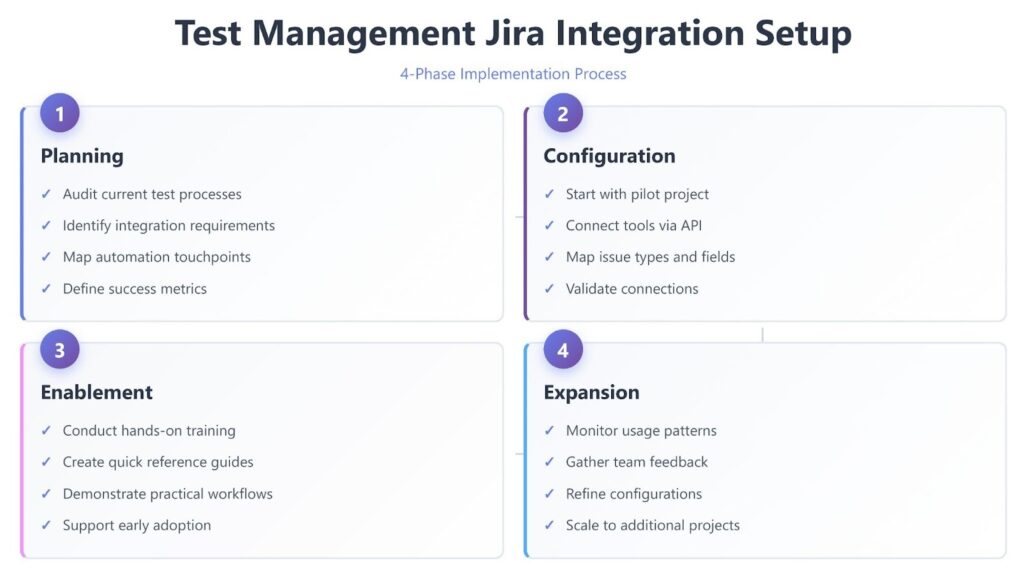
Phase 1: Planning and Preparation
Start by auditing your current state. Document your existing test management process, Jira workflows, and integration requirements. Identify which Jira projects need test management integration and which user roles require access. Map out your desired state including automation touchpoints, reporting needs, and traceability requirements.
Define success metrics early. Will you measure time saved on manual updates? Defect resolution speed? Test coverage percentages? Establishing baseline metrics now lets you prove ROI later.
Phase 2: Initial Configuration
Begin with a pilot project rather than rolling out across your entire organization immediately. Choose a team that's receptive to process changes and has moderately complex testing needs. Too simple and you won't validate key features. Too complex and you risk overwhelming the team during adoption.
Configure your test management tool's connection to Jira. This typically involves generating an API token in Jira, authenticating your test management platform, and selecting which Jira projects to sync. Modern platforms streamline this process with intuitive setup wizards that validate connections in real time.
Map issue types and field correspondences carefully. Decide which Jira issue types represent requirements that need testing. Choose whether test executions create subtasks, linked issues, or custom issue types. Configure which fields sync bidirectionally and which remain tool-specific.
Phase 3: Team Enablement
Technology solves nothing without adoption. Conduct hands-on training sessions that demonstrate practical workflows rather than clicking through every menu option. Show developers how test failures appear in Jira with rich context. Walk QA engineers through linking test cases to requirements and executing tests with automatic Jira updates.
Create quick reference guides for common tasks. How do I create a test case linked to a user story? How do I view test coverage for my assigned requirements? How do I update test status from within Jira? Simple documentation accelerates adoption more than comprehensive manuals.
Phase 4: Iteration and Expansion
Monitor usage during the first sprint cycle. Which features get heavy use? Where do users struggle or revert to old habits? Gather feedback systematically through retrospectives or brief surveys.
Refine configurations based on real usage patterns. Maybe your initial field mappings don't capture critical information. Perhaps automation workflows need adjustment to reduce noise. Treat the first month as an extended beta period where tweaking is expected.
Once the pilot team achieves smooth operations, expand methodically to additional projects. Each new team benefits from lessons learned during the pilot, accelerating their adoption curve.
Best Practices for Jira Test Automation Integration
Automation integration separates adequate test management from exceptional quality engineering. Manual testing has its place, but automation drives the continuous feedback loops that enable rapid releases without quality degradation.

Connect your testing frameworks directly to your test management system via well-defined Jira test automation workflows. When automated tests run—whether Selenium tests within Jenkins or a test suite completed by CircleCI—results should flow automatically into your test management platform and subsequently update relevant Jira issues. This establishes instant visibility into which builds successfully pass quality gates and which introduce regressions.
Structure your test automation with clear naming conventions that map to Jira issues. Tag automated tests with requirement IDs or user story keys. When an automated test fails, your test management system can identify the exact Jira issue that test validates and create appropriately linked defect reports.
Leverage robust test result analysis to efficiently identify flaky tests that can undermine confidence in your automation suite. Teams should carefully evaluate test automation tools based on their reliability and maintenance requirements to ensure stable, continuous delivery. Your integration should proactively track test stability over time and flag tests with inconsistent results for prompt review.
Implement smart failure grouping so that cascading failures don't create hundreds of duplicate Jira issues. If an API test fails and causes fifty dependent UI tests to fail, generate one well-documented issue rather than flooding developers with noise.
Common Integration Challenges and Solutions
Even well-planned integrations encounter obstacles. Anticipating common problems accelerates your resolution time and prevents frustration during rollout.
Challenge: Data Overload
Syncing everything creates clutter that obscures valuable information. Test execution details that QA teams need overwhelm developers who only care about test summaries and failures.
Solution: Implement selective synchronization with intelligent, role-based filtering. Sync summary test results and failures to Jira, while retaining detailed execution logs within your dedicated test management system. Configure Jira issue views to display only the most relevant testing summaries, preventing users from being overwhelmed by granular data.
Challenge: Permission Mismatches
Jira permissions don't always align with test management access needs. A contractor might need test execution access without full Jira project permissions, or vice versa.
Solution: Establish clear permission mapping during setup. Most quality test management platforms offer independent permission systems that control test case editing and execution regardless of Jira access. Document these permission boundaries explicitly so team members understand what they can modify in each system.
Challenge: Workflow Incompatibilities
Your Jira workflow has five statuses while your testing workflow needs eight states. Forcing alignment creates awkward compromises that reduce effectiveness.
Solution: Avoid forcing perfect symmetry. Instead, map testing workflows to Jira at appropriate abstraction levels. For example, multiple granular test execution states within your test management tool might collectively map to a single 'In Progress' status in Jira. This ensures detailed testing states remain visible where QA teams need them, while Jira provides a simplified, high-level status for broader visibility.
Don't force perfect symmetry. Map testing workflows to Jira at appropriate abstraction levels. Multiple test execution states might all map to "In Progress" in Jira. The detailed testing states remain visible in your test management tool where QA teams need them, while Jira displays simplified status for broader visibility.
Challenge: Integration Performance
Heavy synchronization traffic can slow both systems, especially during bulk test executions or when processing large automation results.
Solution: Implement intelligent batching and caching strategies. Many modern integrations batch updates rather than syncing every field change immediately. Test execution results can queue for processing during high-load periods and sync when traffic decreases. This balances real-time visibility with system performance.
Optimizing Your Test Quality Jira Integration
Basic integration gets you operational. Optimization makes integration a competitive advantage. Here's how to squeeze maximum value from your investment.
Leverage Custom Fields Strategically
Jira's custom fields extend beyond default configurations, but overuse creates confusion. Add custom fields that directly support quality decisions. Test coverage percentage, automation status, last execution date, and risk level provide actionable insights. Resist adding fields that duplicate information available through links or that nobody checks regularly.
Build Quality Dashboards
Create Jira dashboards that surface testing metrics for different audiences. Executives need high-level trend data. Product managers want feature coverage statistics. Developers benefit from targeted defect metrics for their components. Purpose-built dashboards transform raw testing data into strategic intelligence.
Automate Routine Updates
Identify and eliminate repetitive manual tasks through integration. For example, tests linked to 'Ready for QA' stories can automatically be added to active test runs. Closed Jira bugs should automatically trigger retest notifications, and completed sprint test executions can generate summary reports. Automation reduces friction, enhances efficiency, and ensures consistency.
Establish Quality Gates
Use integration data to enforce quality standards. Configure CI/CD pipelines to check test coverage before allowing releases. Block sprints from closing until all high-priority test cases execute successfully. Quality gates transform testing from reactive to proactive.
Continuous Improvement Cycle
Review integration effectiveness quarterly. Which metrics improved since implementation? Where do users still struggle? What new automation opportunities emerged? Treat your integration as an evolving system that grows more valuable over time rather than a one-time implementation project.
Here's a comparison of key integration approaches:
| Factor | Native Jira Apps | Standalone with Integration |
| Setup Time | Minutes to hours | Hours to days |
| Learning Curve | Minimal (familiar Jira interface) | Moderate (new platform) |
| Advanced Features | Limited by Jira constraints | Comprehensive testing capabilities |
| Customization | Moderate via Jira workflows | Extensive with dedicated tools |
| Automation Support | Basic integration via APIs | Deep framework integration |
| Pricing | Lower for small teams | Higher but better value at scale |
| Reporting | Jira-based dashboards | Specialized testing analytics |
| Best For | Small teams, simple workflows | Complex testing, enterprise teams |
Frequently Asked Questions
What's the difference between native Jira test management apps and standalone tools?
Native apps operate entirely within Jira using custom issue types and workflows, offering familiar interfaces with quick setup. Standalone tools provide specialized testing capabilities with deeper automation integration and advanced analytics, then sync with Jira through robust two-way connections. Choose native apps for simpler needs and a more integrated Jira experience, or standalone platforms for comprehensive and specialized test management requirements.
How do I integrate automated test results with Jira?
Connect your CI/CD pipeline (Jenkins, CircleCI, etc.) to your test management platform through REST APIs or native plugins. Configure your automation frameworks (Selenium, Playwright, Cucumber) to export results in compatible formats. Your test management system processes results and automatically creates or updates Jira issues based on failures, maintaining complete traceability from automated tests to defect tickets.
Can I maintain separate workflows for testing and development in Jira?
Absolutely. Effective integration doesn't require identical workflows. Map test execution states to Jira issue statuses at appropriate abstraction levels. Your test management system maintains detailed testing workflows while syncing simplified status updates to Jira. This approach gives QA teams the granularity they need without overwhelming developers with testing-specific states.
How long does test management and Jira integration typically take to implement?
Basic integration configuration takes anywhere from a few hours to two days depending on complexity. However, achieving smooth team adoption and workflow optimization typically requires four to six weeks. Start with a pilot project, gather feedback, refine configurations, then expand to additional teams once processes stabilize.
Transform Your Testing Workflow
Quality engineering demands more than good intentions and hard work. It requires the right infrastructure to support sophisticated testing at scale. Test management and Jira integration creates that infrastructure by unifying requirements, tests, automation, and defect tracking in seamless workflows that eliminate waste and accelerate delivery.
The teams winning in competitive markets share common traits. They catch defects before customers do. They ship frequently without quality compromises. They make data-driven decisions about release readiness. These outcomes aren't accidents or the result of superhuman effort. They emerge naturally from well-integrated quality systems that make the right actions easy and the wrong actions hard.
Your current processes might work adequately today. But adequate doesn't compete with excellent. As your team grows, your products become more complex, and your release cadence accelerates, manual coordination breaks down. The time to build robust integration is now, before the pain forces reactive scrambling.
TestQuality delivers the test management platform purpose-built for modern DevOps workflows. With live two-way Jira integration, comprehensive automation support, and intuitive test planning, TestQuality helps teams achieve quality KPIs through unified test execution, automation, and CI/CD workflows. Stop fighting your tools. Start your free trial today and experience what integrated quality engineering can do for your team.


