
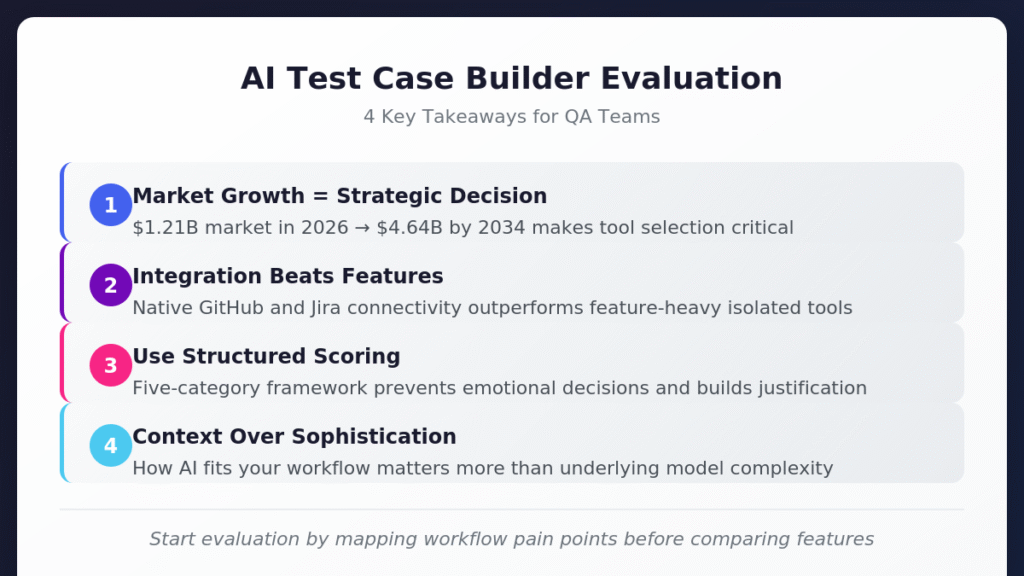
Choosing the right AI test case builder requires evaluating integration depth, output quality, and team readiness rather than chasing feature lists.
- The AI-enabled testing market is projected to reach $4.64 billion by 2034, making tool selection a strategic decision that impacts long-term competitiveness.
- Integration-first platforms that connect natively with GitHub, Jira, and CI/CD systems consistently outperform feature-heavy tools that bolt on connectivity as an afterthought.
- A structured scoring framework across five evaluation categories helps teams avoid emotional decisions and build defensible justifications for their selection.
- Output quality depends more on how well AI understands your specific workflow context than on the sophistication of underlying models.
Start your evaluation by mapping your current workflow pain points before comparing feature lists.
Your QA team is drowning. Requirements shift daily, releases accelerate weekly, and manual test creation has become the bottleneck everyone acknowledges but nobody has time to fix. An AI test case builder seems like the obvious solution, but the market is flooded with options that all promise to revolutionize your testing process.
The AI-enabled testing market was valued at $1.21 billion in 2026 and is projected to reach $4.64 billion by 2034. Rapid market expansion is great but also means an overwhelming number of tools, each claiming to solve problems you might not even have. Making an informed decision requires evaluation criteria that account for your specific workflow requirements. The right test management platform should fit seamlessly into how your team already works rather than forcing process changes to accommodate the tool.
What Makes an AI Test Case Builder Worth Your Time?
Understanding what distinguishes genuinely useful AI test case builders from glorified autocomplete tools sets the foundation for meaningful evaluation. The core value proposition centers on transforming how test cases move from requirements to execution rather than simply typing test steps faster.
An effective automated test case generator understands context, recognizes patterns in your existing test library, and produces cases that align with your team's established conventions. When you feed a Jira ticket describing a login flow into a capable system, it outputs structured test cases formatted consistently with your existing documentation. This capability bridges the gap between how stakeholders describe features and how QA teams validate them.
Understanding Input Flexibility
Look for tools that parse multiple input formats, including plain text specifications, structured data from issue trackers, and visual design files. The flexibility to accept requirements in whatever format your organization already uses determines how quickly teams adopt the tool without overhauling existing processes.
Some tools require meticulously formatted prompts to produce useful output. Others interpret natural language descriptions and user stories without rigid syntax requirements. Match input flexibility to your team's documentation habits. If product managers write informal user stories with inconsistent formatting, choose a tool that handles ambiguity gracefully rather than one that fails silently when inputs deviate from expected patterns.
Evaluating Output Quality
Generated test cases need review before execution. The question becomes whether that review takes five minutes or fifty. High-quality AI QA tools produce test cases with clear preconditions, specific test steps, expected results tied to acceptance criteria, and appropriate coverage of edge cases.
Pay attention to how the tool handles negative testing scenarios. Weak generators focus exclusively on happy paths while ignoring boundary conditions, error states, and security considerations. Strong generators automatically include authentication failures, input validation errors, timeout behaviors, and other scenarios that distinguish thorough testing from checkbox exercises.
Executive Summary
The Shift from Legacy "AI-Assist" to Agentic QA
Stop debugging scripts; start managing agents.
If your QA strategy in 2026 relies on writing prompts to generate brittle code, you are simply trading manual test writing for manual test maintenance. The industry is rapidly pivoting away from legacy AI-assist tools, which act as glorified autocomplete engines, toward Agentic QA.
Evaluators must recognize the critical difference: legacy test management forces QA teams to act as manual translation layers. Even first-generation 'AI copilots' require constant prompt-engineering, manual mapping to Gherkin criteria, and babysitting to ensure requirements trace back to Jira or GitHub. Agentic platforms like, like TestStory.ai, bypass this entirely. They don't just autocomplete steps; they ingest your system context to architect, generate, and map production-ready test suites autonomously in under 30 seconds.
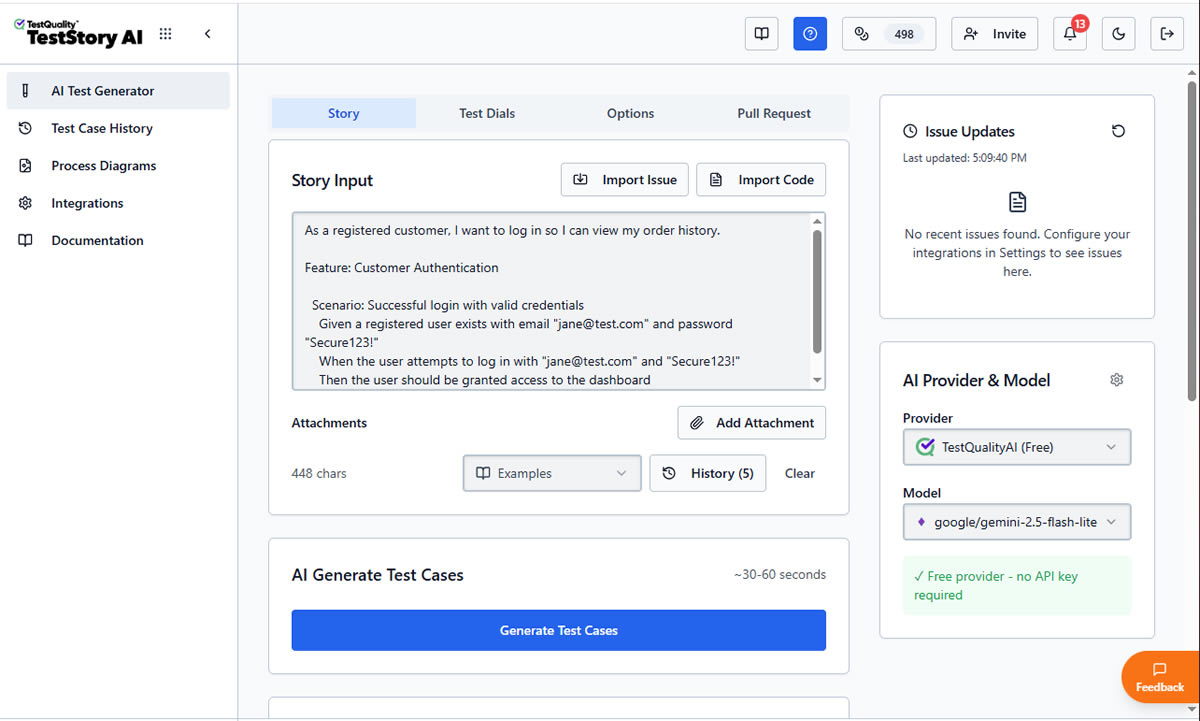
The Agentic Benchmark: Why TestStory.ai Replaces Generic AI Generators
Most AI test case generators are structurally "dumb." They lack specific control mechanisms, resulting in bloated, un-executable test suites. We built TestStory.ai to solve the engineering friction points of test design and coverage validation:
Deep Context Extraction (Zero-Prompting): TestStory natively connects to Jira, GitHub, and Linear. It ingests your Epics, User Stories, and PRs, translating them into comprehensive test cases instantly.
Diagram-to-Test Autonomy: Don't write requirements if you already have the architecture mapped. TestStory autonomously parses complex process diagrams (Visio, Lucidchart, PNG, PDF), understanding UML, BPMN, ERD, and System Architecture to instantly map out state transitions, edge cases, and strict acceptance criteria.
Precision Control via "Test Dials": We replaced generic prompt engineering with deterministic controls. Engineers use "Test Dials" and reusable "Preset Packs" to rigidly define test scope, target audiences, and specific test types (e.g., Smoke, Regression, Integration) ensuring strict alignment with your existing QA strategy.
IDE & Dev Workflow Native (MCP Integration): TestStory's MCP architecture plugs the agent directly into your development environment. Trigger TestStory's QA logic natively inside Claude, Cursor, and VSCode/Copilot, passing the output seamlessly into test management systems like TestQuality.
Enterprise Data Sovereignty: Your proprietary logic is never used to train our base models. TestStory allows you to utilize your own AI provider keys, ensuring strict compliance and zero data leakage.
The benchmark for 2026 isn't how fast an AI can write a script; it's how much test maintenance debt the agent eliminates.
No credit card required.
How Should You Start Your Evaluation?
Start by mapping your current testing process from requirement receipt through test execution and reporting. Identify the handoff points, the tools involved at each stage, and the pain points your team experiences most frequently.
Documenting Current Workflow Friction
An effective test builder tool integrates at critical junctions rather than requiring process changes to accommodate capabilities you never asked for. Consider where your test cases originate. If requirements live in Jira, the AI test case builder must pull directly from Jira issues without manual copy-paste steps. If developers work primarily in GitHub, test management should naturally extend into that environment.
Ask your team three questions before starting vendor conversations:
- Where do test case creation bottlenecks occur most frequently?
- Which integrations would eliminate the most manual data transfer?
- What would "good enough" AI-generated test cases look like for immediate use?
Matching Tool Complexity to Team Capabilities
AI test case builders vary in complexity. Some require prompt engineering expertise to produce useful output, while others guide users through structured interfaces that generate quality cases without specialized knowledge. Match the tool's complexity to your team's current capabilities and realistic training investment.
Junior QA engineers benefit from tools with guided workflows and templates. Senior automation engineers may prefer more flexible systems that allow custom prompt configurations. Mixed teams need solutions that accommodate both use cases without forcing everyone into the same interaction pattern.
What Technical Capabilities Matter Most?
Specific technical capabilities separate AI test case builders that deliver value from those that create more problems than they solve.

Natural Language Processing Depth
The best automated test case generators interpret requirements written in plain English, Gherkin syntax, or informal user stories. Look for platforms that understand context and intent rather than requiring rigid formatting. A tool that only works when requirements follow perfect BDD templates fails the moment a product manager writes a casual description.
Evaluate how tools handle ambiguity. Strong NLP capabilities ask clarifying questions when requirements are unclear rather than making assumptions that produce irrelevant test cases. Weak implementations generate generic output that requires extensive manual revision.
Customization and Control
One-size-fits-all generation rarely fits anyone well. Effective AI QA tools provide fine-grained control over output style, coverage focus, and test type distribution. Look for platforms offering:
- Adjustable test case depth (quick smoke tests versus exhaustive coverage)
- Output format options (Gherkin, traditional step format, automation-ready scripts)
- Configurable focus areas (functional, security, accessibility, performance)
- Reusable presets for common testing scenarios
Teams testing financial applications need different generation parameters than teams building consumer mobile apps. Customization determines whether AI assistance accelerates your specific workflow or imposes generic patterns that miss domain-specific requirements.
Self-Healing and Maintenance Support
Applications evolve constantly. Traditional automated tests break after even minor UI changes, requiring manual updates that consume hours. Modern test builder tools incorporate self-healing capabilities that adapt to application changes without constant intervention.
Evaluate how each tool handles test maintenance over time. Does it flag potentially outdated test cases when linked requirements change? Can it suggest updates based on application modifications detected through integration with your codebase? Maintenance burden compounds as test suites grow, making this capability increasingly important for teams managing hundreds or thousands of test cases.
How Important Is Integration for AI Test Builder Tools?
Integration depth often determines whether an AI test case builder delivers lasting value or becomes another isolated tool requiring manual data synchronization. Modern test management platforms treat integration as foundational architecture rather than optional add-ons. The AI test automation market is projected to grow from $8.81 billion in 2025 to $35.96 billion by 2032, with integration capabilities cited as a primary driver of enterprise adoption.
Development Workflow Connectivity
The most effective platforms connect seamlessly with your existing development ecosystem. GitHub integration that synchronizes in real time means test status flows automatically into pull requests, keeping developers informed without manual updates. Jira connectivity ensures test cases stay linked to requirements without export/import cycles that introduce data inconsistencies.
Consider bidirectional synchronization carefully. Tools that only pull data from issue trackers create one-way workflows where changes in test management don't reflect back to development tools. True two-way integration keeps both systems current, eliminating the "source of truth" debates that slow teams down.
CI/CD Pipeline Integration
Test case generation matters little if results don't flow into continuous integration workflows. Evaluate how each automated test case generator connects with Jenkins, GitHub Actions, CircleCI, and other CI/CD platforms your team uses.
API quality signals vendor commitment to integration flexibility. Comprehensive REST APIs that allow importing test results from any source, exporting data for external analysis, and triggering test case generation programmatically indicate platforms built for enterprise workflows. Sparse documentation with limited examples suggests integration will require significant reverse engineering.
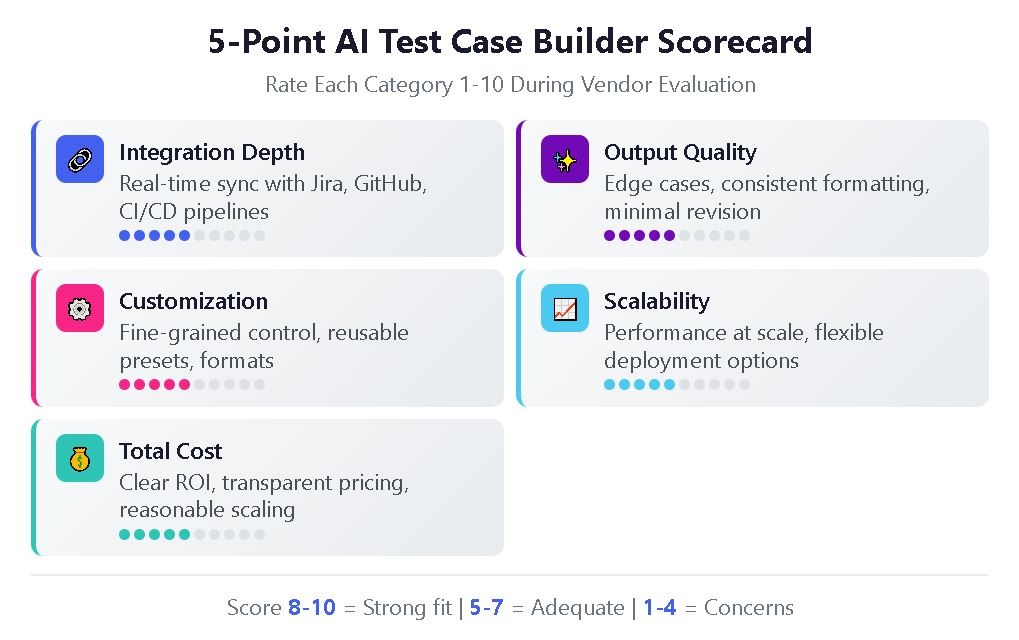
| Evaluation Category | 8-10 Points | 5-7 Points | 1-4 Points |
| Integration Depth | Native, real-time sync with Jira/GitHub; comprehensive API | Basic import/export; API with limited documentation | Manual data transfer required; minimal API support |
| Output Quality | Edge cases included; consistent formatting; minimal revision needed | Happy paths covered; some manual polish required | Generic output; extensive manual rewriting necessary |
| Customization | Fine-grained control; reusable presets; format flexibility | Some adjustable parameters; limited presets | One-size-fits-all generation; no customization |
| Scalability | Consistent performance at scale; flexible deployment | Adequate with some degradation at high volumes | Notable slowdowns; limited deployment options |
| Total Cost | Clear ROI within first year; transparent pricing | Moderate value with reasonable investment | Unclear ROI; hidden costs; expensive scaling |
Use this scoring framework during vendor evaluations to maintain objectivity and build defensible recommendations.
What Are the 5 Red Flags That Signal the Wrong Tool?
Not every AI test case builder delivers on its promises. Watch for these warning signs during evaluation:
- Vague integration claims. Tools that list "integrates with Jira" without specifying synchronization depth, field mapping options, or real-time update capabilities often deliver disappointing connector experiences that require extensive manual configuration.
- No trial with real data. Vendors reluctant to let you test with actual project requirements during evaluation may know their tool struggles with real-world complexity. Insist on trials using your own user stories and acceptance criteria.
- Pricing that obscures total cost. Per-test-case pricing, hidden AI credit consumption, or feature-gating critical capabilities behind enterprise tiers make budget planning difficult and often lead to unexpected costs after adoption.
- Missing maintenance features. Tools focused exclusively on generation without addressing ongoing test case maintenance ignore the reality that maintaining existing tests consumes more QA time than creating new ones.
- Isolated operation. AI QA tools that operate as standalone applications without deep workflow integration add context switching rather than reducing it, limiting adoption and long-term value.
What Questions Should You Ask During Vendor Demos?
Vendor demonstrations often highlight ideal scenarios while glossing over limitations. These questions cut through marketing polish:
"Show me a test case generated from an ambiguous requirement." This reveals how the tool handles imperfect inputs that represent real-world conditions. Watch whether it asks clarifying questions, makes reasonable assumptions, or produces garbage.
"Walk me through updating test cases when requirements change." Understanding maintenance workflows matters as much as initial generation quality. Look for automatic flagging of affected test cases and suggested updates based on requirement modifications.
"How does pricing change as our test case volume grows?" Scaling costs vary between vendors. Some offer predictable per-seat pricing while others charge based on generation volume or API calls, creating unpredictable expenses.
"What happens when the AI generates incorrect test cases?" Every AI tool makes mistakes. The question is whether the platform provides feedback mechanisms that improve generation quality over time and whether human review workflows integrate smoothly.
For teams exploring AI-powered test generation, hands-on trials with actual project data reveal more than any demo or documentation review.
How Do You Build Your Team's Readiness for AI-Assisted Testing?
Successful implementation requires more than tool selection. Organizational readiness determines whether AI test case builders deliver their promised efficiency gains or become expensive shelfware.

Starting Small and Scaling Strategically
Begin with pilot projects demonstrating value while building internal expertise. Identify specific pain points in current test planning processes. Common candidates include repetitive test case creation, environment setup bottlenecks, or difficulty prioritizing tests. Focusing on concrete problems ensures AI delivers measurable improvements rather than adding complexity without clear benefits.
The most successful AI implementations begin with high-volume, repetitive tasks where automation provides immediate value. Test case generation from user stories, regression test suite expansion, and test data creation are ideal starting points for most organizations.
Managing Change Across Teams
QA teams accustomed to manual test creation may resist AI assistance, viewing it as threatening their expertise or autonomy. Frame AI tools as amplifiers of human judgment rather than replacements for professional skills. Experienced testers bring domain knowledge, critical thinking, and contextual awareness that AI can't replicate. AI handles repetitive generation tasks so testers can focus on exploratory testing, edge case identification, and quality strategy.
Training investment varies based on tool complexity and team technical maturity. Budget for initial onboarding, ongoing skill development, and prompt engineering coaching if your selected tool rewards expertise in directing AI behavior.
Frequently Asked Questions
How long does it typically take to see ROI from an AI test case builder? Most teams report measurable time savings within the first one to three months of adoption, particularly for high-volume test case creation scenarios. Initial ROI typically comes from reduced manual writing time, with maintenance efficiency gains becoming apparent after six months as AI-flagged updates prevent test suite degradation.
Can AI-generated test cases replace manual test design entirely? No. AI excels at generating test cases from well-defined requirements and systematically expanding coverage, but human testers remain essential for exploratory testing, edge case identification based on domain expertise, and validating that generated tests actually match business intent.
What's the difference between an AI test case builder and traditional test automation tools? Traditional test automation tools execute pre-written test scripts automatically. AI test case builders generate the test cases themselves from requirements, user stories, or other inputs. Many modern platforms combine both capabilities, allowing teams to generate test cases with AI and then automate execution through integrated frameworks.
How do AI test case builders handle Gherkin and BDD workflows? Top AI QA tools support Gherkin syntax natively, generating Given-When-Then scenarios from requirements and allowing import of existing feature files. Look for platforms that maintain BDD structure through the entire workflow rather than converting between formats, which can introduce inconsistencies and formatting errors.
Start Generating Test Cases with AI-Powered QA
Evaluating an AI test case builder requires balancing technical capabilities against workflow fit, integration depth against feature breadth, and immediate needs against long-term scalability. The frameworks and questions outlined here provide structure for making defensible decisions that serve your team's actual requirements rather than chasing industry trends.
TestQuality brings AI-powered test case generation directly into your DevOps workflow through TestStory.ai, combining intelligent generation with deep GitHub and Jira integration. Experience how QA Agents can transform your test creation process while maintaining the human oversight that ensures quality. Start your free trial and see what AI-driven test management looks like in practice.